
Comprehensive Guide to Building a 3D Knowledge Map Chrome Extension
Enhance your web experience with an interactive 3D knowledge visualization tool
Key Takeaways
- Seamless Integration: Establish a robust Chrome extension framework with Three.js for rendering dynamic 3D scenes.
- Interactive Features: Implement functionalities such as node interactivity, real-time metadata updates, and draggable nodes to enhance user engagement.
- Advanced Clustering: Utilize clustering and collapsible nodes to organize complex datasets efficiently, ensuring optimal performance and scalability.
1. Chrome Extension Setup
Establishing the Foundation
Begin by creating the basic structure of your Chrome extension. This includes essential files such as manifest.json, background.js, content.js, and popup.html.
Steps:
- manifest.json: Define the extension's metadata, permissions (e.g., local storage), and configurations for the popup interface.
- background.js: Manage the extension's background processes and handle events.
- content.js: Inject scripts into web pages to facilitate interaction between the extension and the web content.
- popup.html: Design the user interface, including a canvas element where the 3D scene will be rendered using Three.js.
Ensure that the manifest.json correctly references all necessary scripts and resources, providing a seamless user experience.
2. Initialize a 3D Scene
Setting Up with Three.js
Utilize Three.js to establish the 3D environment within your extension's popup.
Implementation:
- Scene Creation: Initialize a new Three.js scene to serve as the canvas for your knowledge map.
- Camera Setup: Position the camera to provide an optimal view of the 3D space, enabling users to navigate effectively.
- Lighting: Incorporate ambient and directional lighting to enhance the visual appeal and depth of the scene.
- Controls: Implement interactive controls such as orbit controls to allow users to rotate, zoom, and pan the 3D scene using mouse interactions.
3. Render Nodes and Connections
Visualizing Data Structures
Create a dynamic representation of nodes and their interconnections based on a predefined JSON structure.
Steps:
- Node Rendering: Represent each node as a sphere within the 3D space, positioning them according to their
x,y, andzcoordinates. - Connections: Draw lines between nodes to signify relationships, using the
linksarray from the JSON data. - Labels: Attach labels to each node for easy identification, ensuring they remain readable regardless of scene manipulation.
Example JSON Structure:
{
  "nodes": [
    { "id": 1, "label": "Node A", "x": 0, "y": 0, "z": 0 },
    { "id": 2, "label": "Node B", "x": 10, "y": 5, "z": -2 }
  ],
  "links": [
    { "source": 1, "target": 2 }
  ]
}
4. Add Interactivity to Nodes
Enhancing User Engagement
Enable users to interact with nodes to access detailed metadata.
Features:
- Clickable Nodes: Implement event listeners that detect clicks on nodes, triggering the display of a modal window containing metadata.
- Metadata Modal: Design a modal that displays information such as labels, descriptions, and images associated with the node.
- Attachment to Nodes: Ensure the modal remains visually attached to its corresponding node as the user navigates the 3D scene, maintaining context and immersion.
5. Add Node Movement and Real-Time Metadata Updates
Dynamic Data Management
Allow users to reposition nodes within the 3D space, with changes reflected in real-time.
Implementation:
- Draggable Nodes: Enable click-and-drag functionality for nodes, allowing users to alter their positions interactively.
- Real-Time Updates: As nodes are moved, update their
x,y, andzcoordinates in the underlying JSON data structure to maintain data integrity. - Metadata Synchronization: Ensure that the metadata pop-up moves in tandem with the node, preserving the association between the two elements.
6. Adding/Editing/Deleting Nodes
Comprehensive Data Manipulation
Provide users with tools to manage the nodes within the knowledge map effectively.
Functionalities:
- Add Nodes: Implement UI elements such as buttons that open forms for users to input new node details, including labels, positions, and metadata.
- Edit Nodes: Allow users to modify existing nodes by selecting them and updating their information through editable forms.
- Delete Nodes: Enable the removal of nodes by selecting them and confirming deletion actions, ensuring that associated connections are also handled appropriately.
- Dynamic Updates: Reflect all additions, edits, and deletions in both the JSON structure and the rendered 3D scene instantaneously.
7. Customization Options
Personalizing the User Experience
Allow users to tailor the appearance of the knowledge map to their preferences.
Customization Features:
- Node Appearance: Provide options to change node colors and sizes, enabling differentiation between various types of nodes.
- Connection Lines: Allow users to adjust the thickness and color of connection lines to highlight different relationships.
- Background Settings: Enable customization of the canvas background color to improve visibility and aesthetic appeal.
- Real-Time Updates: Ensure that all customization changes are applied immediately within the Three.js scene for instant feedback.
8. Save and Load Maps
Data Persistence and Portability
Implement functionalities to preserve user-created maps and facilitate their sharing or transfer.
Features:
- Save Maps: Allow users to save the current state of their knowledge map by storing the JSON data in local storage.
- Export/Import: Provide options to export the JSON file for backup or sharing, and import existing JSON files to load previously saved maps.
- Data Integrity: Ensure that the import functionality includes validation to handle malformed or incompatible JSON data gracefully.
9. Error Handling
Ensuring Robustness
Implement mechanisms to handle potential errors and edge cases effectively.
Error Handling Strategies:
- JSON Validation: Verify the structure of JSON data before loading, ensuring all required properties such as
id,x,y, andzare present. - User Feedback: Display informative error messages in the UI when issues arise, preventing the extension from crashing.
- Edge Cases: Handle scenarios like attempting to delete non-existent nodes or interacting with empty spaces without causing unexpected behaviors.
10. Optimize Performance
Enhancing Efficiency
Ensure the extension performs smoothly, even with extensive datasets.
Optimization Techniques:
- Instanced Rendering: Utilize Three.js's instanced rendering capabilities to efficiently render large numbers of nodes and connections.
- Level of Detail (LOD): Implement LOD strategies to adjust the complexity of rendered objects based on their distance from the camera.
- Object Pooling: Reuse objects for animations and transitions to reduce memory allocation overhead.
- Efficient Updates: Optimize render loops and update mechanisms to minimize unnecessary computations and re-renders.
11. Documentation
Comprehensive Project Overview
Provide detailed documentation to assist users and developers in understanding and utilizing the extension.
Documentation Components:
- File Structure: Outline the organization of project files and directories.
- Key Functions: Describe essential functions such as node rendering, interactivity features, and customization options.
- Usage Instructions: Guide users on how to utilize various features, including adding/editing nodes, saving/loading maps, and customizing visuals.
- Customization Guide: Explain how to modify settings and what each customization option affects within the 3D scene.
12. Clustering and Collapsible Nodes
Advanced Organizational Features
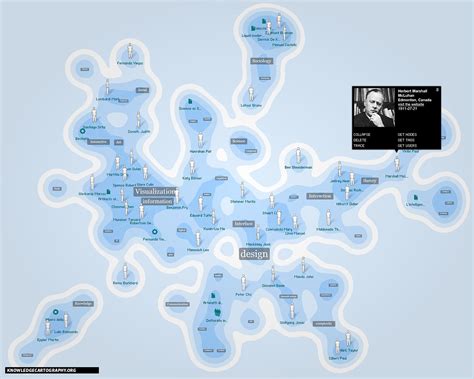
Enhance the knowledge map by enabling the grouping of related nodes into clusters, which can be collapsed or expanded as needed.
Implementation Details:
-
Cluster Representation: Represent each cluster with a distinct parent node, such as a larger sphere, that visually encapsulates its child nodes.
-
JSON Structure Updates: Modify the JSON data to include a
childrenproperty for parent nodes, enabling hierarchical relationships. Example:{ "nodes": [ { "id": 1, "label": "Parent Node", "x": 0, "y": 0, "z": 0, "children": [ { "id": 2, "label": "Child Node A", "x": 2, "y": 1, "z": 1 }, { "id": 3, "label": "Child Node B", "x": -2, "y": 1, "z": 1 } ] } ], "links": [ { "source": 1, "target": 2 }, { "source": 1, "target": 3 } ] } -
Expand/Collapse Interactivity: Allow users to click on parent nodes to toggle the visibility of their child nodes. When collapsed, hide child nodes and display only the parent node. When expanded, reveal all child nodes with smooth transition animations.
-
Animations: Implement Three.js tweening or similar animation techniques to create fluid movements during cluster expansion and collapse, enhancing the visual experience.
-
Rendering Adjustments: Dynamically update the scene graph to reflect changes in cluster states, ensuring that connections and node positions are recalibrated in real-time.
-
Parent Node Customization: Differentiate parent nodes visually by varying their size, color, or by adding unique icons, making it easier for users to identify clustered groups.
-
Performance Considerations: Optimize the handling of large clusters by temporarily hiding child nodes rather than removing them, reducing computational overhead and maintaining quick responsiveness.
-
Error Handling: Account for potential issues such as missing child node data or invalid cluster configurations by implementing fallback mechanisms and informative error messages.
By integrating clustering and collapsible nodes, the knowledge map becomes more organized and navigable, particularly when dealing with extensive and complex datasets.
Conclusion
Developing a 3D knowledge map Chrome extension with Three.js involves a multifaceted approach, encompassing setup, rendering, interactivity, customization, data management, performance optimization, and advanced organizational features like clustering. By meticulously implementing each component, you can create an immersive and efficient tool that enhances user interaction and data visualization.
References
Last updated January 18, 2025