
Integrating Accessibility Standards into the Development Lifecycle
Building Inclusive Digital Experiences from Concept to Deployment
Key Insights into Accessibility Integration
- Proactive Integration: Accessibility is not an afterthought but a fundamental aspect of universal design, requiring integration from the initial stages of concept and design throughout the entire development process.
- Adherence to Global Standards: Compliance with standards like WCAG (Web Content Accessibility Guidelines) and regional regulations such as the ADA (Americans with Disabilities Act) and the European Accessibility Act (EAA) is crucial for legal compliance and fostering inclusivity.
- Holistic Team Effort: Achieving comprehensive accessibility demands collaboration across all roles—UX designers, web developers, content creators, and quality assurance—ensuring that every phase considers and addresses potential barriers.
Integrating accessibility standards into the development process is paramount for creating digital products and services that are usable by everyone, regardless of their abilities. This goes beyond mere compliance; it's about fostering an inclusive digital environment that serves a diverse user base. With new guidelines and regulations continually evolving, such as the 2025 updates to the ADA and the full enforcement of the European Accessibility Act, a proactive and integrated approach to accessibility is more critical than ever.
The Core Principles of Web Accessibility
At the heart of web accessibility are foundational principles that guide the design and development of inclusive digital content. The Web Content Accessibility Guidelines (WCAG), developed by the World Wide Web Consortium (W3C), distill these into four core principles, often remembered by the acronym POUR:
Perceivable: Information and User Interface Components Must Be Presentable to Users in Ways They Can Perceive
This principle ensures that users can perceive the information presented, regardless of sensory limitations. It addresses various aspects:
- Alternative Text for Non-Text Content: Images, charts, and other non-text elements must have meaningful alternative text (alt text). This allows screen readers to describe the visual content to users who are blind or have low vision.
- Time-Based Media Alternatives: For audio and video content, alternatives such as captions, transcripts, and audio descriptions are essential. Captions provide text for spoken dialogue and non-speech sounds, while transcripts offer a full text version of the audio. Audio descriptions narrate important visual details for users who cannot see the video.
- Adaptable Content: Content should be structured in a way that allows it to be presented in different formats without losing information or structure. This includes using semantic HTML, which helps assistive technologies interpret content correctly.
- Distinguishable Content: Ensure sufficient contrast between foreground and background colors, and avoid using color alone to convey information. This benefits users with visual impairments, including color blindness.
Operable: User Interface Components and Navigation Must Be Operable
Operability focuses on ensuring that users can interact with all components of a website or application. Key considerations include:
- Keyboard Accessibility: All functionality must be accessible via keyboard alone. This is critical for users who cannot use a mouse, including those with motor disabilities or who rely on screen readers. Interactive elements should have clear focus indicators.
- Sufficient Time: Users should have enough time to read and use content. This means avoiding excessively strict time limits on forms or interactive elements.
- Seizures and Physical Reactions: Content should not be designed in a way that is known to cause seizures (e.g., excessive blinking or flashing content).
- Navigable: Provide clear, consistent, and predictable navigation. This includes logical heading structures, clear link text, and consistent layouts, which help users orient themselves and find information easily.
- Input Modalities: Allow various input methods beyond mouse clicks, such as touch, voice, and alternative input devices.
Understandable: Information and the Operation of User Interface Must Be Understandable
This principle ensures that content and interface operations are easy to understand. Aspects include:
- Readable and Legible Text: Use plain language, avoid jargon, and choose readable fonts with appropriate sizing and line spacing.
- Predictable Functionality: Ensure that the behavior of interactive components is predictable and consistent. Users should be able to anticipate what will happen when they interact with an element.
- Input Assistance: Provide clear instructions for input fields, offer error identification and suggestions for correction, and allow users to review and correct their input before submission.
Robust: Content Must Be Robust Enough that It Can Be Interpreted by a Wide Variety of User Agents, Including Assistive Technologies
The robust principle focuses on compatibility and future-proofing:
- Compatibility with Assistive Technologies: Use semantic HTML and ARIA (Accessible Rich Internet Applications) roles where necessary to ensure that content can be reliably interpreted by screen readers and other assistive technologies.
- Future Compatibility: Design content to be compatible with current and future user agents, including new assistive technologies.
Key Accessibility Standards and Regulations in 2025
Several global and regional standards mandate digital accessibility, with significant updates and enforcement deadlines in 2025. Adhering to these is crucial for legal compliance and ethical practice.
Web Content Accessibility Guidelines (WCAG)
WCAG remains the international benchmark for web accessibility. While WCAG 2.1 Level AA is the generally accepted best-practice criterion for compliance, WCAG 2.2 is also in use, with a potential ISO standard completion after June 2025. These guidelines provide detailed success criteria across three conformance levels (A, AA, AAA).
Americans with Disabilities Act (ADA)
In the U.S., the ADA requires state and local governments, as well as businesses open to the public (Title II and Title III entities), to ensure their websites and digital services are accessible to people with disabilities. While specific technical standards for web accessibility were not explicitly defined for Title III until recently, the Department of Justice (DOJ) clarified in April 2024 that Title II entities must adhere to WCAG 2.1 A, AA. This signals a clear direction for Title III, emphasizing that websites, apps, and digital content must be accessible. The ADA Standards for Accessible Design also cover physical spaces, extending to signage and building design to ensure physical accessibility.
European Accessibility Act (EAA)
The European Accessibility Act (EAA) is a significant piece of legislation effective June 28, 2025. It mandates accessibility requirements for a range of products and services, including e-commerce, banking services, e-books, and mobile apps, for any entity doing business within the EU. The EAA aims to harmonize accessibility requirements across member states, moving accessibility from a recommendation to a legal obligation.
Section 508 of the Rehabilitation Act
For U.S. federal agencies, Section 508 mandates that Information and Communication Technology (ICT) developed, procured, maintained, or used by the federal government be accessible. Section 508 largely incorporates WCAG 2.0 Level AA success criteria, though federal agencies are encouraged to aim for WCAG 2.1 AA.
Implementing Accessibility Throughout the Development Process
True accessibility is achieved when it's woven into every stage of the development lifecycle, from initial concept to post-launch maintenance.
Design Phase: Laying the Accessible Foundation
The design phase is where the groundwork for accessibility is truly laid. It’s significantly more cost-effective to address accessibility issues at this stage than to fix them later.
- Inclusive User Research: Involve individuals with disabilities in user research and persona development. This provides invaluable insights into diverse user needs and challenges.
- Color Contrast: Designers must specify color palettes that meet WCAG contrast ratios (e.g., a minimum contrast ratio of 4.5:1 for normal text). Online tools can help verify compliance.
- Typography and Readability: Choose fonts that are clear and readable, and ensure appropriate font sizes, line heights, and letter spacing. The U.S. Department of Health and Human Services suggests familiar fonts like Verdana, Arial, and Calibri.
- Logical Structure and Navigation: Design a clear, consistent, and intuitive navigation structure. Use a nested heading structure (H1, H2, H3, etc.) to logically organize content, aiding screen reader users.
- Interactive Element States: Define visual states for interactive elements (e.g., hover, focus, active) that are clearly distinguishable. Focus indicators are crucial for keyboard navigation.
- Error Handling: Plan for user-friendly error messages that clearly explain what went wrong and how to correct it.
Below is an image illustrating accessible web design, emphasizing user experience and inclusivity. This image highlights the harmonious blend of thoughtful design and technical implementation required to make websites available to all users.
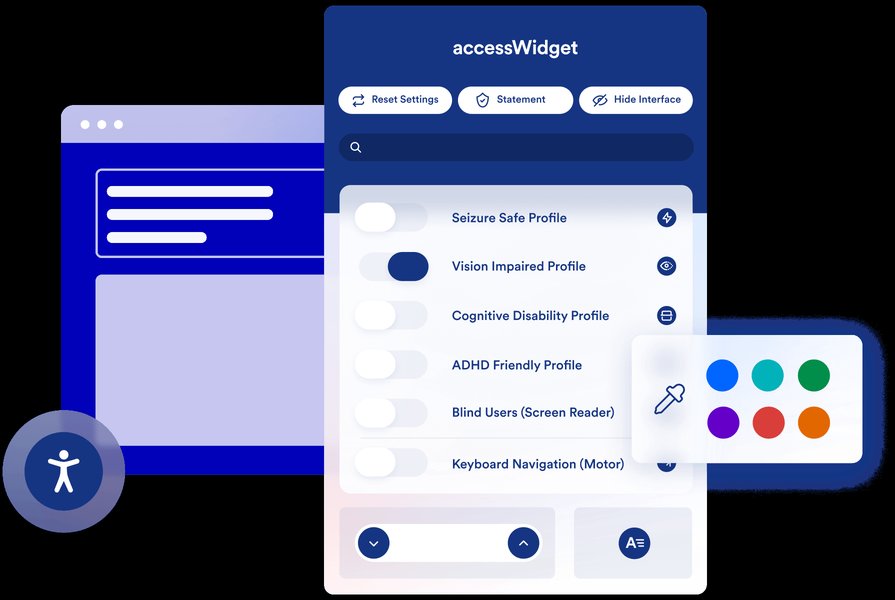
An example of an accessible website design, prioritizing a seamless user experience for all.
Development Phase: Coding for Accessibility
Developers are responsible for translating accessible designs into functional code, ensuring technical compliance and compatibility with assistive technologies.
- Semantic HTML: Utilize HTML elements according to their intended purpose (e.g.,
<button>for buttons,<nav>for navigation) rather than relying on generic<div>or<span>tags styled with CSS. This provides crucial semantic information for assistive technologies. - Keyboard Navigation: Ensure all interactive elements are reachable and operable via keyboard. Manage tab order logically, and implement skip links for efficient navigation for screen reader users.
- ARIA Roles and Attributes: Use WAI-ARIA (Accessible Rich Internet Applications) roles, states, and properties when native HTML elements lack the necessary semantics for complex UI components (e.g., custom tabs, accordions, modals). However, "No ARIA is better than bad ARIA" – use it judiciously.
- Form Accessibility: Associate labels with form fields using
<label for="id">, provide clear instructions, and implement accessible error messages. - Media Accessibility: Implement captions, transcripts, and audio descriptions for multimedia content. Use accessible video players like Able Player.
- Responsive Design: Ensure layouts and content adapt gracefully to different screen sizes and orientations, benefiting users with various devices and magnifiers.
- JavaScript Accessibility: Ensure dynamic content updates and interactive widgets are accessible. Use ARIA live regions for content changes that users need to be aware of immediately.
Content Creation: Accessible Information Delivery
Content authors play a vital role in ensuring that the information itself is accessible.
- Meaningful Alt Text: Write descriptive and concise alt text for all images that conveys the image's purpose and content.
- Clear and Concise Language: Use plain language, avoid jargon, and structure content with clear headings and short paragraphs.
- Accessible Documents: If providing PDFs or other documents, ensure they are also accessible (e.g., tagged for screen readers, proper heading structure).
- Link Text: Use descriptive link text that clearly indicates the destination or purpose of the link, rather than generic "click here."
- Captions and Transcripts: Provide accurate and synchronized captions for videos and comprehensive transcripts for audio content.
Quality Assurance and Testing: Validating Accessibility
Thorough testing is essential to identify and rectify accessibility barriers before deployment.
- Automated Accessibility Tools: Use tools (e.g., Lighthouse, AXE DevTools) to scan for common accessibility issues like missing alt text, insufficient contrast, or invalid ARIA attributes.
- Manual Testing: Automated tools can only catch a fraction of issues. Manual testing, particularly with a keyboard only, and simulating various assistive technologies (screen readers like JAWS, NVDA, VoiceOver) is crucial.
- User Testing with Disabled Individuals: The most effective way to validate accessibility is by engaging real users with disabilities. Their feedback provides invaluable insights into usability and actual barriers.
- Accessibility Checklists: Utilize comprehensive checklists based on WCAG guidelines to systematically review all aspects of the digital product.
The video below provides a concise overview of ADA website compliance, highlighting best practices and expected shifts in website accessibility for 2025. It offers a practical guide for private entities under Title III, emphasizing the importance of staying updated with evolving standards to ensure inclusive digital experiences.
A comprehensive guide to ADA Website Compliance in 2025, focusing on best practices and anticipated changes.
The Benefits Beyond Compliance
While legal compliance is a strong driver, integrating accessibility offers numerous benefits:
- Broader Audience Reach: An accessible website can be used by a larger segment of the population, including those with disabilities, the elderly, and individuals using mobile devices or in challenging environments (e.g., bright sunlight, noisy surroundings).
- Improved User Experience (UX): Many accessibility features enhance usability for all users, such as clear navigation, readable fonts, and responsive design, leading to lower bounce rates and increased engagement.
- Enhanced SEO: Search engines often favor websites with good accessibility practices, as semantic HTML, clear content structure, and alt text for images improve indexing and search rankings.
- Innovation and Creativity: Designing for accessibility can spark innovative solutions that benefit everyone, pushing the boundaries of conventional design.
- Brand Reputation: Companies committed to accessibility demonstrate social responsibility and inclusivity, enhancing their brand image and loyalty.
Strategic Considerations for Accessibility Integration
To successfully embed accessibility, organizations need a strategic approach:
| Strategic Area | Description | Key Actions |
|---|---|---|
| Organizational Commitment | Accessibility must be championed from leadership down, integrating it into company culture. | Develop an accessibility policy, allocate dedicated resources, and establish clear roles and responsibilities. |
| Training and Education | Ensure all team members understand accessibility principles and their role in implementation. | Provide regular training for designers, developers, content creators, and QA testers on WCAG, assistive technologies, and inclusive design. |
| Tooling and Automation | Leverage accessibility tools within development workflows. | Integrate automated accessibility checkers into CI/CD pipelines, use accessibility plugins in design software, and adopt accessible content management systems. |
| Continuous Improvement | Accessibility is an ongoing process, not a one-time project. | Regularly audit digital assets, monitor compliance, collect user feedback, and iterate on accessibility improvements. Stay updated with evolving standards. |
| Legal Counsel | Seek legal advice to ensure compliance with specific regional and national accessibility laws. | Consult with legal experts to understand the nuances of ADA, EAA, and other relevant regulations, especially concerning specific industries or user bases. |
This table outlines the strategic areas and key actions required to embed accessibility effectively within an organization's development process.
Assessing Development Readiness for Accessibility
Understanding an organization's current capabilities and areas for growth is crucial for effective accessibility integration. The radar chart below visually represents different aspects of readiness, offering an opinionated assessment of typical strengths and weaknesses when approaching accessibility in a development context.
This radar chart illustrates a hypothetical assessment of an organization's "Current Readiness Score" versus a "Target Readiness Score" across various dimensions of accessibility integration. It highlights areas where an organization might be strong (e.g., Legal Compliance Understanding due to external pressures) and areas needing improvement (e.g., Content Accessibility Practices or QA & Testing Capabilities). The goal is to move all scores towards the "Target Readiness," indicating a mature and comprehensive approach to accessibility.
Frequently Asked Questions (FAQ)
Why is web accessibility important?
What are the main principles of WCAG?
How often should a website be audited for accessibility?
What is the European Accessibility Act (EAA) and when does it apply?
Conclusion
Applying accessibility standards in the development process is no longer optional but a fundamental requirement for any digital presence. It demands a holistic approach that integrates inclusive design thinking, robust coding practices, accessible content creation, and rigorous testing throughout the entire product lifecycle. By prioritizing accessibility, organizations not only comply with evolving legal mandates but also unlock significant benefits in terms of broader market reach, enhanced user experience, and strengthened brand reputation. Embracing accessibility is a commitment to universal design, ensuring that the digital world truly is for everyone.
Recommended Searches
- Explore the latest updates in Web Content Accessibility Guidelines (WCAG) 2.2.
- Understand the specific impacts of the European Accessibility Act (EAA) on e-commerce platforms.
- Discover best practices for designing user experiences that are inherently inclusive for all abilities.
- Learn about effective tools and techniques for automating accessibility testing in development workflows.