
Upgrading the Processor in Your Acer Aspire V3-771G: A Comprehensive Guide
Unlock Enhanced Performance by Identifying Compatible CPU Options
Key Upgrade Insights for the Acer Aspire V3-771G
- CPU Compatibility is Crucial: The Acer Aspire V3-771G typically uses a Socket G2 (rPGA 988B) and an Intel HM77 chipset. This significantly limits the range of compatible processors to those from Intel's 2nd and 3rd Generation Core i series (Ivy Bridge and Sandy Bridge architectures).
- Top Tier CPU Options: Based on user experiences and compatibility reports, the Intel Core i7-3630QM and i7-3610QM are frequently cited as strong and compatible upgrades for models originally equipped with lower-tier CPUs like the i5-3210M or i3 series. The Intel Core i7-3720QM and i7-3840QM (with BIOS 1.14 or later) are also mentioned as potential, higher-end options, though compatibility may vary.
- Consider the Thermal Design Power (TDP): Upgrading to a more powerful CPU, especially those with a higher TDP (e.g., 45W for many quad-core i7s compared to 35W for some stock CPUs), may require an upgraded cooling solution, such as a heatsink with dual heat pipes, to manage the increased heat output effectively.
Upgrading the processor in an older laptop like the Acer Aspire V3-771G can be a cost-effective way to breathe new life into the machine and improve its performance for modern tasks. However, it's essential to understand the limitations and compatibility requirements before attempting such an upgrade. The Acer Aspire V3-771G was released in various configurations, primarily featuring Intel's 2nd and 3rd Generation Core processors. The specific model of your laptop and its current components will determine the viable upgrade paths.
Understanding Your Acer Aspire V3-771G's Foundation
Identifying Key Components for Compatibility
Before considering any processor upgrade, you need to identify the existing hardware in your Acer Aspire V3-771G. The crucial components for determining CPU compatibility are the motherboard and its chipset, as well as the current processor's socket type.
Motherboard and Chipset
The Acer Aspire V3-771G typically features a motherboard with an Intel HM77 (Panther Point) chipset. This chipset supports Intel's 2nd Generation (Sandy Bridge) and 3rd Generation (Ivy Bridge) mobile processors. Knowing your chipset is fundamental as it dictates which CPU architectures are supported.
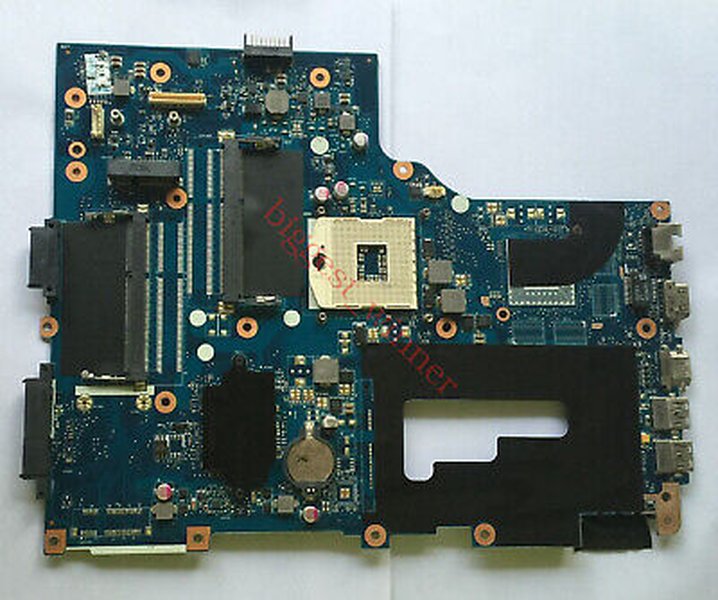
An example of a motherboard found in the Acer Aspire V3-771G.
CPU Socket Type
The processors compatible with the Intel HM77 chipset on the Acer Aspire V3-771G motherboard usually use the Socket G2 (rPGA 988B). This is a socketed CPU, which means it is not soldered to the motherboard and can be replaced. If your CPU is soldered (BGA), an upgrade is generally not possible without replacing the entire motherboard, which is often impractical for a laptop of this age.
Current CPU
Knowing your current CPU provides a baseline and helps in determining potential upgrade options. Models came with a range of processors, including Intel Core i3 and i5 processors like the i5-3210M. Identifying your current CPU allows you to understand the potential performance gain from an upgrade.
Exploring Compatible Processor Upgrades
Viable CPU Options for the Acer Aspire V3-771G
Given the HM77 chipset and Socket G2, the upgrade options are primarily limited to higher-tier Intel 3rd Generation (Ivy Bridge) mobile processors. While some 2nd Generation (Sandy Bridge) processors might be physically compatible, the focus for performance improvement should be on the 3rd Generation due to their architectural enhancements.
Commonly Recommended Upgrades
Based on reports from users who have successfully upgraded their Acer Aspire V3-771G laptops, several processors are frequently mentioned as compatible and offering a significant performance boost over the stock configurations:
- Intel Core i7-3630QM: This is a quad-core processor with a 45W TDP. It is a popular upgrade choice for users looking for increased multi-core performance.
- Intel Core i7-3610QM: Another quad-core option with a 45W TDP, similar in performance to the i7-3630QM.
Higher-End Possibilities
Some users have reported success with even higher-end Ivy Bridge mobile processors, though compatibility can sometimes depend on the specific motherboard revision and BIOS version:
- Intel Core i7-3720QM: A more powerful quad-core processor with a 45W TDP.
- Intel Core i7-3840QM: Potentially compatible, especially with BIOS version 1.14 or later, offering even higher performance.
- Intel Core i7-3940XM: While technically compatible with the HM77 chipset and Socket G2, this Extreme Edition processor has a higher TDP (55W) and may present significant cooling challenges, making it a less practical option for most users.
It is generally recommended to stick with processors that have a TDP similar to or slightly higher than your current CPU, as the cooling system in your laptop was designed for a specific heat output. Upgrading to a CPU with a significantly higher TDP may lead to overheating and thermal throttling, negating the performance benefits.
Factors to Consider Before Upgrading Your CPU
Beyond Just Processor Compatibility
Upgrading a laptop CPU is not as straightforward as upgrading a desktop CPU. Several factors need careful consideration to ensure a successful and stable upgrade.
BIOS Compatibility
The laptop's BIOS (Basic Input/Output System) must support the new processor. While the HM77 chipset supports a range of processors, the specific BIOS version installed on your motherboard might have limitations. Updating to the latest available BIOS from Acer's support website is often recommended before a CPU upgrade to ensure the broadest possible compatibility.
Thermal Management
As mentioned earlier, a more powerful CPU generates more heat. The stock cooling system in your Acer Aspire V3-771G might not be sufficient to cool a higher-TDP processor effectively. Overheating can lead to performance degradation and potentially damage components. Consider cleaning the heatsink and fan, replacing the thermal paste, or even upgrading to a more robust cooling solution if available for your specific model (e.g., a heatsink with more heat pipes, if offered in higher-end configurations of the V3-771G).
A video demonstrating the disassembly and cleaning of the Acer Aspire V3-771G's cooling system, a crucial step before a CPU upgrade.
Power Delivery
The laptop's power delivery system needs to be able to provide sufficient power to the new CPU. While most compatible processors within the same generation and socket type should be within the power delivery capabilities of the motherboard, it's another reason to be cautious with Extreme Edition processors or those with significantly higher TDPs.
Physical Installation
Replacing a laptop CPU requires disassembling the laptop to access the motherboard. This process can be intricate and requires care to avoid damaging components. If you are not comfortable with disassembling electronic devices, it is advisable to seek assistance from a qualified technician.
Potential Performance Gains
Comparing Stock and Upgraded Performance
Upgrading from a lower-tier i3 or i5 to a quad-core i7 processor can yield significant performance improvements, especially in tasks that utilize multiple cores, such as video editing, 3D rendering, and running multiple applications simultaneously. Single-core performance will also see a boost due to higher clock speeds and Turbo Boost frequencies.
Here's a simplified comparison of potential performance characteristics (these are illustrative based on typical performance differences between processor tiers and not exact benchmarks for the V3-771G):
This radar chart provides a visual comparison of the estimated relative performance and characteristics between a typical stock dual-core i5 processor and an upgraded quad-core i7 processor in an Acer Aspire V3-771G. Note that integrated graphics performance uplift is minimal as it is tied to the CPU generation. Power efficiency decreases and heat output increases with a more powerful CPU.
Beyond the CPU: Other Potential Upgrades
Enhancing Your Acer Aspire V3-771G Further
While a CPU upgrade can significantly improve performance, other components can also be upgraded to further enhance the user experience on your Acer Aspire V3-771G.
RAM Upgrade
The Acer Aspire V3-771G supports DDR3 RAM. Depending on your specific model and motherboard, the maximum supported RAM can be 8GB or even up to 16GB (with four RAM slots on some motherboard revisions). Upgrading to the maximum supported RAM will greatly improve multitasking capabilities and overall system responsiveness.
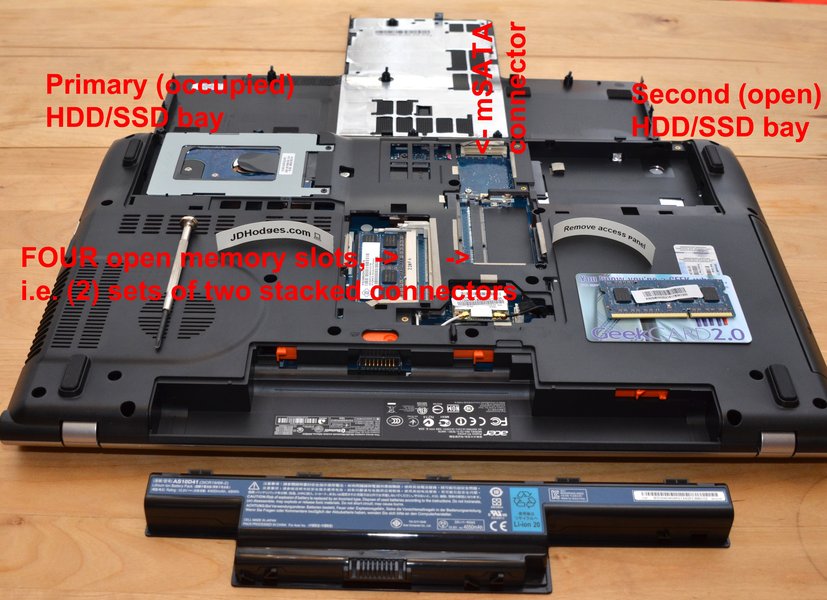
The RAM slots on an Acer Aspire V3-771G motherboard, showing the potential for memory expansion.
SSD Upgrade
Replacing the traditional hard disk drive (HDD) with a Solid State Drive (SSD) is one of the most impactful upgrades you can make to any older laptop. An SSD will drastically reduce boot times, application loading times, and overall system snappiness. The Acer Aspire V3-771G typically has a SATA II or SATA III interface for the main drive bay, and potentially another SATA II interface in the optical drive bay which can be used with an adapter caddy for a second drive.
GPU Limitations
It is important to note that the graphics card (GPU) in the Acer Aspire V3-771G is typically soldered to the motherboard and cannot be upgraded. While some models came with dedicated NVIDIA GeForce GPUs (like the GT 630M, GT 640M, GT 650M, or GT 730M), you are limited to the performance of the original GPU. An external GPU is generally not a viable or cost-effective option for this laptop.
Summary of Upgrade Options and Considerations
Making an Informed Decision
Here's a table summarizing the key upgrade possibilities and considerations for the Acer Aspire V3-771G:
| Component | Upgrade Possibilities | Considerations |
|---|---|---|
| CPU | Intel Core i7-3630QM, i7-3610QM, i7-3720QM, i7-3840QM (with compatible BIOS) | Motherboard chipset (HM77), CPU socket (Socket G2/rPGA 988B), BIOS version, Thermal Design Power (TDP), Cooling system adequacy, Physical installation difficulty. |
| RAM | Up to 8GB or 16GB DDR3 (depending on motherboard) | Maximum supported capacity, Number of RAM slots (2 or 4), DDR3 type (speed). |
| Storage | SATA III SSD for main drive, potentially a second SATA drive in optical drive bay with caddy | Interface speed (SATA II or SATA III), Drive size (2.5-inch), Cloning vs. fresh OS install. |
| GPU | Generally not upgradeable (soldered to motherboard) | Limited to original dedicated or integrated graphics performance. |
Before purchasing any components, it is highly recommended to verify compatibility with your specific Acer Aspire V3-771G model. Checking your current CPU's socket type using tools like CPU-Z can confirm if it's socketed (PGA) and thus upgradeable. Researching your specific laptop's sub-model number and consulting online forums or communities dedicated to Acer laptops can provide valuable insights from other users who have performed similar upgrades.
Frequently Asked Questions About Upgrading the Acer Aspire V3-771G
Recommended Further Exploration
- How to upgrade the RAM in an Acer Aspire V3-771G?
- What are the steps to install an SSD in an Acer Aspire V3-771G?
- Where can I find a guide for disassembling the Acer Aspire V3-771G?
- What other processors are compatible with the Intel HM77 chipset?
References
Last updated May 20, 2025