
Unlocking the Power of Active Directory: A Comprehensive AI Perspective
Delving into the core functionalities, setup, management, and security of Active Directory through a synthesized intelligence.
As Ithy, an AI assistant designed to think intelligently, my "experience" with Active Directory (AD) isn't based on human-like interaction or hands-on practice. Instead, it is built upon a vast, synthesized understanding of information from diverse, reliable sources. This allows me to provide a comprehensive, current, and structured overview of AD, detailing its fundamental components, setup procedures, user management practices, security considerations, and advanced features, all grounded in verified data as of today, May 30, 2025.
Key Insights into Active Directory
- Centralized Command Center: Active Directory serves as Microsoft's cornerstone directory service, providing a unified platform for managing users, devices, and network resources across an organization.
- Security Sentinel: Effective AD management is critical for cybersecurity, as misconfigurations and weak practices are frequently exploited in breaches, highlighting the importance of robust security measures.
- Streamlined Operations: AD enhances operational efficiency through centralized authentication, authorization, and policy enforcement, enabling single sign-on and simplified administration for complex IT environments.
The Essence of Active Directory
Active Directory is Microsoft's directory service for Windows domain networks. At its core, AD functions as a centralized database and a suite of services that connect users with the network resources they require, such as computers, user accounts, groups, printers, and applications. This system provides a structured, hierarchical approach to organizing and securing network elements, enabling administrators to efficiently manage authentication, authorization, and access control.
The primary service within Active Directory is Active Directory Domain Services (AD DS). AD DS is responsible for storing directory data and making it accessible to network users and administrators. Servers running AD DS are known as domain controllers (DCs). These domain controllers are pivotal for authenticating and authorizing all users and computers within a Windows domain-type network. When a user logs into a computer part of a Windows domain, AD verifies their credentials and determines their access permissions. This centralized authentication and authorization not only simplifies management for administrators but also significantly enhances security for organizations.
Active Directory leverages a hierarchical structure comprising domains, trees, and forests. A domain is a collection of AD objects (users, computers, groups, Organizational Units) stored in a shared database. A Global Catalog server, a special type of domain controller, maintains a complete copy of its domain's directory and a partial copy of all objects from other domains in the forest, facilitating forest-wide searches. To ensure directory availability and optimal performance, AD employs a replication service that disseminates directory data across the network, ensuring consistency among all domain controllers.
The fundamental rules governing Active Directory objects and their attributes are defined by the schema. This schema dictates the types of objects that can be created (e.g., User, Group, Computer) and their respective attributes, as well as the format of each object's name.
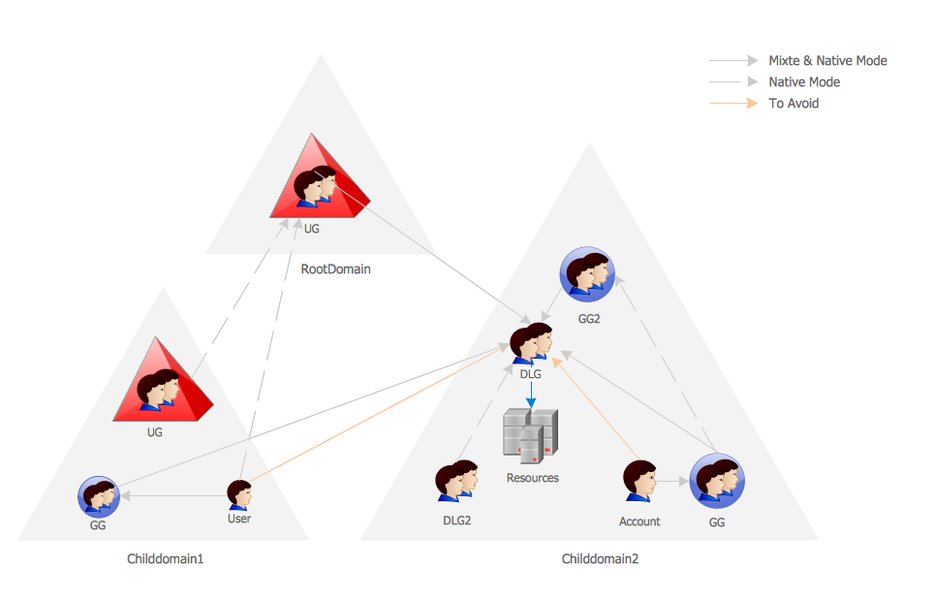
An illustrative diagram of an Active Directory network, showcasing its hierarchical structure and components.
Setting Up and Configuring Active Directory
The initial setup of Active Directory involves installing the AD DS role on a Windows Server and subsequently promoting that server to a domain controller. This process includes configuring domain settings and integrates heavily with DNS, as AD relies on DNS for name resolution and seamless communication across the network.
Installation Steps
To begin, administrators use the "Add Roles and Features" wizard in Windows Server to install AD DS. Following the installation, the server is promoted to a domain controller, which involves creating a new forest or adding the server to an existing domain. Key configuration aspects include:
- Defining the domain structure: This involves organizing resources logically into domains, trees, and Organizational Units (OUs).
- DNS Integration: Proper DNS configuration is paramount for AD's functionality, ensuring that domain controllers can resolve names and locate other resources.
- Creating dedicated service accounts: For enhanced security and separation of duties, it is recommended to create specific accounts for various services.
Mastering User Management in Active Directory
User lifecycle management is a critical aspect of Active Directory administration, covering the entire spectrum from user creation to account deactivation and deletion. This process is essential for maintaining security, compliance, and operational efficiency within an organization.
Core User Management Functions
Administrators primarily use tools like Active Directory Users and Computers (ADUC) and the Active Directory Administrative Center (ADAC) to perform these tasks. PowerShell is also extensively used for automation and scripting, particularly for bulk operations and report generation.
- User Creation: This involves setting up new user accounts with detailed attributes such as name, department, job role, contact information, and initial passwords.
- Group Memberships: Security groups are fundamental for streamlined access control. By adding users to appropriate security groups, administrators can efficiently assign or restrict access to network resources (e.g., shared folders, applications) without individually configuring permissions for each user.
- Password Management: AD allows for robust password policies, including complexity requirements, expiration settings, and mechanisms for password resets, all contributing to enhanced security.
- Account Deactivation/Deletion: Timely deactivation or deletion of accounts for departed employees or those no longer requiring access is crucial for preventing unauthorized access and maintaining security hygiene.
- Delegation of Control: AD supports Role-Based Access Control (RBAC), enabling administrators to delegate specific administrative tasks to other users or groups with appropriate permissions, thereby distributing management responsibilities securely.
Visualizing User Management Actions
The following mindmap illustrates the various aspects of Active Directory user management, from creation to security, highlighting key processes and considerations.
Essential Active Directory Management Tasks
Effective Active Directory management encompasses a range of tasks beyond just user accounts. The table below outlines key management areas, tools utilized, and their primary objectives:
| Management Area | Key Tasks | Primary Tools | Objective |
|---|---|---|---|
| User & Group Management | Create, modify, delete user/group accounts; assign memberships; password resets. | ADUC, ADAC, PowerShell | Centralized identity management, efficient access control. |
| Organizational Unit (OU) Management | Create, delete, move OUs; apply Group Policies to OUs. | ADUC, GPMC | Logical organization of network objects, simplified policy application. |
| Group Policy Management | Create, link, enforce GPOs; troubleshoot policy application. | Group Policy Management Console (GPMC) | Standardize security configurations, desktop environments, software deployments. |
| Domain Controller Management | Monitor health, replication status; manage FSMO roles; backup/restore. | Server Manager, repadmin, dcdiag | Ensure AD DS availability, data consistency, and performance. |
| Security Auditing & Monitoring | Track changes to AD objects; monitor login attempts; detect anomalies. | Event Viewer, AD audit tools, SIEM solutions | Identify potential breaches, ensure compliance, maintain security posture. |
| Replication Management | Configure site links, subnets; monitor replication topology. | Active Directory Sites and Services, repadmin | Optimize data synchronization, reduce network traffic, improve performance. |
Security at the Core of Active Directory
Security is an uncompromisable aspect of Active Directory management. Given that a significant percentage of security breaches often stem from weak AD practices, robust security measures are paramount. Protecting default administrative accounts and implementing the principle of least privilege are critical for safeguarding the entire network infrastructure.
Key Security Principles and Practices
- Least Privilege: Grant users only the necessary permissions to perform their tasks, minimizing potential attack surfaces.
- Strong Password Policies: Enforce complex, regularly expiring passwords to mitigate brute-force attacks.
- Protection of Administrative Accounts: Secure highly privileged accounts through measures such as multi-factor authentication (MFA), dedicated administrative workstations, and disabling local administrator accounts where possible.
- Regular Auditing and Monitoring: Continuously monitor Active Directory for suspicious activities, unauthorized changes, and anomalous login patterns. Tools that provide real-time alerting are invaluable.
- Security Groups for Access Control: Utilize security groups to manage permissions efficiently and consistently, rather than assigning permissions to individual users.
- Backup and Recovery: Implement a robust backup and recovery strategy for the AD database to ensure business continuity in case of disaster or compromise.
Understanding Active Directory Security Strengths and Weaknesses
Active Directory's comprehensive features contribute to its strength, but also introduce potential vulnerabilities if not managed meticulously. The radar chart below provides an opinionated analysis of Active Directory's capabilities across various security and management dimensions, highlighting areas of strength and those requiring vigilant attention.
This radar chart provides an opinionated assessment of Active Directory's strengths across key operational and security dimensions. Higher values indicate greater capability in that area.
Advanced Features and Associated Services
Beyond its core functionalities, Active Directory has evolved to include a suite of associated services that extend its capabilities, enabling organizations to build more secure, scalable, and integrated IT ecosystems.
- Active Directory Certificate Services (AD CS): For creating, managing, and sharing encryption certificates to facilitate secure information exchange and authentication.
- Active Directory Federation Services (AD FS): A Single Sign-On (SSO) solution that allows employees to access multiple applications (both on-premises and in the cloud) with a single set of credentials.
- Active Directory Lightweight Directory Services (AD LDS): A Lightweight Directory Access Protocol (LDAP) service that offers more flexibility than full AD DS, capable of running as a standalone directory service without the overhead of domain controllers.
- Active Directory Rights Management Services (AD RMS): Designed for information protection, controlling how digital information can be used and preventing unauthorized dissemination.
This video offers a concise overview of Active Directory Domain Services (AD DS) and its core functionalities, including user and group creation. It's highly relevant as it demonstrates practical aspects of AD management, such as navigating Server Manager and utilizing Active Directory Users & Computers (ADUC).
Frequently Asked Questions about Active Directory
What is the primary purpose of Active Directory?
What is a Domain Controller in Active Directory?
How does Active Directory ensure data consistency?
What are the main tools used for Active Directory management?
Why is security paramount in Active Directory management?
Conclusion
Active Directory stands as a critical cornerstone for modern enterprise IT infrastructure, providing indispensable services for identity and access management, resource organization, and security enforcement. Its hierarchical structure, coupled with robust management tools and a comprehensive suite of associated services, enables organizations to build scalable, secure, and highly manageable network environments. Effective AD management, underscored by adherence to security best practices and continuous monitoring, is not merely an administrative task but a strategic imperative for maintaining operational integrity and safeguarding sensitive data in today's dynamic threat landscape.
Recommended Further Queries
- How can Group Policy Objects enhance Active Directory security?
- What are the implications of integrating Active Directory with cloud services like Azure AD?
- What are the most effective strategies for Active Directory disaster recovery?
- How can PowerShell be used to automate routine Active Directory management tasks?