
Blueprint for a Cutting-Edge Cartoon Animation Powerhouse
Architecting the Next Generation of Commercial Animation Software with Advanced Security, Templating, and Database Integration.
Developing a fully advanced, commercially viable software package for cartoon editing and production is a significant undertaking, blending creative tools with robust technical infrastructure. This blueprint outlines the essential structure, features, and considerations required to build such a platform, incorporating state-of-the-art capabilities in animation, security, templating, and database management.
Essential Highlights for Your Advanced Animation Suite
Key Takeaways
- Integrated Powerhouse: Build a unified 2D/3D animation environment supporting both vector and raster workflows, advanced rigging, real-time capture, and AI-assisted tools.
- Fortified Security: Implement comprehensive security measures including data encryption, secure authentication, role-based access control, and robust licensing/DRM to protect user creations and the software itself.
- Streamlined Workflow: Incorporate extensive templating systems, powerful asset management databases, and cloud-based collaboration features to enhance productivity for individuals and large studios.
Conceptualizing Your Vision: Planning and Architecture
A successful software project begins with meticulous planning and a solid architectural foundation. Defining the target audience and designing a modular structure are critical first steps.
Defining the Scope and Target Audience
First, clearly identify the intended users. Will this software cater to beginners, hobbyists, professional freelancers, small studios, or large animation enterprises? This decision fundamentally shapes the required feature set, the complexity of the user interface, and the commercialization strategy. A professional focus necessitates advanced rigging, deep customization, collaboration tools, and potentially higher performance requirements, while software for beginners might prioritize ease of use, pre-built templates, and AI assistance.
Designing a Scalable Software Architecture
Adopt a modular architecture. This approach allows for easier development, testing, maintenance, and future expansion. Key architectural components should be distinct yet interconnected, promoting scalability and flexibility. Consider using robust programming languages (like C++ or Rust for the core engine) and frameworks suitable for graphics-intensive applications. Planning for cross-platform support (Windows, macOS, Linux, potentially WebAssembly for web access) from the outset is crucial for market reach.
Core Modules: The Engine of Your Software
The foundation of the software lies in its core modules, each handling a critical aspect of the animation production pipeline.
Animation Editor Module
This is the heart of the software, providing the tools for creation and manipulation.
- 2D & 3D Support: Offer a hybrid environment or specialized modes for both 2D (vector and raster drawing/painting tools) and 3D animation.
- Timeline & Keyframing: A sophisticated multi-track timeline with intuitive keyframe editing, easing curve controls, onion skinning, and interpolation options.
- Layers & Masking: Robust layer management system supporting grouping, blending modes, masking, and compositing for complex scene construction.
- Drawing & Painting Tools: Comprehensive vector and raster brush engines with pressure sensitivity support for tablets.
- Real-time Playback: Optimized, GPU-accelerated preview engine for smooth playback and immediate feedback during animation.
Asset Management Module
Efficiently organizing and reusing assets is vital for productivity.
- Templating System: Allow users to create, save, share, and utilize templates for characters, props, scenes, animation cycles, and visual styles. Include a library of pre-built, customizable templates.
- Media Library: An integrated browser for importing, organizing, tagging, and managing project assets (images, audio, video, 3D models, rigs).
- Version Control: Implement basic versioning for project files and assets, allowing users to track changes and revert if necessary.
Rendering & Export Module
Outputting the final product in various formats is essential.
- Multi-Format Export: Support for common video formats (MP4, MOV, WebM, AVI), image sequences (PNG, JPG), animated GIFs, and potentially data formats for game engines or web use (JSON, SVG).
- Batch Rendering: Ability to queue multiple scenes or shots for automated rendering.
- Customizable Settings: Control over resolution, frame rate, compression quality, color space, and alpha channel support.
Collaboration & Multiplatform Support
Facilitating teamwork and broad accessibility.
- Cloud Integration: Optional cloud storage for projects and assets, enabling backup, synchronization across devices, and potentially collaborative workflows.
- Project Sharing & Review: Features allowing teams to share projects or specific scenes for feedback and review, possibly integrating with platforms like SyncSketch. Consider operational transform sync for real-time multi-user editing.
- Cross-Platform Compatibility: Ensure the software runs natively on major desktop operating systems (Windows, macOS, Linux). Explore web-based access via technologies like WebAssembly or cloud streaming for wider reach.
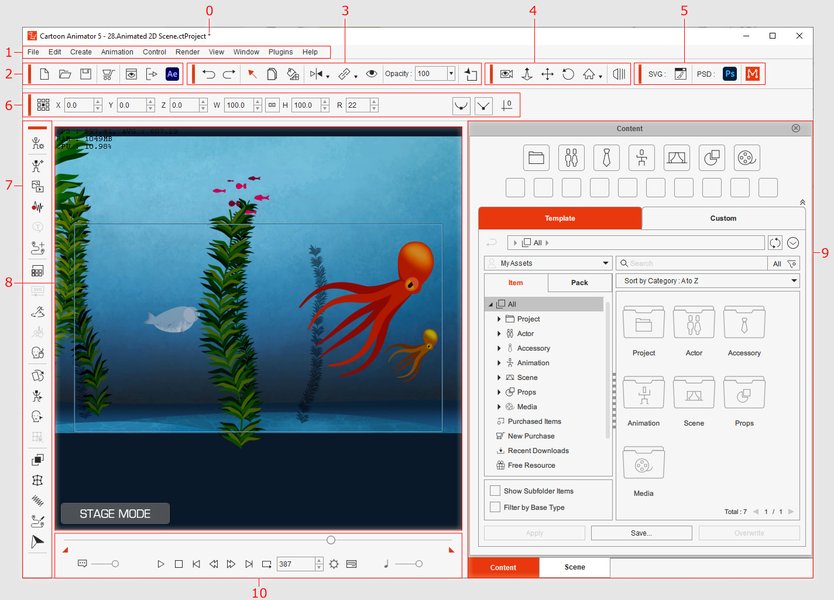
A typical user interface for animation software, showcasing timeline and viewport elements (Example: Cartoon Animator 5).
Unleashing Advanced Capabilities
To compete commercially and cater to professionals, the software must incorporate advanced features that push the boundaries of efficiency and creativity.
Next-Level Animation Features
Rigging and Character Tools
- Advanced Rigging: Support for sophisticated bone systems, Inverse Kinematics (IK) and Forward Kinematics (FK), constraints, weight painting, and deformers for organic character movement.
- Puppet Tools: Features like Adobe Character Animator's Puppet Maker or Reallusion's tools for quickly creating animatable characters from artwork or photos (e.g., Headshot-style tech).
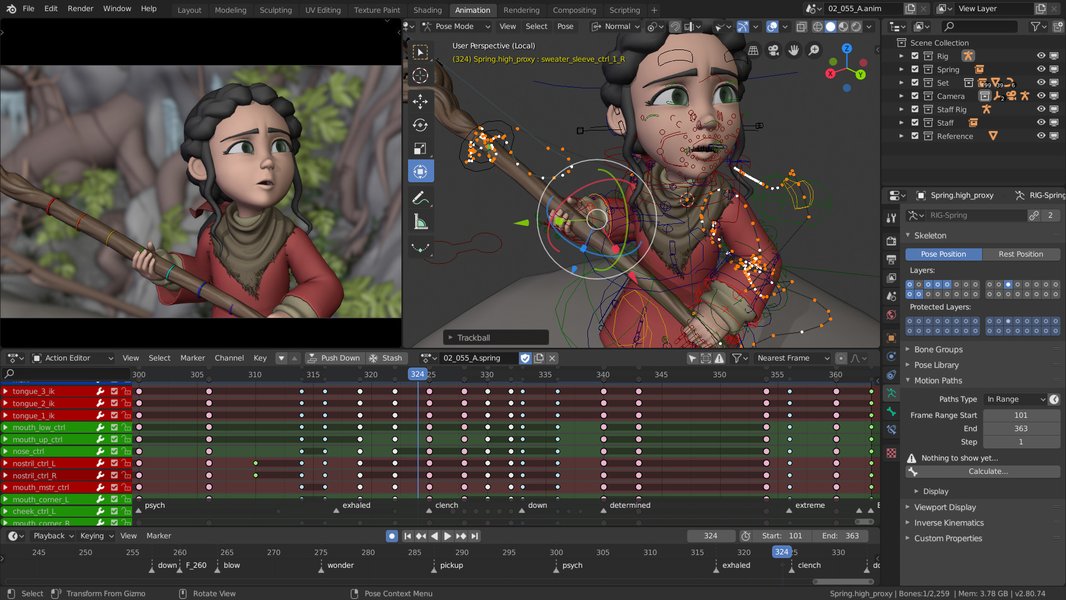
Example of character rigging in Blender, a fundamental aspect of advanced animation workflows.
Real-Time Performance Capture
- Body & Face Tracking: Integrate tools similar to Adobe Character Animator or iClone's Motion Director to capture performer movements using webcams, depth sensors, or motion capture suits for real-time character animation.
- Lip Sync Automation: Automatic lip-sync generation from audio input, supporting multiple languages.
AI-Powered Animation
- Content Generation: AI tools similar to Animaker or Vyond to generate cartoon characters, scenes, or even basic animated sequences from text prompts or existing images/videos (e.g., AI cartoonizers like PhotoDirector, XnSketch).
- Animation Assistance: AI for tasks like automatic in-betweening (tweening), motion smoothing, style transfer between different artistic looks, or optimizing render settings.
Dynamics and Effects
- Physics Simulation: Integrated physics engine for simulating soft bodies, cloth, hair dynamics (e.g., spring bones), and basic fluid effects.
- Visual Effects (VFX): Built-in particle systems, post-processing effects (blurs, glows, color grading), and potentially integration with dedicated VFX software.
Scripting and Extensibility
- API/SDK: Provide Application Programming Interfaces (APIs) or Software Development Kits (SDKs) using languages like Python or Lua, allowing users and third-party developers to automate tasks, create custom tools, and extend the software's functionality via plugins.
Intuitive User Experience (UI/UX)
An advanced feature set must be accessible through a well-designed interface.
- Customizable Workspaces: Allow users to rearrange panels, create custom layouts, and save workspace presets tailored to different tasks (e.g., rigging, animating, compositing).
- Multi-language Support: Implement localization infrastructure to support users globally.
- Workflow Optimization: Design intuitive workflows with features like drag-and-drop functionality, clear iconography, and comprehensive tooltips/help systems.
Robust Security Framework
Security is paramount for commercial software handling potentially valuable intellectual property.
- Data Encryption: Encrypt project files and assets both at rest (on disk or cloud storage) using standards like AES-256, and in transit (during upload/download or collaboration).
- Secure Authentication & Access Control: Implement secure login mechanisms (e.g., OAuth 2.0, multi-factor authentication - MFA). For team/enterprise versions, provide role-based access control (RBAC) to manage permissions for different users on projects or assets.
- Licensing and Digital Rights Management (DRM): Integrate a robust system to manage software licenses (subscription validation, perpetual key activation) and potentially protect exported content or marketplace assets using watermarking or other DRM techniques.
- Data Integrity and Backups: Use checksums or other methods to ensure data integrity. Offer robust backup and recovery options, especially if using cloud storage. Consider blockchain timestamping for critical assets as an advanced measure.
Integrated Database Solutions
A backend database is crucial for managing user data, assets, templates, and enabling advanced features.
- Purpose: Store and manage user accounts, preferences, project metadata, asset libraries (including tags, previews, versions), user-created templates, license information, and potentially analytics data.
- Technology Choices: A hybrid approach often works best. Use a relational database (like PostgreSQL) for structured data (users, licenses, project metadata) and a NoSQL database (like MongoDB) or object storage (like AWS S3, Azure Blob Storage) for less structured data and large binary files (assets, templates). Ensure the database is scalable, reliable, and secure.
Visualizing the Software Ecosystem
A mindmap helps visualize the interconnected components of this complex software system, from core modules to commercial aspects.
Comparative Feature Analysis
This radar chart provides a conceptual comparison of the proposed advanced software against typical professional animation software (like Toon Boom Harmony or Adobe Animate) and simpler online animation makers (like Animaker or Powtoon). The scores are illustrative, highlighting the ambition to excel in areas like AI, security, and commercial features while maintaining strong core animation capabilities.
Technology Stack Recommendations
Choosing the right technologies is crucial for performance, scalability, and development efficiency.
Frontend Development (Desktop/Web)
For desktop applications, frameworks like Electron (using web technologies) or Qt (C++) offer cross-platform capabilities. For a potential web version, technologies like React, Angular, or Vue.js combined with WebAssembly (to run high-performance C++/Rust code in the browser) are viable options.
Backend Infrastructure (API, Database, Storage)
The backend API could be built using Node.js (JavaScript), Python (Django/Flask), or Go for performance. As mentioned, a mix of PostgreSQL for structured data and MongoDB/S3/Azure Blob for assets often provides a good balance. Cloud platforms like AWS, Azure, or Google Cloud offer scalable solutions for hosting, databases, and storage.
Graphics and Animation Engine
The core animation and rendering engine is often custom-built in C++ or Rust for maximum performance, utilizing graphics APIs like Vulkan, Metal (Apple), DirectX (Windows), or OpenGL/WebGL for broader compatibility. Leveraging existing open-source components (e.g., parts of Blender's code, physics engines like Bullet) can accelerate development, but requires careful integration.
Example Microservice Structure Snippet
This Python dictionary structure illustrates a conceptual microservice approach:
# Conceptual representation of potential service components

animation_engine_service = {
    "language": "C++17 / Rust",
    "graphics_api": ["Vulkan", "Metal", "OpenGL"],
    "features": ["2D/3D Pipeline", "Real-time Rendering", "Physics"],
    "scripting_interface": "Python / Lua"
}

asset_management_service = {
    "language": "Python (Django)",
    "database": "PostgreSQL (Metadata) + AWS S3 (Binaries)",
    "features": ["Versioning", "Templating API", "Search Indexing"]
}

security_service = {
    "framework": "OAuth 2.0 / OpenID Connect",
    "encryption": "AES-256 (at-rest), TLS 1.3 (in-transit)",
    "features": ["MFA Support", "Role-Based Access Control", "License Verification"]
}

collaboration_service = {
    "protocol": "WebSockets / Operational Transforms",
    "features": ["Real-time Sync", "Review/Annotation Tools", "Project Sharing"]
}
Bringing Your Software to Market: Commercialization
A powerful tool needs a solid business strategy to succeed commercially.
Licensing Models and Monetization
- Subscription Tiers: Offer different subscription levels (e.g., Free/Basic, Individual Pro, Team/Studio, Enterprise) with varying feature access, usage limits (e.g., cloud storage, render time), and support levels. This provides recurring revenue.
- Perpetual Licenses: Optionally offer a one-time purchase option, perhaps with paid major version upgrades, catering to users who prefer ownership.
- In-App Marketplace: Create a marketplace where users (or the company) can sell/buy templates, pre-rigged characters, plugins, brushes, or other assets, potentially using a revenue-sharing model.
- Add-on Services: Offer premium support, dedicated training, or cloud rendering credits as additional revenue streams.
Deployment and Updates
Provide a seamless installation experience and a reliable automatic update mechanism. Ensure update servers are scalable and secure. Offer rollback capabilities in case of problematic updates.
Marketing, Sales, and Support
Develop a comprehensive marketing strategy targeting the identified audience (content marketing, social media, industry events, partnerships). Establish a responsive customer support system (ticketing, forums, knowledge base, tutorials). Comprehensive documentation and tutorials are essential for user adoption and retention.
Commercial Feature Comparison
This table outlines key features relevant for different commercial tiers:
| Feature | Starter/Individual Tier | Studio/Team Tier | Enterprise Tier |
|---|---|---|---|
| Core Animation Tools | Full Access | Full Access | Full Access |
| Advanced Features (AI, Real-time) | Limited or Basic Access | Full Access | Full Access |
| Collaboration Tools | None or Limited Sharing | Cloud Sync, Project Sharing, Basic RBAC | Advanced RBAC, Multi-User Editing, Audit Logs |
| Asset Management | Local Library, Basic Templates | Cloud Library, Shared Templates, Basic Versioning | Advanced Versioning, Custom Template Libraries, API Access |
| Security | Standard Encryption, Basic Auth | Enhanced Auth (MFA Option), Role-Based Access | Advanced Security Options (e.g., SSO), Dedicated Support, On-Premise Option |
| Support | Community Forum, Knowledge Base | Priority Email Support | Dedicated Account Manager, Phone Support, SLAs |
| Render Integration | Local Render Only | Local + Optional Cloud Render Credits | Integration with Custom Render Farms, API Access |
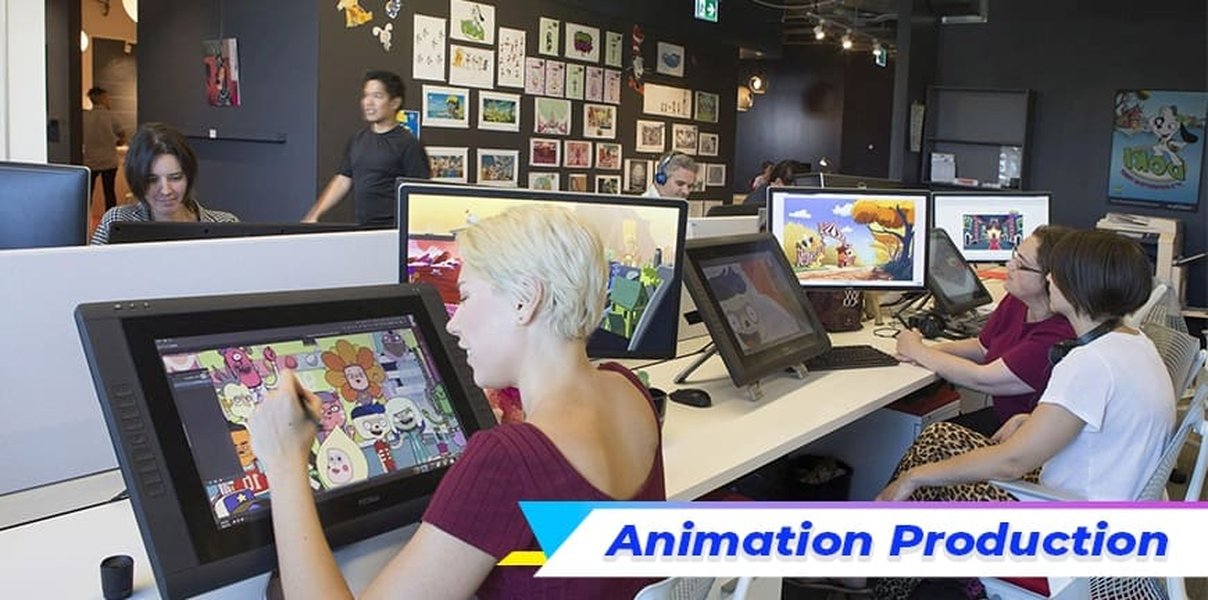
Illustrating the typical stages in animation production, which a comprehensive software solution aims to streamline.
Learning Resources & Demonstrations
Understanding how existing tools handle specific features can be insightful. The video below demonstrates features in Reallusion's Cartoon Animator, a popular 2D animation software often mentioned for its character animation and motion capabilities, which aligns with some of the advanced features discussed (like puppet tools and real-time performance integration concepts).
This video showcases how to create animated videos by combining features of Cartoon Animator with video editing software, highlighting aspects like template usage, character animation, and export workflows relevant to building a user-friendly yet powerful animation tool.
Frequently Asked Questions (FAQ)
Who is the target audience for this type of advanced software?
While designed with advanced features, the target audience could range from professional freelance animators and small-to-medium studios to large animation production houses and educational institutions. Tiered licensing and features (like intuitive templates vs. deep scripting) can cater to different segments within this broad professional market.
What are the key differentiators from existing software like Toon Boom or Adobe Animate?
Potential differentiators could include a seamless integration of 2D/3D workflows within one environment, more advanced and accessible AI-powered tools (for generation and assistance), a highly flexible and user-friendly templating system, built-in robust security features from the ground up, and potentially more modern collaboration tools integrated directly into the platform.
What kind of security measures are most essential for commercial viability?
Essential security includes robust user authentication (including MFA), encryption of sensitive project data (both at rest and in transit), secure license validation (DRM) to prevent piracy, and role-based access control to protect project integrity in team environments. Regular security audits and adherence to data privacy regulations (like GDPR) are also crucial.
How would the templating system work effectively?
An effective system would offer a library of professionally designed, customizable templates (characters, backgrounds, scenes, effects, animation cycles). Users should be able to easily browse, preview, and apply templates. Importantly, users should also be able to create, save, modify, and potentially share/sell their own templates, fostering a community and allowing for workflow standardization within teams.
What specific functions would the database integration serve?
Database integration is key for managing: User Accounts (profiles, authentication, permissions, licenses), Project Management (metadata, status, versions), Asset Library (storing, tagging, searching media files like images, audio, rigs, models), Template Repository (storing and serving pre-built and user-generated templates), and potentially Analytics (tracking feature usage for improvement, anonymous crash reports).
What are viable commercialization models?
Common and viable models include: tiered subscriptions (monthly/annual) offering different levels of features and support; perpetual licenses with optional paid upgrades; a freemium model with basic free features and paid advanced capabilities; and an asset/plugin marketplace with revenue sharing. Enterprise licenses with custom pricing and support are also essential for large organizations.
Recommended Next Steps
- Explore the differences between 2D vector and raster animation workflows.
- Investigate how AI is transforming modern animation pipelines.
- Compare the security features of leading creative cloud software.
- Learn about building scalable asset management systems for creative teams.
References
Last updated May 5, 2025