
Beyond the Basics: Building an AI-Powered Typography Assistant Inspired by Typescale
Leverage AI to automatically generate harmonious typescales and select font pairings that resonate with your project's unique mood and tone.
Highlights: Key Advantages of an AI Typography Tool
- Automated Harmony: Go beyond manual ratio selection. AI can analyze content and context to suggest mathematically sound and aesthetically pleasing type scales optimized for readability and visual appeal.
- Mood-Driven Font Pairing: Move past guesswork. Utilize AI trained on design principles and sentiment analysis to recommend font combinations that perfectly capture the desired emotional tone (e.g., professional, playful, elegant) of your website or app.
- Intelligent Selection: Leverage AI to sift through vast font libraries (like Google Fonts) and suggest fonts not just based on pairing potential, but also on their suitability for specific moods, tones, and accessibility standards.
Understanding the Foundation: What is Typescale.com?
The Core Concept of Typographic Scales
Typescale.com is a popular web tool designed to simplify the process of creating consistent and harmonious typography for digital projects. At its core, it allows designers and developers to establish a visual hierarchy for text elements (like headings, subheadings, body text, captions) based on mathematical relationships. Users typically start by defining two key parameters:
- Base Font Size: This is the foundational size, often used for the main body text (commonly 16px for web).
- Scale Ratio: This multiplier determines the size progression between different text elements. Common ratios include the Minor Third (1.200), Major Third (1.250), Perfect Fourth (1.333), Augmented Fourth (1.414), and the Golden Ratio (1.618).
By applying the chosen ratio to the base size, Typescale.com generates a series of font sizes that work well together, creating a visually pleasing and structured layout. It provides a live preview and often allows users to select fonts (e.g., from Google Fonts) and export the generated CSS code, making implementation straightforward.
The goal is to achieve consistency, readability, and aesthetic balance across different text elements and, ideally, across different screen sizes (responsive typography).
Enhancing with Intelligence: Integrating AI Features
While Typescale.com provides a solid foundation, integrating Artificial Intelligence (AI) can elevate the tool from a simple calculator to an intelligent design assistant. The goal is to automate and refine the process of creating typescales and selecting fonts by incorporating context, mood, and advanced design principles.
AI for Mood and Tone Analysis
A key innovation is enabling the tool to understand the desired 'feel' of a project.
Natural Language Processing (NLP)
By incorporating NLP models, the tool can analyze user input like project descriptions, brand statements, keywords (e.g., "professional," "playful," "minimalist," "bold"), or even sample content from the target website or app. The AI interprets this text to classify the intended mood and tone.
(Optional) Visual Analysis
For a more advanced approach, computer vision techniques could analyze uploaded mood boards, logos, or existing design examples to extract visual cues about color palettes, imagery style, and overall aesthetic, further refining the mood analysis.
Classification Output
The AI would output a profile identifying the dominant mood (e.g., Formal, Casual, Modern, Classic, Energetic, Calm) and tone (e.g., Serious, Friendly, Luxurious, Technical). This profile becomes the basis for subsequent AI recommendations.
AI-Powered Font Selection and Pairing
Selecting and pairing fonts is an art form that AI can significantly assist with, especially when guided by the analyzed mood and tone.
Intelligent Font Databases
The system requires access to extensive font libraries (like Google Fonts, Adobe Fonts) where fonts are tagged not just with basic classifications (serif, sans-serif, script, display) but also with associated characteristics and common mood associations (e.g., "Lato" often perceived as friendly and modern, "Garamond" as classic and elegant).
AI Pairing Algorithms
AI models, potentially inspired by tools like Fontjoy or Monotype's AI, analyze various factors to suggest harmonious font pairings:
- Contrast: Ensuring sufficient difference between heading and body fonts for clear hierarchy (e.g., pairing a bold sans-serif heading with a readable serif body font).
- Harmony: Finding fonts that share complementary characteristics or historical context.
- Readability: Prioritizing fonts known for good legibility at various sizes, especially for body text.
- Mood Alignment: Recommending pairs whose combined aesthetic matches the target mood identified earlier. For a "tech startup" mood, it might suggest modern sans-serif pairs; for an "artisan bakery," perhaps a script font paired with a warm serif.
Accessibility Focus
Crucially, the AI should incorporate accessibility checks (like WCAG guidelines). It can evaluate the suggested fonts and sizes for inherent legibility and recommend pairings that maintain good contrast ratios, ensuring the typography is usable for everyone.
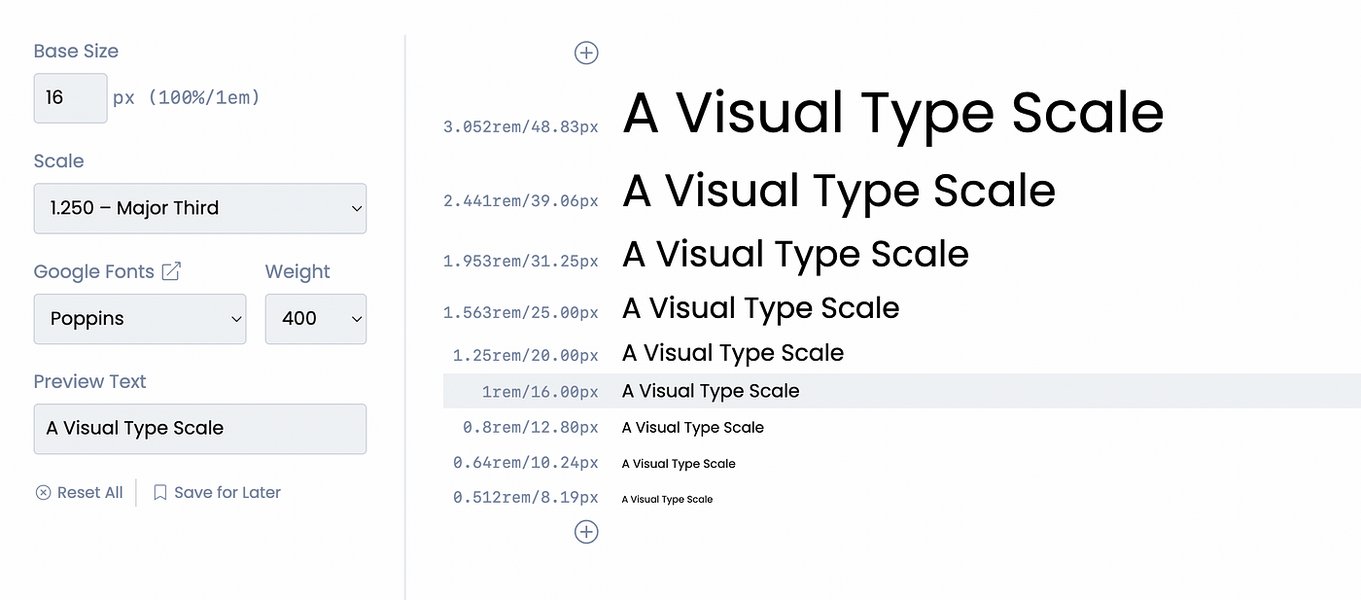
Visualizing how a type scale creates hierarchy within a design system.
AI-Assisted Typescale Generation
Beyond just selecting fonts, AI can help craft the entire typographic scale more intelligently.
Contextual Ratio & Base Size Suggestions
Instead of relying solely on standard ratios, AI can recommend a base size and scale ratio tailored to the project's context. Factors influencing this could include the chosen fonts (different fonts have varying x-heights and perceived sizes), the target mood (e.g., a tighter scale for a dense, professional UI; a more dramatic scale for an expressive marketing site), and the primary viewing environment (app vs. website).
Readability Optimization
AI can analyze the generated scale in conjunction with the selected fonts, potentially evaluating factors like line height and character count per line (ideally 45-75 characters) to suggest adjustments that optimize reading comfort.
Variation Generation
The AI could quickly generate several viable typescale options based on slightly different parameters or interpretations of the mood, allowing the user to compare and select the best fit, speeding up the design exploration process.
Visualizing the Components
This mindmap illustrates the core components of the original Typescale concept and the proposed AI enhancements that build upon it, creating a more intelligent typography assistant.
Building Your AI-Enhanced Typescale Tool
Recommended Technology Stack
Building a tool with these capabilities requires a combination of frontend, backend, and AI technologies. Here’s a suggested stack based on common practices:
| Component | Technology/Tools | Notes |
|---|---|---|
| Frontend UI | React.js, Vue.js, or Svelte | For building interactive user interfaces with real-time previews. |
| Backend Logic | Node.js (Express) or Python (Flask/Django) | To handle API requests, AI model integration, and business logic. |
| AI/Machine Learning | OpenAI API (GPT models for NLP/generation), TensorFlow or PyTorch (for custom models), NLP Libraries (spaCy, Hugging Face Transformers), Computer Vision Libraries (OpenCV, if implementing image analysis) | For mood analysis, font recommendation logic, and potentially typescale optimization models. |
| Font Data & APIs | Google Fonts API, Open Font Format (OFF) metadata | To access font files, styles, weights, and metadata (including classifications and character sets). Building a curated/tagged database might be necessary for mood associations. |
| Styling & Export | CSS Variables, Tailwind CSS, Styled Components | For generating clean, maintainable, and easily exportable CSS code (including responsive clamp functions or media queries). |
| Database | PostgreSQL, MongoDB | To store user data (if applicable), saved palettes/scales, and potentially the curated font metadata. |
Example: Simplified Font Pairing AI Logic (Python)
While a full implementation is complex, this conceptual Python snippet using TensorFlow illustrates how a machine learning model might be structured to suggest pairings based on input features.
import tensorflow as tf
from tensorflow.keras.models import Sequential
from tensorflow.keras.layers import Dense
import numpy as np # Assuming features are preprocessed into numpy arrays

# Assume preprocess_input converts mood/tone/style preferences into a numerical feature vector
# Assume get_font_pairs_from_prediction maps model output to actual font pair names

# Simplified Font Pairing Model Definition
def create_font_pairing_model(input_feature_shape, num_output_classes):
    """Creates a simple sequential model for font pairing."""
    model = Sequential([
        Dense(128, activation='relu', input_shape=input_feature_shape), # Input layer based on feature vector size
        Dense(64, activation='relu'),
        Dense(num_output_classes, activation='softmax') # Output layer representing probabilities for different font pair suggestions
    ])

    model.compile(optimizer='adam',
                  loss='categorical_crossentropy', # Suitable for classification tasks
                  metrics=['accuracy'])
    return model

# --- Placeholder Training & Prediction ---
# Define input shape (e.g., 20 features representing mood, style, etc.)
# Define number of output classes (e.g., 50 potential font pair suggestions)
# input_shape = (20,)
# num_classes = 50

# model = create_font_pairing_model(input_shape, num_classes)
# model.summary()

# --- Hypothetical Training Data (Requires a large dataset) ---
# features = np.random.rand(1000, 20) # Example features
# labels = tf.keras.utils.to_categorical(np.random.randint(0, num_classes, size=1000), num_classes=num_classes) # Example labels
# model.fit(features, labels, epochs=10, batch_size=32)

# --- Hypothetical Prediction ---
def suggest_font_pairs(user_input_features, model):
    """Predicts font pairs based on input features."""
    # Ensure input_features is correctly shaped (e.g., (1, 20))
    prediction_probabilities = model.predict(user_input_features)
    # Logic to select top N suggestions based on probabilities
    # top_pair_indices = np.argsort(prediction_probabilities[0])[-3:] # Get top 3 indices
    # suggested_pairs = get_font_pairs_from_prediction(top_pair_indices)
    # return suggested_pairs
    print("Prediction probabilities shape:", prediction_probabilities.shape) # Placeholder
    return ["Example Pair 1 (e.g., Roboto + Lora)", "Example Pair 2 (e.g., Montserrat + Merriweather)"] # Placeholder return


# Example Usage (assuming user_input processed into features)
# user_features = preprocess_input({"mood": "modern", "tone": "friendly"}) # Shape (1, 20)
# suggested_pairs = suggest_font_pairs(user_features, model)
# print(suggested_pairs)
Note: This code is illustrative. A real-world implementation requires significant data collection, feature engineering, model training, and integration work.
Implementation Workflow
A typical user journey through the AI-enhanced tool might look like this:
- Input Phase: User provides project details – descriptive keywords, sample text, target audience, desired mood/tone (perhaps via sliders or tags), or uploads visual references.
- AI Analysis: The backend AI models process the input to determine the project's mood/tone profile.
- Font Recommendation: Based on the profile, the AI suggests several suitable font pairings, potentially explaining the rationale behind each choice (e.g., "This pair evokes a professional yet approachable feel").
- Typescale Generation: Once a font pair is selected (or potentially suggested alongside the fonts), the AI recommends an appropriate base size and scale ratio, generating the full typescale.
- Preview & Refinement: The user sees a live preview of the chosen fonts and scale applied to sample UI elements (headings, paragraphs, buttons). They can tweak the base size, ratio, or even request alternative AI suggestions.
- Export: The user exports the final configuration as CSS variables, utility classes (like Tailwind), or potentially configuration files for design tools.
User Experience (UX) Considerations
- Intuitive Interface: Design a clean, visual interface that makes it easy to input information, understand AI suggestions, and preview results.
- Transparency: Briefly explain *why* the AI made certain recommendations (e.g., "Suggested due to 'modern' mood and high readability").
- User Control: AI suggestions should be starting points, not final decisions. Always allow users to override AI choices, manually select fonts, or adjust scale parameters.
- Visual Previews: Provide realistic previews on sample web/app layouts, not just abstract lists of font sizes.
- Feedback Loop: Consider incorporating a way for users to rate the AI's suggestions. This feedback can be invaluable for iteratively improving the AI models.
- Saving & Sharing: Allow users to save their generated themes or share them with team members.
Comparing Traditional vs. AI-Enhanced Tools
This radar chart highlights the potential differences in key aspects between a standard typescale tool and one augmented with AI features. The values represent relative strengths based on the described functionalities.
Guidance from the Experts: Creating Type Scales
Understanding the principles behind effective typography is crucial, whether using AI assistance or manual methods. This video provides insights into creating type scales within a design system context.
The video emphasizes stopping guesswork and learning systematic ways to establish text ratios, which aligns with the goal of both traditional typescale tools and the enhanced AI version aiming for harmonious results.
Potential Challenges and How to Approach Them
Developing an AI-enhanced tool presents unique challenges:
- Subjectivity of Mood: Training AI to accurately interpret subjective concepts like "mood" and "tone" in relation to typography is complex and requires robust datasets and sophisticated models. Approach: Start with clearer categories, use user feedback to refine models, and allow manual overrides.
- AI Performance: Complex AI models, especially for real-time analysis, can be computationally intensive, potentially slowing down the user experience. Approach: Optimize models, use efficient backend infrastructure, and consider asynchronous processing for heavy tasks.
- Data Requirements: Effective AI requires large, well-annotated datasets linking fonts, scales, and design contexts to specific moods or styles. Acquiring or creating this data can be a significant undertaking. Approach: Leverage existing open datasets where possible, start with smaller models, and build data collection mechanisms (e.g., user feedback).
- Balancing Automation and Control: While AI offers powerful assistance, users must retain final creative control. The tool should empower, not dictate. Approach: Design the UX to present AI suggestions clearly as options, always allowing for manual adjustment and selection.
- Font Licensing: Integrating font libraries requires careful attention to licensing agreements, especially if the tool is used for commercial purposes. Approach: Primarily integrate open-source libraries like Google Fonts, and clearly state licensing terms for any suggested fonts.
Frequently Asked Questions (FAQ)
What is a typographic scale?
A typographic scale (or type scale) is a system of related font sizes used to create hierarchy and harmony in text content. It typically starts with a base font size (for body text) and uses a mathematical ratio (like 1.250 or 1.618) to determine progressively larger sizes for headings (H1, H2, H3, etc.) and potentially smaller sizes for captions or fine print. This ensures visual consistency and makes the text easier to scan and understand.
How does AI help with font pairing?
AI assists font pairing by analyzing vast datasets of fonts and successful combinations. It considers factors like font classification (serif, sans-serif), visual weight, x-height, contrast, historical context, and increasingly, the desired mood or aesthetic. AI algorithms can quickly suggest pairs that are likely to work well together for hierarchy and readability, saving designers time compared to manual trial-and-error. Mood-based AI adds another layer by matching font characteristics to emotional tones described by the user.
What core technologies are needed to build this AI tool?
You'll typically need a frontend framework (like React, Vue) for the user interface, a backend language/framework (like Python with Flask/Django, or Node.js) to handle logic and API calls, AI/ML libraries (like TensorFlow, PyTorch, scikit-learn, or NLP libraries such as spaCy or Hugging Face Transformers), potentially access to pre-trained models via APIs (like OpenAI), and APIs for font libraries (like the Google Fonts API). A database might also be needed to store user preferences or curated font data.
Is it difficult to integrate AI for mood analysis?
The difficulty varies. Using existing pre-trained NLP models (like sentiment analysis models or large language models via API) can be relatively straightforward for basic mood detection from text. However, building a custom model that accurately links nuanced moods specifically to typographic choices requires significant expertise in machine learning, data collection (tagging fonts/designs with moods), and model training/tuning, which can be considerably more complex.
Where can I find font data for the AI?
Public APIs like the Google Fonts API provide access to font files and basic metadata (family, weight, style). For more detailed characteristics or mood associations, you might need to scrape font vendor websites (respecting their terms of service), use specialized typography databases if available, or build your own dataset by manually tagging fonts or using machine learning to extract features and cluster them based on perceived aesthetics.
Recommended Further Exploration
- How can I train an AI model for font pairing based on aesthetic principles?
- What are the best practices for responsive typography using CSS clamp() and variables?
- Explore Natural Language Processing techniques for detecting mood and tone in text for design applications.
- Learn how to integrate the Google Fonts API into a web application for dynamic font loading and selection.
References
Last updated May 4, 2025