
AI Tools for Excel
Transforming spreadsheets with intelligent automation and insights
Highlights
- Automation of Complex Tasks: AI tools can generate complex formulas, automate data cleaning, and streamline data analysis, saving time and reducing human error.
- Advanced Data Insights: With features like predictive analytics, dynamic visualizations, and AI-assisted reporting, these tools help derive deeper insights from raw data.
- Seamless Integration: Many of these technologies integrate directly with Excel and other spreadsheet platforms, providing a smooth, user-friendly interface for both beginners and advanced users.
Introduction
Artificial Intelligence (AI) has revolutionized the way we handle spreadsheet data, particularly in Excel. Modern AI tools for Excel are designed to enhance productivity by automating repetitive tasks, generating complex formulas from simple instructions, and providing actionable insights through powerful data analysis. These tools come in various forms—from simple add-ins that help convert text into formulas, to comprehensive platforms that integrate machine learning directly into your spreadsheets.
By harnessing the capabilities of AI, professionals across finance, data analysis, and business intelligence can now focus on strategic decision-making rather than getting bogged down by the intricacies of formula creation and manual data manipulation. This article provides an in-depth look at the state-of-the-art AI tools for Excel available in 2025, explaining their features, benefits, and how they integrate within Excel.
Overview of AI Tools for Excel
AI tools for Excel can be categorized into several key areas: formula generation, data analysis, visualization, and integration with broader platforms. Each category serves a unique purpose, and together, they help create a more efficient, error-reducing, and insightful Excel experience.
Formula Generation Tools
One of the primary advantages AI offers in Excel is the ability to transform plain language instructions into complex formulas. This functionality is particularly useful for users who find Excel formulas intimidating or time-consuming. Instead of manually inputting every character, these tools enable users to type a simple instruction—for example, "calculate the compound interest for this dataset"—and receive a fully functional formula.
Key Features
Text-to-Formula Conversion: Tools in this category parse natural language and convert instructions into Excel formulas or even VBA scripts. This makes advanced calculations accessible to a broader range of users.
Multiple Output Formats: Some tools also generate SQL queries, regular expressions (regex), and automation scripts, demonstrating versatility beyond traditional Excel formulas.
These tools are designed to support both simple computations and complex financial models, ensuring that whether you are working on a basic budget or a sophisticated financial projection, the process is significantly streamlined.
Data Analysis and Predictive Tools
AI tools have reshaped the data analytics capabilities of Excel. By integrating machine learning and advanced analytics directly into the spreadsheet, these tools provide immediate insights and predictions based on historical data trends and current inputs. Whether you are examining sales data or analyzing customer behavior, AI-driven analysis tools can automate the recognition of patterns and trends.
Key Features
Automated Data Cleaning: Clean data is essential for accurate analytics. AI tools help identify and correct data errors, ensuring consistency and accuracy within datasets.
Predictive Analytics: Many AI-powered solutions integrate statistical and machine learning models that forecast trends, detect anomalies, and offer predictive insights. These models are particularly useful for forecasting sales, budgeting, and risk management.
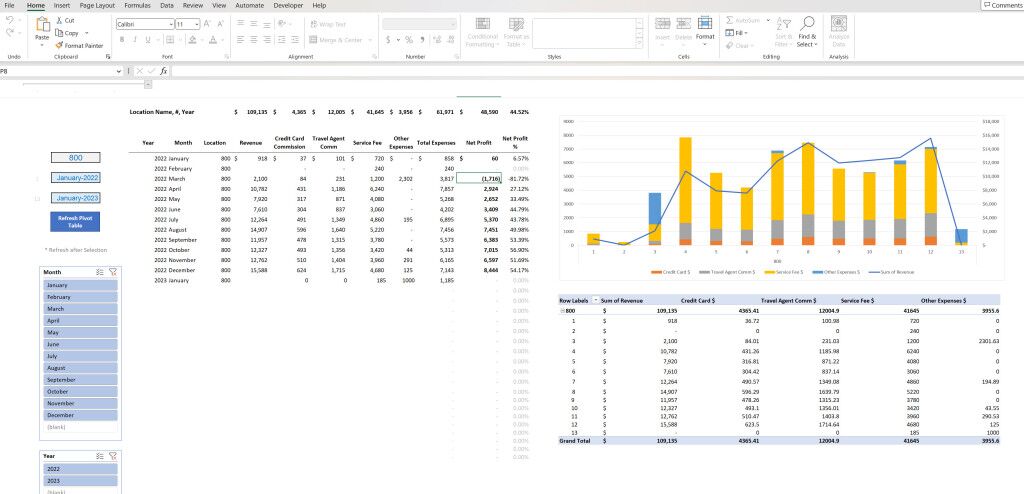
Instant Insights: Through data visualization and real-time analysis, these tools can transform large quantities of raw data into immediately understandable charts, graphs, and dashboards.
Visualization and Reporting
Effective visualization is key to understanding complex data. AI tools in Excel are now capable of transforming datasets into interactive dashboards and reports that highlight insights and trends. These capabilities are crucial in today's data-centric decision-making processes.
Key Features
Dynamic Visualizations: Some tools integrate with platforms that specialize in advanced data visualization such as Tableau. This enables users to create professional-looking dashboards directly within Excel or through connected software.
Automated Reporting: Instead of manually formatting spreadsheets for presentation, AI tools can generate professional reports autonomously, complete with charts, graphs, and executive summaries.
Intelligent Insights: By utilizing AI, these systems can recommend the best types of visualizations for the given dataset, ensuring that the most important trends and anomalies are easily visible.
Integrated AI Add-Ins for Microsoft 365
Many of the cutting-edge AI features are now integrated into Microsoft 365, particularly through services like Microsoft 365 Copilot. This integration means that you don’t have to install or manage separate tools; instead, you have a powerful suite of AI-enabled features built directly into your familiar Excel environment.
Key Features
Seamless User Experience: These integrated tools work within Excel to suggest enhancements, generate formulas, and provide data insights without requiring a switch to another application.
Automated Formatting and Analysis: Tasks like data cleaning, error correction, and even the identification of emerging data trends are handled automatically, allowing users to focus on strategic analysis.
Accessibility for All Users: With user-friendly interfaces and context-aware suggestions, these tools democratize advanced data analysis for users with varying levels of expertise.
Detailed Comparison and Usage
There are numerous AI tools available that cater to different aspects of Excel usage. Understanding the strengths and specific applications of each tool can help organizations and individuals choose the right solutions based on their unique requirements.
Comparative Table of AI Tools for Excel
| Category | Tool Name | Key Features | Usage |
|---|---|---|---|
| Formula Generation | AI Excel Bot / Formula Bot | Converts text instructions into formulas, generates SQL queries and VBA scripts | Ideal for users who need quick, accurate formula generation |
| Data Analysis & Prediction | DataRobot / Numerous.ai | Automates machine learning, generates predictive models, and performs statistical analysis | Great for business analysts and data scientists in financial and market forecasting |
| Visualization & Reporting | Powerdrill AI / Tableau Add-In | Transforms data into interactive dashboards and charts | Useful for presenting insights and trends to stakeholders |
| Microsoft 365 Integration | Microsoft 365 Copilot / Excel Ideas | Embedded AI functionalities for data cleaning, auto-formatting, and insights | Recommended for organizations using Microsoft 365 for enhanced collaboration |
The table above summarizes the key categories of AI tools for Excel and their primary applications. Each tool is designed to streamline different aspects of data management and analysis, making it easier for users to handle increasingly large and complex datasets.
In-depth Analysis of Key Tools and Their Impact
Delving deeper into the capabilities of these AI tools, we observe that the driving force behind many of their benefits is automation. By automating mundane tasks, these tools free up valuable human resources, allowing professionals to focus on decision-making and strategy. Below, we explore some of the most transformative features and their implications.
Automation and Its Benefits
Automation is at the heart of AI’s impact on Excel. Instead of manual data entry, error-prone formula creation, and laborious data cleaning, AI tools perform these tasks within seconds. This automation leads to several benefits:
Efficiency and Time Savings
Automation tools streamline repetitive tasks. Whether it is generating formulas using natural language or cleaning and normalizing datasets, these tools drastically reduce the time required to prepare data for analysis. With tasks that previously took hours now being completed in minutes or seconds, businesses can redirect effort and resources to other high-impact activities.
Reduction in Errors
Human error is a constant concern when dealing with complex spreadsheets. AI tools are designed to identify and correct data inconsistencies, prevent formula mistakes, and audit the logic behind calculations. This leads to significant improvements in data reliability and overall output quality.
Scalability
As datasets grow larger and more complex, manually managing Excel spreadsheets becomes increasingly challenging. AI tools scale seamlessly, handling everything from simple arithmetic to advanced statistical analysis without performance degradation. This adaptability makes these tools essential for organizations dealing with big data.
Advanced Data Analysis and Predictive Modeling
The integration of machine learning and predictive analytics into Excel has opened new avenues for data analysis. Predictive models can be trained on historical data, enabling users to forecast future trends and gain insights into potential business scenarios.
Predictive Capabilities
AI-powered predictive models within Excel analyze historical data and extrapolate trends. They can identify patterns that may not be visible through traditional analysis techniques. Businesses use these insights for budgeting, forecasting, and strategic planning.
Real-Time Analysis
Many AI tools offer real-time analytics. As data is entered or updated, these systems automatically re-calculate insights and trends. This capacity for dynamic analysis ensures that users always have access to the most current information, which is critical for making timely decisions.
Visualization and Reporting for Better Decision-Making
Visualizations transform data analysis from a purely numerical exercise into an intuitive order of presentation that highlights relationships, trends, and outliers. AI tools for Excel excel (pun intended) in creating these visual representations that are not only informative but also aesthetically pleasing.
Interactive Dashboards
With dynamic dashboards, stakeholders can drill down into the details of the data and interact with visual elements such as charts and graphs. This interaction fosters a better understanding of complex datasets and supports data-driven decision-making.
Automated Reports
Generating reports is traditionally a time-consuming process. However, AI tools streamline this by automatically formatting data, creating charts, and compiling comprehensive reports. The result is an efficient workflow where insights are delivered quickly and in a professional format.
Practical Applications Across Different Sectors
The advancements in AI tools for Excel extend across various industries and use cases. Their applications are not confined to finance and data analysis alone; they are equally beneficial in fields such as marketing, operations, education, and research.
Finance and Accounting
In finance, precision is paramount. AI tools help in automating financial modeling, ensuring that complex calculations and projections are accurate. They streamline tasks such as generating budgets, forecasting cash flows, and performing variance analysis. With AI integration, firms can quickly produce detailed financial reports that would otherwise require extensive manual labor.
Business Intelligence and Analytics
For business analysts, having real-time, insightful data is crucial. AI tools in Excel provide predictive analytics and trend detection, enabling businesses to identify emerging market trends and respond proactively. Decision-makers can quickly assess risk, optimize operations, and secure competitive advantages through informed strategies.
Marketing and Sales
In the competitive realm of marketing and sales, understanding customer behavior and market trends can pave the way for innovative strategies. AI-driven Excel tools analyze customer datasets, help segment target audiences, and even predict purchasing patterns, which aids in crafting personalized and effective marketing campaigns.
Educational and Research Applications
Educational institutions and researchers increasingly rely on data analysis for various projects. AI tools in Excel simplify the process of statistical analysis, trend identification, and data presentation. They empower educators and researchers to focus on content and research insights rather than getting entangled in the technicalities of spreadsheet management.
Integration and Future Perspectives
One of the most revolutionary aspects of AI in Excel is its seamless integration with existing platforms. With built-in functionalities in Microsoft 365, many of these AI features are becoming part of the standard Excel toolkit. The future promises even tighter integration with cloud-based data services and collaboration tools.
Integration within Microsoft 365
Microsoft 365's integrated AI tools, such as the advanced Copilot, work behind the scenes to help with everything from data cleaning to visual storytelling. This integration marks a shift toward a more holistic computing experience, where Excel is not simply a standalone tool but part of an interconnected ecosystem that supports a wide range of tasks.
Evolving Trends in AI for Productivity
Looking ahead, the impact of AI on productivity continues to grow. Future Excel developments are expected to feature even more sophisticated AI algorithms, capable of deeper data analysis, improved error diagnostics, and more intuitive user interfaces. There is also increasing investment in tools that support collaboration, enabling teams to work together in a more data-driven manner across different platforms.
Scalability and Adaptability
As businesses generate larger datasets, the need for scalable AI tools becomes critical. Future innovations are expected to handle even larger volumes of data seamlessly, offering more advanced statistical models and predictive analytics to drive informed decisions in real-time.
Enhanced Accessibility
With an emphasis on user-friendly design, the next iterations of AI excel tools will further lower the barrier for entry. They will empower non-experts to harness the power of AI for their everyday tasks, making data analysis a universally accessible skill.
Community and User Adoption
The adoption of AI tools for Excel is not limited to large enterprises—small businesses, educators, and individual professionals are also finding tremendous value. The ease of use, coupled with the significant performance improvements these tools offer, has led to a broad user base that is quickly redefining how spreadsheets are used.
Collaboration and Sharing
Many of these AI tools now feature collaborative elements where multiple users can work on the same dataset simultaneously. This ensures that insights are shared across teams, decisions are made faster, and data integrity is maintained throughout the analysis process.
User Training and Support
As with any new technology, user adoption is accelerated by robust training and support systems. Providers of advanced AI tools for Excel often offer online tutorials, customer support, and community forums to assist users in optimizing their use of these resources. This ecosystem of support not only improves the user experience but also encourages continuous learning and adaptation.
Conclusion
AI tools for Excel are reshaping the landscape of data management by enabling users to automate intricate tasks, generate advanced formulas from simple language, and extract meaningful insights through real-time analysis and visualization. With capabilities that range from text-to-formula conversion to predictive data modeling, these tools cater to diverse industries, from finance and marketing to education and research.
Their deep integration with platforms like Microsoft 365 further enhances the user experience by delivering seamless, context-aware functionalities. As AI technology evolves, we can expect an even more dynamic and user-friendly approach that demands less technical know-how and delivers greater productivity.
In summary, these tools are not just add-ons but essential drivers of efficiency and innovation in modern data analysis. Their capacity to reduce human error, rapidly process large datasets, and offer actionable insights makes them indispensable in a world that increasingly relies on data-driven decision-making.
References
- AI ToolMate - Best AI Tools For Excel
- Powerdrill.ai - Top AI Tools For Excel Data Analysis
- The Windows Club - Best AI Tools For Microsoft Excel
- Autonomous.ai - Top AI Tools For Excel
- BuddyXTheme - Excel AI Tools
- GeeksforGeeks - Top Excel AI Tools
- DataRails - Top AI Plugins For Excel
- Useful AI - AI Spreadsheet Assistants
- Microsoft - AI for Excel
- GPTExcel - AI Powered Excel Tools
Recommended
Last updated February 21, 2025