
Unlock Automated NACE Coding: Can AI Streamline Your Spreadsheet Classification?
Discover AI tools that analyze your data, reference NACE codes, and help update your spreadsheets with remarkable efficiency.
Yes, Artificial Intelligence (AI) tools are increasingly capable of assisting with the complex task of reviewing spreadsheets, assessing individual rows of data, and assigning the correct NACE (Nomenclature of Economic Activities) categories and codes. These tools can often leverage a separate reference Excel sheet containing your NACE code definitions and apply these classifications back to your primary spreadsheet, significantly streamlining what is traditionally a manual and time-consuming process.
Key Insights at a Glance
- Automated Analysis: AI employs Natural Language Processing (NLP) and Machine Learning (ML) to understand descriptions of economic activities in your spreadsheet rows and match them to NACE codes.
- Reference Sheet Integration: Many AI solutions can utilize your custom Excel sheet of NACE codes and categories as a knowledge base, or they come pre-trained on official NACE classifications.
- Streamlined Updates: While direct, in-place modification of your original spreadsheet by AI is less common for data integrity reasons, tools typically output classifications that can be easily merged back, often through new columns or separate files, with some tools offering direct integration or scripting possibilities for automation.
Understanding NACE Codes and the Role of AI
NACE codes (derived from the French "Nomenclature statistique des Activités économiques dans la Communauté Européenne") are the European Union's standard system for classifying business activities. These hierarchical codes are crucial for statistical analysis, economic reporting, regulatory compliance, and market research. Assigning them accurately can be challenging, especially for large datasets.
AI offers a powerful solution by automating this classification. Here’s how AI tools generally tackle this:
How AI Facilitates NACE Code Assignment
Input Data Analysis
AI tools can process various data types within your spreadsheet rows, but they excel with textual descriptions of business activities. Using NLP, the AI comprehends the meaning and context of the text. ML algorithms, often trained on vast datasets of NACE-classified businesses, then predict the most appropriate code.
NACE codes provide a standardized way to categorize economic activities.
Reference Data Integration
Your specific Excel sheet containing NACE codes and categories can serve as a critical reference. Some AI tools allow you to upload or point to this sheet, using it as a direct lookup or for fine-tuning their existing models. More advanced tools might already incorporate comprehensive NACE databases (like NACE Rev. 2.1) but can be guided by your custom categorizations.
Automated Classification and Tagging
Once the AI analyzes a row and consults the reference data, it assigns the most probable NACE code and/or category. This process can be performed for thousands of rows far more quickly and consistently than manual efforts.
Applying Changes to Your Spreadsheet
The method for applying these classifications varies:
- Direct Output: Some tools, especially Excel add-ins, can write the NACE codes directly into new columns in your existing spreadsheet.
- File Export: Many web-based or standalone tools will output the results as a new file (e.g., CSV or Excel), which you can then merge with your original sheet using standard spreadsheet functions.
- API Integration: For more technical users or larger operations, some AI services offer APIs (Application Programming Interfaces) that allow for custom scripting to read from, classify, and write back to spreadsheets programmatically.
AI Tools and Approaches for NACE Classification
Several types of AI tools and methodologies can assist you. The best choice depends on your technical expertise, the volume of data, and the level of integration required.
Dedicated NACE Classification Tools
NACE Classifier by YesChat.ai
Tools like the NACE Classifier from YesChat.ai are specifically designed for this purpose. They typically analyze company descriptions or activity details and suggest precise NACE sectors. While often web-based, they may offer batch processing and export options to integrate results into your spreadsheet.

AI-powered NACE classifiers can provide precise sector suggestions.
AI NACE Code Selector Tools (e.g., armslength.ai)
Platforms such as armslength.ai offer AI-driven tools that take a description of business activities and return suggested NACE codes. These are valuable for ensuring accuracy and can often handle bulk inputs or provide APIs for integration.
Spreadsheet-Integrated AI Solutions
GPT for Excel/Sheets
Add-ins that bring the power of large language models (LLMs) like GPT directly into Excel or Google Sheets are emerging. These tools can offer functions like GPT_CLASSIFY. For example, you might use a formula like =GPT_CLASSIFY(A2,'NACE Codes'!$A$2:$A$119) to classify the content of cell A2 based on a list of NACE categories in a sheet named 'NACE Codes'. Bulk classification features in such add-ins can process many rows efficiently.
AI Classification for Excel (Microsoft AppSource)
Microsoft's AppSource may list AI tools designed for general data classification within Excel. While not exclusively for NACE codes, they can often be customized or trained with your NACE reference sheet to perform the desired categorization.
Custom and Programmatic Solutions
OpenAI API and Custom Scripts
For maximum flexibility, you can use APIs from AI providers like OpenAI. With some programming knowledge (e.g., Python with libraries like pandas for Excel manipulation), you can build a custom script that:
- Reads data from your input spreadsheet.
- Sends relevant information (e.g., business descriptions) to an AI model via its API.
- Instructs the AI to classify the information based on NACE principles, potentially cross-referencing your NACE codes Excel sheet.
- Receives the classified NACE codes.
- Writes these codes back into your original spreadsheet or a new output file.
Comparative Overview of AI Tool Approaches
Different AI approaches for NACE code classification offer varying balances of ease of use, integration capabilities, customization, and potential cost. The following chart provides a generalized comparison of common tool categories. "Accuracy Potential" reflects the tool's ability to be fine-tuned or its inherent specialization, while "Cost" can range from free tiers and API credits to subscriptions.
This chart illustrates that while custom scripts offer high customization and scalability, they require more technical expertise. Direct Excel add-ins provide better ease of use and integration, while specialized web tools often balance user-friendliness with strong NACE-specific accuracy.
Process Flow: AI for NACE Code Classification
The mindmap below outlines the typical workflow when using AI to classify NACE codes in your spreadsheets, from understanding the initial need to the final considerations for implementation.
Implementing AI for NACE Coding: Step-by-Step
- Prepare Your Data:
- Ensure your main spreadsheet has a clear column with descriptions of economic activities or relevant keywords for each row. The quality of this input significantly impacts AI accuracy.
- Your NACE reference Excel sheet should be well-structured, with distinct columns for NACE codes, descriptions, and any hierarchical levels.
- Choose Your Tool/Approach: Select a tool based on your technical comfort, dataset size, budget, and desired integration level (direct add-in, web tool with export, or custom script).
- Configure and Execute:
- Install any necessary add-ins or set up accounts for web-based services.
- If using a tool that allows it, upload or link your NACE reference sheet.
- Run the classification process. This might involve selecting the relevant columns in your spreadsheet and initiating the AI analysis.
- Review, Validate, and Integrate:
- AI suggestions are powerful but not infallible. Critically review the assigned NACE codes, especially for ambiguous or complex business activities.
- Use standard Excel functions (like VLOOKUP, INDEX/MATCH, or Power Query) to merge the AI's output (if it's in a separate file) with your original spreadsheet.
- Refine your input descriptions or the AI tool's settings if you notice systematic errors, and re-run the classification if necessary.
Key AI Tools and Their Features for NACE Classification
The table below summarizes some common AI tools and approaches, highlighting how they can meet your NACE classification needs in spreadsheets.
| Tool/Approach | Primary Function | Spreadsheet Integration | Reference Sheet Usage | Output Method |
|---|---|---|---|---|
| GPT for Excel/Sheets | AI functions within Excel/Sheets for text-based classification. | Direct (add-in providing custom functions). | Via formula referencing cells/ranges in your NACE sheet. | Directly into new cells/columns in the active sheet. |
| AI NACE Classifiers (e.g., YesChat.ai, armslength.ai) | Web-based NACE code suggestion from textual descriptions. | Typically API access or CSV/Excel file export/import. | Primarily uses internal, pre-trained NACE knowledge; some may allow guidance from custom lists. | CSV/Excel file download, API JSON response. |
| Custom Scripts (e.g., Python with OpenAI API) | Programmatic classification using LLM APIs for tailored solutions. | High integration via scripting libraries (e.g., Python's pandas, xlwings) or VBA. | Can be programmed to explicitly use your Excel sheet as a lookup table or for fine-tuning prompts. | Flexible: write to a new file, update original Excel directly, or store in a database. |
| AI Classification for Excel (Microsoft AppSource) | General AI-powered data classification add-in. | Direct (add-in). | Can often be customized or trained using your NACE reference data. | Directly into new cells/columns. |
Contextualizing NACE Data with Interactive Tools
Understanding how NACE data is used and visualized can be beneficial. While not an AI classification tool itself, resources like NACE's interactive dashboards demonstrate the practical application and structure of NACE-coded data, which can inform your classification efforts.
This video explains how to use NACE's interactive dashboards, offering insights into data utilization based on NACE classifications.
Important Considerations
- Accuracy and Validation: Always plan for a human review step. AI provides excellent suggestions, but domain expertise is vital for validation, especially for nuanced cases or where financial/regulatory implications are significant.
- Data Privacy and Security: If using cloud-based AI tools or APIs, be mindful of the sensitivity of your spreadsheet data and the provider's data handling policies.
- Complexity of Activities: Some businesses may engage in multiple economic activities. Determine if you need to assign multiple NACE codes per row or a primary one, and how the chosen AI tool handles such scenarios.
- EU Taxonomy Alignment: If your goal is EU Taxonomy reporting, remember that while NACE codes are helpful, they are not a direct substitute for EU Taxonomy activity classifications. Specific criteria must be met.
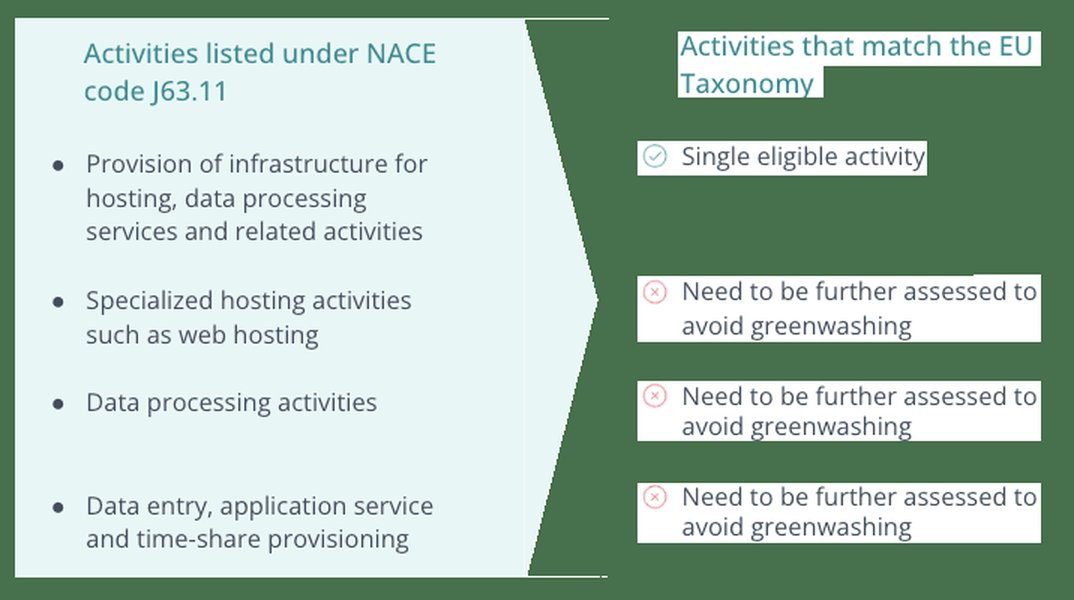
Understanding the distinction between NACE codes and EU Taxonomy activities is crucial for accurate reporting.
Frequently Asked Questions (FAQ)
Can AI tools directly modify my original Excel file?
How accurate are AI NACE code classifications?
Do I need coding skills to use these AI tools for NACE classification?
What if my business activities are complex or fall under multiple NACE codes?
Conclusion
AI presents a significant opportunity to automate and enhance the accuracy of NACE code classification in spreadsheets. By leveraging tools ranging from direct Excel add-ins to sophisticated AI platforms and custom scripts, businesses can save considerable time and improve data consistency. The key is to choose an approach that aligns with your technical capabilities and specific needs, always incorporating a stage of human review to ensure the highest quality outcomes. With the right tools and processes, NACE coding can transform from a laborious task into an efficient, AI-assisted workflow.
Recommended Further Exploration
- How to prepare spreadsheet data for optimal AI NACE classification?
- Compare different AI tools for NACE coding in terms of cost, features, and integration capabilities.
- What are the best practices for validating AI-suggested NACE codes in large datasets?
- Can I train a custom AI model for NACE classification specific to my industry nuances?
Referenced Search Results
 assets.lloyds.com