
Troubleshooting Squeaky AirPods Pro 2
Effective Steps to Resolve Mild Squeaking Issues
Key Takeaways
- Clean and Inspect: Regular cleaning and a thorough visual inspection often resolve minor issues.
- Reset and Update: Resetting the earbuds and ensuring updated firmware may eliminate software glitches.
- Replace or Re-adjust Components: Adjusting or replacing ear tips, and contacting support if physical damage is detected, ensures long-term functionality.
Introduction
Experiencing a squeaking sound when your AirPods Pro 2 are mildly rubbed can be both distracting and concerning. This relatively uncommon issue can be attributed to a variety of factors including debris accumulation, misfitting ear tips, or even internal hardware issues. In this comprehensive guide, we elaborate on best practices, troubleshooting steps, and preventive measures you can take to address and potentially solve the problem. Our approach involves a detailed analysis that incorporates cleaning techniques, software resets, firmware updates, and the role of physical components. Whether you suspect a simple maintenance issue or a more significant hardware problem, these steps offer a structured route toward ensuring optimal performance from your AirPods.
Understanding the Issue
AirPods Pro 2 are precision-engineered devices known for their high-quality audio and active noise cancellation capabilities. However, with frequent use, even high-end products can develop minor issues such as squeaking when touched. The squeak is typically heard when there is friction against the surface of the AirPod, and it often indicates that it might need some attention either in cleaning or component adjustment. Although this issue is not typically a sign of a severe malfunction, it is important to address it early, as it could escalate or indicate early wear on specific components.
Potential Causes of Squeaking
Several elements can contribute to the squeaking noise in your AirPods Pro 2. The following factors are common culprits:
Debris and Dirt Accumulation
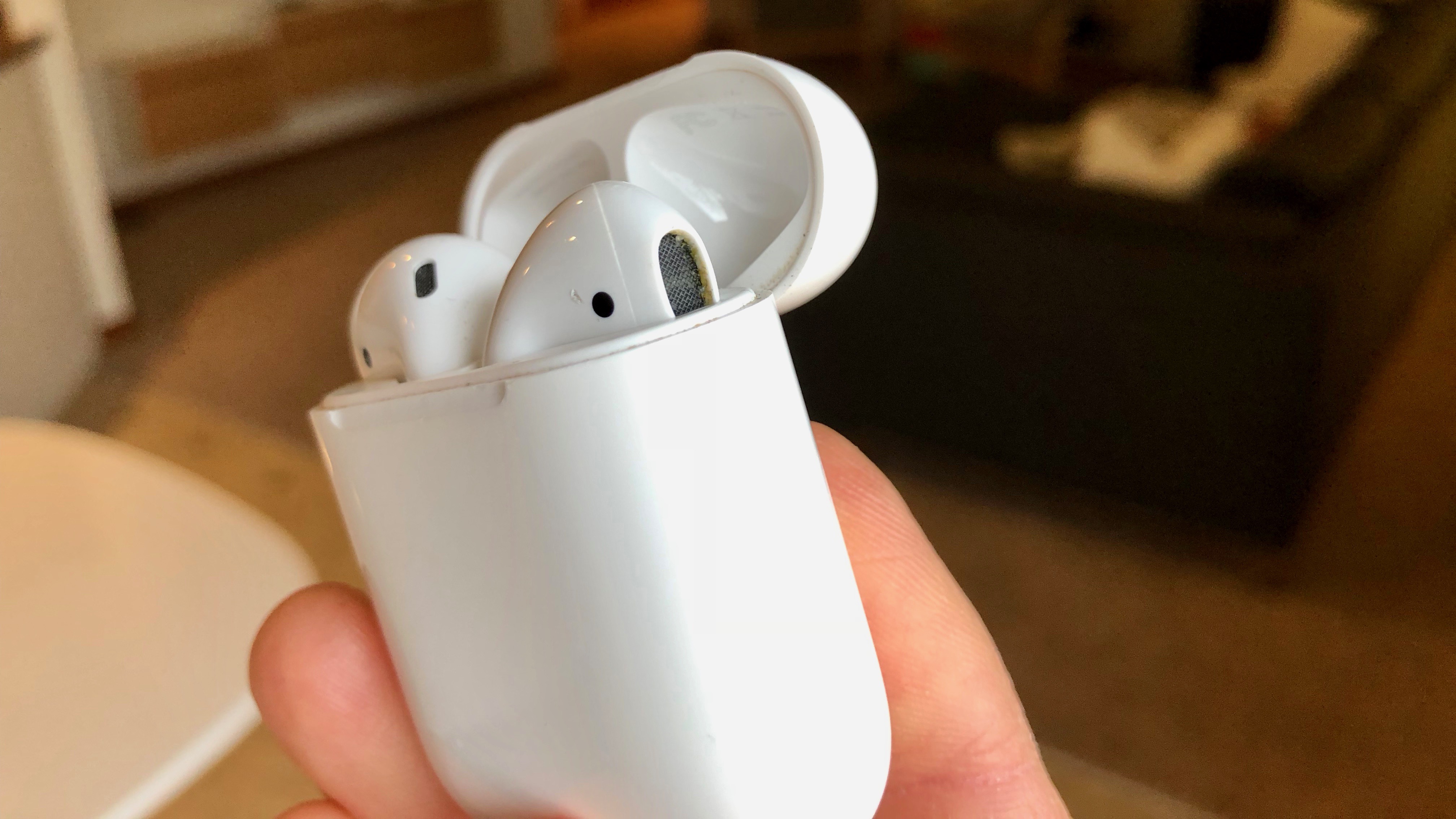
Over time, small particles, including dust, earwax, or other debris, can accumulate in the speaker grille, microphone openings, or around the eartip connectors. These deposits can create friction when in contact with moving parts, resulting in a squeak when the device is rubbed. Regular use, especially in environments with high dust levels or during physical activities that increase sweat and oil on surfaces, exacerbates this issue.
Improper Fit or Misaligned Components
AirPods Pro 2 come with removable silicone ear tips designed to provide a secure and comfortable fit. Over time, ear tips may become worn or not sit properly, leading to gaps and friction against the earbuds’ surface. A misaligned tip can cause minor movements that add up to a squeaking sound during use.
Software Glitches or Setting Anomalies
While less common, software irregularities might play a role. Settings like Active Noise Cancellation (ANC) or automatic ear detection can sometimes cause anomalies in how the devices function if glitches occur. Resetting the connectivity settings restores the default configuration, potentially eliminating such odd behaviors.
Physical or Hardware Damage
Physical damage, whether due to accidental drops, improper storage, or exposure to moisture, might compromise the integrity of the internal components. A minor crack or loosened component inside the AirPod can cause repeated friction and result in a squeaking noise. This is also a sign to consult professional support if cleaning and resetting do not resolve the issue.
Detailed Troubleshooting Guide
Step 1: Cleaning Your AirPods Pro 2
Cleaning is the most immediate and cost-effective solution to address minor issues, such as squeaking. Begin by examining your AirPods thoroughly to identify areas with visible grime or buildup.
Cleaning Materials and Procedure
Gather a soft, dry, lint-free cloth and a dry cotton swab. The cloth should be used to gently wipe the exterior surfaces, while the cotton swab can target the finer details such as the speaker grilles and microphone openings. Follow this simple method:
| Cleaning Item | Purpose | Instructions |
|---|---|---|
| Lint-Free Cloth | Exterior, body cleaning | Wipe gently across all surfaces; avoid harsh motions. |
| Cotton Swab | Detailing fine areas | Use dry to remove debris in speaker and mic openings; be gentle. |
| Optional Isopropyl Alcohol | Extra cleaning (if recommended) | Dampen the cloth slightly if the manufacturer suggests use; avoid liquids entering the device. |
Avoid applying significant pressure while cleaning to prevent any accidental damage. Do not submerge the AirPods in any cleaning solution or water. The goal is to remove any particles that could be causing friction between components.
Step 2: Inspect and Adjust Components
After cleaning, it’s essential to inspect the physical components of your AirPods Pro 2. This step involves checking the ear tips, the case, and the internal grills for any physical anomalies.
Ear Tips: Alignment and Condition
Remove the silicone ear tips and inspect them for any signs of wear or misalignment. Sometimes, a slight misplacement can result in excess friction leading to squeaking when the earbuds are touched.
Tips for Maintenance:
- Detach and reattach the ear tips to ensure a proper seat.
- Try different sizes if available to achieve a snug and secure fit.
- If the ear tips are visibly worn or damaged, consider replacing them with new ones.
Evaluating for Physical Damage
Visual inspection of the AirPods is important. Look closely at areas like the speaker mesh, microphone openings, and the overall structure of the earbuds. Small cracks, loose components, or deformation may contribute to the noise you are experiencing. Pay special attention to recently impacted areas if the device has experienced a drop or accidental impact.
Step 3: Resetting and Reconnecting
If cleaning and inspection do not resolve the issue, the next step is to conduct a reset. Resetting your AirPods Pro 2 can often resolve issues that might initially appear to be hardware-related but are actually due to minor software misconfigurations.
How to Reset Your AirPods
To reset your AirPods, follow these procedures:
- Place both AirPods in the charging case and make sure the lid is open.
- Locate the setup button on the back of the case.
- Press and hold the button until the status light flashes amber, then switch to white.
- Open Bluetooth settings on your device, forget the AirPods, and then reconnect them once the reset is complete.
This reset procedure not only clears any temporary glitches but may also recalibrate settings that could be causing anomalies such as the squeaking noise.
Step 4: Firmware Updates
Ensuring that your device and your AirPods' firmware are updated to the latest version is another critical step. Software updates often include bug fixes and improvements that can resolve minor issues.
Checking and Updating Firmware
You can ensure that your firmware is updated by:
- Checking the AirPods settings on your connected iPhone or iPad.
- Verifying that iOS or iPadOS is running the latest release.
- Following any prompts for firmware updates related to your AirPods.
It is worthwhile to note that sometimes manufacturers release updates specifically addressing minor acoustic and connectivity issues, and staying current with these updates is vital.
Step 5: Contacting Support
If you have followed the previous steps and the squeaking persists, it might be time to consult professionals. Persistent noise despite proper maintenance might indicate internal hardware issues that require expert attention.
When to Reach Out
Consider contacting support if:
- There are indicators of physical damage or if the cleaning process did not resolve the issue.
- The reset and firmware update did not eliminate the squeaking sound.
- Your AirPods are still under warranty, as seeking professional help may prevent further damage and may even result in a replacement if deemed necessary.
Be sure to describe the issue thoroughly, including the steps you have already taken, so the support team can provide the most effective guidance.
Additional Considerations and Best Practices
In addition to the direct troubleshooting measures mentioned above, maintaining your AirPods Pro 2 over the long term involves adopting a set of best practices. Regular care can prevent many common issues.
Routine Maintenance
Engage in routine cleaning at least once a month, especially if you use your AirPods in environments prone to dust or high moisture. Scheduled maintenance can include:
- Wiping down the surfaces with a soft, dry cloth.
- Inspecting and cleaning the mesh and microphone areas carefully.
- Re-checking the fit and condition of the silicone ear tips.
This routine minimizes the accumulation of particles that might cause unusual noises, ensuring that the delicate components are free from interference.
Proper Storage and Usage
How you handle your AirPods greatly impacts their longevity. Use the charging case as intended and always store the earbuds in their case when not in use. Keeping them in the case protects them from environmental factors and reduces the risk of physical damage. Additionally:
- Avoid exposing them to extreme temperatures.
- Ensure they are not subjected to excessive moisture by carefully avoiding use in high-humidity environments.
- Be gentle during insertion and removal from your ears.
Software and Setting Management
Occasionally, the settings on your connected device can influence the behavior of your AirPods. For example, settings related to active noise cancellation (ANC) or automatic head/ear detection might interact with the hardware. Toggle these features periodically to determine if they impact the squeaking. This trial can help isolate whether the noise is due to mechanical or software-related factors.
Comparing with Similar Devices
While this guide specifically addresses AirPods Pro 2, it is important to understand that many modern wireless earbuds have similar maintenance and troubleshooting protocols. Devices similar in design from other manufacturers often follow comparable cleaning, resetting, and support contact procedures. This standardization means that many of the best practices outlined here are widely applicable across different models. Furthermore, user experiences from various devices suggest that regular upkeep significantly minimizes issues like squeaking noises.
General FAQs on Squeaking Issues in Wireless Earbuds
The troubleshooting steps for AirPods Pro 2 are often echoed in broader discussions regarding all wireless earbuds. Below is a table summarizing frequently asked questions and their corresponding solutions:
| Issue | Potential Cause | Solution |
|---|---|---|
| Squeaking Sound when Rubbing | Debris accumulation or misaligned ear tips | Clean the device and adjust ear tips; inspect for damage |
| Audio Distortion | Firmware glitches or physical damage | Reset settings and update firmware; inspect for damage |
| Loose Fit and Noise Interference | Worn out or improper ear tip size | Re-seat or replace ear tips |
| Connectivity Issues | Software glitches in pairing protocols | Reset and re-pair the device |
These queries represent common issues and succinct solutions, reaffirming that regular maintenance and timely updates can prevent a majority of problems.
Conclusion
In summary, the occasional squeaking sound from your AirPods Pro 2 when they are mildly rubbed is most often a sign of a minor issue, such as debris accumulation, ear tip misalignment, or a temporary software glitch. Following the systematic steps of cleaning, inspection, resetting, and firmware update offers a thorough method to pinpoint and eliminate the cause. Should these measures not bring the desired resolution, contacting professional support remains the advised path, especially if physical damage is suspected or if the device is still under warranty.
Regular maintenance practices not only help resolve current issues but also serve as preventive measures against future problems. By incorporating routine cleaning, proper storage, and periodic checks, you can ensure that your AirPods Pro 2 maintain optimal performance and longevity. Understanding the multifaceted nature of such issues emphasizes the importance of treating even minor glitches with due diligence.
References
- AirPods Pro Squeaking When Moving - AirPods Mind
- AirPods Pro 2 Squeaking - Reddit
- Apple Discussions Thread on Squeaking - Apple
- Why Is My AirPod Making a Squeaking Noise? - Best AirPods
- Fixing High-Pitched Noise in AirPods - Mac Observer
More
Last updated February 19, 2025