
Unlocking Financial Clarity: Mastering Reporting Codes in Ex Libris Alma
A deep dive into configuring, applying, and analyzing financial data using Alma's powerful reporting code features for enhanced fiscal control.
Effectively managing library finances requires granular insights into expenditures. Ex Libris Alma's reporting codes offer a robust mechanism to categorize acquisitions, enabling detailed financial analysis, comprehensive reporting, and streamlined reconciliation with institutional financial systems. Understanding how to leverage these codes is key to maximizing their potential for informed decision-making and robust fiscal oversight.
Key Takeaways: Harnessing Reporting Codes
- Strategic Categorization: Reporting codes allow for customizable tagging of Purchase Order (PO) lines, going beyond standard fund structures to track specific expenditure types, projects, or departments.
- Enhanced Analytics: Alma Analytics utilizes these codes to filter, group, and generate detailed financial reports, offering deep insights into spending patterns and budget adherence.
- System Integration: Reporting codes are instrumental in mapping library expenditures to external Enterprise Resource Planning (ERP) systems, facilitating accurate data exchange and reconciliation.
Decoding Reporting Codes in Alma
Reporting codes in Ex Libris Alma are user-defined attributes that can be assigned to Purchase Order (PO) lines. They serve as a powerful tool for classifying and analyzing acquisitions data, providing a layer of categorization that complements Alma's standard fund and ledger hierarchy. This allows libraries to gain more nuanced insights into their financial activities.
What Are They and How Many?
These codes are essentially labels or tags. As of recent updates (e.g., June 2021 release), Alma supports up to five distinct reporting codes per PO line (Primary, Secondary, Tertiary, Fourth, and Fifth). This expansion from an earlier limit of three codes provides greater flexibility for detailed financial tracking. These codes typically appear as drop-down selections on the PO line's "Summary" tab during the creation or editing of purchase orders, ensuring consistency in data entry.
Purpose and Significance
The primary purpose of reporting codes is to enable more granular financial analysis and reporting than might be possible using fund codes alone. They can be used to:
- Track expenditures by specific categories (e.g., "postage," "equipment," "binding," "digital resources").
- Align library spending with institutional financial categories or cost centers.
- Monitor spending for specific projects, grants, or departmental initiatives.
- Facilitate the generation of reports for external bodies like ARL, IPEDS, or AAHSL.
- Support reconciliation processes with the institution's main financial systems (e.g., SAP, Oracle).
By using reporting codes, libraries can categorize expenditures in ways that are meaningful to their specific operational and financial reporting needs, moving beyond the limitations of a hierarchical fund structure.
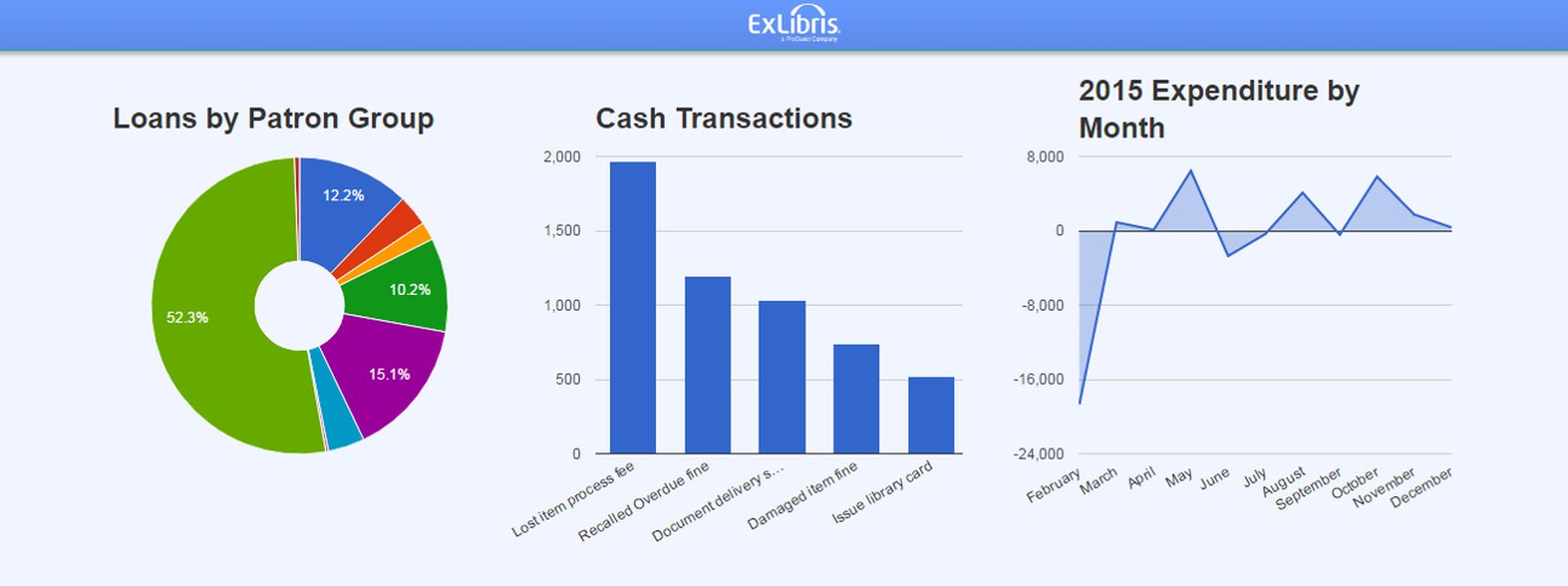
An example of how Alma Analytics reports, which can leverage reporting codes, can be visualized.
Setting Up Your Financial Compass: Configuring Reporting Codes
Proper configuration is the cornerstone of effectively using reporting codes. Alma administrators are responsible for defining these codes within the system to reflect the institution's financial tracking requirements.
The Configuration Pathway
Reporting codes are configured in Alma via the following path: Configuration Menu > Acquisitions > Purchase Orders > Reporting Codes (options for 1st, 2nd, 3rd, 4th, and 5th Reporting Codes will be listed). Within this area, administrators can:
- Add new codes: Define a code identifier and a descriptive label.
- Edit existing codes: Modify descriptions or other attributes.
- Import codes: Bulk upload codes if necessary.
- Enable/Disable codes: Control which codes are active and appear in drop-down lists.
- Reorder codes: Change the sequence in which codes appear in selection lists.
- Set default codes: Specify a default reporting code that can be automatically applied to new PO lines if no other code is selected.
Best Practices for Configuration
Strategic Planning
Before defining codes, institutions should collaboratively decide on the categories essential for their financial analysis. This involves consulting with acquisitions staff, financial officers, and other stakeholders to ensure the codes will provide meaningful data.
Consistency and Clarity
Use clear, unambiguous descriptions for each code. Ensure consistency with any existing institutional financial coding structures to simplify mapping and reconciliation with external systems like SAP or other ERPs.
Meaningful Granularity
While the availability of five codes allows for detailed categorization, avoid overcomplication. Implement only as many codes and levels of detail as are genuinely useful for analysis and reporting. For instance, a primary code might denote a broad expense type, while secondary or tertiary codes offer finer distinctions.
Regular Review
Periodically review and update the reporting code tables to ensure they remain relevant to evolving reporting needs, funding structures, or organizational changes.
Applying Reporting Codes in Acquisitions Workflows
Once configured, reporting codes must be consistently applied during the acquisitions process to ensure data integrity for financial analysis.
Assigning Codes to PO Lines
Staff creating or editing PO lines are responsible for selecting the appropriate reporting code(s) from the configured drop-down lists. This step is crucial as it tags the expenditure at its source. These codes generally carry over to associated invoice lines, maintaining classification throughout the payment process.
Ensuring Data Completeness
Alma offers functionality to help ensure codes are applied. For instance, purchasing review rules can be configured to generate alerts if PO lines are created without required reporting codes. This helps maintain data completeness and accuracy for subsequent financial analysis.
Use Cases in Practice
- Tracking specific material types: E.g., "DVDs," "Print Standing Orders," "E-book Packages."
- Departmental allocation: Assigning costs to specific academic departments or library units.
- Project-based accounting: Tracking expenses related to particular grants or initiatives (e.g., a "Preservation Project" code).
- Distinguishing funding sources: When fund codes alone are insufficient to capture the nuance of funding.
Illuminating Insights: Reporting Codes in Financial Analysis with Alma Analytics
The true power of reporting codes is realized when they are used within Alma Analytics to generate detailed financial reports and perform in-depth analysis.
Radar chart illustrating the comparative strengths of different reporting code strategies.
The radar chart above provides an opinionated comparison of different approaches to using reporting codes. A "Minimalist Coding" strategy might be easier to configure and maintain with less training but offers less granularity. "Comprehensive Coding" maximizes analytical power and granularity but requires more effort in setup, training, and maintenance. Aligning codes directly with an "External System" balances these factors, particularly excelling in integration.
Accessing and Utilizing Data in Alma Analytics
Alma Analytics is the environment where financial data, enriched by reporting codes, can be explored. Reporting codes are available as attributes or dimensions in various Analytics subject areas, most notably the "Funds Expenditure" subject area. Users can:
- Filter reports: Narrow down results based on specific reporting codes or combinations thereof.
- Group data: Aggregate expenditures by reporting codes to see totals for different categories.
- Create custom reports: Design reports from scratch, incorporating reporting codes as key analytical dimensions.
- Use out-of-the-box reports: Leverage pre-built reports that may already include reporting codes or can be easily customized to do so. These are often found under
Analytics > Access Analytics > Catalog > Shared Folders > Alma.
Examples of Analytical Applications
- Analyzing expenditure trends for specific material formats (e.g., print vs. electronic) using dedicated reporting codes.
- Monitoring budget utilization for grant-funded projects identified by a unique project reporting code.
- Generating summaries of spending by cost center for institutional financial reporting.
- Identifying spending on services like binding or shipping by filtering for relevant codes.
It's important to be cautious when combining fields from different subject areas in Alma Analytics (e.g., "Funds Expenditure" with "Physical Items") to avoid incorrect results due to mismatched joins. Also, note that Alma Analytics data is typically updated periodically (e.g., nightly), so it's not always real-time.
Bridging Systems: Reporting Codes and External Financial Integration
A significant benefit of using reporting codes is their role in facilitating integration and reconciliation with external institutional financial systems (ERPs).
Mapping to External Systems
Libraries often need to align their internal financial tracking with broader institutional accounting structures. Reporting codes can be designed to directly map to categories, cost centers, or project codes used in the institution's primary financial system (e.g., SAP, Oracle Financials, Workday). This mapping is crucial for:
- Accurate export of invoice data from Alma to the financial system.
- Reconciliation of library expenditures recorded in Alma against the general ledger.
- Ensuring consistency in financial reporting across the institution.
For example, the University of Kentucky successfully used reporting codes to map Alma's fund structure to their SAP system, streamlining reporting and reconciliation.
Data Exchange Processes
Alma supports processes for exporting financial transaction data (like closed or canceled PO lines and invoices) and importing fund balance information. These exchanges often occur via XML files transferred through a predefined FTP location. Reporting codes included in this data provide the necessary categorization for the receiving system to correctly process and allocate the transactions.
Visualizing the Reporting Code Ecosystem
To better understand the interconnected components of effectively using reporting codes in Alma for financial analysis, the following mindmap illustrates the key areas and their relationships.
Strategic Planning, Consistency,
Meaningful Granularity, Regular Review"] id3["3. Application in Workflows"] id3a["Assigning to PO Lines"] id3b["Data Consistency & Completeness"] id3c["Link to Fund Structure"] id3d["Alerts for Missing Codes"] id4["4. Financial Analysis & Reporting"] id4a["Alma Analytics Primary Tool"] id4b["'Funds Expenditure' Subject Area"] id4c["Filtering & Grouping Data"] id4d["Custom & Out-of-the-Box Reports"] id4e["Expenditure Tracking & Trend Analysis"] id5["5. Integration with External Systems"] id5a["Mapping to ERP/Financial Systems (e.g., SAP)"] id5b["Facilitating Data Export/Import (XML/FTP)"] id5c["Reconciliation Support"] id6["6. Best Practices & Considerations"] id6a["Strategic Category Definition"] id6b["Staff Training & Documentation"] id6c["Data Integrity & Regular Audits"] id6d["Awareness of Analytics Data Refresh Cycles"] id6e["Leverage Historical Data (Perpetual Storage)"]
This mindmap outlines the journey from understanding what reporting codes are, through their configuration and daily application, to their ultimate use in sophisticated financial analysis and system integration, all guided by best practices.
Reporting Code Use Cases at a Glance
The flexibility of Alma's reporting codes allows for diverse applications in financial tracking. The table below summarizes some common scenarios for how the different reporting code fields might be utilized:
| Reporting Code Level | Potential Use Case Examples | Benefit for Financial Analysis |
|---|---|---|
| 1st Reporting Code (Primary) | Broad Expense Category (e.g., Monographs, Serials, Electronic Resources, Operational Supplies, Equipment) | High-level overview of spending across major categories. |
| 2nd Reporting Code | Funding Source Type (e.g., General Fund, Grant A, Endowment B, Departmental Allocation) | Tracks expenditure against specific funding mechanisms or allocations. |
| 3rd Reporting Code | Project or Initiative (e.g., Digitalization Project, New Program Support, Collection Development Area X) | Monitors costs associated with specific, often temporary, projects or strategic initiatives. |
| 4th Reporting Code | Institutional Cost Center / Department Code (e.g., Library Admin, Science Library, Arts & Humanities Division) | Aligns library spending with broader institutional financial structures for easier reconciliation. |
| 5th Reporting Code | Specific Detail or Temporary Tracker (e.g., FY25 Special Purchase, One-Time Vendor, Preservation Activity) | Captures highly specific details or temporary classifications needed for short-term analysis or specific reporting needs. |
This table illustrates how a layered approach using multiple reporting codes can provide a rich dataset for comprehensive financial analysis, allowing institutions to tailor the coding structure to their precise needs.
Further Learning: Reporting Codes and PO Lines
The following video from Ex Libris provides insights into enhancements related to reporting codes in PO lines, which is fundamental to their use in financial analysis. Understanding how these codes are integrated at the PO line level is crucial for ensuring data accuracy for downstream reporting.
This video, titled "Alma May 2021 Release: Additional Reporting Codes in PO Lines," explains the expansion of reporting code availability. While it refers to a specific release, the principles of applying multiple codes for better categorization remain highly relevant for financial analysis tasks discussed here, such as enabling more granular tracking and reporting of expenditures.
Best Practices for Maximizing Effectiveness
- Develop a Clear Strategy: Define reporting code categories in alignment with institutional financial reporting requirements and analytical needs. Involve stakeholders from finance and acquisitions.
- Ensure Consistent Application: Train staff thoroughly on the correct and consistent use of reporting codes. Document procedures and the meaning of each code.
- Leverage Alerts: Configure alerts in Alma for PO lines missing required reporting codes to maintain data integrity.
- Regularly Audit Data: Periodically review data in Alma Analytics to ensure reporting codes are being used correctly and that reports are accurate.
- Stay Informed: Keep up-to-date with Alma enhancements related to acquisitions, finance, and analytics, as new features can further improve financial analysis capabilities.
- Document Everything: Maintain clear documentation of your reporting code structure, definitions, and usage guidelines for current staff and future reference.
Frequently Asked Questions (FAQ)
What is the main advantage of using reporting codes over just fund codes?
How many reporting codes can I use per PO line in Alma?
Can reporting codes be made mandatory for PO lines?
How are reporting codes used with Alma Analytics?
Is data in Alma Analytics real-time when using reporting codes?
Conclusion
Effectively utilizing reporting codes in Ex Libris Alma transforms financial data from simple transaction logs into powerful strategic assets. Through careful configuration aligned with institutional needs, consistent application in acquisitions workflows, and strategic use of Alma Analytics, libraries can achieve unprecedented clarity in their financial operations. This empowers data-driven decision-making, supports robust budget management, facilitates seamless integration with broader institutional financial systems, and ultimately enhances accountability and transparency in the stewardship of library resources.
Recommended Further Exploration
- How can I create custom financial reports in Alma Analytics that specifically leverage our institution's reporting code structure?
- What are the detailed best practices for mapping Alma reporting codes to an external ERP system, such as SAP or Oracle, for seamless data exchange?
- Could you provide examples of how to configure purchasing review rules in Alma to ensure mandatory assignment of reporting codes on PO lines?
- How can Alma Analytics be used for longitudinal financial trend analysis, tracking expenditures by reporting codes across multiple fiscal periods?