
Unveiling the "Chalkboard" Aesthetic: A Deep Dive into Amazfit's Nostalgic Watch Faces
Rediscover a classic school-era look with digital charm on your Amazfit smartwatch.
Key Insights into Chalkboard Amazfit Watch Faces
- Popular Naming Conventions: The watch faces resembling an old-school chalkboard are most commonly known as "Chalkboard" or "Blackboard" watch faces.
- Signature Aesthetic: These designs consistently feature a dark, often black background, with text and graphics styled to mimic chalk, providing high contrast and a nostalgic retro feel.
- Broad Availability: While some designs are model-specific, a wide array of chalkboard-style watch faces are available across various Amazfit models (Bip, GTR, GTS, T-Rex, Active, etc.) through official apps like Zepp and third-party platforms such as AmazFaces and amazfitwatchfaces.com.
For Amazfit users seeking a blend of retro charm and modern functionality, the "Chalkboard" or "Blackboard" watch face stands out as a popular choice. This distinctive style transforms your smartwatch display into a nostalgic school-era blackboard, featuring text and graphics that appear as if written in chalk. These watch faces are designed to provide a high-contrast, easy-to-read interface, often incorporating essential smartwatch data points like time, steps, heart rate, and weather in a unique, vintage aesthetic.
The Essence of the Chalkboard Aesthetic on Amazfit
The core appeal of the chalkboard watch face lies in its visual simplicity and nostalgic evocation. By utilizing a dark background and high-contrast, chalk-like fonts and graphics, these watch faces offer excellent readability while delivering a distinct retro vibe. They often feature minimalist layouts that prioritize essential information, presented in a style reminiscent of handwritten notes on a school blackboard.
Beyond mere aesthetics, many chalkboard watch faces integrate modern smartwatch features seamlessly. Users can typically expect to see:
- Digital Time Display: Prominently featured in a chalk-like font.
- Steps Counter: Displayed as if drawn with chalk.
- Heart Rate Monitoring: Integrated into the design, maintaining the theme.
- Date and Weekday: Often presented in a simple, clear format.
- Weather Information: Some advanced designs include digital temperature and weather icons styled to match.
Prominent Chalkboard Watch Face Variants
While the general "Chalkboard" theme is consistent, specific designs cater to different Amazfit models and user preferences. Here are some of the most notable examples:
Blackboard with Seconds (by robotvedroid)
This popular watch face is specifically designed for the Amazfit GTR 47mm. It maintains the classic chalkboard aesthetic with a black background and white digital elements. Key features include a prominent seconds counter and real-time temperature display, alongside other essential data like steps and date. Its design leans into a clean, digital interpretation of the chalkboard look, ensuring clarity and functionality.
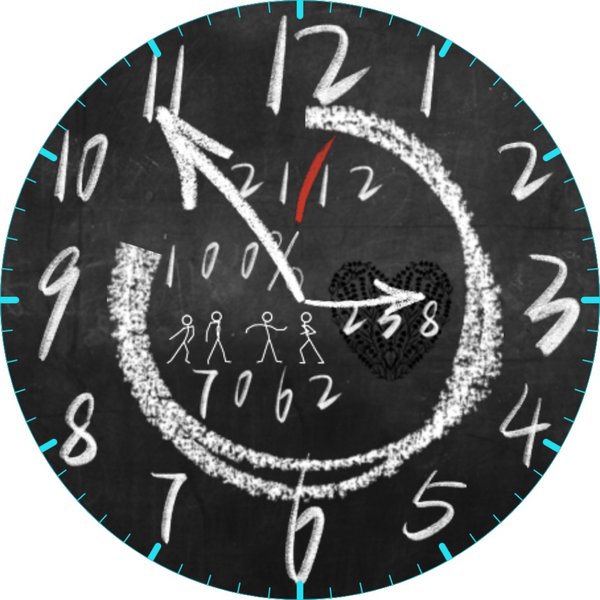
Chalkboard (by TomBom)
Also available for the Amazfit GTR 47mm, this "Chalkboard" watch face is described as a simple, clear, and easy-to-read design. It often incorporates playful elements or subtle colorful chalk marks, adding a touch of personality. Information such as time, heart rate, steps, and date are presented in chalk-style fonts and colors, making it highly legible and aesthetically pleasing. Users can often customize elements like 12-hour time, steps as distance, or heart rate display.
Chalk board (by SpokesAdventure)
For users of the Amazfit Bip series, this "Chalk board" watch face embodies the style with elements like time, weather, and steps. It's known for its playful, chalk-inspired design and simple layout, making it a direct fit for the old-school classroom blackboard feel. Compatibility often extends to newer Bip models like the Bip 5 due to consistent image encoding for watch faces across these devices.
Pebble Blackboard inspired Watchface
Specifically, the "Amazfit Bip / Bip Lite blackBoard_steps_en_MODOFiED" is a notable option for the Amazfit Bip and Bip Lite. This design draws inspiration from the Pebble smartwatch's blackboard theme, featuring a black background with chalk-like text for time, steps, and English weekdays. It's praised for its high contrast and minimalist appeal, offering a straightforward, vintage aesthetic.
Basic Digital – Cool Chalkboard Watchface
Highlighted in community discussions, this variant emphasizes a neat digital chalkboard look, focusing on easy visibility and simplicity. It's a general descriptor for many minimalist, high-contrast digital watch faces that evoke the chalkboard feel.
Where to Discover and Install Your Chalkboard Watch Face
Finding and installing a chalkboard-style watch face for your Amazfit device is straightforward, thanks to a robust ecosystem of official and third-party platforms. The primary resources include:
The Zepp App
The official Zepp App (formerly Amazfit App), which manages all Amazfit smartwatches, features a dedicated watch face store. With recent updates, including improved search functionality (version 9.7 and later), it has become easier for users to find specific styles like the chalkboard look. Within the app, you can browse a wide selection of watch faces, including both free and paid options, and enable always-on display settings to enhance the chalkboard aesthetic.
Third-Party Watch Face Repositories
For an even broader selection, third-party platforms are invaluable:
- amazfitwatchfaces.com: This website boasts one of the largest collections of watch faces for Amazfit, Zepp, and Xiaomi devices. You can search directly for "chalkboard" or "blackboard" to find numerous compatible designs for various models, including GTR, GTS, Bip, and T-Rex series.
- AmazFaces App (Google Play & App Store): Available for both Android and iOS, the AmazFaces app offers access to over 180,000 watch faces. This extensive library is updated daily and supports a wide range of Amazfit models, making it an excellent resource for discovering chalkboard and retro designs.
- mywatchfaces.com: Another platform hosting a large collection of watch faces, including specific chalkboard-inspired designs like the "Pebble Blackboard inspired Watchface" for Amazfit Bip/Bip Lite.
Community Forums and Customization
Online communities, particularly on platforms like Reddit's r/amazfit, are great places to find recommendations, discussions, and sometimes even custom watch face files shared by users. These forums often feature users discussing preferences for "retro faces" or "minimalist type watchfaces with black background and high contrast," which align perfectly with the chalkboard aesthetic.
For those with a penchant for unique designs, watch face editor tools available online for certain models (like the Amazfit Bip) allow users to create or modify designs to perfectly match the chalkboard aesthetic. The Zepp App also enables users to upload their own photos as custom watch face backgrounds, offering another layer of personalization.
Here's a visual representation of how different Amazfit models and platforms stack up in terms of "chalkboard" watch face availability and feature integration. This radar chart represents an opinionated analysis of their strengths:
This chart illustrates the varying strengths of different Amazfit models and third-party platforms when it comes to the "Chalkboard" watch face experience. The GTR 47mm, for instance, often excels in Always-On Display (AOD) optimization, making the chalkboard look persistent and clear. The Bip/Bip Lite models score high on "Retro Authenticity" due to their inherently vintage hardware design, which complements the chalkboard theme perfectly. General third-party platforms are unparalleled in "Design Variety" and "Community Support," offering a vast array of options and active user discussions.
Understanding the Chalkboard Watch Face Ecosystem
The prevalence of chalkboard-style watch faces on Amazfit devices is a testament to the strong demand for retro and minimalist designs. Users often seek watch faces with black backgrounds and high contrast, characteristics that are central to the chalkboard aesthetic. This preference is driven by a desire for clear readability, battery efficiency (especially on AMOLED screens where black pixels are off), and a unique visual identity that stands apart from more elaborate or colorful modern designs.
Watch Face Compatibility and Installation Tips
When selecting a chalkboard watch face, it's crucial to consider model compatibility. While many designs are broadly available, some are optimized for specific Amazfit models (e.g., GTR 47mm, Bip). Ensuring the correct device model is selected during installation helps prevent issues like color distortion or improper scaling, preserving the intended chalkboard appearance.
Installation typically involves downloading the watch face file through the Zepp App or a third-party app like AmazFaces, then syncing it to your device. Some advanced users might explore manual installation methods via GitHub repositories or community forums, especially for highly customized designs.
Here’s a mindmap illustrating the various aspects of Amazfit chalkboard watch faces:
This mindmap provides a structured overview of the essential elements, naming conventions, popular variants, and discovery platforms for Amazfit chalkboard watch faces. It highlights how these designs combine aesthetic appeal with practical smartwatch features, appealing to users who appreciate a blend of vintage charm and modern utility.
The Amazfit Neo: A Retro Device Complementing the Chalkboard Vibe
While not a watch face itself, the Amazfit Neo smartwatch deserves mention as a device that inherently embodies a retro aesthetic, making it a natural fit for chalkboard-style interfaces. The Neo features a "retro four-sided screen" with physical buttons and an always-on display that offers clear visibility even under bright light. Its default interfaces often lean into this vintage feel, providing a perfect hardware canvas for chalkboard-like designs. This aligns with the broader trend of users seeking minimalist watch faces with black backgrounds and high contrast, echoing the simplicity of old-school LED displays or, indeed, chalkboards.
Here's a video that showcases the retro appeal of the Amazfit Neo, providing context for the design philosophy that complements chalkboard watch faces:
This video helps illustrate the hardware design philosophy that aligns with the visual appeal of chalkboard watch faces. The Amazfit Neo's focus on a clear, always-on display and a vintage look makes it an ideal companion for watch faces that prioritize simplicity and high contrast, much like the chalkboard designs.
Comparative Overview of Chalkboard Watch Faces
The table below provides a concise comparison of key "Chalkboard" watch face variants for Amazfit devices, highlighting their compatibility, main features, and aesthetic characteristics:
| Watch Face Name/Style | Compatible Amazfit Models | Key Features | Aesthetic Description |
|---|---|---|---|
| Blackboard with Seconds (by robotvedroid) | Amazfit GTR 47mm | Digital time, seconds, temperature, steps, date. | Clean digital chalk on black background, high contrast, focused on data. |
| Chalkboard (by TomBom) | Amazfit GTR 47mm | Time, heart rate, steps, date; customizable data tiles. | Simple, clear, chalk-style fonts, sometimes with colorful elements, easy to read. |
| Chalk board (by SpokesAdventure) | Amazfit Bip, Bip Lite, possibly Bip 5 | Time, weather, steps. | Playful, chalk-inspired, simple layout, reminiscent of classroom blackboard. |
| Pebble Blackboard Inspired | Amazfit Bip, Bip Lite | Time, English weekdays, steps counter. | Minimalist, high-contrast, true old-school blackboard vibe, derived from Pebble design. |
| Basic Digital – Cool Chalkboard | Various (general style) | Time, basic digital stats. | Neat digital chalkboard look, emphasizes simplicity and high visibility. |
Frequently Asked Questions (FAQ)
What is the exact name of the Amazfit watch face that looks like an old-school chalkboard?
How do I find these chalkboard watch faces for my Amazfit device?
Are chalkboard watch faces available for all Amazfit models?
Do chalkboard watch faces support Always-On Display (AOD)?
Can I customize the information displayed on a chalkboard watch face?
Conclusion
The Amazfit watch face that captures the essence of an old-school chalkboard is a beloved design, widely recognized as "Chalkboard" or "Blackboard." These watch faces leverage a dark background and high-contrast, chalk-like typography to deliver a unique blend of retro charm and modern smartwatch functionality. Whether you own an Amazfit GTR, Bip, or other models, a variety of these nostalgic designs are readily available through official channels like the Zepp App and extensive third-party platforms. They offer not only a distinctive aesthetic but also clear readability and efficient display, making them a top choice for users seeking a touch of vintage elegance on their wrist.
Recommended Searches
- How to install custom watch faces on Amazfit smartwatches?
- Best minimalist watch faces for Amazfit?
- Amazfit retro style smartwatches and their features?
- Customizing Amazfit watch faces with third-party apps?
