
Best Practices for Android Multi-Module Architecture
Structuring Scalable and Maintainable Android Applications
Key Insights into Android Multi-Module Architecture
- Multi-module architecture breaks down a large codebase into smaller, independent modules, improving build times, team collaboration, and code reusability.
- Common modularization patterns include organizing by feature, layer, or a combination of both, with Android's recommended architecture often following a layered approach within features.
- Effective dependency management and clear API definitions between modules are crucial to maintain low coupling and high cohesion.
Building large and complex Android applications can quickly lead to a monolithic codebase that is difficult to manage, slow to build, and challenging for multiple developers to work on simultaneously. Android multi-module architecture addresses these issues by dividing the application into smaller, self-contained units called modules. This approach enhances scalability, maintainability, and testability.
A multi-module project in Android consists of several Gradle modules. Each module has a specific responsibility and can be developed, tested, and built independently. This allows for better organization and separation of concerns compared to a single-module project.
Understanding the Fundamentals of Modularization
Modular programming is a software design technique that emphasizes separating the functionality of a program into independent, interchangeable modules. In the context of Android development, this translates to breaking down your app into distinct Gradle modules.
The granularity of your codebase refers to the extent to which it is composed of modules. A more granular codebase has more, smaller modules. Choosing the right level of granularity is important. Too many small modules can lead to increased build complexity and boilerplate, while too few large modules can result in a monolithic structure that defeats the purpose of modularization.
A "good modularization" results in a components' structure where modules are highly cohesive (elements within a module are closely related) and lowly coupled (modules have minimal dependencies on each other).
Why Adopt Multi-Module Architecture?
There are several compelling reasons to adopt a multi-module architecture for your Android project:
Improved Build Times
Gradle's build system can leverage modularization to build only the modules that have changed, significantly reducing build times, especially in large projects.
Enhanced Team Collaboration
With a modularized project, different teams or developers can work on separate modules concurrently with fewer merge conflicts.
Increased Code Reusability
Common functionalities, like networking or UI components, can be extracted into reusable library modules that can be shared across different features or even different applications.
Better Code Organization and Maintainability
Modules provide clear boundaries and well-defined interfaces, making the codebase easier to understand, navigate, and maintain.
Improved Testability
Individual modules can be tested in isolation, simplifying the testing process and improving test coverage.
Common Modularization Patterns
There are several common patterns for organizing modules in an Android multi-module project. The choice of pattern often depends on the size and complexity of the application, as well as the team structure.
Modularization by Feature
In this pattern, each major feature of the application is a separate module. This approach promotes feature independence and allows teams to own specific features end-to-end.
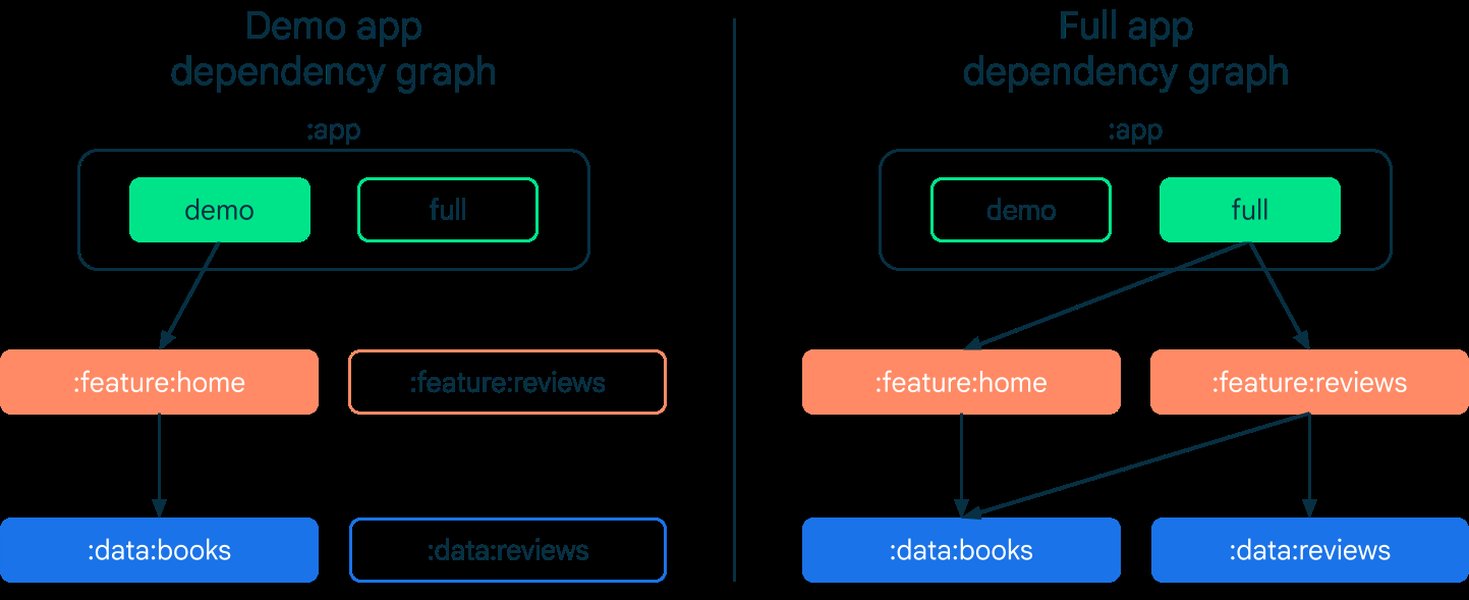
Example dependency graph showing modularization by feature.
Modularization by Layer
This pattern organizes modules based on the architectural layers of the application, such as presentation (UI), domain (business logic), and data (data sources and repositories). This aligns well with clean architecture principles.
Illustrating the separation of concerns by organizing modules into layers.
Hybrid Approaches
Many real-world applications use a hybrid approach, combining feature and layer-based modularization. For example, a project might have modules for each feature, with each feature module internally structured into presentation, domain, and data layers.
Structuring Your Multi-Module Project
Structuring your multi-module project effectively is crucial for reaping the benefits of modularization. Here are some best practices:
The App Module
The main application module (:app) is typically the entry point of your application. It depends on the various feature and library modules and is responsible for assembling the final application.
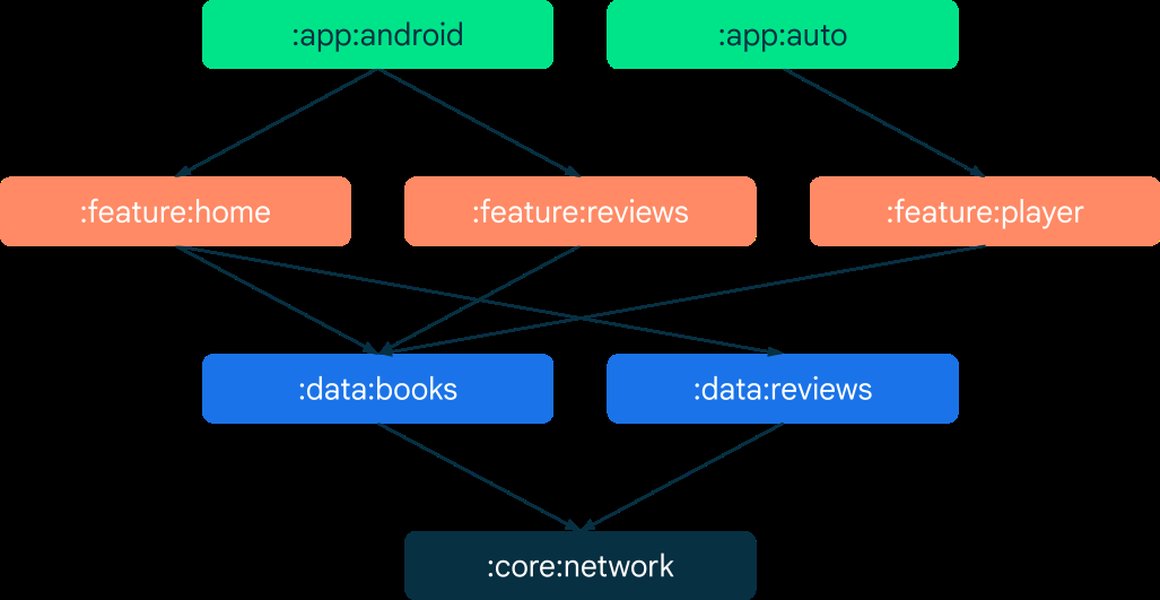
A sample dependency graph illustrating the central role of the app module.
Library Modules
These modules contain reusable code that can be shared across other modules. They are compiled into Android Archive (AAR) files and can be added as dependencies to other modules. Examples include UI components, networking clients, or utility functions.
Feature Modules
Feature modules encapsulate the code related to a specific feature of your application. They should be as independent as possible and ideally not have direct dependencies on other feature modules.
Data Modules
Data modules are responsible for handling data sources, such as databases, network APIs, or shared preferences. They expose data to the domain or presentation layers through well-defined interfaces.
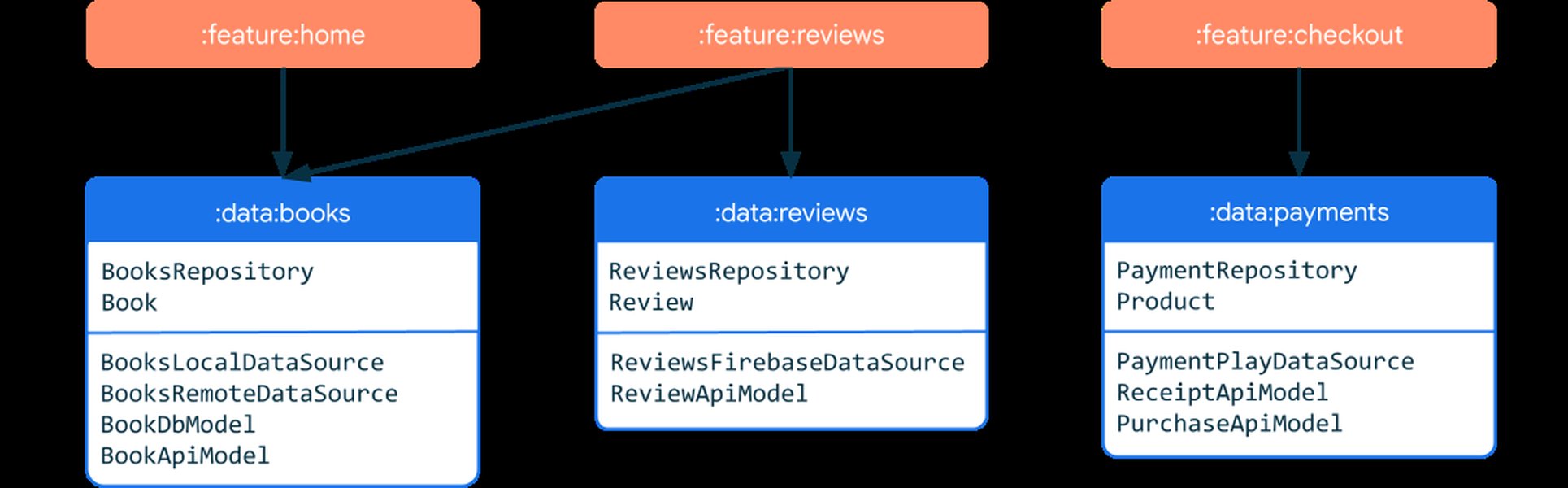
Depiction of how data modules can be structured.
Domain Modules
Domain modules contain the business logic and use cases of your application. They should be pure Kotlin or Java modules without any Android framework dependencies, making them easily testable.
Convention Plugins
Using Gradle convention plugins can help manage common build configurations and dependencies across multiple modules, reducing boilerplate and ensuring consistency.
Dependency Management in Multi-Module Projects
Managing dependencies effectively is paramount in a multi-module project to avoid tight coupling and circular dependencies. Here are some best practices:
Minimize Dependencies
Modules should only depend on other modules or libraries they strictly need. Avoid unnecessary dependencies to keep modules independent.
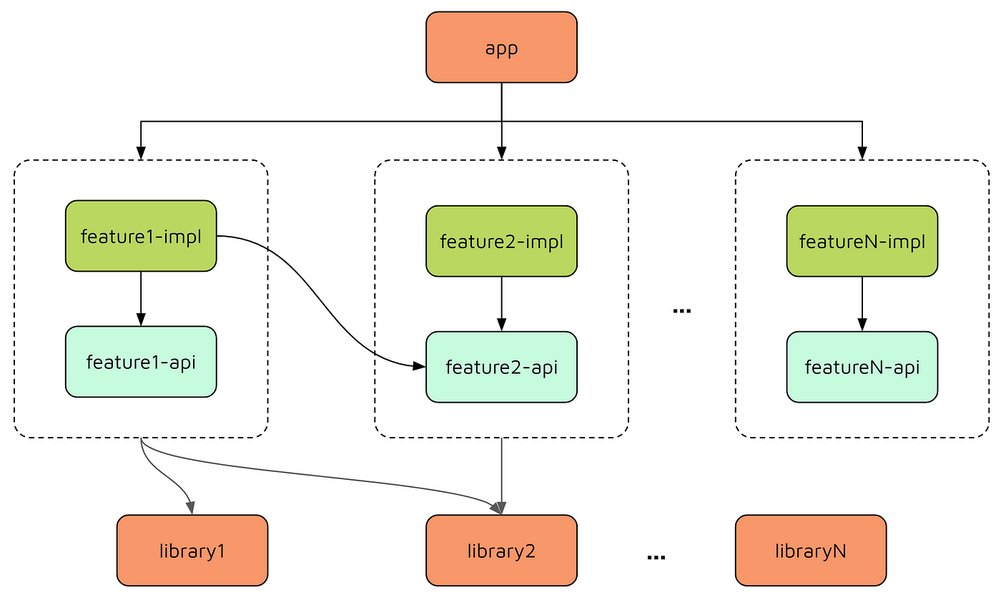
Define Clear APIs
Modules should expose their functionality through well-defined interfaces or API modules. This allows the implementation details to change without affecting the dependent modules.
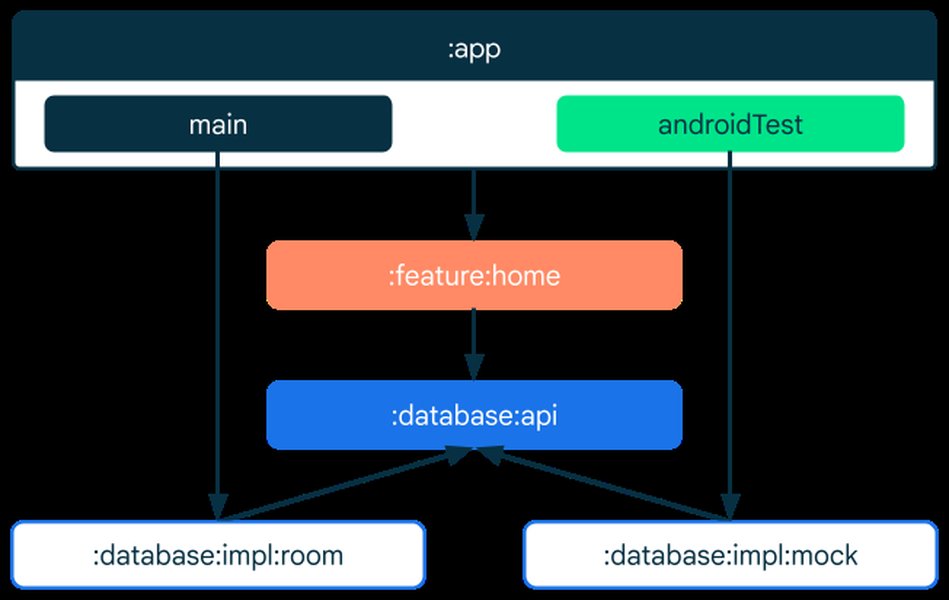
An example of separating API and implementation into different modules.
Avoid Circular Dependencies
Circular dependencies between modules can lead to build issues and make the codebase difficult to understand and maintain. Tools and static analysis can help identify and prevent circular dependencies.
Centralize Dependency Versions
Manage library versions in a central location, such as a
libs.versions.tomlNavigation in Multi-Module Applications
Handling navigation in multi-module applications requires careful consideration to maintain module independence. Best practices often involve using a centralized navigation module or defining navigation flows within feature modules and composing them in the app module.
Jetpack Navigation Component is a popular choice for managing navigation in Android apps, and it provides good support for multi-module projects. You can define navigation graphs within feature modules and link them together in the main navigation graph in the app module.
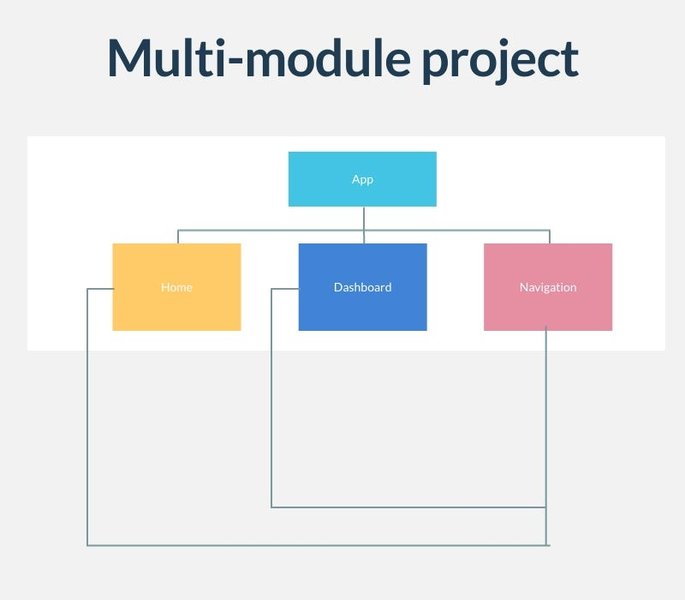
Visualizing navigation flows across different modules.
Considerations and Potential Challenges
While multi-module architecture offers numerous benefits, it also introduces some complexities:
Increased Initial Setup Time
Setting up a multi-module project requires more initial effort compared to a single-module project.
Complexity in Build Configuration
Managing build configurations across multiple modules can become complex, especially in large projects.
Potential for Over-Modularization
Breaking down the application into too many small modules can lead to increased overhead and make the project harder to manage.
Refactoring an Existing Monolith
Migrating an existing monolithic application to a multi-module structure can be a significant undertaking.
Best Practices Summary Table
Here's a summary of key best practices for Android multi-module architecture:
| Area | Best Practice | Benefit |
|---|---|---|
| Module Structure | Organize by feature, layer, or a hybrid approach based on project needs. | Improved code organization and separation of concerns. |
| Granularity | Find a balance between too few and too many modules. | Optimized build times and maintainability. |
| Dependencies | Minimize dependencies and avoid circular relationships. | Reduced coupling and improved testability. |
| APIs | Define clear interfaces for module communication. | Allows for internal implementation changes without impacting dependents. |
| Build Configuration | Use convention plugins and centralize dependency versions. | Ensures consistency and reduces boilerplate. |
| Testing | Test modules in isolation. | Simplified testing and faster feedback loops. |
Further Exploration: A Visual Guide
This video provides a visual introduction to Android app modularization and the challenges of a monolithic codebase.
Understanding the problems that modularization solves is the first step towards effectively implementing it in your projects. The video highlights the pain points of a single large module and introduces the concept of breaking down the app into independent parts.
Frequently Asked Questions about Android Multi-Module Architecture
What is the main benefit of using multi-module architecture in Android?
The primary benefits include improved build times, enhanced code organization, better team collaboration, increased code reusability, and improved testability.
How do I decide on the modularization strategy (by feature or by layer)?
The choice depends on your project's size, complexity, and team structure. Modularization by feature works well for apps with distinct, independent features, while modularization by layer aligns with clean architecture. Hybrid approaches are also common.
How can I avoid circular dependencies between modules?
Careful design and adherence to dependency rules (e.g., lower-level modules should not depend on higher-level modules) are crucial. Static analysis tools can help identify circular dependencies.
Is multi-module architecture suitable for small projects?
While the benefits are more pronounced in larger projects, even small projects can benefit from modularization in terms of better organization and preparing for future growth. However, over-modularization in a small project can add unnecessary complexity.
Recommended Queries
- Android Clean Architecture with Multi-Module
- Dependency Injection in Android Multi-Module Projects
- Strategies for Navigation in Multi-Module Android Apps
- Improving Android Build Times with Modularization
References
Last updated May 17, 2025