
Attachment Assistance and Troubleshooting
A comprehensive guide to resolving attachment issues effectively
Key Highlights
- Diagnosing the Issue: Identify if the attachment problem is related to file format, file size, or security settings.
- Resolving File Attachment Issues: Follow step-by-step instructions for troubleshooting common issues such as unrecognized formats and antivirus restrictions.
- Additional Insights: Guidance on both file attachment troubleshooting and understanding emotional attachments if needed.
Introduction
Attachments play a critical role in our digital communication, whether you are sending important documents, images, or multimedia files. Occasionally, these files may not work as expected either when sending or opening them. This comprehensive guide aims to help you troubleshoot issues related to email/file attachments, offering detailed advice that covers multiple potential causes and solutions. Additionally, if your query about "attachment" refers to emotional connections or relationship dynamics, this guide also briefly touches on that area, ensuring you receive clear guidance regardless of your context.
Understanding Attachment Issues
Attachment issues in emails or file sharing can arise from various factors. The troubleshooting process usually begins by determining whether the problem is with opening or sending an attachment, or perhaps an issue with attachments not being displayed. By establishing the nature of the problem clearly, you can adopt the most effective approach to resolve it.
Differentiating Between Types of Attachment Issues
It is essential to distinguish between issues related to file attachments and emotional attachments. In this guide, we will primarily focus on file attachments employed in emails and other communications. However, if you are also seeking guidance on understanding personal or emotional attachment hassles, we have included a brief section discussing this matter.
File Attachments
In the realm of digital communication, file attachments refer to the data files that accompany emails or messages. These can include documents, spreadsheets, images, videos, or compressed files. Users may encounter problems when attempting to send or open these attachments. Often, these issues are caused by technical constraints such as file format incompatibility, file size limitations, interference by antivirus or firewall software, or other settings within the email client.
Emotional Attachments
Emotional attachments pertain to the deep connections we form with others or even objects. While this might not be your primary concern when asking for help with an attachment, it's important to recognize that the term "attachment" can be applied in both a technical and an emotional context. Emotional attachments are typically managed through understanding personal attachment styles, reflection, and often professional guidance such as therapy.
Diagnosing the Problem
Before you can successfully solve an attachment problem, you need to accurately diagnose the issue. Consider the following steps and questions to help pinpoint the root of the problem:
Step 1: Identify the Problem’s Nature
Ask yourself the following questions:
- Are you unable to open an attachment received in an email?
- Is your email client failing to attach a file when sending an email?
- Are attachments not displaying or loading properly in your email interface?
- Is the file associated with an unrecognized format?
Combining these answers provides a clear direction for troubleshooting. Once you determine the nature of the problem, move forward with the relevant section in this guide.
Step 2: Isolate the Issue
Separating the underlying causes into distinct scenarios can streamline the troubleshooting process:
Issues with Opening Attachments
Common reasons you might be unable to open an attachment include:
- Unrecognized File Format: Your device might not recognize the format, necessitating the installation of appropriate software or viewers.
- File Associations: The operating system might not be correctly associating the file type with the corresponding application. Adjusting file association settings can rectify this.
- Antivirus or Firewall Interference: Security software might be blocking the file from opening. Check whether your antivirus or firewall settings are causing the issue.
- Corruption of the File: Network issues, incomplete downloads, or storage errors might result in file corruption. In these cases, obtaining a retransmitted version from the sender is advised.
- Special Characters in File Name: Certain symbols or special characters in the file name may inhibit proper functioning. Renaming the file can often eliminate this obstacle.
- Email Client Problems: Temporary glitches or misconfigurations in the email client might require the program to be restarted or updated.
Issues with Sending Attachments
When attempting to send attachments, several factors might be at play:
- File Size Limitations: Most email services impose a cap on the size of attachments. Exceeding this limit may prevent the file from being sent. In such cases, consider compressing the file or utilizing a cloud-based sharing service.
- Stable Internet Connection: An unstable or slow internet connection can disrupt file uploads when sending attachments.
- Configuration Settings in Email Client: Certain settings within your email client may restrict the ability to attach files, necessitating adjustments in the configurations.
- Software Updates or Bugs: Occasionally, a recent update or bug in the email application can interfere with attachment functionality. Reverting updates or reinstalling might help solve the issue.
Step-by-Step Troubleshooting Guide
The following step-by-step guide outlines common troubleshooting techniques for resolving issues with file attachments:
Troubleshooting Opening Attachment Issues
Step 1: Verify File Format
Ensure you have the necessary software to open the file attached to the email. For example, if you receive a PDF but lack a PDF reader, download and install a reliable PDF viewer such as Adobe Reader or an open-source alternative.
Step 2: Check File Associations
In your operating system settings, confirm that the file types you are trying to open are associated with the correct application. For example, if a .docx file does not open in your preferred word processor, adjust the settings to update the default application.
Step 3: Review Antivirus and Firewall Settings
Sometimes, antivirus software or firewall settings are overly protective and block attachments. Temporarily disable the antivirus software (ensuring you are aware of the risks) or check its settings to whitelist your email client. Also, verify that your firewall is not interfering with email operations.
Step 4: Download and Save the Attachment
Instead of trying to open the attachment directly from the email interface, save it to your local drive and then open it. This reduces the chance of the email interface causing the problem.
Step 5: Check for File Corruption
Occasionally, issues occur because the file was corrupted during transmission. If you suspect corruption, ask the sender to resend the file or use any built-in repair tools if available. Some file formats offer a “repair” option in their applications.
Troubleshooting Sending Attachment Issues
Step 1: Verify Attachment Size
Email providers typically have size limits for attachments. Verify the size of your file and ensure it is within the allowable limit. If the file is too large, try compressing it or consider splitting the file into smaller parts.
Step 2: Ensure Stable Internet Connectivity
Problems with sending attachments may also be due to a weak or intermittent internet connection. Make sure that you are connected to a reliable network before attempting to send the email again.
Step 3: Review Email Client Settings
Examine your email client’s configuration settings. Some clients have security settings that disable attachments or limit their size. Consult the help section of your email client or seek support if necessary.
Step 4: Update or Reinstall the Email Application
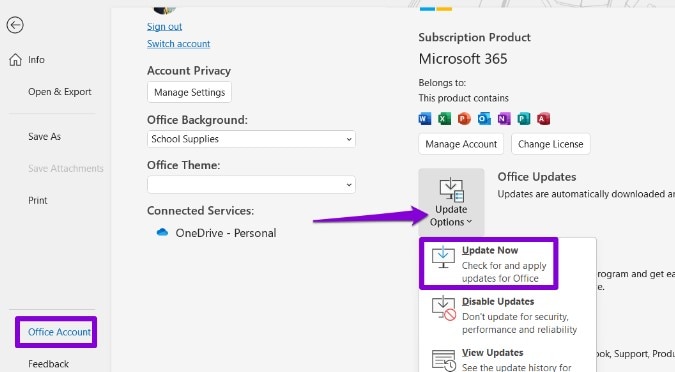
If the problem persists, check if there are any available updates for your email client. Outdated software may be prone to bugs that affect attachment functionality. Reinstalling the program can also resolve unexpected issues.
Detailed Troubleshooting Table
The following table summarizes common problems and corresponding solutions for both opening and sending attachments:
| Issue | Possible Cause | Recommended Solution |
|---|---|---|
| Attachment won't open | Unsupported file format or incorrect file association | Install the software/viewer or change default application settings |
| Attachment blocked by antivirus | Security software preventing access | Temporarily disable antivirus/firewall or whitelist the email client |
| File appears corrupted | Incomplete download or transmission error | Re-download or request the sender to resend the file |
| File name issues | Special characters causing conflicts | Rename the file to remove troublesome characters |
| Cannot attach file when sending | File size exceeds limits | Compress the file or use a cloud-based sharing service |
| Email client error | Software bug or misconfiguration | Restart, update, or reinstall the email client |
Additional Considerations and Best Practices
Beyond basic troubleshooting steps, there are additional considerations that can help you avoid or resolve attachment issues in the future. By integrating these best practices into your routine, you can minimize disruptions and streamline your email workflow.
Ensuring Software Compatibility
Always verify that both you and your email recipients are using compatible software versions. Outdated applications can hinder file opening. Regularly updating your operating system and applications can preemptively resolve incompatibility issues.
Maintaining File Integrity
To ensure file integrity during transmission, avoid making changes to filenames that include special symbols or spaces which might be misinterpreted by email servers. It is best practice to use standard naming conventions for attachments.
Utilizing Cloud Storage Solutions
For large files or sensitive documents, consider using cloud-based storage solutions instead of traditional email attachments. Services like Google Drive, Dropbox, or OneDrive allow you to share links securely while bypassing email size limitations. This not only facilitates easier sharing but also provides an additional layer of security.
Proactive Troubleshooting Tips
Incorporating a few proactive habits can significantly reduce the risk of encountering attachment issues:
- Regular Software Updates: Make a habit of updating your email clients, antivirus software, and file viewers regularly. This ensures you have the latest patches and compatibility fixes.
- Test Before Sending: When dealing with important documents, consider sending a test email to yourself to verify that attachments are working as expected.
- Backup Files: Always maintain backups of essential files. This way, if a file becomes corrupted, you have an alternative version ready.
- Clear Cache and Temporary Files: Over time, cached data and temporary files can interfere with the proper functioning of your email client. Periodically clear these files to maintain optimal performance.
Addressing Emotional Attachment Concerns
While our focus has been on the technical aspects of file attachments, it's important to acknowledge that the term "attachment" can also refer to emotional bonds in relationships. If you or someone you know is facing challenges related to emotional attachment:
Understanding Attachment Styles
Human relationships are influenced by various attachment styles formed early in life. Secure attachment is characterized by healthy relationships, while insecure attachment styles might result in difficulty trusting or forming positive connections. Recognizing your own attachment style can facilitate better interpersonal dynamics and aid in addressing personal relationship issues.
Strategies for Managing Emotional Attachments
If emotional attachment issues are affecting your life, consider these approaches:
- Reflect and Understand: Spend time examining your feelings and the roots of your attachment behaviors. Understanding where these behaviors originate can pave the way for healthier relationship dynamics.
- Seek Professional Help: Therapists and counselors specializing in attachment theory can help guide you toward forming more secure relationships. They can offer strategies tailored to your individual experiences.
- Build Self-Awareness: Engage in practices such as mindfulness and journaling to cultivate awareness of your emotional needs. This self-understanding is essential in acknowledging and managing attachment issues.
While emotional attachment is a distinct matter from the technical issues that accompany file attachments, both topics significantly impact our daily lives. Addressing each with appropriate strategies can lead to improved communication and personal growth.
Advanced Troubleshooting and Future Considerations
As technology continues to evolve, staying updated on the latest troubleshooting techniques and understanding common pitfalls becomes increasingly important. Here, we provide some advanced tips for ensuring smooth email communication:
Leveraging Diagnostic Tools
Many modern email clients and operating systems provide built-in diagnostic tools that can help pinpoint software conflicts or other issues that may be interfering with attachments. Make sure to explore these resources in your software’s help documentation.
Using System Logs
Looking at system logs or error messages can give you specific clues about what might be causing your attachment problems. Logs usually provide error codes or detailed messages that can be directly referenced when seeking support.
Remote Troubleshooting Options
If troubleshooting on your own becomes overwhelming, many software and hardware support services offer remote diagnostics. These services can analyze your system configuration in real-time to identify conflicts or misconfigurations that may be causing attachment issues.
Staying Informed About Email Security
Since antivirus and firewall settings play a key role in attachment functionality, keep abreast of the latest developments in email security. Regularly review your security software’s update logs and adjust settings as needed to maintain both robust protection and functional usability.
Security Practices
In addition to troubleshooting attachment issues, employing secure email practices such as two-factor authentication and encryption for sensitive files is advisable. These practices help ensure that you not only resolve attachment problems but also secure your communications.
Final Thoughts and Recommendations
Whether your issue involves opening, sending, or even understanding the nuances of attachments, this guide provides a comprehensive framework to help you diagnose and solve common problems. By systematically addressing software compatibility, file integrity, and security settings, you can significantly reduce the frequency and impact of these technical challenges.
For those grappling with emotional attachments, it is equally important to seek professional guidance and explore strategies that promote secure, healthy relationships. Incorporating both technical troubleshooting and emotional awareness into your problem-solving approach ensures that you are well-equipped to handle attachment-related challenges on multiple fronts.
In summary, clear identification of the problem, systematic troubleshooting, and proactive best practices are key components to ensure smooth functioning of file attachments in your daily digital communications. By learning how to manage both digital and emotional attachments, you establish a foundation for effective problem resolution and improved overall operations.
Conclusion
In conclusion, addressing attachment issues—whether filed digitally or experienced emotionally—requires a systematic approach. Begin by determining the exact nature of the problem: consider whether you are facing obstacles when opening attachments or difficulties when sending them. For file attachments, ensure that your system has the appropriate software for file format functions, adjust file associations, verify security software settings, and review file integrity. For large files, consider cloud-based solutions or compression tools. Alongside these practical steps, maintaining updated software, performing routine system maintenance, and leveraging remote diagnostic tools contribute significantly to minimizing similar issues in the future.
For those exploring emotional attachment concerns, understanding your attachment style and seeking professional guidance are key steps toward healthier relationships. The insights provided in this guide are designed to empower you with practical troubleshooting tips and encourage proactive solutions for your attachment-related challenges, ensuring that your digital communications and personal relationships are as seamless as possible.
References
- Can't Open an Email Attachment? Here's How to Fix It - DataCate
- How to Fix the Attachments Not Showing in Outlook Issue - How-To Geek
- Why Am I Unable to Open an E-mail Attachment? - Computer Hope
- Can't Open File Attachments? Here Are Possible Solutions - HelloTech
- Troubleshoot attachment problems in Outlook for Windows - Microsoft Support
- Fix Gmail Won't Attach Files Error - EaseUS
- Can't Open Attachments? Here's How to Fix It - SolveYourTech
- Can't Open Attachments Issue - JustAnswer
Recommended Queries
Last updated February 23, 2025