
Automating Image Deskewing for Enhanced OCR Accuracy with Pytesseract
Master the art of preprocessing images to achieve flawless text extraction using Pytesseract.
Key Takeaways
- Understanding Deskewing: Recognize the significance of correcting image skew to improve OCR results.
- OpenCV Integration: Utilize OpenCV for effective skew detection and image rotation.
- Comprehensive Workflow: Implement a step-by-step approach combining image preprocessing and Pytesseract for optimal text extraction.
Introduction to Image Deskewing
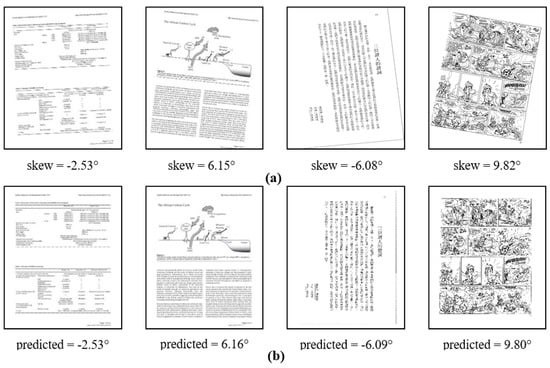
Optical Character Recognition (OCR) has become an indispensable tool in digitizing printed or handwritten text. However, the accuracy of OCR systems like Pytesseract heavily depends on the quality of the input images. One common issue affecting OCR performance is image skew—a condition where the text appears rotated or tilted relative to the horizontal axis. Automating the deskewing process is crucial to ensure that the text is correctly aligned, thereby enhancing the reliability of text extraction.
Importance of Deskewing Before OCR
Deskewing serves as a critical preprocessing step in OCR workflows. Misaligned text can lead to several problems, including:
- Reduced OCR accuracy due to misinterpreted character orientations.
- Increased error rates in text extraction.
- Challenges in downstream text analysis and processing tasks.
By correcting the skew, the OCR engine can better recognize individual characters and words, leading to more reliable and accurate text extraction.
Methods to Automatically Deskew Images
Utilizing OpenCV for Deskewing
OpenCV, an open-source computer vision library, provides robust tools for image processing, making it ideal for automating the deskewing process. The general approach involves the following steps:
1. Image Preprocessing
Start by converting the image to grayscale, which simplifies the image data and reduces computational complexity. Apply thresholding or edge detection to highlight textual regions.
2. Skew Angle Detection
Identify the angle of skew by analyzing the orientation of text lines. Techniques such as the Hough Line Transform or minimum area bounding rectangles can be employed to calculate the skew angle.
3. Image Rotation
Rotate the image by the negative of the detected skew angle to correct the alignment. This step ensures that the text lines are horizontally aligned, facilitating accurate OCR processing.
Comprehensive Workflow for Deskewing and OCR
Step-by-Step Implementation
The following sections provide a detailed guide to automating image deskewing and subsequent text extraction using OpenCV and Pytesseract.
Step 1: Install Required Libraries
Ensure that you have Python installed on your system. Install the necessary libraries using pip:
pip install opencv-python pytesseract numpy PillowStep 2: Import Libraries
Import the essential libraries in your Python script:
import cv2
import numpy as np
from PIL import Image
import pytesseract
Step 3: Define the Deskew Function
Create a function to handle the deskewing process:
def deskew(image):
    # Convert to grayscale
    gray = cv2.cvtColor(image, cv2.COLOR_BGR2GRAY)

    # Invert the image if necessary
    gray = cv2.bitwise_not(gray)

    # Apply thresholding to get binary image
    thresh = cv2.threshold(gray, 0, 255, cv2.THRESH_BINARY | cv2.THRESH_OTSU)[1]

    # Detect coordinates of non-zero pixels
    coords = np.column_stack(np.where(thresh > 0))

    # Compute minimum area bounding box
    angle = cv2.minAreaRect(coords)[-1]

    # Adjust angle to correct skew
    if angle < -45:
        angle = -(90 + angle)
    else:
        angle = -angle

    # Get image dimensions and compute center
    (h, w) = image.shape[:2]
    center = (w // 2, h // 2)

    # Create rotation matrix
    M = cv2.getRotationMatrix2D(center, angle, 1.0)

    # Perform rotation
    rotated = cv2.warpAffine(image, M, (w, h),
                             flags=cv2.INTER_CUBIC,
                             borderMode=cv2.BORDER_REPLICATE)

    return rotated
Step 4: Load and Deskew the Image
Load your image and apply the deskew function:
# Load the image from disk
image = cv2.imread('path_to_your_image.jpg')

# Apply deskewing
deskewed_image = deskew(image)
Step 5: Perform OCR with Pytesseract
Convert the deskewed image to a format compatible with Pytesseract and extract text:
# Convert the image to RGB (from BGR)
rgb_image = cv2.cvtColor(deskewed_image, cv2.COLOR_BGR2RGB)

# Convert to PIL Image
pil_image = Image.fromarray(rgb_image)

# Extract text using Pytesseract
extracted_text = pytesseract.image_to_string(pil_image)

print(extracted_text)
Enhancing the Deskewing Process
Advanced Techniques and Optimizations
To further improve the deskewing accuracy and OCR results, consider the following techniques:
Noise Reduction
Apply morphological operations or Gaussian blurring to reduce noise, which can interfere with edge detection and skew angle calculation.
# Apply Gaussian Blur to reduce noise
gray = cv2.GaussianBlur(gray, (5, 5), 0)
Adaptive Thresholding
Use adaptive thresholding methods to handle images with varying lighting conditions, ensuring consistent binary conversion.
# Apply adaptive thresholding
thresh = cv2.adaptiveThreshold(gray, 255,
                               cv2.ADAPTIVE_THRESH_GAUSSIAN_C,
                               cv2.THRESH_BINARY, 31, 2)
Edge Detection Enhancements
Enhance edge detection using techniques like Canny edge detection to improve the accuracy of skew angle detection.
# Apply Canny Edge Detection
edges = cv2.Canny(gray, 50, 150, apertureSize=3)
Comprehensive Workflow Illustration
Detailed Steps and Code Integration
The following table outlines the sequence of operations involved in the deskewing and OCR process:
| Step | Operation | Description |
|---|---|---|
| 1 | Image Loading | Read the input image using OpenCV. |
| 2 | Grayscale Conversion | Convert the image to grayscale to simplify processing. |
| 3 | Noise Reduction | Apply Gaussian blur to minimize image noise. |
| 4 | Thresholding | Convert the image to a binary format using thresholding techniques. |
| 5 | Skew Angle Detection | Identify the skew angle using edge detection and contour analysis. |
| 6 | Image Rotation | Rotate the image to correct the detected skew angle. |
| 7 | OCR Processing | Extract text from the deskewed image using Pytesseract. |
Best Practices and Recommendations
Optimizing OCR Accuracy
To maximize the efficiency and accuracy of your OCR system, consider the following best practices:
- Consistent Image Quality: Ensure high-resolution images with clear text to facilitate accurate text recognition.
- Proper Lighting: Use uniform lighting conditions to reduce shadows and glare, which can affect text clarity.
- Appropriate Image Formats: Utilize lossless image formats like PNG or TIFF to maintain image integrity.
- Batch Processing: Implement batch processing for large volumes of images to streamline the workflow.
- Error Handling: Incorporate robust error handling to manage exceptions during image processing and OCR stages.
Performance Optimization
Enhance the performance of the deskewing and OCR process by:
- Parallel Processing: Utilize multi-threading or multi-processing to handle multiple images simultaneously.
- Resource Management: Optimize memory usage by processing images in batches and releasing resources promptly.
- Algorithm Tuning: Fine-tune algorithm parameters such as threshold values and kernel sizes based on specific image characteristics.
Troubleshooting Common Issues
Incorrect Skew Angle Detection
If the deskewing process results in improper rotation, consider the following solutions:
- Adjust Thresholding Parameters: Modify the thresholding technique or parameters to better highlight textual regions.
- Enhance Edge Detection: Experiment with different edge detection methods or parameters to improve edge clarity.
- Refine Contour Analysis: Use alternative methods for contour detection to more accurately identify text regions.
OCR Inaccuracy Post-Deskewing
If the extracted text contains errors despite successful deskewing:
-
Image Resolution: Increase the image resolution to provide more detailed information for OCR.
-
Font Clarity: Ensure that the text is clear and legible, avoiding overly stylized fonts that are hard to recognize.
-
Language Settings: Configure Pytesseract with the appropriate language settings to match the text content.
Conclusion
Automating the deskewing of images is a vital step in enhancing the accuracy and reliability of OCR systems like Pytesseract. By leveraging powerful tools such as OpenCV, developers can implement effective skew detection and correction mechanisms, ensuring that text is properly aligned for optimal recognition. Adhering to best practices in image preprocessing and algorithm optimization further amplifies the performance of the OCR workflow, enabling seamless and accurate text extraction across diverse applications.
References
Last updated February 9, 2025