
Spring Boot Axon Tracking Token Configuration
A comprehensive configuration for enabling token reset with context in Axon Framework
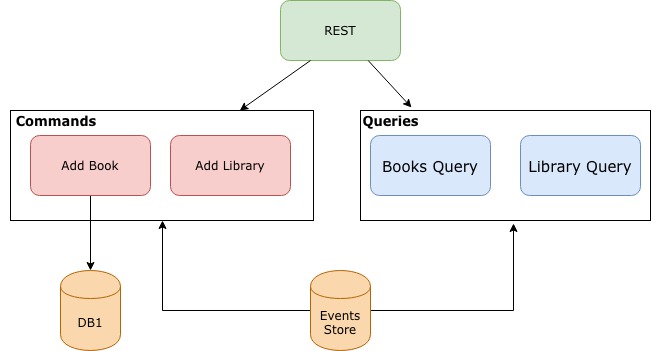
Key Takeaways
- Custom TokenStore with Context: Extend the default TokenStore to store additional metadata or context alongside the tracking token.
- Configurable Processor Reset: Integrate a mechanism to reset the tracking token to any arbitrary point in time, enabling event replay from a specific moment.
- Context-Aware Event Processing: Supply and evaluate contextual information during event handling to influence processing logic based on circumstances like reprocessing modes.
Overview
In modern event-driven architectures, the ability to reprocess past events is crucial for tasks such as rebuilding projections, implementing correction routines, or testing new processing logic. The Axon Framework supports this capability through its Tracking Event Processor (TEP). The TEP uses a Tracking Token to remember the last processed event in the event stream. By manipulating the tracking token, you can reset and replay events from a chosen point in time.
This guide dives into a Spring Boot configuration for the Axon Framework that not only resets the tracking token but also attaches a custom “context” with it. The context can later be used within your event handlers to modify the behavior of event processing according to dynamic operational needs.
Configuration Components and Their Roles
1. Custom TokenStore with Extended Context
Out of the box, Axon Framework’s default TokenStore stores tracking tokens without extra metadata. By extending the TokenStore, you have the flexibility to store additional context information alongside each token. This is particularly useful when you want to associate a reset event (such as a replay or manual intervention) with a specific reason or operational parameter.
CustomTokenStore Implementation
The following implementation demonstrates how to create a custom TokenStore. This version uses an in-memory map to store both the token and an additional context message. In production systems, you may adapt this to persist tokens using databases like JDBC, JPA, or even MongoDB.
  // CustomTokenStore.java
  package com.example.axonconfig;

  import org.axonframework.eventhandling.tokenstore.TokenStore;
  import java.util.Map;
  import java.util.concurrent.ConcurrentHashMap;

  public class CustomTokenStore implements TokenStore {

      // Use a thread-safe map to hold tokens and context per processor.
      private final Map<String, Map<String, Object>> tokens = new ConcurrentHashMap<>();

      @Override
      public void storeToken(String processorName, Object token) {
          Map<String, Object> tokenAndContext = tokens.computeIfAbsent(processorName, k -> new ConcurrentHashMap<>());
          tokenAndContext.put("token", token);
      }

      @Override
      public Object fetchToken(String processorName) {
          Map<String, Object> tokenAndContext = tokens.get(processorName);
          return tokenAndContext != null ? tokenAndContext.get("token") : null;
      }

      // Method to explicitly store a token along with its corresponding context.
      public void setTokenWithContext(String processorName, Object token, String context) {
          Map<String, Object> tokenAndContext = tokens.computeIfAbsent(processorName, k -> new ConcurrentHashMap<>());
          tokenAndContext.put("token", token);
          tokenAndContext.put("context", context);
      }

      // Retrieve the stored context for a particular processor.
      public String getContext(String processorName) {
          Map<String, Object> tokenAndContext = tokens.get(processorName);
          return tokenAndContext != null ? (String) tokenAndContext.get("context") : null;
      }
  }
This implementation enables you not only to store and fetch tokens but also to augment them with contextual data—ensuring that event processing logic can evaluate additional metadata such as the reason for a reset or the originator of the change.
2. Configuring the TrackingEventProcessor
Axon Framework’s TrackingEventProcessor (TEP) supports asynchronous processing of events. When integrated with a custom TokenStore, you gain the ability to update and manage tokens dynamically. In this configuration, we also define a TrackingEventProcessorConfiguration that enables single-threaded processing. This may be segmented for parallelism in more advanced setups.
Processor Configuration in Spring Boot
The following Spring Boot configuration class sets up the TEP to use the custom token store created earlier. In this sample, the processor is registered with the name "myEventProcessor" and configured to pick up a token reset from an arbitrary point in time.
  // AxonConfig.java
  package com.example.axonconfig;

  import org.axonframework.config.EventProcessingConfigurer;
  import org.axonframework.eventhandling.TrackingEventProcessor;
  import org.axonframework.eventhandling.TrackingEventProcessorConfiguration;
  import org.axonframework.eventhandling.tokenstore.TokenStore;
  import org.springframework.beans.factory.annotation.Autowired;
  import org.springframework.context.annotation.Bean;
  import org.springframework.context.annotation.Configuration;

  @Configuration
  public class AxonConfig {

      @Autowired
      private EventProcessingConfigurer configurer;

      // Register the custom TokenStore as a Spring bean.
      @Bean
      public TokenStore customTokenStore() {
          return new CustomTokenStore();
      }

      // Define the TrackingEventProcessor configuration for single-threaded processing.
      @Bean
      public TrackingEventProcessorConfiguration trackingEventProcessorConfiguration() {
          return TrackingEventProcessorConfiguration.forSingleThreadedProcessing();
      }

      // Configure the tracking event processor and associate it with our custom token store.
      @Bean
      public void configureEventProcessors() {
          configurer.registerTrackingEventProcessor(
              "myEventProcessor",
              (configuration, eventProcessor) -> {
                  TrackingEventProcessor trackingEP = (TrackingEventProcessor) eventProcessor;
                  trackingEP.setTokenStore(customTokenStore());
                  trackingEP.setTrackingEventProcessorConfiguration(trackingEventProcessorConfiguration());
              }
          );
      }
  }
In this configuration, the processor “myEventProcessor” will retrieve its current tracking token, process events in single-threaded mode, and rely on the custom token store for token management. This setup paves the way for resetting and replaying events by altering the stored token.
3. Implementation of Token Reset and Context-Aware Replay
Replaying events requires resetting the tracking token to a specific position, such as a point in time when a misconfiguration was discovered or when data corrections are needed. To further enhance this mechanism, context information is stored alongside the token. The event handlers can then evaluate this context to tailor the processing logic.
Token Reset Service
The reset service involves stopping the event processor, updating the tracking token (with its context), and restarting the processor to process events from the desired position. This example demonstrates how to integrate these steps in a dedicated Spring bean.
  // ResetService.java
  package com.example.axonconfig;

  import org.axonframework.config.Configuration;
  import org.axonframework.eventhandling.TrackingEventProcessor;
  import org.axonframework.eventhandling.tokenstore.TokenStore;
  import org.axonframework.eventhandling.tokenstore.TrackingToken;
  import org.springframework.beans.factory.annotation.Autowired;
  import org.springframework.stereotype.Service;

  @Service
  public class ResetService {

      private final Configuration configuration;
      private final TokenStore tokenStore;

      @Autowired
      public ResetService(Configuration configuration, TokenStore tokenStore) {
          this.configuration = configuration;
          this.tokenStore = tokenStore;
      }

      /**
       * Reset the token for a specific tracking event processor.
       *
       * @param processorName the name of the event processor
       * @param resetToken the tracking token representing the desired start position
       * @param context a String representing the context for this reset operation
       */
      public void resetProcessor(String processorName, TrackingToken resetToken, String context) {
          // Retrieve the TrackingEventProcessor instance using the configuration.
          TrackingEventProcessor processor = configuration.eventProcessingConfiguration()
                  .eventProcessor(processorName, TrackingEventProcessor.class)
                  .orElseThrow(() -> new IllegalArgumentException(
                          "No TrackingEventProcessor found with name " + processorName));

          // Shut down the processor to allow token updates.
          processor.shutDown();

          // Assuming the tokenStore is our CustomTokenStore, update or reset the token.
          if (tokenStore instanceof CustomTokenStore) {
              ((CustomTokenStore) tokenStore).setTokenWithContext(processorName, resetToken, context);
          }

          // Optionally, add logging or additional error handling here.

          // Restart the processor - it will initialize processing based on the updated token.
          processor.start();
      }
  }
The ResetService provides a simple API to reset a processor’s token. You can call this service by specifying the processor’s name, the new token (which might be generated as a tail token or any custom tracking token), and the associated context (such as "data correction requested by admin" or "replay for testing purposes").
4. Context-Aware Event Handling
Once you have reset the token with context, your event handlers need to be designed to react according to the context provided. One approach is to inject a shared context value into your event handlers.
Event Handler Example
In this example, an event handler checks for a reset context and adjusts its behavior accordingly:
  // MyEventHandler.java
  package com.example.axonconfig;

  import org.axonframework.eventhandling.EventHandler;
  import org.springframework.beans.factory.annotation.Autowired;
  import org.springframework.stereotype.Component;

  @Component
  public class MyEventHandler {

      // A service or shared object to retrieve the current reset context.
      private final ResetContextService resetContextService;

      @Autowired
      public MyEventHandler(ResetContextService resetContextService) {
          this.resetContextService = resetContextService;
      }

      @EventHandler
      public void on(Object event) {
          String context = resetContextService.getCurrentContext("myEventProcessor");
          if (context != null) {
              // Process event with awareness of the reset context.
              System.out.println("Processing event " + event + " with context " + context);
              // Additional processing logic based on the context.
          } else {
              System.out.println("Processing event " + event);
          }
      }
  }
Here, the ResetContextService acts as a simple repository or mediator to provide the event processing context. In a production-level solution, this might interface with persistent stores or other systems to manage context more robustly.
5. Additional Spring Boot and Axon Configuration
Apart from explicit Java-based configuration, you might also configure aspects of the tracking event processor using application properties. For instance, you can set processor modes and link them to specific sources as shown below:
  # application.properties
  axon.eventhandling.processors.myEventProcessor.mode=tracking
  axon.eventhandling.processors.myEventProcessor.source=eventStore
This property-based configuration is useful when you have multiple processors or when you prefer to externalize configuration details.
Comparative Overview
The table below summarizes the key components of the configuration and their roles:
| Component | Purpose | Implementation |
|---|---|---|
| CustomTokenStore | Store tracking token with a custom context | Extends TokenStore with methods to set and retrieve context |
| TrackingEventProcessor Configuration | Defines how events are processed and tokens managed | Configured for single-threaded or segmented processing |
| ResetService | Resets the current tracking token to a new position with context | Stops the processor, updates token store, and restarts processing |
| Event Handler | Processes events with awareness of any reset context | Injects a shared or external context manager to adjust behavior |
Integration and Execution Flow
The overall flow when resetting a tracking token with context involves the following steps:
Step-by-Step Execution
Step 1: Storing the Token and Context
A custom TokenStore is used, where tokens are stored along with an additional context value. By providing methods such as setTokenWithContext(...) and getContext(...), you prepare the TokenStore for the next steps.
Step 2: Configuring the Processor
The TrackingEventProcessor is wired with the custom TokenStore and a specific configuration. This includes single-threaded processing or parallel segments, along with properties set via application configuration if desired.
Step 3: Resetting the Token for Replay
Through a dedicated service (ResetService), the processor is stopped, the token is reset in the TokenStore using setTokenWithContext, and the processor is restarted. This allows the processor to resume from the new token position with the new context intact.
Step 4: Context-Aware Event Processing
Event handlers obtain the context associated with the processor. They can then implement logic based on the context—deciding whether to ignore certain events, log additional information, or alter the event handling workflow during a replay scenario.
Final Remarks
The configuration outlined above demonstrates a robust method to extend the functionality of Axon Framework’s TrackingEventProcessor within a Spring Boot application. By augmenting the TokenStore to manage additional context information, you create a flexible system that not only supports resetting of the token at an arbitrary point in time, but also makes it possible to tailor event processing based on operational or business-specific criteria.
It’s critical to ensure that proper shutdown and restart mechanisms are in place when modifying tokens – particularly in production environments where concurrent event processing might lead to duplication or missed events. Considerations for concurrency, transactional boundaries, and error handling are integral to a resilient system. This configuration serves as a starting point and should be further refined to meet specific application needs, scaling requirements, and production stability.
Conclusion
In summary, leveraging Axon Framework’s TrackingEventProcessor with a customized TokenStore enables you to control event processing more granularly through token resets and associated context. This approach opens up capabilities such as event replay, correction of past mistakes, and operational auditing, all critical for modern event-driven microservices and CQRS architectures. By following the provided configuration, you can implement a powerful and flexible solution that aligns with your business needs.
References
- Spring Boot App Axon Server Configuration - AxonIQ Discussion
- Demystifying Tracking Event Processors in Axon Framework - AxonIQ
- Axon Framework Reference - Streaming Event Processors
- StackOverflow: Tracking Token for different processor names - Unique Tracking Token - StackOverflow
More
Last updated February 18, 2025