
Building a Comprehensive Baseball Predictor from Scratch
A Step-by-Step Guide to Developing a Data-Driven Baseball Prediction System
Key Takeaways
- Comprehensive Data Collection: Establishing a robust scraping pipeline to gather extensive player and game statistics from multiple reliable sources.
- Efficient Data Management: Designing a scalable SQL database schema to store and organize the collected data systematically.
- Advanced Prediction Models: Utilizing machine learning techniques to accurately predict game outcomes and player performances.
1. Define the Scope and Objectives
a. Determine Prediction Goals
Before diving into the technical aspects, it's crucial to clearly define what you aim to predict. Common objectives include:
- Predicting game outcomes (win/loss).
- Forecasting player performance metrics (e.g., batting average, ERA).
- Estimating team rankings or win-loss records.
b. Identify Relevant Metrics
Select the metrics that will significantly influence your predictions. These may include:
- Player Statistics: Batting average (BA), Earned Run Average (ERA), home runs (HR), runs batted in (RBI).
- Team Statistics: Win-loss records, team batting average, team ERA.
- Game-Specific Factors: Weather conditions, starting pitchers, home-field advantage.
2. Set Up the Tech Stack
a. Programming Language
Python is widely preferred for data scraping, processing, and machine learning due to its rich ecosystem of libraries.
b. Web Scraping Tools
- BeautifulSoup: Ideal for parsing HTML and XML documents.
- Scrapy: A powerful framework for large-scale web scraping.
- Selenium: Useful for scraping JavaScript-rendered content.
c. Database Systems
- PostgreSQL: A robust, scalable SQL database suitable for handling large datasets.
- MySQL: Another reliable SQL database option with widespread support.
- SQLite: A lightweight database suitable for smaller projects or initial development.
d. Machine Learning Libraries
- Scikit-learn: Offers a wide range of algorithms for classification, regression, and clustering.
- TensorFlow: Advanced library for deep learning applications.
- PyTorch: Another powerful framework for building and training neural networks.
3. Data Collection Pipeline
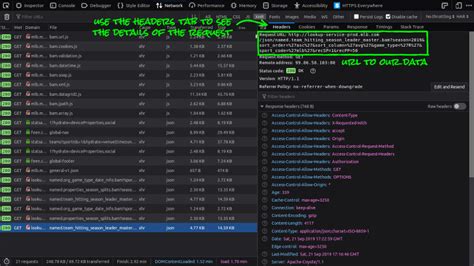
a. Identify Data Sources
Reliable data sources are essential for building accurate prediction models. Consider the following:
b. Install Prerequisite Libraries
Ensure that you have the necessary Python libraries installed. You can install them using pip:
pip install requests beautifulsoup4 lxml sqlalchemy pandas seleniumc. Develop Scraping Functions
i. Fetch HTML Content
import requests
from bs4 import BeautifulSoup

def fetch_html(url):
    response = requests.get(url)
    if response.status_code == 200:
        return response.text
    else:
        raise Exception(f"Failed to fetch {url}, Status code: {response.status_code}")
ii. Parse and Extract Data
def parse_player_stats(html):
    soup = BeautifulSoup(html, 'html.parser')
    table = soup.find('table')
    headers = [th.text.strip() for th in table.find_all('th')]
    data_rows = table.find_all('tr')[1:]
    data = [[td.text.strip() for td in row.find_all('td')] for row in data_rows]
    return headers, data
iii. Save Scraped Data
import csv

def save_to_csv(headers, data, filename):
    with open(filename, 'w', newline='') as file:
        writer = csv.writer(file)
        writer.writerow(headers)
        writer.writerows(data)
d. Handle Pagination and Dynamic Content
Many websites paginate their data or use JavaScript to load content dynamically. Utilize Selenium for such cases:
from selenium import webdriver
from selenium.webdriver.chrome.service import Service
from webdriver_manager.chrome import ChromeDriverManager

def fetch_dynamic_content(url):
    driver = webdriver.Chrome(service=Service(ChromeDriverManager().install()))
    driver.get(url)
    content = driver.page_source
    driver.quit()
    return content
e. Automate Scraping
To keep your data up-to-date, automate the scraping process using schedulers:
- Cron Jobs: Schedule scraping scripts on Unix-based systems.
- Python’s Schedule Library: Integrate scheduling within your Python application.
import schedule
import time

def job():
    url = "https://www.example.com/baseball-stats"
    html = fetch_html(url)
    headers, data = parse_player_stats(html)
    save_to_csv(headers, data, "player_stats.csv")

schedule.every().day.at("02:00").do(job)

while True:
    schedule.run_pending()
    time.sleep(1)
4. Design the SQL Database
a. Design the Database Schema
A well-structured database schema is vital for efficient data storage and retrieval. Below is an example schema:
i. Players Table
CREATE TABLE players (
    player_id INT PRIMARY KEY AUTO_INCREMENT,
    name VARCHAR(100),
    team_id INT,
    position VARCHAR(50),
    birthdate DATE
);
ii. Teams Table
CREATE TABLE teams (
    team_id INT PRIMARY KEY AUTO_INCREMENT,
    name VARCHAR(100),
    league VARCHAR(50),
    wins INT,
    losses INT
);
iii. Games Table
CREATE TABLE games (
    game_id INT PRIMARY KEY AUTO_INCREMENT,
    date DATE,
    home_team_id INT,
    away_team_id INT,
    home_score INT,
    away_score INT,
    weather VARCHAR(100),
    FOREIGN KEY (home_team_id) REFERENCES teams(team_id),
    FOREIGN KEY (away_team_id) REFERENCES teams(team_id)
);
iv. Player Stats Table
CREATE TABLE player_stats (
    stat_id INT PRIMARY KEY AUTO_INCREMENT,
    player_id INT,
    game_id INT,
    at_bats INT,
    hits INT,
    home_runs INT,
    rbi INT,
    batting_avg FLOAT,
    FOREIGN KEY (player_id) REFERENCES players(player_id),
    FOREIGN KEY (game_id) REFERENCES games(game_id)
);
v. Pitching Stats Table
CREATE TABLE pitching_stats (
    pitch_stat_id INT PRIMARY KEY AUTO_INCREMENT,
    pitcher_id INT,
    game_id INT,
    innings_pitched FLOAT,
    strikeouts INT,
    walks INT,
    earned_runs INT,
    era FLOAT,
    FOREIGN KEY (pitcher_id) REFERENCES players(player_id),
    FOREIGN KEY (game_id) REFERENCES games(game_id)
);
b. Implement the Schema
Use SQLAlchemy to interact with your database in Python:
from sqlalchemy import create_engine
from sqlalchemy.orm import sessionmaker

DATABASE_URL = "postgresql://username:password@localhost/baseball_db"
engine = create_engine(DATABASE_URL)
Session = sessionmaker(bind=engine)
session = Session()
c. Populate the Database
Insert scraped data into the corresponding tables:
import pandas as pd

def load_csv_to_db(csv_file, table_name):
    df = pd.read_csv(csv_file)
    df.to_sql(table_name, engine, if_exists='append', index=False)

# Example
load_csv_to_db("player_stats.csv", "player_stats")
5. Data Preprocessing and Cleaning
a. Load Data from SQL
import pandas as pd
from sqlalchemy import create_engine

engine = create_engine(DATABASE_URL)

def load_data(query):
    return pd.read_sql(query, engine)

# Example: Load player stats
player_stats = load_data("SELECT * FROM player_stats")
b. Clean and Transform Data
Ensure data quality by handling missing values, removing duplicates, and normalizing data:
# Handle missing values
player_stats.fillna(0, inplace=True)

# Remove duplicates
player_stats.drop_duplicates(inplace=True)

# Normalize categorical variables
player_stats['position'] = player_stats['position'].astype('category').cat.codes
c. Feature Engineering
Create additional features that may improve model performance:
- Win Percentage: Calculated from team wins and losses.
- Rolling Averages: Stats over the last N games to capture recent performance trends.
- Advanced Metrics: On-base Plus Slugging (OPS), Weighted Runs Created Plus (wRC+).
# Example: Calculate win percentage
teams = load_data("SELECT * FROM teams")
teams['win_percentage'] = teams['wins'] / (teams['wins'] + teams['losses'])

# Merge with player stats
player_stats = player_stats.merge(teams[['team_id', 'win_percentage']], on='team_id')

# Calculate rolling batting average
player_stats['rolling_ba'] = player_stats.groupby('player_id')['batting_avg'].rolling(window=10).mean().reset_index(0, drop=True)
6. Building the Prediction Model
a. Feature Selection
Select the most relevant features for your prediction objective:
- Batting Average
- ERA
- Win Percentage
- Home Runs
- RBI
- Innings Pitched
- Strikeouts
- Walks
- Weather Conditions
b. Split Data into Training and Testing Sets
from sklearn.model_selection import train_test_split

# Define features and target
X = player_stats[['batting_avg', 'ERA', 'win_percentage', 'home_runs', 'RBI', 'innings_pitched', 'strikeouts', 'walks']]
y = player_stats['runs_scored']  # Example target

# Split the data
X_train, X_test, y_train, y_test = train_test_split(X, y, test_size=0.2, random_state=42)
c. Choose a Machine Learning Algorithm
Select an appropriate algorithm based on your prediction type:
- Regression Models: For predicting continuous outcomes like runs scored.
- Classification Models: For categorical outcomes like win/loss.
- Ensemble Methods: Random Forests, Gradient Boosting for improved accuracy.
d. Train the Model
from sklearn.ensemble import RandomForestClassifier
from sklearn.linear_model import LinearRegression

# Example: Classification for game outcomes
model = RandomForestClassifier(n_estimators=100, random_state=42)
model.fit(X_train, y_train)
e. Evaluate the Model
Assess the model's performance using relevant metrics:
- Accuracy: Percentage of correct predictions.
- Precision and Recall: Especially important for imbalanced datasets.
- ROC-AUC: Measures the ability of the model to distinguish between classes.
- Mean Squared Error (MSE): For regression tasks.
from sklearn.metrics import accuracy_score, precision_score, recall_score, roc_auc_score, mean_squared_error

# Predictions
y_pred = model.predict(X_test)
y_proba = model.predict_proba(X_test)[:,1]

# Evaluation
accuracy = accuracy_score(y_test, y_pred)
precision = precision_score(y_test, y_pred)
recall = recall_score(y_test, y_pred)
roc_auc = roc_auc_score(y_test, y_proba)

print(f"Accuracy: {accuracy}")
print(f"Precision: {precision}")
print(f"Recall: {recall}")
print(f"ROC-AUC: {roc_auc}")
f. Hyperparameter Tuning
Optimize model performance by tuning hyperparameters:
from sklearn.model_selection import GridSearchCV

# Define parameter grid
param_grid = {
    'n_estimators': [100, 200, 300],
    'max_depth': [10, 20, None],
    'min_samples_split': [2, 5, 10]
}

# Initialize Grid Search
grid_search = GridSearchCV(estimator=RandomForestClassifier(random_state=42),
                           param_grid=param_grid,
                           cv=5,
                           scoring='roc_auc',
                           n_jobs=-1)

# Fit Grid Search
grid_search.fit(X_train, y_train)

# Best parameters
print(grid_search.best_params_)
7. Deploying the Predictor
a. Create an API
Expose your prediction model through a REST API using Flask or FastAPI:
from flask import Flask, request, jsonify

app = Flask(__name__)

@app.route('/predict', methods=['POST'])
def predict():
    data = request.get_json(force=True)
    features = [data['batting_avg'], data['ERA'], data['win_percentage'], data['home_runs'], data['RBI'], data['innings_pitched'], data['strikeouts'], data['walks']]
    prediction = model.predict([features])
    return jsonify({'prediction': prediction[0]})

if __name__ == '__main__':
    app.run(debug=True)
b. Develop a Frontend Dashboard
Create an interactive dashboard to display predictions and statistics. Tools like React.js or Vue.js can be integrated with your Flask API.
c. Monitor and Update the Model
-
Regularly retrain the model with new data to maintain accuracy.
-
Implement logging to track prediction performance and detect anomalies.
-
Use tools like Airflow for pipeline automation and scheduling retraining jobs.
# Example: Retraining Scheduler with Airflow
from airflow import DAG
from airflow.operators.python_operator import PythonOperator
from datetime import datetime

def retrain_model():
    # Data loading and preprocessing
    # Model training
    # Save the updated model
    pass

default_args = {
    'owner': 'airflow',
    'start_date': datetime(2025, 1, 1),
    'retries': 1,
}

dag = DAG('retrain_model_dag', default_args=default_args, schedule_interval='@weekly')

retrain = PythonOperator(task_id='retrain', python_callable=retrain_model, dag=dag)
8. Iterating and Refining
a. Regular Data Updates
Continuously update your SQL database with the latest game and player statistics to ensure your model remains current.
b. Model Retraining and Validation
Periodically retrain your model with new data and validate its performance to adapt to shifting trends and player dynamics.
c. Feature Enhancement
Incorporate new features and advanced metrics as they become available to enhance prediction accuracy.
# Example: Adding new feature - OPS (On-base Plus Slugging)
player_stats['OPS'] = player_stats['on_base_percentage'] + player_stats['slugging_percentage']
Conclusion
Building a baseball predictor involves a multifaceted approach that integrates data collection, storage, preprocessing, model development, and deployment. By systematically following the steps outlined above, you can create a robust system capable of providing accurate and insightful predictions. Remember to continually refine your model and update your data sources to maintain and improve the system's performance over time.
References
Last updated January 17, 2025