
Understanding the BayerRG8 Pixel Format
A detailed exploration of the BayerRG8 raw image format and its processing considerations
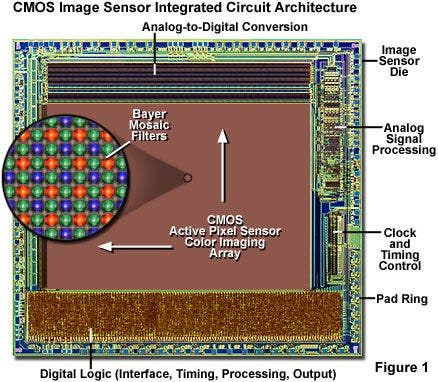
Key Insights
- Efficient Data Handling: BayerRG8 uses an 8-bit per pixel system that is byte-aligned for simpler storage and processing.
- Bayer Filter and Color Capture: The format relies on a Bayer color filter array, capturing raw data that requires demosaicing to reconstruct full color images.
- Applications and Versatility: Commonly used in machine vision, digital photography, and scientific imaging, BayerRG8 offers sufficient detail while keeping data volumes low.
Introduction to the BayerRG8 Pixel Format
BayerRG8 is a widely used pixel format in digital imaging, particularly within devices that incorporate a Bayer color filter array (CFA). This raw format is essential for capturing color images directly from an image sensor. The key concept is that each pixel in the sensor data does not represent full-color information immediately; rather, each pixel is filtered to sense only one of the primary colors — red, green, or blue.
The designation "BayerRG8" breaks down into two components. The "Bayer" part references the Bayer color filter array invented by Bryce Bayer, which arranges filters in a repeating pattern to capture different colors. The "RG8" denotes the specific color pattern (red and green starting) and the fact that each pixel is represented using 8 bits of data. In total, every pixel contains a value between 0 and 255, corresponding to the intensity level of the captured color.
Detailed Explanation of the Bayer Color Filter Array
A Bayer filter is essentially a mosaic of color filters applied to an image sensor, and its primary role is to enable the sensor to capture color information even though the sensing element itself is inherently monochromatic. Each pixel is filtered such that it only captures one color channel (red, green, or blue). The particular arrangement of these filters follows a specific pattern typically based on a 2×2 grid.
Structure of the Bayer Filter
In the Bayer pattern, the filters are arranged to optimize how the human eye perceives color. This arrangement often comprises:
- One red filter in one corner
- One blue filter in the opposite corner
- Two green filters, capitalizing on the eye's heightened sensitivity to green light
In BayerRG8, the pattern specifically indicates that the top row of the sensor begins with a red pixel followed by a green pixel, whereas the bottom row starts with a green pixel followed by a blue pixel. This arrangement is sometimes referred to as the RG pattern. The pattern not only facilitates efficient color capture but also simplifies the subsequent processing steps.
Technical Characteristics of BayerRG8
8-Bit Depth and Byte-Alignment
The “8” in BayerRG8 explicitly refers to the 8-bit representation of each pixel. This means that each pixel's intensity is recorded over a range of 256 discrete levels (0 to 255). The choice of an 8-bit depth strikes a balance between file size and the level of detail captured. Since each pixel occupies one byte, the data is byte-aligned, meaning there's no need for extra padding or bit manipulation during storage. This makes the raw data both compact and straightforward to handle.
Intermediate Raw Data
It is important to understand that the BayerRG8 format outputs raw data directly from the sensor. In this raw state, each pixel samples only one color channel – for instance, a pixel filtered to capture red will not contain any information about green or blue intensities. This raw array is invaluable for applications where minimal processing is desired before applying more advanced techniques, such as scientific imaging and specialized machine vision tasks.
Demosaicing Process
Since the image sensor data is incomplete (each pixel only offers one color component), a post-capture process known as demosaicing is essential. Demosaicing (or debayering) interpolates the missing color values for each pixel by considering the information of neighboring pixels in the grid. Various algorithms may be employed to perform this interpolation, with some aimed at preserving edge detail and minimizing artifacts, while others focus on smooth color transitions.
Image Processing and Conversion
Converting Raw Data to Full-Color RGB
In order to convert the single-channel intensity values in a BayerRG8 image into a complete color image, an interpolation algorithm is applied. Essentially, each pixel’s missing two color channels are estimated based on nearby pixel information in the Bayer pattern. The precision and quality of this process directly affect the final image quality. For example, in photography and videography, advanced demosaicing algorithms help in generating images with realistic color reproduction and fine contrast.
Advantages of a Raw Approach
Working with raw sensor data offers several benefits. Since the data hasn’t been altered by on-board camera processing or compression, it provides greater flexibility during post-processing. Photographers and imaging experts can adjust parameters such as white balance, exposure, and noise reduction. Moreover, it preserves the maximum amount of detail captured by the sensor. For applications that require precise color measurements or scientific accuracy, being able to manipulate raw BayerRG8 data is imperative.
Comparative Analysis with Other Pixel Formats
Differences with Packed Formats
Unlike packed formats such as BayerRG10 or BayerRG12, where pixels may use 10 or 12 bits and require methods to pack the extra bits into a byte stream efficiently, BayerRG8 is inherently simple because each pixel cleanly fits into one byte. This simplicity eliminates the need for additional processing steps during image acquisition and transmission. Such a design ensures that data processing pipelines can be streamlined, which is particularly beneficial in high-speed imaging applications.
Other Bayer Variants
There are several other variants to consider alongside BayerRG8. Formats like BayerGR8, BayerBG8, and BayerGB8 differ only in the arrangement or sequence of color filters. Though they all operate on the same basic principles of using a Bayer filter pattern and an 8-bit depth, the choice between them might be influenced by factors such as sensor design and desired color response characteristics. The BayerRG pattern, with its red-green initiation, is one of the most common variants and is frequently used in many imaging systems.
Applications and Practical Implications
Digital Photography
In digital photography, BayerRG8 is widely used because it provides a manageable trade-off between image quality and data size. Although the raw Bayer data must be processed (demosaiced) into a full-color image, the benefit is that photographers have access to unprocessed data. This allows the maximum range of correction and fine-tuning in post-processing applications such as Adobe Lightroom or other professional image editing tools. Advanced techniques can be applied to correct color imbalances or enhance details, making raw Bayer data highly desirable.
Machine Vision & Scientific Imaging
Many machine vision and scientific imaging applications also depend on BayerRG8 because raw image data enables precise analysis. In contexts where image analysis is critical – such as quality control in manufacturing, automated inspection systems, or research applications – having direct access to unprocessed sensor data is invaluable. It offers a true representation of light intensities which can be quantitatively analyzed using specialized software algorithms.
Real-Time Processing and Bandwidth Considerations
Because BayerRG8 images are stored using only one byte per pixel, the resulting data rates are lower compared to formats with higher bit depths. This efficient use of storage and bandwidth is particularly important in real-time imaging systems where quick data transfer and rapid processing are necessary. Lower bandwidth demands facilitate faster transmission over networks and reduce latency in time-sensitive applications like automotive imaging and surveillance cameras.
Data Organization Overview
BayerRG8 Pixel Structure Table
The table below outlines the key characteristics and differences of the BayerRG8 pixel format, providing a quick reference point for understanding how it is structured compared to other imaging data formats.
| Aspect | Description | Implication |
|---|---|---|
| Bit Depth | 8 bits per pixel | 256 brightness levels; compact data size |
| Color Filter Arrangement | Bayer pattern (Red, Green and Blue filters) | Each pixel captures only one color; requires demosaicing |
| Data Storage | Byte-aligned | Simpler data manipulation without additional packing/unpacking |
| Image Quality | Raw sensor data | High flexibility for post-processing and corrections |
| Typical Applications | Digital photography, machine vision, scientific imaging | Offers balance between quality and speed |
Practical Considerations and Future Perspectives
Processing Software and Hardware
A wide array of software libraries, including those available in languages like Python (e.g., scikit-image), support the processing of BayerRG8 images. The demosaicing algorithms provided by these libraries range from simple nearest-neighbor interpolation to more sophisticated methods that preserve details and minimize noise. Additionally, many modern cameras come with built-in hardware support for real-time debayering, which offloads processing from the host computer.
Emerging Trends and Innovations
Over the years, sensor technology has advanced significantly. Although BayerRG8 remains popular for its efficiency and straightforward data handling, there exists a continuous effort to push the limits of color fidelity and resolution. Emerging formats with higher bit depths such as BayerRG10 or BayerRG12 provide more detailed data for applications that demand extremely high resolution. Nonetheless, BayerRG8 serves as a reliable and efficient format for many standard imaging applications and remains relevant in scenarios where processing speed and data compactness are prioritized.
Compatibility and Standardization
The simplicity of the BayerRG8 format has also contributed to its widespread adoption across various manufacturers. As the standard for many imaging sensors, it guarantees a consistent method of data acquisition and eases integration in cross-platform systems. This standardization allows for efficient hardware designs, as the byte alignment and raw format nature simplify both sensor design and subsequent digital signal processing.
Challenges and Considerations
Noise and Digital Artifacts
One of the challenges inherent in the BayerRG8 format, as with any raw imaging approach, is dealing with noise levels and digital artifacts. Since the sensor data is unprocessed, the raw image may contain sensor noise, especially in low-light environments. The subsequent demosaicing process must then be meticulously designed to avoid amplifying these artifacts. This is an area of active research, with many algorithm enhancements focused on reducing noise while preserving the integrity of the color interpolation.
Balancing Compression and Quality
While BayerRG8 inherently produces a smaller data footprint than higher bit depth formats, there is still a trade-off between file size and image quality. Professionals often need to decide whether to use raw uncompressed data—which offers full post-capture flexibility—or to utilize some form of compression that, while reducing data volume further, might compromise certain details. In real-time applications, compression algorithms must be finely tuned to balance these conflicting priorities.
Conclusion
In summary, the BayerRG8 pixel format is a crucial aspect of digital imaging that marries simplicity with flexibility. By leveraging an 8-bit depth and a Bayer color filter array, it captures raw, unprocessed data from image sensors. This raw data, though initially incomplete due to each pixel representing only a single color channel, can be transformed into full-color images using demosaicing algorithms. BayerRG8’s byte-aligned nature allows for efficient storage and quick processing, making it a favored choice in applications ranging from digital photography to complex machine vision and scientific imaging projects.
The adoption of BayerRG8 remains robust, driven by its efficiency and the degree of control it affords users during post-processing. Despite potential challenges such as noise management and balancing compression with quality, the format continues to be integral in both consumer electronics and specialized industrial systems. Looking forward, while higher bit-depth formats continue to emerge, BayerRG8 will likely retain its popularity due to its balance between high image fidelity and lower data complexity.
References
- Pixel Format - 1st Vision Camera Manuals - 1st Vision
- Understanding Color Interpolation - FLIR Support Center
- Pixel Format Documentation - Basler Web Docs
- Raw Bayer Pixel Formats - 1st Vision Camera Manuals
- Pixel Formats Overview - Think Lucid Support
Recommended Queries
 assets.balluff.com
Last updated February 24, 2025