
Key Takeaways
- WORKSPACE Configuration: Establishes the Bazel environment by declaring dependencies and toolchains essential for cross-platform builds.
- BUILD Files Structure: Defines build targets for Go binaries and container images, incorporating platform-specific configurations.
- Platform and Toolchain Setup: Ensures compatibility across various operating systems and processor architectures through detailed platform definitions and toolchain registrations.
1. The WORKSPACE File
Purpose and Importance
The WORKSPACE file serves as the foundational configuration for your Bazel project. It delineates the root of the Bazel workspace and is pivotal in managing external dependencies, including Go rules and containerization tools. Proper configuration of this file ensures that Bazel recognizes and integrates all necessary components for building cross-platform binaries and container images.
Configuring Dependencies
Within the WORKSPACE file, you need to declare dependencies such as rules_go for Go language support and either rules_oci or rules_docker for container image creation. These dependencies enable Bazel to understand how to build Go binaries and package them into containers.
Example Configuration
load("@bazel_tools//tools/build_defs/repo:http.bzl", "http_archive")

# Load rules_go for Go support
http_archive(
    name = "io_bazel_rules_go",
    sha256 = "your_sha256_here",
    urls = ["https://github.com/bazelbuild/rules_go/releases/download/v0.40.0/rules_go-v0.40.0.zip"],
)

load("@io_bazel_rules_go//go:deps.bzl", "go_rules_dependencies", "go_register_toolchains")

go_rules_dependencies()
go_register_toolchains(version = "1.21.0")  # Specify the Go version

# Load rules_oci for container image support
http_archive(
    name = "rules_oci",
    sha256 = "your_sha256_here",
    urls = ["https://github.com/bazel-contrib/rules_oci/releases/download/v0.1.0/rules_oci-v0.1.0.tar.gz"],
)

load("@rules_oci//oci:deps.bzl", "oci_register_toolchains")

oci_register_toolchains()
Additional Configurations
Optionally, you can include configurations for container base images or other dependencies. This flexibility allows you to tailor your build environment to specific needs.
2. BUILD.bazel Files
Defining Build Targets
Each directory containing Go source code or container configurations should have a corresponding BUILD.bazel file. These files specify the build targets, which include Go binaries and container images. Properly defining these targets is crucial for Bazel to execute builds correctly.
Go Binary Target Example
load("@io_bazel_rules_go//go:def.bzl", "go_binary", "go_library")

go_library(
    name = "mylib",
    srcs = ["main.go"],
    importpath = "github.com/yourorg/yourrepo",
    visibility = ["//visibility:private"],
)

go_binary(
    name = "mybinary",
    embed = [":mylib"],
    visibility = ["//visibility:public"],
)
Container Image Target Example
load("@rules_oci//oci:defs.bzl", "oci_image")

oci_image(
    name = "mycontainer",
    base = "@alpine_linux//image",
    entrypoint = ["/app/mybinary"],
    files = [":mybinary"],
)
Platform-Specific Configurations
To facilitate cross-platform builds, you can include platform-specific configurations within your BUILD.bazel files. This involves specifying different targets for each platform you intend to support.
Example for Linux AMD64
go_binary(
    name = "mybinary_linux_amd64",
    embed = [":mylib"],
    goos = "linux",
    goarch = "amd64",
)
Example for Darwin ARM64
go_binary(
    name = "mybinary_darwin_arm64",
    embed = [":mylib"],
    goos = "darwin",
    goarch = "arm64",
)
3. Platform Configuration Files
Defining Target Platforms
Platform configuration files are essential for specifying the various operating systems and processor architectures you aim to support. These configurations enable Bazel to perform cross-compilation, ensuring that your binaries and container images can run on any target platform.
Creating platform Definitions
Create a platforms.bzl file to define the target platforms. This file will include detailed specifications for each OS and architecture combination.
Example Platform Definitions
PLATFORMS = {
    "linux_amd64": {
        "os": "linux",
        "arch": "amd64",
    },
    "darwin_arm64": {
        "os": "darwin",
        "arch": "arm64",
    },
    "windows_amd64": {
        "os": "windows",
        "arch": "amd64",
    },
}
Integrating Platforms into BUILD Files
Once platforms are defined, they can be integrated into your BUILD.bazel files to specify which platform each build target targets.
load("//:platforms.bzl", "PLATFORMS")

go_binary(
    name = "mybinary_linux_amd64",
    embed = [":mylib"],
    goos = PLATFORMS["linux_amd64"]["os"],
    goarch = PLATFORMS["linux_amd64"]["arch"],
)
4. Toolchain Configuration
Registering Toolchains
Toolchains are essential for cross-compiling Go binaries to different platforms. Properly configuring toolchains ensures that Bazel uses the correct compilers and settings for each target architecture and operating system.
Go Toolchains Setup
In your WORKSPACE file, register the Go toolchains corresponding to the platforms you intend to support.
load("@io_bazel_rules_go//go:deps.bzl", "go_register_toolchains", "go_rules_dependencies")

go_rules_dependencies()
go_register_toolchains(version = "1.21.0")
Platform Constraints
Define platform constraints to ensure that each toolchain is associated with the correct platform.
load("@bazel_tools//platforms:platforms.bzl", "platform")

platform(
    name = "linux_amd64",
    constraint_values = [
        "@bazel_tools//platforms:linux",
        "@bazel_tools//platforms:x86_64",
    ],
)

platform(
    name = "darwin_arm64",
    constraint_values = [
        "@bazel_tools//platforms:darwin",
        "@bazel_tools//platforms:arm64",
    ],
)
5. Gazelle Configuration (Optional)
Automating BUILD File Generation
Gazelle is a Bazel extension that automatically generates and updates BUILD.bazel files for Go projects. By integrating Gazelle, you can simplify dependency management and reduce the overhead of manually maintaining build files.
Setting Up Gazelle
Add a BUILD.bazel file in the root directory to configure Gazelle.
load("@bazel_gazelle//:def.bzl", "gazelle")

gazelle(
    name = "gazelle",
    prefix = "github.com/yourorg/yourrepo",
)
Running Gazelle
Execute Gazelle to generate or update the BUILD.bazel files based on your Go module dependencies.
bazel run //:gazelle
6. Dependency Management with go.mod
Synchronizing Dependencies
Using a go.mod file allows you to manage your Go project's dependencies effectively. Bazel can synchronize these dependencies to ensure that your build targets are up-to-date and reproducible.
Integrating go.mod with Bazel
Declare your dependencies in the go.mod file and use Gazelle to update the Bazel workspace accordingly.
# Declare dependencies in go.mod
module github.com/yourorg/yourrepo

go 1.21

require (
    github.com/some/dependency v1.2.3
)

# Run Gazelle to sync dependencies
bazel run //:gazelle -- update-repos -from_file=go.mod
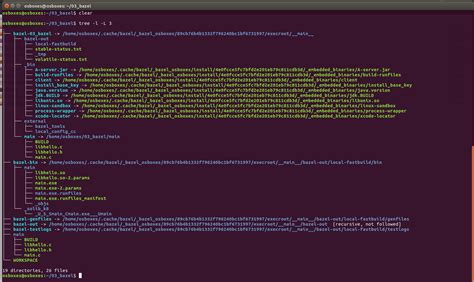
7. Directory Structure and File Organization
Recommended Project Layout
Organizing your project directory effectively can streamline the build process and enhance maintainability. A well-structured project facilitates easier navigation and management of build configurations.
Example Directory Structure
├── WORKSPACE
├── BUILD.bazel
├── go.mod
├── platforms/
│   └── BUILD.bazel
├── toolchains/
│   └── BUILD.bazel
├── src/
│   ├── main.go
│   └── lib/
│       └── lib.go
└── containers/
    └── BUILD.bazel
Explanation of Directories
- platforms/: Contains platform-specific configurations.
- toolchains/: Hosts toolchain configurations for cross-compilation.
- src/: Holds the Go source code organized into packages.
- containers/: Includes BUILD files and configurations related to container image creation.
8. Building and Containerizing
Steps to Build Go Binaries
- Ensure all dependencies are declared in
go.mod. - Run Gazelle to synchronize Bazel build files:
bazel run //:gazelle - Build the Go binary for a specific platform:
bazel build //:mybinary_linux_amd64 --platforms=//platforms:linux_amd64
Steps to Build Container Images
- Define container image targets in the relevant
BUILD.bazelfile. - Build the container image:
bazel build //containers:mycontainer - Push the container image to a registry:
bazel run //containers:mycontainer.push
Cross-Platform Build Commands
# Build for Linux AMD64
bazel build //:mybinary_linux_amd64 --platforms=//platforms:linux_amd64

# Build for Darwin ARM64
bazel build //:mybinary_darwin_arm64 --platforms=//platforms:darwin_arm64

# Build the container image
bazel build //containers:mycontainer
Conclusion
Building cross-platform Go binaries and container images with Bazel involves a meticulous setup of various configuration files. By accurately configuring the WORKSPACE file, defining build targets in BUILD.bazel files, setting up platform configurations, and managing toolchains, you can ensure that your applications are portable and scalable across different environments. Incorporating tools like Gazelle further streamlines the build process, enhancing efficiency and maintainability. Adhering to the best practices outlined in this guide will empower you to leverage Bazel's robust build capabilities for seamless cross-platform development.
References
Last updated January 19, 2025