
Crafting Elegance: Designing a Serene Single-Page Static Homepage
Discover the art of blending soft muted colors and a unique theme for an unforgettable first impression.
A single-page static homepage offers a streamlined, focused experience, guiding visitors through a narrative without the complexity of multi-page navigation. When combined with the understated sophistication of soft, muted colors and a distinct, unique theme, it creates a digital space that is not only visually beautiful but also deeply engaging and memorable. This approach prioritizes clarity, storytelling, and aesthetic harmony, making it ideal for portfolios, personal brands, event pages, or focused business presentations.
Essential Insights
- Muted Palettes Enhance Calmness: Soft, desaturated colors create a serene, sophisticated atmosphere, reducing visual noise and allowing content and theme to shine.
- Single-Page Design Facilitates Storytelling: A linear, scrolling format allows for a controlled narrative flow, guiding users seamlessly through your message or brand story.
- Unique Themes Create Memorability: A distinct concept, woven through visuals and content, sets your page apart and fosters a stronger connection with the visitor.
The Power of Simplicity: Single-Page Design Principles
Single-page websites condense all essential information onto one continuously scrolling page. This format excels at delivering a focused message and creating a cohesive user journey. The beauty lies in its simplicity, but effective execution requires careful planning.
Structuring the Narrative Flow
Logical Sectioning
Divide the page into distinct sections that flow logically from one to the next. Common sections include:
- Hero Section: The crucial first impression, featuring a compelling headline, evocative imagery or subtle background, and a clear value proposition.
- About/Story: Introduce the 'who' or 'why' behind the page, building connection.
- Services/Features/Portfolio: Showcase what you offer or examples of your work. Visual grids or card layouts work well here.
- Testimonials/Social Proof: Build credibility with quotes or endorsements.
- Contact/Call-to-Action (CTA): Provide clear ways to get in touch or take the next step.
- Footer: Essential links, copyright information, and perhaps social media icons.
Intuitive Navigation
Even without multiple pages, navigation is key. Techniques include:
- Sticky Header Navigation: A menu bar that stays fixed at the top as the user scrolls, with links pointing to different sections (#about, #services, etc.).
- Scrollspy: Highlighting the current section's link in the navigation menu as the user scrolls.
- Navigation Dots: A fixed vertical series of dots, often on the side, allowing users to jump between sections (as seen in Answer D's concept).
- Smooth Scrolling: Using CSS (
scroll-behavior: smooth;) or JavaScript to create elegant transitions between sections.
Embracing the Aesthetics of Soft Muted Colors
Muted colors are hues with lower saturation, often mixed with grey, white, or black, resulting in softer, more subdued tones. They are lauded for creating a sense of calm, sophistication, and timelessness. Unlike bright, bold colors that demand attention, muted palettes provide a gentle backdrop that enhances content readability and user focus.
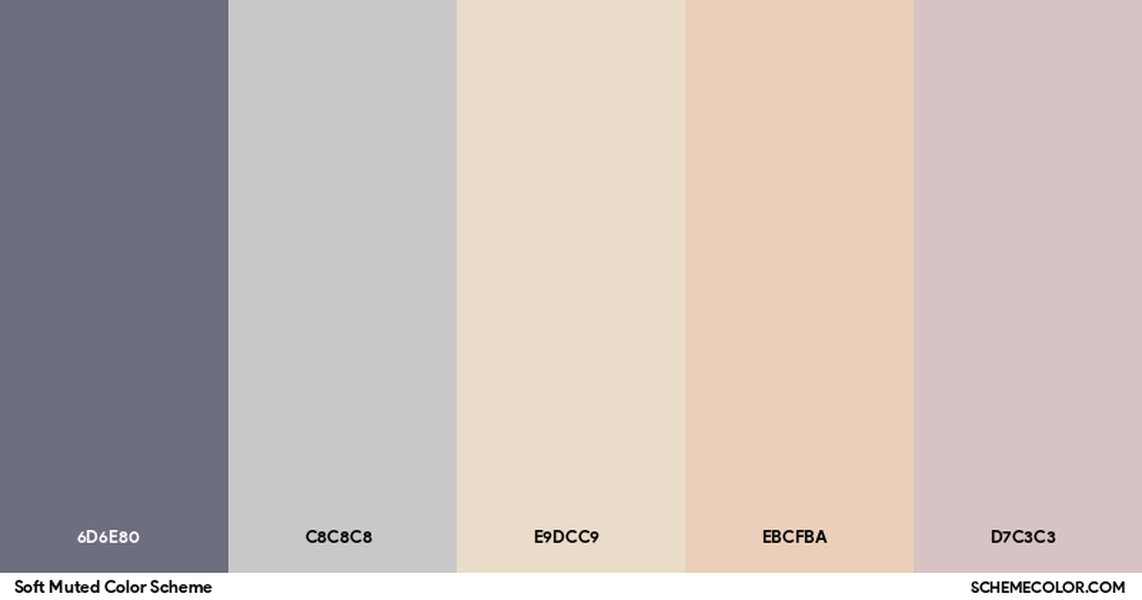
An example palette showcasing soft, muted tones.
Choosing Your Palette
Consider palettes built around soft greys, dusty blues, pale greens, warm beiges, faded pinks (mauve/rose), or earthy browns. Resources like Coolors, Piktochart, and SchemeColor offer excellent starting points. Key considerations:
- Base Color: Often a light, neutral muted tone (like off-white, pale grey, or soft beige) for the background.
- Primary & Secondary Colors: Slightly more dominant muted shades for key elements or section backgrounds.
- Accent Color: A subtly contrasting muted color (or occasionally a slightly brighter, desaturated color) used sparingly for CTAs, links, or highlights to draw attention without disrupting the overall calm.
- Text Color: Ensure sufficient contrast for readability, often a darker grey or muted dark blue/brown instead of harsh black.
Applying Colors Effectively
Use your palette consistently across the page. Backgrounds, text, buttons, icons, and dividers should all adhere to the chosen scheme. Ample white space (or negative space using your light base color) is crucial – it prevents the design from feeling cluttered and allows the muted tones to breathe, enhancing the serene feel.
Crafting a Unique and Memorable Theme
A theme provides a narrative or conceptual anchor for your homepage. It's the underlying idea or story that informs the design choices, imagery, and copy, making the page feel cohesive and distinctive. A unique theme transforms a simple webpage into an experience.
Developing Your Concept
Think about the purpose of the page and its target audience. What feeling do you want to evoke? What story do you want to tell? Inspiration can come from anywhere:
- Nature: Misty forests, calm seascapes, desert dunes, botanical elements (e.g., "Ethereal Nature," "Ephemeral Blooms").
- Art & Craft: Minimalism, artisan processes, specific art movements (e.g., "Serene Studio").
- Abstract Concepts: Tranquility, growth, connection, celestial movements (e.g., "Celestial Tea House").
- Specific Niches: Focusing on a particular product, service, or personal brand identity.
Integrating the Theme Visually
Once you have a theme, infuse it subtly throughout the design:
- Imagery: Select high-quality photos or create custom illustrations that align with the theme. Use desaturated or softly filtered images.
- Iconography: Use custom icons that reflect the theme's style.
- Typography: Choose fonts that match the theme's personality (e.g., elegant serifs for sophistication, clean sans-serifs for minimalism).
- Microinteractions: Subtle hover effects or animations can reinforce the theme (e.g., a gentle fade like blooming flowers for "Ephemeral Blooms").
- Copywriting: Use language and tone that align with the theme's mood and message.
Visualizing the Theme: "Ephemeral Blooms" Concept
Let's visualize a unique theme concept, "Ephemeral Blooms," suitable for a floral designer, artist, or boutique focusing on transient beauty. This mindmap outlines key elements, blending a soft, muted aesthetic with a specific narrative.
Single-Page Homepage"] id1["Theme Concept"] id1a["Focus on transient beauty,
delicate florals, artistry"] id1b["Evokes calmness, elegance,
natural cycles"] id2["Color Palette
(Muted & Soft)"] id2a["Base: Pale Linen (#F5EDE3)"] id2b["Primary: Dusty Rose (#C7A59A)"] id2c["Secondary: Sage Green (#A9B8A8)"] id2d["Accent: Soft Gold (#D4AF37 - used sparingly)"] id2e["Text: Deep Charcoal (#5A5A5A)"] id3["Key Sections"] id3a["Hero: Faded floral macro photo background,
elegant serif headline"] id3b["Our Philosophy: Story of appreciating fleeting moments,
subtle leaf motif dividers"] id3c["Collections/Gallery: Grid of softly lit product/art photos,
hover effect reveals details"] id3d["Process/Artistry: Minimalist icons explaining craft,
muted background sections"] id3e["Contact: Simple form,
gentle Call-to-Action button in Dusty Rose"] id4["Visual Elements"] id4a["Typography: Elegant Serif (e.g., Playfair Display) for headings,
Clean Sans-serif (e.g., Open Sans) for body"] id4b["Imagery: High-quality, desaturated photos of florals/art,
focus on texture and light"] id4c["Icons: Delicate line art icons (leaf, bloom, hand)"] id4d["Interactivity: Subtle fades on scroll, gentle hover zoom on gallery items"] id5["Overall Feel"] id5a["Serene & Sophisticated"] id5b["Artistic & Natural"] id5c["Minimalist yet Warm"]
This mindmap illustrates how the "Ephemeral Blooms" theme translates into specific design choices, ensuring a cohesive and beautiful final result that utilizes soft muted colors effectively.
Comparing Muted Palette Characteristics
Choosing the right muted palette depends on the specific mood and goals of your homepage. Different combinations offer varying levels of calmness, sophistication, and versatility. This radar chart compares hypothetical muted palettes based on key characteristics:
This chart helps visualize how different muted palettes might align with your desired aesthetic. For instance, "Dusty Rose & Earth Tones" scores high on warmth and calmness, while "Stone & Slate Greys" offers more contrast potential and sophistication but less inherent warmth.
Key Design Considerations Summarized
Building a beautiful single-page static homepage requires balancing several key elements. This table summarizes best practices:
| Consideration | Best Practice | Why It Matters |
|---|---|---|
| Layout Flow | Logical vertical sections, clear visual hierarchy, ample whitespace. | Guides the user naturally, prevents clutter, improves readability. |
| Color Application | Consistent use of a chosen muted palette, strategic accent color for CTAs, sufficient text contrast. | Creates visual harmony, maintains calm aesthetic, ensures accessibility. |
| Typography Choice | Legible fonts, pairing complementary styles (e.g., serif/sans-serif), appropriate font sizes for hierarchy. | Enhances readability, reinforces theme, contributes to overall polish. |
| Thematic Integration | Subtly weave theme through imagery, icons, colors, and copy. | Creates a unique, memorable, and cohesive user experience. |
| Interactivity Level | Use subtle CSS transitions/animations (hover, fade-in on scroll) sparingly. Avoid overly complex JS for static sites. | Adds polish and engagement without compromising performance or simplicity. |
| Responsiveness | Ensure the design adapts seamlessly to all screen sizes (desktop, tablet, mobile) using fluid grids and media queries. | Provides a consistent and accessible experience for all users. |
| Performance | Optimize images, minimize code, leverage browser caching. | Ensures fast loading times, crucial for user retention. |
Illustrative Code Snippet: Setting the Tone
While a full implementation depends on the specific theme, here’s a basic HTML structure and CSS snippet demonstrating how to set up a muted color palette using CSS variables for easy management, inspired by the "Serene Studio" concept.
CSS (within <style> tags or a separate file)
/* Define the muted color palette using CSS variables */
:root {
  --bg-light: #F5F5F7;      /* Light Gray Background */
  --bg-section: #E9E4DD;   /* Soft Beige for sections/cards */
  --text-dark: #434559;    /* Dark Gray for body text */
  --text-muted: #7E7F9A;   /* Warm Gray for secondary text */
  --heading-color: #B8A9C9; /* Dusty Mauve for headings */
  --accent-primary: #A6D8C0; /* Muted Green for accents/links */
  --accent-hover: #B799D4;  /* Lighter Mauve/Purple for hover */
  --shadow-color: rgba(0, 0, 0, 0.05); /* Subtle shadow */

  --font-primary: 'Open Sans', sans-serif;
  --font-headings: 'Playfair Display', serif;
}

/* Apply base styles */
body {
  font-family: var(--font-primary);
  background-color: var(--bg-light);
  color: var(--text-dark);
  line-height: 1.6;
  margin: 0;
  padding: 0;
  scroll-behavior: smooth; /* Enable smooth scrolling for anchor links */
}

/* Example Section Styling */
section {
  padding: 4rem 2rem;
  max-width: 900px;
  margin: 0 auto; /* Center content */
}

section h2 {
  font-family: var(--font-headings);
  color: var(--heading-color);
  font-size: 2.2rem;
  margin-bottom: 1.5rem;
  border-bottom: 2px solid var(--accent-primary);
  display: inline-block;
  padding-bottom: 0.5rem;
}

p {
  color: var(--text-muted);
  font-size: 1.1rem;
  margin-bottom: 1rem;
}

/* Example Card Styling */
.card {
  background-color: var(--bg-section);
  padding: 2rem;
  border-radius: 10px;
  box-shadow: 0 5px 15px var(--shadow-color);
  margin-bottom: 2rem;
}

/* Example Button Styling */
.button {
  display: inline-block;
  padding: 0.8rem 1.5rem;
  background-color: var(--accent-primary);
  color: white;
  text-decoration: none;
  border-radius: 8px;
  font-weight: 600;
  transition: background-color 0.3s ease;
}

.button:hover {
  background-color: var(--accent-hover);
}
HTML (Basic Structure)
<!DOCTYPE html>
<html lang="en">
<head>
    <meta charset="UTF-8">
    <meta name="viewport" content="width=device-width, initial-scale=1.0">
    <title>[Your Unique Theme Name]</title>
    <link rel="stylesheet" href="styles.css"> <!-- Link to your CSS file -->
    <!-- Add Google Font links if needed -->
    <link href="https://fonts.googleapis.com/css2?family=Playfair+Display&family=Open+Sans&display=swap" rel="stylesheet">
</head>
<body>

    <header id="home">
        <!-- Navigation Menu Here (Optional Sticky Nav) -->
        <div class="hero-content">
            <h1>Your Compelling Headline</h1>
            <p>Engaging tagline related to your theme.</p>
            <a href="#contact" class="button">Get Started</a>
        </div>
    </header>

    <section id="about">
        <h2>About Us / Our Story</h2>
        <p>Details about your brand, philosophy, or the story behind the page.</p>
        <div class="card">
            <h3>A Section within About</h3>
            <p>More specific information.</p>
        </div>
    </section>

    <section id="services">
        <h2>Services / Features</h2>
        <!-- Use cards or grids to display services -->
    </section>

    <section id="portfolio">
        <h2>Portfolio / Gallery</h2>
        <!-- Image grid or carousel -->
        <img src="https://storage.googleapis.com/e-object-409003.firebasestorage.app/beautiful-single-page-static-homepage-pmdwz2r4-1.jpg" alt="Portfolio example image - muted landscape" style="width: 100%; height: auto">
        <p style="text-align: center; font-style: italic;">Example of imagery suitable for a muted theme.</p>
    </section>

    <section id="contact">
        <h2>Contact Us</h2>
        <!-- Contact form or details -->
    </section>

    <footer>
        <p>© 2025 [Your Name/Brand]. All rights reserved.</p>
    </footer>

</body>
</html>
This snippet provides a foundational structure. Remember to replace placeholder text and content with your own, tailored to your unique theme and utilizing the defined muted color variables for consistency.
Homepage Design Insights Video
Understanding the core principles of effective homepage design is crucial, even for a single-page site. This video offers valuable insights into creating layouts and elements that capture attention and guide users effectively, complementing the specific advice on muted palettes and unique themes.
The video covers aspects like layout structure, calls to action, and visual hierarchy, which are fundamental to designing a homepage that is not just beautiful but also functional and achieves its goals.
Frequently Asked Questions (FAQ)
What makes a single-page website effective?
Single-page websites excel at presenting a focused narrative or a limited amount of content in a linear, easy-to-digest format. They simplify navigation, making it ideal for portfolios, event pages, product launches, or small businesses with a clear, concise message. The uninterrupted scrolling experience can be highly engaging and guide users directly towards a specific call to action.
Are muted colors good for all types of websites?
Muted colors are excellent for creating sophisticated, calm, and professional aesthetics. They work well for brands emphasizing elegance, wellness, nature, artistry, or minimalism. However, they might be less suitable for websites aiming for high energy, excitement, or targeting very young audiences, where brighter, bolder colors might be more effective at capturing attention and conveying vibrancy.
What are the technical limitations of a static single-page site?
Static sites are built purely with HTML, CSS, and client-side JavaScript. They don't have server-side processing or databases. This means they generally can't handle user accounts, complex e-commerce backends (though simple integrations are possible), or dynamically generated content based on user input without relying on third-party services or APIs. They are best suited for content that doesn't change frequently.
How important is mobile responsiveness for a single-page design?
Mobile responsiveness is extremely important. A significant portion of web traffic comes from mobile devices. A single-page site must adapt gracefully to smaller screens, ensuring text is readable, images scale correctly, navigation remains usable (often collapsing into a 'hamburger' menu), and scrolling is smooth. Failure to optimize for mobile leads to a poor user experience and can negatively impact search engine rankings.
Can I add interactivity to a static page?
Yes, absolutely. While static pages don't have server-side dynamic features, you can add significant interactivity using CSS (like hover effects, transitions, animations) and JavaScript (for things like image sliders, form validation, interactive elements triggered by scrolling, fetching data from external APIs, or smooth scrolling navigation). Libraries like Intersection Observer (used in Answer B's example) allow for animations triggered as elements enter the viewport.
Recommended Further Exploration
- Explore advanced CSS techniques for subtle animations on static pages.
- Discover tools for generating harmonious muted color palettes.
- Learn about optimizing images for fast-loading static websites.
- Find inspiration from award-winning single-page website designs.
References

 themes.shopify.com
 squarespace.com
Last updated May 4, 2025