
Unlocking Sonic Precision: The Best Free Parametric EQ Software for Your PC
Discover top-tier tools for precise audio shaping and enhancement on Windows.
Key Highlights in Free Parametric EQ Software
- Equalizer APO: A powerhouse for system-wide equalization on Windows, offering extensive parametric control and compatibility with other tools like Peace GUI for enhanced usability.
- TDR Nova: A highly versatile and free dynamic EQ that functions as a parametric EQ, multi-band compressor, and de-esser, making it a go-to for mixing and mastering.
- MEqualizer: Part of MeldaProduction's freeware bundle, this tool provides a feature-rich 6-band parametric EQ, known for its pristine sound quality and low CPU usage.
Equalization (EQ) is a fundamental process in audio production, allowing users to adjust the balance of audible frequency components within an audio signal. It's an indispensable tool for shaping sound, addressing problematic frequencies, and enhancing the clarity and impact of your audio. For PC users, a wide array of free parametric EQ software is available, providing professional-grade capabilities without the hefty price tag. Parametric EQs are particularly powerful because they offer full customization over each frequency band, allowing precise control over filter type, center frequency, bandwidth (Q factor), and gain (boost/cut).
Understanding Parametric EQ and Its Significance
The Power of Precise Frequency Control
Unlike graphic EQs which have fixed frequency bands, parametric EQs offer unparalleled flexibility. Each band in a parametric equalizer can be adjusted independently across several parameters:
- Frequency: Determines the center frequency of the band being adjusted.
- Gain (Boost/Cut): Controls how much the selected frequency is amplified or attenuated.
- Q Factor (Bandwidth): Dictates the width of the frequency band affected. A higher Q value means a narrower, more surgical adjustment, while a lower Q value affects a broader range of frequencies.
This level of control makes parametric EQs ideal for both corrective tasks, such as removing resonances or muddiness, and creative shaping, like enhancing the presence of an instrument or adding warmth to a vocal. Many modern parametric EQs also offer visual feedback through spectrum analyzers, allowing users to see the frequency changes in real-time, which can greatly aid in precise adjustments.
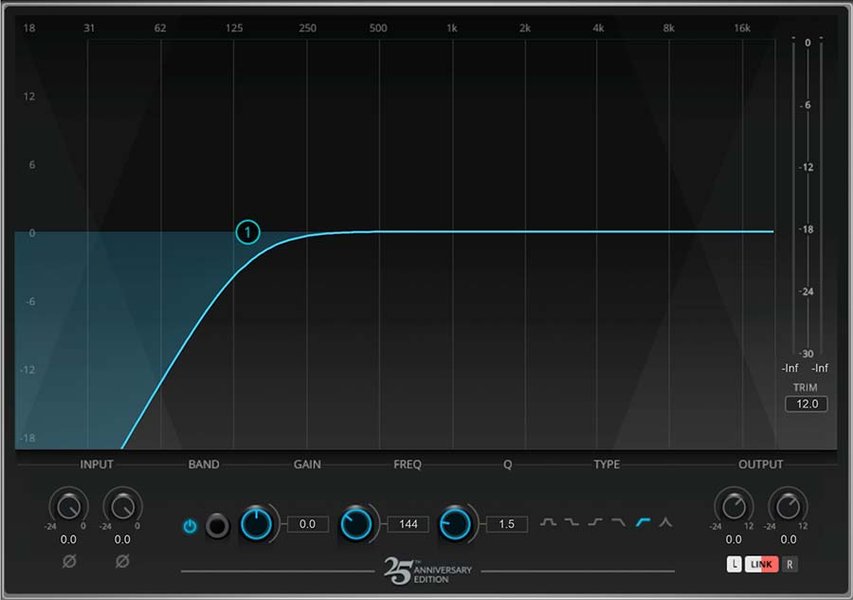
A parametric EQ interface with adjustable parameters for precise frequency shaping.
Top Free Parametric EQ Software for PC
Comprehensive Tools for Every Audio Need
The landscape of free EQ plugins for PC is rich with powerful options that can rival their paid counterparts. These tools cater to a range of applications, from system-wide audio enhancement to professional music mixing and mastering.
Equalizer APO: The System-Wide Champion
Equalizer APO stands out as a premier open-source, system-wide parametric/graphic equalizer for Windows (supporting Windows 7 through 11). Its low latency and extensive feature set make it a top choice for audiophiles and casual users alike. It allows for precise adjustments across various frequency bands and can be configured for numerous audio devices. While it initially lacked a graphical user interface (GUI), complementary interfaces like Peace Equalizer and AQUA provide a more intuitive visual experience.
Equalizer APO also supports VST plugin integration, expanding its capabilities significantly. It can read filter text files from tools like Room EQ Wizard, making it invaluable for room correction and advanced audio calibration. Its open-source nature means it's continuously updated and improved by a community of developers, ensuring its longevity and relevance.

Graphic EQ, a simpler form of equalization often compared to parametric EQs.
TDR Nova: The Dynamic EQ Workhorse
TDR Nova by Tokyo Dawn Records is highly regarded as a versatile and free dynamic EQ. It effectively functions as a fully featured parametric EQ, a multi-band compressor, and even a de-esser. Its transparent sound and intuitive interface make it suitable for both mixing and mastering tasks. Nova offers four fully dynamic EQ bands, each capable of functioning as a peak or shelf filter, providing immense flexibility for shaping audio and addressing dynamic frequency issues. Many users find its spectrum analyzer to be very similar to premium EQs like FabFilter Pro-Q 3, offering excellent visual feedback.
MeldaProduction MEqualizer: Feature-Rich and Efficient
As part of MeldaProduction’s extensive freeware bundle, MEqualizer is a robust 6-band parametric EQ. It is celebrated for its pristine sound quality, low CPU usage, and lack of latency, making it an excellent choice for everyday use in digital audio workstations (DAWs). MEqualizer offers a wide range of presets and a unique "Areas" feature that labels different sections of the frequency spectrum with instrument names, simplifying the EQ process for beginners and seasoned producers alike.
Blue Cat's Triple EQ: Simple and Versatile
Blue Cat's Triple EQ is a semi-parametric 3-band equalizer known for its simplicity and versatility. It offers low-shelf and high-shelf filters, a boost/cut peak filter, and wide gain and bandwidth ranges. It can be controlled like a single filter, offering customizable shapes. This plugin is useful for general tone shaping and can be particularly effective for adjusting the volume and sense of space within tracks.
Analog Obsession Plugins: Vintage Character for Free
Analog Obsession offers a collection of free analog-modeled plugins, many of which include excellent EQ emulations. Examples include SSQ (SSL console EQ), Frank, and FIVER. These plugins are praised for bringing a vintage, analog warmth and character to mixes, often replicating the sound of classic hardware. While not strictly parametric in all cases, their semi-parametric designs and unique characteristics provide excellent tonal sculpting capabilities.
Key Features to Look For in Free Parametric EQs
When selecting a free parametric EQ, consider the following features to ensure it meets your audio processing needs:
- Number of Bands: More bands offer finer control over the frequency spectrum.
- Filter Types: Look for various filter types like bell, shelf (low/high), and pass filters (low-pass, high-pass, band-pass, notch-pass).
- Visual Feedback: A built-in spectrum analyzer or frequency curve display helps in making informed decisions.
- Dynamic EQ Capabilities: Some parametric EQs offer dynamic functions, acting like a frequency-dependent compressor.
- CPU Usage and Latency: Low CPU usage is crucial for running multiple instances, especially in complex mixes, and low latency is vital for real-time monitoring.
- Presets: Pre-designed settings can be great starting points or quick solutions for common audio issues.
- Compatibility: Ensure the plugin is compatible with your operating system (Windows, macOS, Linux) and your DAW (VST, AU, AAX).
Comparing Top Free Parametric EQs
To help illustrate the strengths of these popular free parametric EQ options, here's a comparison based on their typical performance and features:
This radar chart provides a subjective comparison of three highly-rated free parametric EQ options. Equalizer APO excels in overall versatility and precision, particularly for system-wide application, though its default interface might be less intuitive. TDR Nova shines in its dynamic capabilities and visual feedback, making it excellent for detailed mixing and mastering. MEqualizer is a strong performer in CPU efficiency and offers good versatility for a standard parametric EQ, with a user-friendly approach thanks to its preset and "Areas" features.
Practical Applications and Workflow
Integrating Free EQs into Your Audio Workflow
Whether you are producing music, enhancing audio for video, or simply optimizing your listening experience on PC, free parametric EQ software offers immense value. Here’s how these tools fit into different workflows:
System-Wide Audio Enhancement
For general PC audio, Equalizer APO with a GUI like Peace or AQUA is indispensable. It allows you to apply custom EQ settings to all audio output from your computer, perfect for correcting headphone frequency responses, improving speaker sound, or tailoring audio for gaming and multimedia consumption. This system-wide application ensures a consistent and enhanced listening experience across all applications.
This video explains how to use Equalizer APO and its Peace user interface to customize your sound on Windows. It demonstrates the setup and benefits of system-wide equalization, which is a core function of parametric EQs for general PC audio enhancement.
Music Production and Mixing
In a Digital Audio Workstation (DAW) environment, VST/AU/AAX compatible parametric EQs like TDR Nova and MEqualizer are crucial for mixing and mastering. You can use them to:
- Corrective EQ: Remove unwanted resonances, harshness, or muddiness from individual tracks. For instance, you might use a narrow Q to cut a ringing frequency in a snare drum or a low-pass filter to clean up rumble in a vocal track.
- Surgical EQ: Precisely carve out space for different instruments in a mix to prevent frequency masking.
- Enhancement: Boost desired frequencies to add clarity, warmth, or punch to elements. For example, adding a high-shelf boost to vocals for "air" or a low-mid boost to a bass guitar for body.
- Dynamic EQ: Use dynamic EQ features (like in TDR Nova) to address frequency issues that only occur at certain volume levels, such as taming harsh sibilance in a vocal performance.
Considerations for Optimal Use
While free parametric EQs are powerful, a few considerations can help you get the most out of them:
- Listen Critically: Always rely on your ears. Visualizers are helpful, but they shouldn't dictate all your decisions.
- Subtractive EQ First: Often, cutting problematic frequencies is more effective than boosting desired ones, leading to a cleaner mix.
- Less is More: Small, precise adjustments can often achieve better results than drastic changes.
- Room Acoustics: For critical listening or mixing, consider your room acoustics. Even the best EQ cannot fully compensate for poor room treatment. Tools like Room EQ Wizard (REW) can be used in conjunction with Equalizer APO for advanced room correction.
Summary of Top Free Parametric EQ Software
This table provides a concise overview of the leading free parametric EQ software discussed, highlighting their primary strengths and typical use cases.
| Software Name | Primary Strength | Key Features | Typical Use Case | Compatibility |
|---|---|---|---|---|
| Equalizer APO | System-wide audio control, high precision | Parametric/graphic EQ, VST support, low latency, open-source | System-wide audio enhancement, headphone/speaker correction, gaming | Windows (7, 8, 10, 11) |
| TDR Nova | Dynamic EQ capabilities, versatility | Dynamic EQ, parametric EQ, multi-band compressor, de-esser, transparent sound, visual analyzer | Mixing, mastering, sound design, vocal processing | Windows, macOS (VST2, VST3, AU, AAX) |
| MeldaProduction MEqualizer | Low CPU usage, pristine sound | 6-band parametric EQ, "Areas" feature, presets, low latency | General mixing, precise tone shaping, daily DAW use | Windows, macOS (VST, VST3, AU, AAX) |
| Blue Cat's Triple EQ | Simplicity, semi-parametric control | 3-band semi-parametric EQ, low/high shelf, peak filter, wide gain/bandwidth | Basic tone shaping, quick adjustments, beginner-friendly | Windows, macOS (VST, VST3, AU, AAX) |
| Analog Obsession (Various) | Analog character and warmth | Vintage emulations, diverse EQ types (console, graphic, etc.) | Adding character to mixes, mastering, specific instrument processing | Windows, macOS (VST, AU, AAX) |
Frequently Asked Questions
What is the difference between parametric and graphic EQ?
Can I use these free EQs for professional music production?
Do free EQ plugins consume a lot of CPU?
What are VST, AU, and AAX formats?
Recommended Further Exploration
- How to use dynamic EQ in mixing for better results.
- Explore advanced Equalizer APO configurations for audiophiles.
- Learn best practices for EQing vocals in music production.
- Understand the differences between linear-phase and minimum-phase EQ.
References
Last updated May 21, 2025