
Unlock Precision: Which Laser Engraver Type Reigns Supreme for Your Needs?
Navigate the world of laser engraving technology and discover the perfect match for your projects, materials, and budget in 2025.
Choosing the "best" laser engraver isn't a one-size-fits-all decision. The ideal machine hinges entirely on what you plan to create, the materials you'll work with, your budget, and the level of detail and speed you require. As of May 2025, laser engraving technology offers several distinct types, each excelling in different areas. Understanding these differences is key to making an informed investment.
Key Takeaways: Choosing Your Laser Engraver
- Material Matters Most: The type of material you intend to engrave or cut (wood, acrylic, metal, glass) is the primary factor determining the best laser source (Diode, CO2, Fiber, UV).
- Budget vs. Capability: Diode lasers offer affordability for beginners and hobbyists, CO2 lasers provide versatility for small businesses, while Fiber lasers deliver high power for industrial metalwork, each with corresponding price points.
- Power, Speed, and Precision: Higher wattage generally means faster cutting and engraving on thicker materials, but different laser types offer varying levels of precision crucial for detailed work.
Decoding Laser Engraver Technologies: A 2025 Overview
Laser engravers are primarily categorized by the source generating the laser beam. Each source has unique characteristics impacting its performance on different materials.
Diode Laser Engravers: The Accessible Starting Point
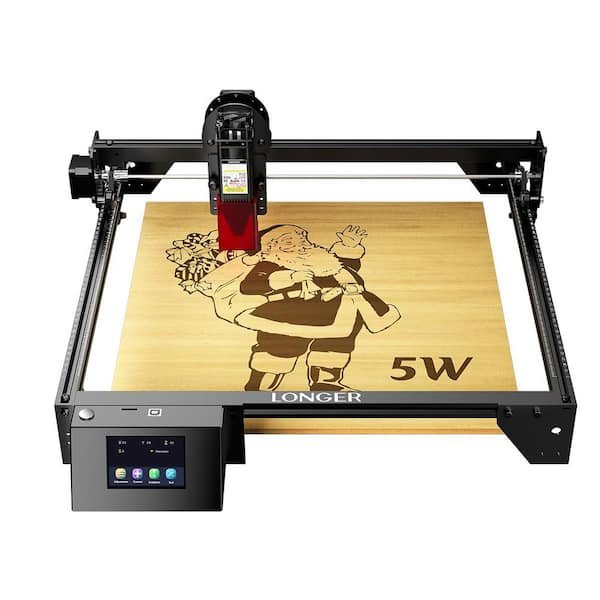
A typical diode laser engraver, often featuring an open frame or optional enclosure.
Best For:
Beginners, hobbyists, and small businesses operating on a tighter budget. Ideal for users focusing on lighter materials.
Materials:
Excels at engraving and cutting thinner pieces of wood, opaque acrylic, leather, paper, fabric, cardboard, and some plastics. Can mark certain coated metals or require specific addons (like infrared modules) for limited metal engraving.
Power & Performance:
Typically range from 5W to 40W. Newer models boast higher speeds (up to 24,000 mm/min) and improved accuracy. While powerful for their class, they generally lack the cutting depth of CO2 or fiber lasers, especially on thicker or denser materials.
Pros:
- Affordability: Generally the most budget-friendly option.
- Ease of Use: Often feature user-friendly software and simpler setup (sometimes plug-and-play).
- Compact Size: Many models are desktop-friendly or even portable.
- Low Maintenance: Diode modules tend to have long lifespans.
Cons:
- Limited power for thick cutting or dense materials.
- Struggles with clear acrylic and cannot effectively engrave most bare metals without specialized modules or coatings.
- Open-frame designs may require additional safety precautions (enclosures, laser safety glasses).
Notable Models (2025):
xTool S1 (enclosed, beginner-friendly), Sculpfun SF-A9 (high power options), xTool D1 Pro, Creality Falcon2.
CO2 Laser Engravers: The Versatile Workhorse
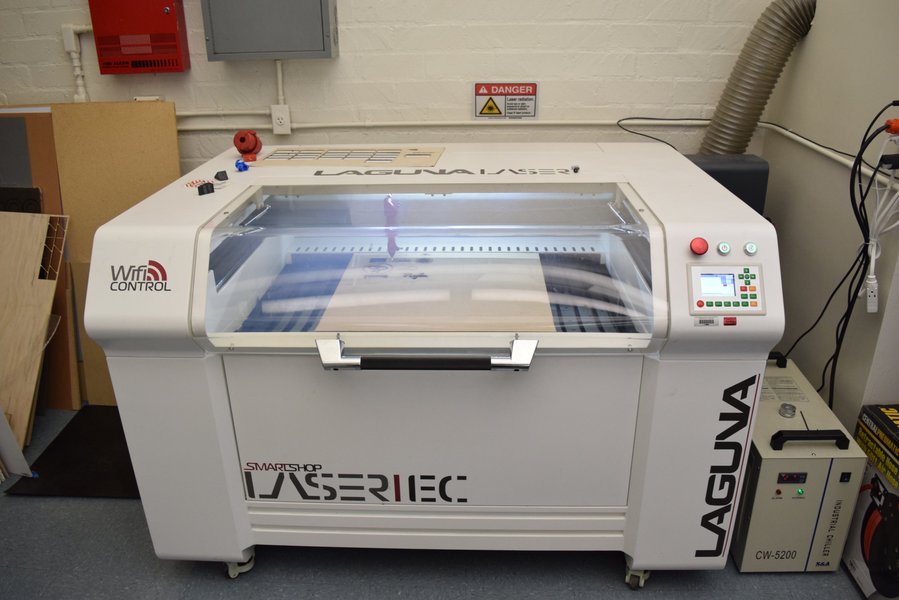
CO2 laser systems are often larger, enclosed units suitable for workshops.
Best For:
Small businesses, makerspaces, educational institutions, and serious hobbyists needing versatility across a wide range of non-metal materials.
Materials:
Excellent for cutting and engraving wood, acrylic (including clear), glass, leather, fabric, rubber, paper, stone, and ceramics. Can mark coated metals or bare metals when used with marking sprays/pastes.
Power & Performance:
Typically range from 30W to 150W or higher. Offer high speeds (e.g., up to 600 mm/s) and can cut thicker materials (e.g., 20mm wood) compared to diode lasers. Known for high precision engraving.
Pros:
- High Versatility: Handles the widest range of organic materials effectively.
- Power and Speed: Capable of faster and deeper cuts than most diode lasers.
- Excellent Engraving Quality: Produces fine details on various surfaces.
Cons:
- Higher cost compared to diode lasers (average budget models around $3,680 in 2025).
- Larger footprint and requires more space.
- Needs adequate ventilation/fume extraction and often water cooling for the laser tube.
Notable Models (2025):
xTool P2 (often cited as best overall), Glowforge Aura / Pro, Epilog Laser (high-end professional), Trotec (premium industrial).
Fiber Laser Engravers: The Metal Marking Specialist
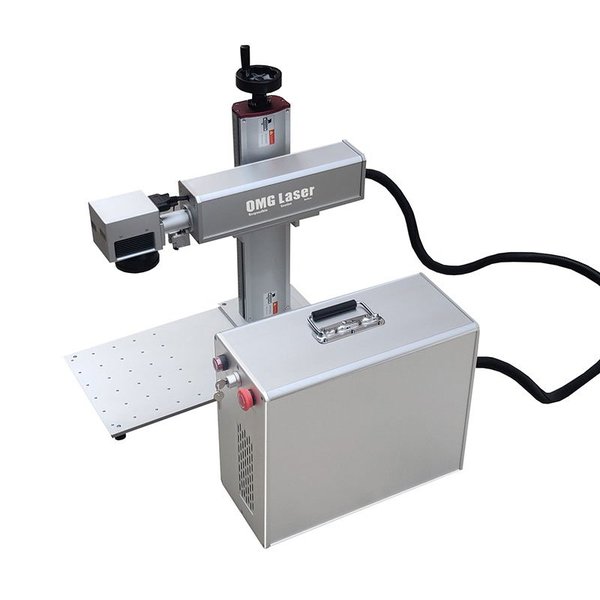
Fiber lasers are typically used for high-precision marking on metals and some plastics.
Best For:
Industrial applications, businesses focusing on metal products, jewelry marking, tool marking, firearm engraving, and permanent marking on plastics.
Materials:
Primarily metals (stainless steel, aluminum, brass, titanium, gold, silver, etc.) and certain plastics (polymers, carbon fiber). Not suitable for most organic materials like wood or clear glass.
Power & Performance:
Range from 10W to 100W or more. Deliver extremely high precision and speed for marking and deep engraving on metals. The laser beam wavelength is optimized for metal absorption.
Pros:
- Superior Metal Performance: Unmatched for engraving and marking metals.
- High Speed and Precision: Ideal for industrial marking and intricate designs.
- Durability & Low Maintenance: Fiber laser sources have very long lifespans (often 100,000+ hours) with minimal upkeep.
Cons:
- Significantly higher cost (average affordable models around $5,060 in 2025, specialized units up to $20,000+).
- Limited versatility – primarily for metals and specific plastics.
- Often requires more specialized knowledge for optimal operation.
Notable Brands/Types:
Often sold as specialized marking stations (e.g., for gun stippling) or integrated into industrial systems. Brands like Epilog, Trotec, and STYLECNC offer fiber options. xTool F1 combines diode and infrared (similar principle to fiber for some tasks) in one unit.
UV Laser Engravers: The Delicate Materials Expert
Best For:
Highly specialized applications involving delicate, heat-sensitive materials where minimal thermal damage is crucial.
Materials:
Glass, certain plastics, ceramics, crystals, silicon wafers, and other materials susceptible to heat stress. Excellent for fine marking on electronics or medical devices.
Power & Performance:
Typically lower power (e.g., 3W to 20W) but uses a shorter wavelength (UV) that allows for "cold marking," minimizing heat affected zones.
Pros:
- Minimal Heat Damage: Ideal for heat-sensitive materials.
- High Precision: Capable of extremely fine and detailed marking.
- Marks a wide range of materials that other lasers struggle with without damage.
Cons:
- High cost, often comparable to or exceeding fiber lasers.
- Generally slower process compared to other laser types for bulk engraving.
- Niche applications – not a general-purpose engraver.
Comparative Analysis of Laser Engraver Types
To visualize the strengths and weaknesses of each laser type across key attributes, consider the following radar chart. Scores are based on typical performance characteristics, where 10 represents the highest performance or suitability for that attribute.
This chart highlights the trade-offs: Diode lasers lead in affordability and ease of use but lag in metal engraving. CO2 lasers offer the best non-metal versatility. Fiber lasers dominate metal engraving and precision but are less affordable and versatile. UV lasers excel in precision on delicate materials but have narrower applications and lower speed.
Navigating Your Choice: A Decision Mindmap
Choosing the right laser engraver involves considering several interconnected factors. This mindmap illustrates a typical thought process:
(Hobby, Business, Industrial)"] id1b["Scale & Volume?"] id1c["Required Precision & Detail?"] id2["Material Focus"] id2a["Wood, Acrylic, Leather, Paper?
(Organics)"] id2a1["--> Diode Laser (Budget/Beginner)"] id2a2["--> CO2 Laser (Versatility/Power)"] id2b["Metals?"] id2b1["--> Fiber Laser (Primary Choice)"] id2b2["--> CO2 Laser + Marking Spray"] id2b3["--> Diode Laser (Limited/IR Module)"] id2c["Glass, Ceramics, Delicate Plastics?"] id2c1["--> UV Laser (Precision/Cold Mark)"] id2c2["--> CO2 Laser (Good Results)"] id2d["Mixed Materials?"] id2d1["--> CO2 Laser (Most Versatile)"] id2d2["--> High-Power Diode (Good Range)"] id3["Budget"] id3a["<$1,000 (Hobbyist)"] id3a1["--> Diode Laser"] id3b["$1,000 - $5,000 (Prosumer/Small Biz)"] id3b1["--> High-Power Diode"] id3b2["--> Entry/Mid CO2 Laser"] id3c[">$5,000 (Professional/Industrial)"] id3c1["--> High-End CO2 Laser"] id3c2["--> Fiber Laser"] id3c3["--> UV Laser"] id4["Key Features"] id4a["Power (Wattage)"] id4b["Speed (Engraving/Cutting)"] id4c["Work Area Size"] id4d["Software & Usability"] id4e["Safety Features (Enclosure, Filtration)"] id4f["Accessories (Rotary, Feeder)"] id5["Compare Models & Brands"] id5a["xTool (P2, S1, D1, F1)"] id5b["Sculpfun (SF-A9)"] id5c["Glowforge (Aura, Pro)"] id5d["Epilog, Trotec (Professional)"] id5e["Others (Creality, Atomstack, etc.)"] id6["Final Selection"]
Start by defining your core needs and primary materials. This will guide you towards the most suitable laser type. Then, factor in your budget and desired features to narrow down specific models.
Feature Comparison Table
Here's a summary table comparing the main laser engraver types based on common criteria:
| Feature | Diode Laser | CO2 Laser | Fiber Laser | UV Laser |
|---|---|---|---|---|
| Primary Use | Hobbyists, Beginners, Light Non-Metal Work | Versatile Cutting/Engraving, Small Business, Education | Industrial Metal Marking, Deep Engraving | Fine Marking on Delicate/Heat-Sensitive Materials |
| Best Materials | Wood, Leather, Paper, Opaque Acrylic, Fabric | Wood, Acrylic (All Types), Glass, Leather, Fabric, Rubber, Stone | Metals (All Types), Some Plastics | Glass, Plastics, Ceramics, Silicon, Delicate Items |
| Pros | Affordable, Compact, Easy to Use, Low Maintenance | Highly Versatile, Good Power/Speed, Excellent Engraving Quality | Superior Metal Performance, Fast, Precise, Durable Source | Minimal Heat Damage, High Precision, Marks Difficult Materials |
| Cons | Limited Power, Poor on Metals/Clear Acrylic | Higher Cost, Larger Size, Needs Cooling/Ventilation | Very High Cost, Limited Non-Metal Use | High Cost, Slower Process, Niche Use |
| Approx. Price Range (2025) | $200 - $2,000+ | $2,000 - $15,000+ (Avg. Budget: ~$3,680) | $3,000 - $20,000+ (Avg. Affordable: ~$5,060) | $5,000 - $25,000+ |
Factors Driving Your Decision
Beyond the laser type, several factors influence the best choice for your specific situation:
- Purpose & Project Scale: Are you creating small crafts or large signage? Occasional hobby use or high-volume production? This impacts required work area size and speed.
- Power vs. Precision: Higher wattage cuts faster and deeper but may not always be best for fine engraving detail. Consider the balance needed for your typical projects.
- Work Area Size: Ensure the machine's bed size accommodates your largest planned projects. Some offer passthrough slots for longer materials.
- Software & Ease of Use: Look for intuitive software compatible with common design file formats (SVG, DXF, JPG, PNG). Features like autofocus, camera previews (like xTool P2's dual cameras), and AI assistance can significantly improve workflow.
- Safety Features: Essential, especially for home use. Look for enclosed designs (Class 1 safety rating), emergency stop buttons, flame detection sensors, lid sensors, and air filtration/exhaust systems.
- Accessories & Upgradability: Consider future needs. Rotary attachments allow engraving on cylindrical objects (tumblers, glasses). Air assist improves cutting quality. Some diode lasers allow power module upgrades. Conveyor feeders enable batch processing.
- Budget: Prices range dramatically. Factor in the initial cost, potential accessories, consumables (like CO2 laser tubes eventually need replacing), and maintenance.
- Brand Reputation & Support: Established brands often offer better customer support, warranties, and community resources.
Video Insights: Choosing Your Engraver
Making the right investment requires careful consideration. This video discusses common pitfalls and key factors to weigh before purchasing a laser cutter and engraver in 2025, offering valuable perspectives for potential buyers.
Frequently Asked Questions (FAQ)
What's the best type of laser engraver for a beginner? +
Diode laser engravers are generally considered the best type for beginners. They are typically the most affordable, easiest to set up and operate, and often come with user-friendly software. Models like the xTool S1 or Sculpfun SF-A9 are frequently recommended due to their balance of performance, safety features (especially enclosed models like the S1), and accessible price point for hobbyists starting out.
Which laser engraver type is best for metal? +
Fiber laser engravers are definitively the best type for engraving and marking directly onto most bare metals (steel, aluminum, titanium, brass, precious metals, etc.). They offer high speed, precision, and permanence. While CO2 lasers can mark metals using marking sprays, and some high-power diode lasers with infrared modules can achieve limited metal marking, fiber lasers provide superior results and efficiency for dedicated metalwork.
Do I need a CO2 laser, or is a powerful diode laser enough? +
It depends on your primary materials and tasks. If you mainly work with wood, leather, fabric, paper, and opaque acrylic, a high-power diode laser (20W-40W) might be sufficient and more budget-friendly. However, if you need to cut thicker materials reliably (especially wood >10mm), work extensively with clear acrylic, engrave glass effectively, or require maximum versatility across non-metals, a CO2 laser (like the xTool P2) is generally the better investment due to its power and beam characteristics.
What safety features are most important? +
Key safety features include:
- Enclosure: Fully enclosed machines (Class 1 rating) are safest as they contain the laser beam and fumes.
- Laser Safety Glasses: Essential for open-frame models, rated for the specific wavelength of your laser.
- Lid Sensor: Automatically stops the laser if the lid is opened during operation.
- Emergency Stop Button: Allows immediate shutdown in case of problems.
- Flame Detection Sensor: Alerts you or stops the machine if the material catches fire.
- Air Filtration/Exhaust System: Crucial for removing potentially harmful fumes and smoke generated during engraving/cutting.
Recommended Reading
- Explore the detailed differences and use cases comparing Diode and CO2 laser technologies.
- Discover which laser engravers are top-rated for small business applications this year.
- Learn more about the capabilities and applications of fiber lasers specifically for metal engraving.
- Understand the essential safety measures and setup requirements for operating a laser engraver at home or work.
References
Last updated May 4, 2025