
Unlock the Secrets to Building Your Own Mahjong Scoring App on iOS with React Native!
A step-by-step guide to creating a sleek, functional score tracker for Mahjong enthusiasts.
Developing a dedicated iOS application for tracking Mahjong scores using React Native is not only achievable but also a practical way to leverage modern development tools. React Native allows for efficient cross-platform development, meaning you can build for iOS now and potentially expand to Android later with significant code reuse. Several existing apps and open-source projects demonstrate that this is a well-trodden path, offering valuable insights and proof of concept.
Essential Insights
- React Native Feasibility: Creating an iOS Mahjong scoring app with React Native is highly viable, leveraging its cross-platform capabilities and JavaScript ecosystem.
- Core Functionality: Key features include real-time score input, support for various Mahjong rule sets (like Riichi, MCR, American), round tracking, and persistent game history.
- Development Roadmap: Building the app involves setting up the environment, designing the UI, implementing complex scoring logic, managing state, handling data storage, and thorough testing.
Why Choose React Native for Your Mahjong App?
React Native stands out as an excellent choice for this project due to several factors:
- Cross-Platform Development: Write your code primarily in JavaScript and deploy natively to both iOS and Android, saving time and resources.
- Large Community & Ecosystem: Benefit from a vast collection of libraries, tools, and community support to accelerate development.
- Fast Development Cycles: Features like Fast Refresh allow you to see changes instantly, speeding up the iteration process.
- Native Performance: React Native components compile to native platform equivalents, ensuring a smooth and responsive user experience akin to apps built purely with Swift or Objective-C.
Planning Your Mahjong Score Tracker: Core Features
A successful Mahjong scoring app needs a solid foundation of features. Consider incorporating the following:
Essential Functionality
- Player Management: Allow users to add, name, and manage up to four players for a standard game.
- Real-time Score Input: Provide an intuitive interface for entering scores after each hand or round. This could involve selecting the winner, the loser(s) involved in payment, and the hand's value or specific scoring elements (like *fu* and *han* in Riichi).
- Rule Set Support: Mahjong scoring varies significantly. Offer support for popular rule sets (e.g., Riichi, MCR, Hong Kong, American, Chinese Classical) or allow users to define custom rules.
- Round and Wind Tracking: Keep track of the current round number, prevailing wind, and dealer (East player) rotation.
- Live Scoreboard: Display the current scores for all players clearly and update them in real-time.
- Game History & Session Saving: Allow users to save the current game state and review past games or rounds.
User Experience Enhancements
- Intuitive User Interface (UI): Design a clean, visually appealing interface that is easy to navigate, even during a fast-paced game. Consider using visual aids like tile images.
- Input Validation: Prevent incorrect score entries by validating user inputs.
- Customization: Allow users to customize settings like starting scores, rule variations, or interface themes.
Potential Advanced Features
- AI-Assisted Scoring: Implement hand recognition via the camera to automatically calculate scores (a complex but powerful feature).
- Statistical Analysis: Provide insights into player performance over multiple games.
- Shanten Calculator: Help players determine how many tiles away they are from a winning hand.
- Multiplayer Syncing: Allow scores to be shared or synced across devices (requires backend infrastructure).
Development Steps: From Concept to App Store
Building the app involves several key stages:
1. Setting Up Your Development Environment
Prerequisites
Ensure you have Node.js, npm (or Yarn), and the React Native CLI installed. For iOS development, you'll need macOS and Xcode.
Project Initialization
Create a new React Native project. You can use the standard React Native CLI or Expo CLI (Expo simplifies setup and builds but might have limitations for certain native integrations).
Using React Native CLI:
npx react-native init MahjongScoreTracker --template react-native-template-typescript
cd MahjongScoreTracker
# For iOS dependency installation
cd ios && pod install
Using Expo CLI:
npx create-expo-app MahjongScoreTracker
cd MahjongScoreTracker
2. Designing the User Interface (UI)
Plan your app's screens and navigation flow. Key screens might include:
- Game Setup (Player names, rule set selection)
- Main Scoreboard
- Score Entry Form
- Game History
- Settings
Use React Native's built-in components (View, Text, TextInput, Button, FlatList) or UI libraries like React Native Paper for a more polished look.
3. Implementing Scoring Logic
This is often the most complex part. You'll need to translate Mahjong rules into JavaScript functions. Consider:
- Creating separate modules for different rule sets.
- Handling various winning conditions (Tsumo, Ron), payments between players, and penalties.
- Referencing reliable sources or open-source libraries for specific rule implementations (e.g., calculating *fu* and *han* for Riichi).
4. Managing Application State
Keep track of scores, player information, current round, etc. Options include:
- React's built-in Context API for simpler state needs.
- Redux or Zustand for more complex state management, especially if sharing state across many components.
5. Handling Data Persistence
Save game sessions and history so users don't lose data when closing the app. Use:
@react-native-async-storage/async-storagefor simple local key-value storage.- A local SQLite database via libraries like
react-native-sqlite-storagefor more structured data. - A backend service (like Firebase) if you plan for cloud storage or synchronization features.
6. Testing Thoroughly
Test your application rigorously:
- Unit Tests (Jest): Verify the correctness of your scoring logic functions.
- Component Tests (React Native Testing Library): Ensure UI components render and behave as expected.
- End-to-End Tests: Simulate user flows on simulators and real iOS devices.
7. Deployment to iOS
Once testing is complete:
- Obtain an Apple Developer account.
- Configure your app in Xcode (Bundle ID, signing certificates, icons, launch screens).
- Build the release version of your app (
.ipafile). - Submit the app to App Store Connect for review and publication.
Visualizing App Structure: A Mindmap
This mindmap outlines the potential structure and components of your Mahjong scoring application, providing a high-level overview of its architecture.
(Riichi, MCR, HK, etc.)"] id1d["Round/Wind Tracking"] id1e["Live Scoreboard"] id1f["Game History"] id2["Technology Stack"] id2a["React Native"] id2b["JavaScript/TypeScript"] id2c["State Management
(Context API / Redux / Zustand)"] id2d["Navigation
(React Navigation)"] id2e["Local Storage
(AsyncStorage / SQLite)"] id2f["UI Components
(Core RN / UI Libraries)"] id3["App Screens"] id3a["Setup Screen"] id3b["Game Screen (Scoreboard)"] id3c["Score Entry Modal/Screen"] id3d["History Screen"] id3e["Settings Screen"] id4["Development Process"] id4a["Setup & Config"] id4b["UI/UX Design"] id4c["Logic Implementation"] id4d["State & Data Handling"] id4e["Testing (Unit, Component, E2E)"] id4f["iOS Deployment"] id5["Advanced Features (Optional)"] id5a["AI Hand Recognition"] id5b["Statistics"] id5c["Cloud Sync"] id5d["Shanten Calculator"]
React Native Implementation Snippets
Here’s a very basic conceptual example of how you might structure the main app component and handle simple score updates. This is highly simplified and doesn't include navigation, persistent storage, or complex rule logic.
Basic Score Tracking Component (Conceptual)
  // Import necessary modules from React and React Native
  import React, { useState } from 'react';
  import { SafeAreaView, View, Text, TextInput, Button, FlatList, StyleSheet } from 'react-native';

  // Define a type for the player object
  type Player = {
    id: string;
    name: string;
    score: number;
  };

  // Initial player data
  const initialPlayers: Player[] = [
    { id: '1', name: 'East', score: 25000 },
    { id: '2', name: 'South', score: 25000 },
    { id: '3', name: 'West', score: 25000 },
    { id: '4', name: 'North', score: 25000 },
  ];

  // Main App Component
  export default function App() {
    // State for player scores
    const [players, setPlayers] = useState<Player[]>(initialPlayers);
    // State for input value (e.g., points exchanged in a hand)
    const [pointChange, setPointChange] = useState('');
    // State for selecting winner/loser (simplified)
    const [selectedPlayerId, setSelectedPlayerId] = useState(players[0].id);

    // Simplified function to update scores
    // NOTE: Real Mahjong logic is MUCH more complex!
    const handleScoreUpdate = () => {
      const value = parseInt(pointChange);
      if (isNaN(value)) {
        alert('Please enter valid points.');
        return;
      }

      setPlayers((currentPlayers) =>
        currentPlayers.map((player) => {
          if (player.id === selectedPlayerId) {
            // Example: Winner gains points
            return { ...player, score: player.score + value };
          } else {
            // Example: Others lose points (highly simplified)
            // Real logic depends on Ron/Tsumo, dealer, etc.
            return { ...player, score: player.score - Math.floor(value / (currentPlayers.length - 1)) };
          }
        })
      );
      setPointChange(''); // Reset input
    };

    return (
      <SafeAreaView style={styles.container}>
        <Text style={styles.title}>Mahjong Score Tracker</Text>

        {/* Display Player Scores */}
        <FlatList
          data={players}
          keyExtractor={(item) => item.id}
          renderItem={({ item }) => (
            <View style={styles.playerRow}>
              <Text style={styles.playerName}>{item.name}:</Text>
              <Text style={styles.playerScore}>{item.score}</Text>
            </View>
          )}
        />

        {/* Simple Score Input Section */}
        <View style={styles.inputContainer}>
          <Text>Select Player (Winner/Loser):</Text>
          {/* In a real app, use a Picker or better selection UI */}
          <Text>Selected: {players.find(p => p.id === selectedPlayerId)?.name}</Text>

          <Text>Point Change:</Text>
          <TextInput
            style={styles.input}
            keyboardType="numeric"
            value={pointChange}
            onChangeText={setPointChange}
            placeholder="e.g., 1000"
          />
          <Button title="Update Score" onPress={handleScoreUpdate} />
        </View>
      </SafeAreaView>
    );
  }

  // Basic Styles
  const styles = StyleSheet.create({
    container: { flex: 1, padding: 20, backgroundColor: '#f5f5f5' },
    title: { fontSize: 24, fontWeight: 'bold', marginBottom: 20, textAlign: 'center', color: '#333' },
    playerRow: { flexDirection: 'row', justifyContent: 'space-between', paddingVertical: 8, borderBottomWidth: 1, borderBottomColor: '#eee' },
    playerName: { fontSize: 18 },
    playerScore: { fontSize: 18, fontWeight: 'bold' },
    inputContainer: { marginTop: 30, padding: 15, backgroundColor: '#fff', borderRadius: 8, shadowColor: '#000', shadowOffset: { width: 0, height: 1 }, shadowOpacity: 0.2, shadowRadius: 1.41, elevation: 2 },
    input: { borderWidth: 1, borderColor: '#ccc', padding: 10, marginVertical: 10, borderRadius: 5 },
  });
This example provides a starting point. You'll need to expand significantly on the UI, state management (perhaps using Redux as suggested in Answer D), navigation, and especially the scoring logic to create a fully functional app.
Mahjong Rule Sets: A Comparative Overview
Supporting different Mahjong variants is crucial for a widely appealing app. The scoring systems can differ substantially. Here's a simplified comparison of common elements:
| Feature | Riichi Mahjong (Japanese) | Mahjong Competition Rules (MCR / Chinese Official) | Hong Kong Mahjong | American Mahjong |
|---|---|---|---|---|
| Scoring Basis | Han (doubles) & Fu (mini-points) | Points based on specific patterns (88 max points) | Fan (doubles), based on hand patterns | Score based on pre-defined hands on a card |
| Key Elements | Riichi declaration, Dora tiles, Furiten rule | Minimum 8 points to win, diverse patterns | Simpler scoring, common patterns like Pung/Chow | Requires specific combinations from annual card, uses Jokers |
| Starting Points | Typically 25,000 | Variable, often 0 | Variable, often 0 | Variable, often 0 |
| Complexity | High (due to Fu calculation) | High (due to many specific patterns) | Moderate | Moderate (following the card) |
Implementing the logic for each rule set requires careful study and testing. You might start with one rule set and add others incrementally.
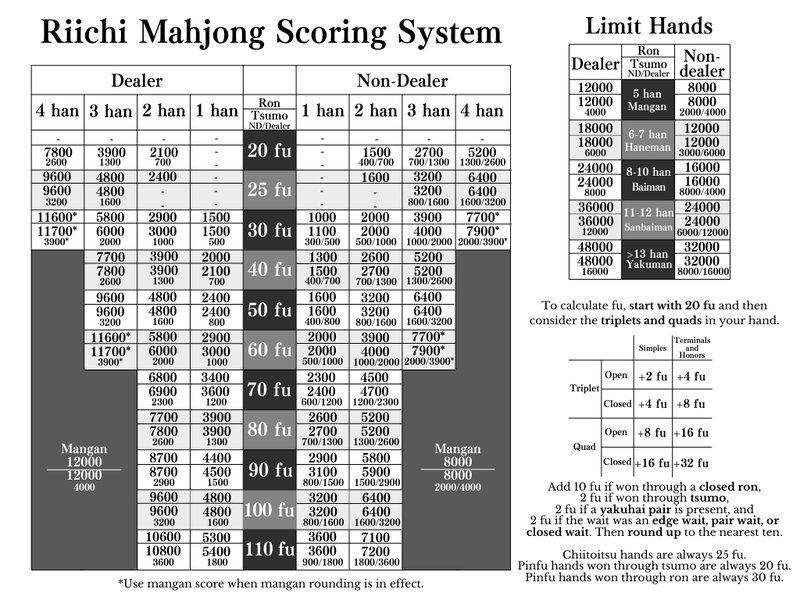
A user-created compact scoring chart for Riichi Mahjong, illustrating the complexity involved.
Comparing Development Approaches: Radar Chart
When building your app, you'll make choices affecting complexity, features, and user experience. This radar chart contrasts hypothetical approaches: a basic tracker versus a feature-rich app with advanced capabilities like AI scoring.
Choosing the right approach depends on your goals, resources, and target audience. Starting simple and iterating is often a good strategy.
Frequently Asked Questions (FAQ)
Is React Native suitable for handling complex Mahjong scoring rules?
Yes, absolutely. React Native uses JavaScript (or TypeScript), which is a powerful language capable of implementing complex logic. The challenge lies not in React Native itself, but in accurately translating the intricate rules of various Mahjong variants (like Riichi's *fu* calculations or MCR's specific pattern points) into code. You can create dedicated modules or functions for scoring calculations and test them thoroughly. State management libraries like Redux can help manage the complex game state involved.
Can I reuse code if I want to build an Android version later?
Yes, significant code reuse is one of the main advantages of React Native. Most of your JavaScript/TypeScript code, including UI components, business logic (like scoring rules), and state management, can be shared between the iOS and Android versions. You might need some platform-specific adjustments, particularly for native module integrations or platform-specific design guidelines, but the core codebase remains largely the same.
Where can I find accurate Mahjong scoring rules to implement?
Reliable sources are crucial. Look for official rulebooks from Mahjong organizations (e.g., European Mahjong Association for MCR/Riichi rules, National Mah Jongg League for American rules). Online resources like reputable Mahjong wikis (e.g., Arcturus Mahjong Wiki for Riichi), established community forums, and existing open-source projects (like those mentioned in the references) can also provide valuable implementation details and algorithms. Always cross-reference information, especially for complex variants like Riichi.
How long would it take to build a functional Mahjong scoring app?
The development time varies greatly depending on the complexity of the features, the number of rule sets supported, and your experience level with React Native and Mahjong rules. A basic app with one rule set might take a few weeks of dedicated effort. A more comprehensive app with multiple rule sets, polished UI, persistence, and potentially advanced features could take several months.
Recommended Next Steps & Further Exploration
- Explore detailed comparisons of various Mahjong scoring rule sets to decide which to implement first.
- Investigate the best state management libraries for React Native suitable for complex applications like a game tracker.
- Learn about different methods for saving game data locally in a React Native app.
- Examine open-source React Native game projects for code structure and best practices inspiration.
References
Last updated May 3, 2025