
Don’t Miss Out! How to Secure Your Admit Card for CDS 2025: Tips and Tricks
Your Comprehensive Guide to Downloading and Preparing for the CDS 2025 Exam
Key Highlights
- Important Dates: Know when the admit card is released and the exam dates.
- Step-by-Step Download Process: A detailed guide to download your CDS 2025 admit card from the official UPSC website.
- Practical Tips: Essential technical tips, document checks, and exam day instructions for a hassle-free experience.
Understanding the Importance of the Admit Card
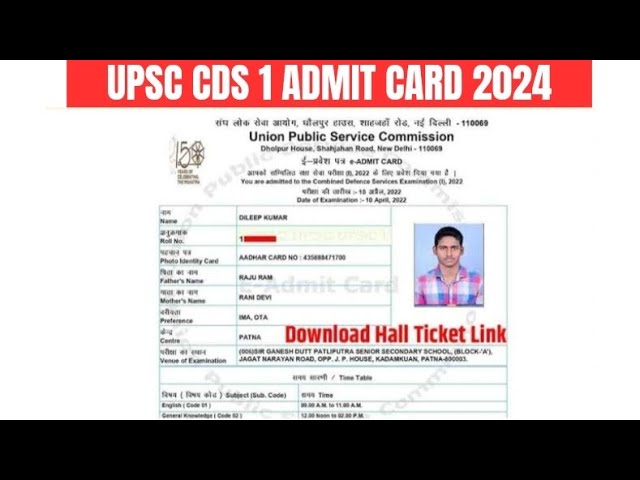
The admit card, also known as the hall ticket, is a mandatory document that serves as your entry ticket to the CDS 2025 examination. Without this document, you will not be permitted to enter the exam hall. The admit card contains vital details such as your name, roll number, exam center, date, and time of the examination. It is crucial to download your admit card in advance, verify its details, and follow all on-screen instructions to avoid any inconveniences on exam day.
Important Dates for CDS 2025
Being aware of key dates is essential in planning your CDS exam preparation timeline. Here is a table summarizing the critical dates for the CDS 2025 process:
| Event | Date |
|---|---|
| Notification Date | 11 December 2024 |
| Online Application Start Date | 11 December 2024 |
| Application End Date | 31 December 2024 (06:00 PM) |
| Admit Card Release Date | Expected around late March 2025 |
| Exam Date | 13 April 2025 |
| Result Date | Expected around early May 2025 |
Step-by-Step Guide to Downloading the CDS 2025 Admit Card
Follow these detailed steps to download your CDS 2025 admit card:
Step 1: Visit the Official UPSC Website
Open your preferred web browser (preferably the latest version of Google Chrome or Mozilla Firefox) and go to the official UPSC website at upsc.gov.in. It is important to use a stable internet connection to avoid download disruptions.
Step 2: Navigate to the Admit Card Section
Locate the “Examination” or “Active Examinations” tab on the homepage. Here, you will find the link for the "Combined Defence Services Examination (I), 2025." Click on the designated link to proceed.
Step 3: Login to Access Your Admit Card
After clicking on the appropriate link, you will be asked to enter your registration number (or roll number) and date of birth. Input your login credentials correctly to access your personalized admit card.
Step 4: Download and Print Your Admit Card
Once logged in, your admit card will be generated and displayed on the screen. Verify all the details such as your name, exam center, exam date, and timings. After ensuring that all the information is accurate, select the option to download the admit card. It is highly recommended that you print at least one copy of the admit card and carry it along with you on the exam day.
Step 5: Verify Your Admit Card Details
While the admit card is your gateway to the examination hall, any discrepancies could lead to complications. Check details like your name, roll number, exam center, and photo carefully. In case of any errors, contact the UPSC immediately using their official support channels.
Technical Tips and Best Practices
To ensure a smooth downloading experience, here are some technical tips:
- Updated Browsers: Always use the most recent version of web browsers such as Google Chrome or Mozilla Firefox.
- Clear Cache and Cookies: If you experience any difficulty accessing the site, clear your browser's cache and cookies before attempting again.
- Stable Connection: Ensure that your internet connection is reliable, particularly during the peak download time.
- Use a Desktop or Laptop: It is advisable to use a desktop or laptop computer instead of a mobile phone for a better user experience.
- Multiple Printouts: To avoid last-minute issues, keep multiple printed copies of your admit card.
Documents to Carry on Exam Day
Besides your CDS 2025 admit card, ensure you have the following documents in hand:
- Valid Photo ID Proof: Carry any government-issued ID such as Aadhaar Card, Voter ID, Passport, or Driving License.
- Passport-Sized Photographs: Bring extra passport-sized photographs in case the photograph on your admit card is unclear.
- Additional Copies: It is recommended to carry extra photocopies of all critical documents.
Exam Day Guidelines and Tips
A successful exam experience requires thorough preparation. Along with your academic readiness, ensure you adhere to these exam day guidelines:
- Arrive Early: Plan to arrive at the exam center at least 30-60 minutes before the scheduled time to avoid any last-minute rush.
- No Electronic Devices: Electronic gadgets such as mobile phones, smartwatches, or calculators are strictly prohibited; leave them at home.
- Comfortable Attire: Dress comfortably and in accordance with the exam guidelines to ensure a pleasant test-taking experience.
- Follow Instructions: Read all on-screen instructions on your admit card carefully, including instructions about the exam venue and allowed items.
Visual Guide
Below is an image that illustrates the typical layout of a CDS admit card:

The image above serves as a visual reference, helping you to quickly identify key sections—such as your personal details, exam center information, and important instruction notes.
Handling Discrepancies and Contacting UPSC
If you notice any discrepancies on your CDS admit card such as incorrect spelling of your name, wrong exam center, or any other errors:
- Contact UPSC Immediately: Reach out to the UPSC support team via their official email at web-upsc@nic.in and report the issue. Attach a scanned copy or a screenshot of the error if possible.
- Submit Supporting Documents: In case there are errors or missing information, you may be required to submit additional documents (e.g., a handwritten undertaking, photographs, and valid ID proofs) to rectify the issues.
Additional Tips for CDS 2025 @ a Glance
- Regularly Check the Official Website: Stay updated with the latest announcements on dates and detailed instructions.
- Prepare Early: Do not wait until the last moment; download your admit card as soon as it is released.
- Keep Backup Copies: Maintain both digital and printed backup copies of your admit card and related documents.
References
- UPSC Official Website - UPSC
- CDS Exam Admit Card - Indian Express
-
CDS Admit Card Download Instructions - Testbook
- CDS Admit Card Tips - Careers360
- CDS Admit Card Process - RankersBuzz
Recommended Related Queries
Last updated March 20, 2025