
Unlock Metal Machining on a Budget: Your 3D Printer's Hidden ECM Potential!
Discover how minimal, low-cost tweaks can transform your everyday 3D printer into a capable electrochemical machining tool.
Highlights of DIY Electrochemical Machining
- Minimal Investment: Leverage your existing 3D printer; additional modification parts can cost less than $50.
- Accessible Technology: Utilizes readily available materials like hypodermic needles as electrodes and simple saltwater solutions as electrolytes.
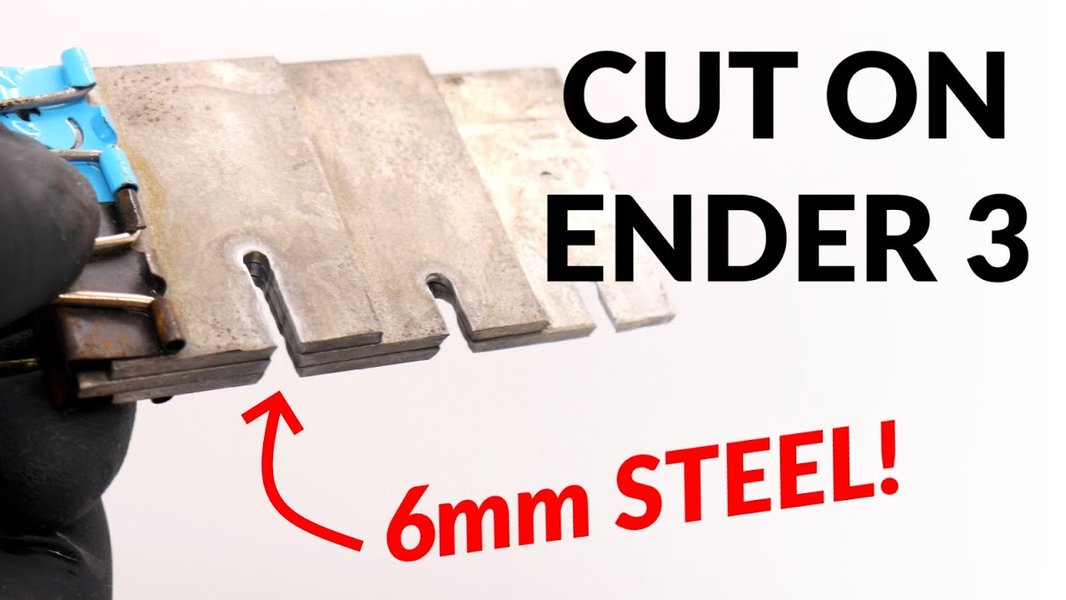
- Versatile Machining: Capable of cutting and engraving various conductive metals, including those difficult to machine conventionally.
The Dawn of Desktop Metal Machining: ECM on Your 3D Printer
Electrochemical Machining (ECM) is a non-traditional manufacturing process where material is removed from a conductive workpiece by anodic dissolution. Essentially, it's a highly controlled corrosion process. Instead of mechanical force, ECM uses electrical energy and a chemical electrolyte to shape metal parts. The exciting part? The precise motion control systems inherent in common 3D printers make them surprisingly adaptable for basic ECM tasks, offering a remarkably low-cost entry point into metal machining that traditionally requires expensive, dedicated machinery.
Modifying a 3D printer for ECM leverages its existing framework—the gantry system for X, Y, and Z movement, and the control electronics—to guide an electrode tool with precision. This means you don't need to invest in a completely new CNC (Computer Numerical Control) system, drastically reducing costs.
An Ender 3 3D printer adapted for Wire Electrochemical Machining, showcasing a common setup.
The Cheapest Path: Modifying Your 3D Printer for ECM
The most budget-friendly approach to ECM involves retrofitting an existing, inexpensive Fused Deposition Modeling (FDM) 3D printer. Models like the Creality Ender 3 or Monoprice Select Mini are popular choices due to their affordability, hackability, and widespread community support.
Core Components and Setup
The transformation from a plastic-extruding 3D printer to a metal-machining ECM device centers around a few key, inexpensive components:
The Electrode Tool:
The standard plastic extruder (hotend) is removed. In its place, a simple electrode is mounted. The most common and cost-effective option is a hypodermic needle or a thin metal wire (e.g., brass or stainless steel). This needle acts as the cathode (tool), while the metal workpiece is the anode.
Electrolyte Solution and Delivery:
An electrolyte is crucial for conducting electricity between the tool and the workpiece and flushing away dissolved material. Simple and cheap solutions like saltwater (sodium chloride solution) or sodium nitrate solution are highly effective. A basic system to deliver the electrolyte to the machining gap can be fashioned using a small container, tubing, and sometimes a very low-cost aquarium pump, or even gravity feed. Some parts of the delivery system can even be 3D printed.
Power Supply:
A low-voltage DC power supply is needed to drive the electrochemical reaction. This doesn't have to be a sophisticated lab-grade unit; a basic bench power supply, or even a modified computer or laptop power supply, can often suffice. Voltages are typically low (e.g., 5-20V), but current control can be beneficial.
Workpiece Holding:
A non-conductive tray or container is needed to hold the workpiece and contain the electrolyte. This can be a simple plastic container or a custom 3D-printed part.
The Machining Process
Once assembled, the 3D printer's firmware (often Marlin, which is open-source) is used to control the movement of the electrode. G-code, typically used for printing paths, now dictates the machining path of the electrode across the workpiece. As the electrode (cathode) is brought close to the workpiece (anode) and voltage is applied, the electrolyte facilitates ion transfer, causing metal to dissolve from the workpiece in a precise pattern. The gap between the electrode and workpiece is critical and is maintained by the printer's Z-axis.
Estimated Cost Breakdown
The beauty of this modification lies in its minimal additional cost, especially if you already own a budget 3D printer:
- Base 3D Printer: If you don't have one, a budget model like an Ender 3 can be found for $150-$300. If you already own one, this cost is $0.
- Electrode (Hypodermic Needle/Wire): $1 - $5.
- Electrolyte Chemicals (Salt, Sodium Nitrate): < $10 for a substantial amount.
- Power Supply: $0 if repurposing an old one, or up to $20-$30 for a basic new one.
- Tubing, Container, Wires: < $10 - $15.
Thus, the direct cost for the ECM-specific modifications can easily be under $50. Some enthusiasts report total build costs (including a second-hand printer) to be around $300 for a fully functional DIY ECM setup.
Visualizing the DIY ECM Modification
To better understand the components involved in converting a 3D printer for electrochemical machining, the mindmap below outlines the key elements and their relationships. It highlights how the existing 3D printer infrastructure is augmented with specific ECM parts to achieve metal machining capabilities.
This mindmap illustrates the interconnectedness of the original printer hardware with the added ECM-specific components, emphasizing the simplicity and low cost of the required modifications.
DIY ECM in Action: A Practical Demonstration
Seeing is believing! Many talented makers and engineers in the open-source community have successfully converted their 3D printers for ECM. The video below by ZURAD showcases a Wire ECM setup on an Ender 3, demonstrating the practical application of the principles discussed. It provides a visual understanding of how the modified printer operates to cut metal, the kind of setup involved, and the potential results one can achieve with such a low-cost system.
This particular video is insightful as it shows the Wire ECM variant, where a continuously fed wire can be used as the electrode, similar to Wire EDM (Electrical Discharge Machining) but using electrochemical principles. This highlights the versatility within even these DIY setups.
Comparing DIY ECM with Other Machining Techniques
To put the capabilities and trade-offs of a DIY 3D Printer ECM setup into perspective, the radar chart below compares it against other common hobbyist and professional machining techniques across several key attributes. The scores are relative, with higher values generally indicating better performance or lower cost/complexity in that specific category (e.g., a high score in "Cost-Effectiveness" means it's very affordable).
As illustrated, DIY 3D Printer ECM excels in cost-effectiveness but may trade off speed and ultimate precision compared to dedicated or more expensive systems. However, for hobbyists and small-scale projects, it offers an unparalleled entry into metal machining.
Summary of Components and Estimated Costs
For clarity, the table below summarizes the essential components for the cheapest ECM modification, their typical role, and estimated costs, assuming you already possess a basic 3D printer.
| Component | Description/Role | Estimated Cost (if purchased separately for mod) | Notes |
|---|---|---|---|
| Base 3D Printer | Provides motion control (e.g., Ender 3) | $0 (if already owned) / $150-$300 (if purchased) | The foundation of the system. |
| Electrode | Tool for material removal (e.g., hypodermic needle, thin metal wire) | $1 - $5 | Replaces the printer's standard extruder/hotend. |
| Electrolyte Solution | Conductive medium (e.g., saltwater, sodium nitrate solution) | < $10 (for chemicals) | Facilitates the electrochemical reaction. |
| DC Power Supply | Provides electrical current (e.g., bench supply, modified PSU) | $0 - $30 | Low voltage, moderate current typically required. |
| Electrolyte Bath/Container | Holds workpiece and electrolyte | < $5 (can be a simple plastic container or 3D printed) | Must be non-conductive. |
| Wiring & Connectors | Connects electrode and workpiece to power supply | < $5 | Basic electrical components. |
| Tubing/Pump (Optional) | For electrolyte circulation/delivery | $0 - $15 | Improves flushing of dissolved material. |
| TOTAL MODIFICATION COST | Cost for parts specifically for ECM conversion | Typically under $50 | Excludes the cost of the base 3D printer if already owned. |
This table underscores how accessible ECM can be by repurposing a 3D printer and adding a few inexpensive, commonly available items.
Advantages and Limitations of DIY ECM
Advantages:
- Extremely Low Cost: The primary advantage. Significantly cheaper than dedicated ECM machines or other metal CNC options.
- Utilizes Existing Hardware: Repurposes the precise motion system of a 3D printer.
- Machining Hard Materials: Can machine hard conductive metals regardless of their hardness, as it's a non-contact, chemical process.
- No Tool Wear (Theoretically): The electrode tool doesn't mechanically wear in the same way as cutting tools (though it can erode over time due to the process).
- Good for Complex Shapes: Capable of producing intricate patterns and shapes.
- No Burrs: Produces smooth, burr-free edges.
- Open Source Community: Abundant resources, plans (like Cooper Zurad's Ender ECM project), and support available online, particularly on platforms like Hackaday.
Limitations:
- Material Restriction: Only works with electrically conductive materials.
- Slower Machining Rates: Generally slower than conventional machining methods for bulk material removal.
- Precision Challenges: Achieving very high precision can be challenging and requires careful calibration and control of parameters like electrolyte flow, voltage, and tool-workpiece gap.
- Electrolyte Management: Handling and disposing of electrolyte solutions requires care. The electrolyte can also cause corrosion on unprotected parts of the printer.
- Safety Concerns: Involves electricity and potentially corrosive chemicals. Proper safety precautions are essential.
- Process Complexity: While the hardware mod is simple, optimizing the ECM process itself can be complex and involve trial and error.
Safety First: Important Considerations
Embarking on a DIY ECM project requires a mindful approach to safety:
- Electrical Safety: Always work with low voltages and ensure all connections are properly insulated. Isolate the 3D printer's main electronics from any potential spills or contact with the electrolyte. Use a Ground Fault Circuit Interrupter (GFCI) if possible.
- Chemical Handling: Wear appropriate Personal Protective Equipment (PPE), including safety glasses and gloves, when handling electrolytes. Some electrolytes or byproducts can be corrosive or irritant.
- Ventilation: Some electrochemical reactions can produce gases (e.g., hydrogen, chlorine if using NaCl). Ensure good ventilation in your workspace.
- Material Compatibility: Be aware of the materials you are machining and the potential byproducts.
- Isolation: Ensure the workpiece and electrolyte bath are electrically isolated from the printer frame to prevent unintended current paths.
Frequently Asked Questions (FAQ)
What exactly is Electrochemical Machining (ECM)?
Electrochemical Machining is a method of removing metal by an anodic dissolution process. An electrode (tool, cathode) is advanced towards a conductive workpiece (anode) in the presence of an electrolyte. When a DC voltage is applied, metal is selectively eroded from the workpiece into the electrolyte, effectively "machining" it without physical contact or high temperatures.
Why use a 3D printer for ECM?
3D printers offer a readily available, low-cost, and precise XYZ motion platform. Their existing control systems (firmware like Marlin and G-code interpretation) can be directly repurposed to guide the ECM tool. This drastically reduces the cost and complexity compared to building an ECM system from scratch or buying a commercial one.
What materials can be machined with this DIY ECM setup?
Generally, any electrically conductive metal can be machined. This includes various steels (stainless, tool steel), aluminum, brass, copper, titanium, and other alloys. The effectiveness and machining rate can vary depending on the material and electrolyte used.
How precise is ECM on a modified 3D printer?
The precision depends on the mechanical accuracy of the 3D printer itself, the stability of the power supply, the consistency of the electrolyte flow, and the control over the tool-workpiece gap. While it might not match industrial ECM standards, it can be surprisingly good for hobbyist projects, achieving details that would be difficult with other low-cost DIY methods. Careful calibration is key.
Are there any open-source plans or communities for this?
Yes, absolutely! The maker community is very active in this area. Websites like Hackaday frequently feature such projects, including Cooper Zurad's Ender ECM project which provides detailed plans. RepRap forums and other DIY electronics/machining communities are also great resources for information, shared builds, and troubleshooting.
Recommended Further Exploration
- What are the step-by-step instructions for converting an Ender 3 to an ECM machine?
- How do different electrolyte solutions affect the performance of DIY electrochemical machining?
- What are the critical safety measures to implement when operating a homemade ECM setup?
- How does the achievable precision of DIY ECM compare to that of hobbyist CNC milling for metal parts?
References
 cdn.imagearchive.com
Last updated May 12, 2025