
Unlock Network Control: Your Comprehensive Guide to Cisco IOS Access Lists
Master the fundamentals of ACLs, from basic filtering to advanced security configurations, and optimize your Cisco network.
Highlights
- Crucial for Security: Access Control Lists (ACLs) are ordered sets of rules that act as filters on Cisco routers and switches, meticulously controlling inbound and outbound network traffic based on predefined criteria to enforce security policies.
- Diverse Types for Varied Needs: The primary types are Standard ACLs, which filter based solely on source IP addresses, and Extended ACLs, offering granular control by examining source/destination IPs, protocols, and port numbers. Named ACLs enhance manageability by allowing descriptive names instead of just numbers.
- Sequential Processing and Implicit Deny: ACLs process rules sequentially from top to bottom. The first rule that a packet matches dictates the action (permit or deny), and no further rules are checked. Crucially, every ACL has an invisible "deny all" rule at the end, meaning any traffic not explicitly permitted is blocked.
What are Cisco IOS Access Control Lists?
Cisco IOS Access Control Lists (ACLs) are a cornerstone of network security and traffic management within Cisco-powered networks. Think of an ACL as a digital gatekeeper or a bouncer for your network segments. It's a sequential list of permit or deny statements, known as Access Control Entries (ACEs), that apply to network traffic. These lists are configured on Cisco routers and Layer 3 switches to filter packets passing through their interfaces. The primary function of an ACL is to scrutinize each packet against its set of rules and decide whether to forward it or drop it. This filtering can be based on a variety of information contained within the packet's header, such as the source IP address, destination IP address, the type of network protocol (like TCP, UDP, or ICMP), and even specific source and destination port numbers (for protocols like TCP and UDP). By meticulously controlling what traffic is allowed or denied, network administrators can secure network resources, prevent unauthorized access, manage bandwidth effectively, and optimize overall network performance.
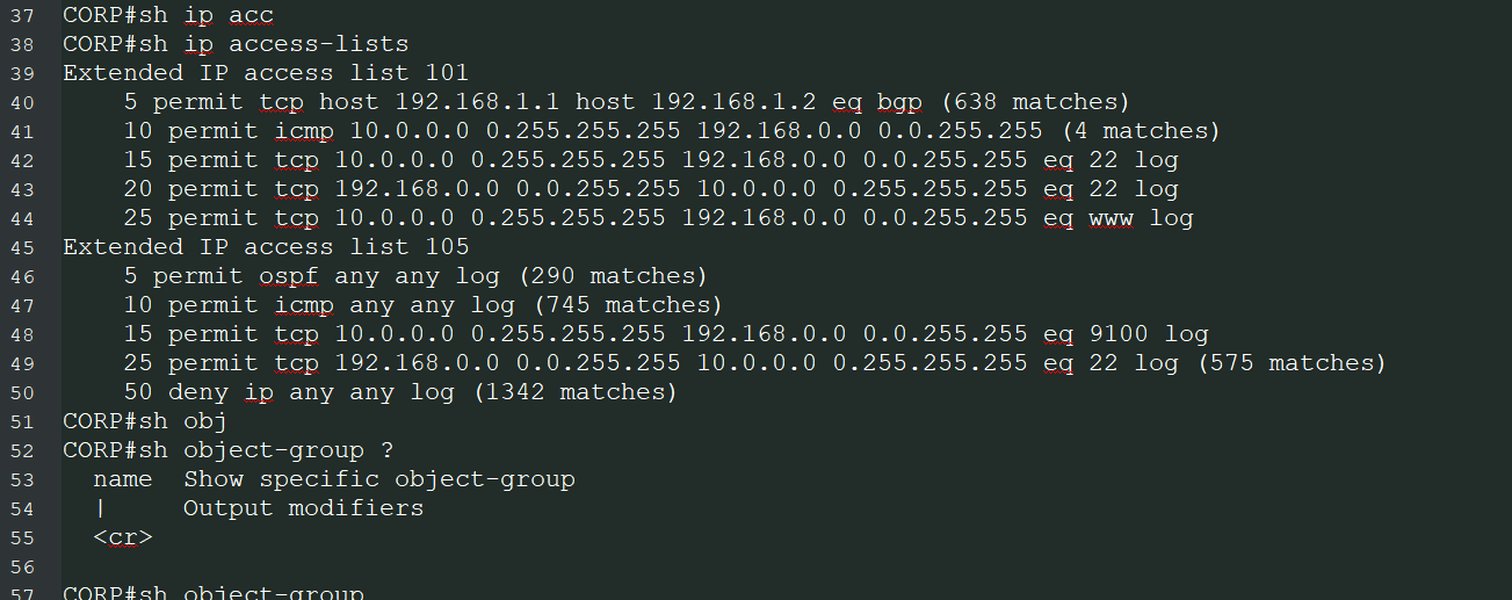
Visual representation of how ACLs process packets sequentially against defined rules, leading to a permit or deny action.
ACLs are fundamental for implementing security policies, ensuring that only legitimate traffic reaches sensitive parts of the network while blocking potentially malicious or unwanted packets. They are versatile tools used not just for security, but also for tasks like classifying traffic for Quality of Service (QoS), controlling routing updates, and triggering dial-on-demand routing (DDR).
Unpacking the Types of ACLs
Cisco IOS supports several types of ACLs, each designed with different capabilities and for specific use cases. Understanding these types is crucial for selecting the right tool for your network filtering needs.
Standard Access Lists
Standard ACLs are the most basic form of access control and have been available since early versions of Cisco IOS. They offer a straightforward way to filter traffic.
Key Characteristics of Standard ACLs
The defining feature of Standard ACLs is that they filter traffic based solely on the source IP address of the packet. They do not inspect the destination IP address, protocol type, or port numbers. This simplicity makes them easy to configure but limits their granularity.
Numbering and Identification
Standard ACLs are typically identified by numbers. The original range is 1 to 99. An expanded range, 1300 to 1999, is also available for creating more standard ACLs.
Typical Use Cases
Due to their source-IP-only filtering, standard ACLs are generally used for broad access control, such as permitting or denying all traffic from a specific host or an entire subnet. Because they lack the ability to filter based on destination or service, they are often placed as close to the destination of the traffic as possible to avoid inadvertently blocking legitimate traffic destined elsewhere.
Extended Access Lists
Extended ACLs provide significantly more granular control over traffic filtering compared to their standard counterparts.
Key Characteristics of Extended ACLs
Extended ACLs can filter packets based on a much wider range of criteria. These include:
- Source IP address
- Destination IP address
- Protocol type (e.g., TCP, UDP, ICMP, EIGRP, OSPF)
- Source port number (for TCP or UDP)
- Destination port number (for TCP or UDP)
- ICMP message types and codes
- Other parameters like DSCP values or time ranges (with additional configuration).
Numbering and Identification
Extended ACLs also use numerical identifiers. The original range is 100 to 199. An expanded range, 2000 to 2699, provides additional capacity for extended ACLs.
Enhanced Filtering Capabilities
The power of extended ACLs lies in their ability to permit or deny specific services. For example, you could allow HTTP (TCP port 80) traffic from a particular network to a web server while denying FTP (TCP ports 20 and 21) traffic from the same source. Because they can be very specific, extended ACLs are generally placed as close to the source of the traffic as possible to filter unwanted packets early and save network resources.
Named Access Lists
Named ACLs offer an alternative to numbered ACLs, providing better readability and management, especially in complex network environments.
Advantages of Named ACLs
Instead of using a number, you can assign a descriptive name (e.g., "ALLOW_WEB_ACCESS" or "BLOCK_GUEST_FTP") to an ACL. This makes the ACL's purpose much clearer in the router's configuration. Named ACLs can be either standard or extended in their functionality; the name simply replaces the number as an identifier.
Flexibility in Editing
A significant advantage of named ACLs (and some more recent numbered ACL implementations) is the ability to edit them more easily. You can insert, delete, or reorder individual Access Control Entries (ACEs) within a named ACL using sequence numbers, without having to delete and re-create the entire list, which was a limitation of older numbered ACLs.
Other ACL Variations
While Standard, Extended, and Named ACLs are the most common, Cisco IOS also supports other specialized types:
Dynamic ACLs (Lock-and-Key)
Dynamic ACLs provide temporary access to users who authenticate through Telnet or another method. Once authenticated, specific entries are dynamically added to an ACL to permit their traffic for a limited time.
Timed ACLs
Timed ACLs allow ACEs to be active only during specific times of the day or days of the week, as defined by a time range. This is useful for enforcing policies that vary based on time, such as allowing internet access only during non-business hours.
Reflexive ACLs
Reflexive ACLs offer a form of stateful packet filtering. They dynamically create temporary ACEs to allow return traffic that is part of an established session initiated from within the protected network. This is particularly useful for allowing responses to outbound traffic while generally blocking unsolicited inbound connections.
The Inner Workings: How ACLs Process Traffic
Understanding the logic behind ACL processing is key to implementing them effectively. When a packet arrives at an interface with an applied ACL, the router follows a strict set of rules to determine its fate.
Sequential Processing: The Top-Down Approach
ACLs are processed sequentially, meaning the router checks the packet against each Access Control Entry (ACE) in the list, starting from the very first entry and moving downwards. The order of ACEs is therefore critically important.
The First Match Principle
As soon as the packet's characteristics match the criteria of an ACE, the action specified in that ACE (either permit or deny) is immediately taken. Crucially, once a match is found, the router stops processing the ACL for that packet; it does not continue to check subsequent ACEs in the list. This "first match" behavior means that more specific rules should generally be placed before more general rules to ensure they are evaluated correctly.
The Implicit "Deny All": A Critical Default
At the end of every ACL, whether you explicitly configure it or not, there is an invisible, un-editable rule known as the "implicit deny any." This rule states that if a packet does not match any of the preceding ACEs in the list, it will be denied (dropped). This default-deny behavior is a security measure, ensuring that only explicitly permitted traffic is allowed through. Therefore, any ACL that is intended to allow some traffic must contain at least one permit statement, or all traffic will be blocked.
Applying ACLs: Inbound vs. Outbound Traffic Flow
ACLs are applied to router interfaces using the ip access-group command (for IP ACLs). They can be applied in one of two directions:
Inbound ACLs
When an ACL is applied to an interface in the inbound (in) direction, incoming packets arriving at that interface are checked against the ACL rules before the router makes any routing decisions for those packets. If a packet is permitted by the inbound ACL, it then proceeds through the routing process. If denied, it's dropped immediately.
Outbound ACLs
When an ACL is applied to an interface in the outbound (out) direction, packets are first processed by the router (i.e., a routing decision is made determining the exit interface). Then, just before the packet is transmitted out of that interface, it is checked against the outbound ACL rules. If permitted, it's sent; if denied, it's dropped.
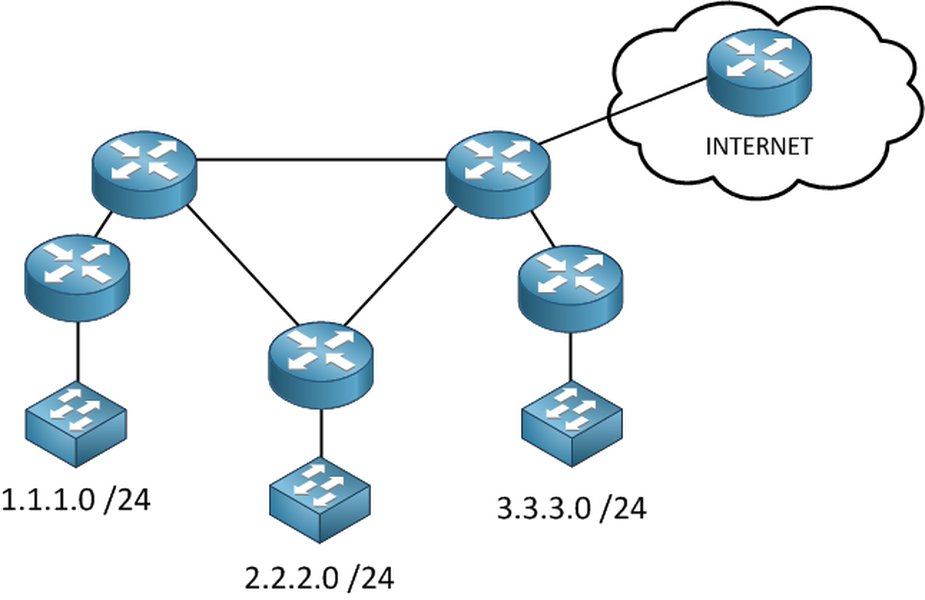
A typical network diagram showing potential points for ACL implementation to control traffic flow between different network segments.
One ACL Per Interface, Per Protocol, Per Direction
A critical rule in ACL application is that you can only apply one ACL per interface, per protocol (e.g., IP, IPv6), and per direction (inbound or outbound). For instance, on a single interface, you can have one inbound IPv4 ACL and one outbound IPv4 ACL, but not two inbound IPv4 ACLs.
Mastering Wildcard Masks in ACLs
Wildcard masks are a fundamental component of Cisco IOS ACLs, used in conjunction with IP addresses to specify which parts of an IP address should be checked and which parts can be ignored. They are essentially the inverse of subnet masks.
Understanding Wildcard Logic
A wildcard mask is a 32-bit quantity, just like an IP address or a subnet mask, but it uses 0s and 1s differently:
- A 0 bit in the wildcard mask means: "The corresponding bit in the IP address must match the bit in the ACL's IP address."
- A 1 bit in the wildcard mask means: "The corresponding bit in the IP address can be anything (it is ignored)."
Practical Examples of Wildcard Masks
Let's look at common scenarios:
- To match a single host: If you want to match a specific host IP address, say
192.168.1.10, you would use the wildcard mask0.0.0.0. This means all 32 bits of the packet's IP address must exactly match192.168.1.10.Example ACE:
permit ip host 192.168.1.10 any(the keywordhostis a shortcut for a0.0.0.0wildcard mask). - To match an entire subnet: If you want to match all hosts in the
192.168.1.0/24network (subnet mask255.255.255.0), the corresponding wildcard mask is0.0.0.255. This means the first three octets (24 bits) must match192.168.1, while the last octet (8 bits) can be anything.Example ACE:
permit ip 192.168.1.0 0.0.0.255 any - To match any IP address: The keyword
anyis a shortcut for the IP address0.0.0.0with a wildcard mask of255.255.255.255. This means all bits are ignored, so it matches any IP address.Example ACE:
permit ip any any
Configuring ACLs: A Practical Overview
Configuring ACLs in Cisco IOS involves defining the list of rules (ACEs) and then applying that list to one or more interfaces in a specific direction. The commands vary slightly depending on the type of ACL.
General Configuration Steps
- Enter Global Configuration Mode: Start by entering global configuration mode on the router:
configure terminal. - Define the Access List: Use the
access-listcommand (for numbered ACLs) orip access-listcommand (for named ACLs) to create the ACL and add its ACEs. - Apply the Access List to an Interface: Enter interface configuration mode for the desired interface and use the
ip access-groupcommand to apply the ACL inbound or outbound.
Standard ACL Configuration Example
Let's create a standard ACL (numbered 10) to permit traffic from the 192.168.1.0/24 network and deny all other traffic (implicitly, but we'll add an explicit permit for demonstration before the implicit deny kicks in for other non-matching ACLs or if this was the only ACL).
Router(config)# access-list 10 permit 192.168.1.0 0.0.0.255
Router(config)# access-list 10 deny any logging  ! Optional: Deny others and log attempts
! Implicit deny any is always at the end if no other "permit any" exists
In this example, access-list 10 permit 192.168.1.0 0.0.0.255 allows traffic from any host within the 192.168.1.0 network. The 0.0.0.255 is the wildcard mask. The optional deny any logging explicitly denies everything else and logs it; without it, the implicit deny would still block but not log by default.
Extended ACL Configuration Example
Now, let's configure an extended ACL (numbered 101) to permit HTTP (TCP port 80) traffic from any host on the 10.1.1.0/24 network to a specific web server at 172.16.30.5, and also permit ICMP (ping) traffic from any source to any destination, while denying all other IP traffic.
Router(config)# access-list 101 permit tcp 10.1.1.0 0.0.0.255 host 172.16.30.5 eq 80
Router(config)# access-list 101 permit icmp any any
Router(config)# access-list 101 deny ip any any logging ! Deny all other IP traffic and log
Here:
permit tcp 10.1.1.0 0.0.0.255 host 172.16.30.5 eq 80allows TCP traffic from the 10.1.1.0/24 network to host 172.16.30.5 on destination port 80 (HTTP).permit icmp any anyallows all ICMP traffic.deny ip any any loggingblocks all other IP traffic and logs matches.
Named ACL Configuration Example
Let's create a named extended ACL called "WEB_AND_PING_POLICY".
Router(config)# ip access-list extended WEB_AND_PING_POLICY
Router(config-ext-nacl)# permit tcp 10.1.1.0 0.0.0.255 host 172.16.30.5 eq www
Router(config-ext-nacl)# permit icmp any any echo
Router(config-ext-nacl)# permit icmp any any echo-reply
Router(config-ext-nacl)# deny ip any any log
Note: www is an alias for port 80. We've also specified ICMP echo and echo-reply. The log keyword at the end of a deny statement enables logging for matched packets.
Applying ACLs to Network Interfaces
Once an ACL is defined, it must be applied to an interface to take effect. For example, to apply ACL 101 inbound on GigabitEthernet0/0:
Router(config)# interface GigabitEthernet0/0
Router(config-if)# ip access-group 101 in
Router(config-if)# exit
To apply the named ACL "WEB_AND_PING_POLICY" outbound on GigabitEthernet0/1:
Router(config)# interface GigabitEthernet0/1
Router(config-if)# ip access-group WEB_AND_PING_POLICY out
Router(config-if)# exit
Comparing ACL Types: A Visual Snapshot
The radar chart below offers a comparative view of Standard, Extended, and Named (assuming Extended functionality for Named) ACLs based on several key operational characteristics. This visualization helps in understanding the trade-offs and strengths of each ACL type when deciding which to implement for specific network security and traffic management goals. Higher values generally indicate a stronger presence of the characteristic, scaled from a baseline where a value of 2 represents minimal presence and 10 represents maximal presence for the given attributes.
Common Applications and Use Cases for ACLs
Access Control Lists are versatile tools employed for a wide array of network management and security tasks. Their ability to filter traffic based on various criteria makes them invaluable in modern networking.
Enhancing Network Security
This is the most prominent use of ACLs. They are fundamental in creating firewalls by blocking unauthorized access from external networks to internal resources, or between different internal network segments (e.g., preventing guest Wi-Fi users from accessing corporate servers). They can mitigate common network attacks by filtering out packets from known malicious IP addresses or blocking traffic to unused or vulnerable ports.
Granular Traffic Filtering
Extended ACLs allow administrators to permit or deny specific types of traffic. For example, an organization might allow employees to access web (HTTP/HTTPS) and email (SMTP/POP3/IMAP) services on the internet but block peer-to-peer file sharing, online gaming, or streaming services to conserve bandwidth and maintain productivity.
Bandwidth Management and Optimization
While not a direct bandwidth shaping tool, ACLs can contribute to bandwidth management by blocking non-essential or high-bandwidth consuming applications. This helps prioritize critical business traffic and prevent network congestion caused by unwanted traffic flows.
Controlling Routing Updates
ACLs can be used with distribute lists in routing protocols (like RIP, EIGRP, OSPF, BGP) to filter which routing updates are sent or received. This allows for more precise control over the routing table and can prevent unwanted routes from propagating through the network.
Securing Router Access (VTY Lines)
ACLs are commonly used to restrict administrative access (Telnet/SSH) to network devices themselves. By applying an ACL to the VTY (virtual terminal) lines, administrators can ensure that only authorized personnel from specific IP addresses or subnets can manage the routers and switches.
Supporting QoS and Other Network Services
ACLs can identify and classify traffic for Quality of Service (QoS) mechanisms. Based on ACL matching, traffic can be marked, queued, or policed differently. They are also used in conjunction with Network Address Translation (NAT) to define which addresses are eligible for translation, and with VPNs to specify which traffic should be encrypted (interesting traffic).
Visualizing ACL Concepts: A Mindmap Overview
To better understand the interconnected concepts within Cisco IOS Access Lists, the following mindmap provides a hierarchical view. It outlines the fundamental purpose, various types, operational mechanics, configuration aspects, and best practices associated with ACLs, offering a structured perspective on this essential networking topic.
(Firewalling)"] id1b["Traffic Filtering
& Control"] id1c["Resource Protection"] id1d["Network Optimization"] id2["Core Concepts"] id2a["Packet Inspection"] id2b["Access Control Entries (ACEs)"] id2c["Permit / Deny Actions"] id2d["Inbound vs. Outbound Application"] id3["Types of ACLs"] id3a["Standard ACLs"] id3aa["Filters on Source IP Only"] id3ab["Numbered: 1-99, 1300-1999"] id3b["Extended ACLs"] id3ba["Filters on Source/Destination IP,
Protocol, Port"] id3bb["Numbered: 100-199, 2000-2699"] id3c["Named ACLs"] id3ca["Descriptive Names for Readability"] id3cb["Can be Standard or Extended"] id3cc["Supports Sequence Numbers for Editing"] id3d["Other Specialized ACLs"] id3da["Dynamic ACLs (Lock-and-Key)"] id3db["Timed ACLs (Time-based Rules)"] id3dc["Reflexive ACLs (Session Filtering)"] id4["How ACLs Work"] id4a["Sequential Processing (Top-Down)"] id4b["First Match Principle"] id4c["Implicit 'Deny All' at the End"] id4d["Wildcard Masks for IP Matching"] id5["Configuration & Application"] id5a["Defining ACLs (ACEs)"] id5b["Applying to Interfaces
(ip access-group)"] id5c["Applying to VTY Lines
(access-class)"] id6["Best Practices & Considerations"] id6a["Order of ACEs is Critical"] id6b["Placement Strategy
(Standard: near destination, Extended: near source)"] id6c["Thorough Testing Before Deployment"] id6d["Regular Review and Maintenance"] id6e["Use Named ACLs for Complex Policies"] id6f["Document ACL Purpose and Logic"]
Key Differences: Standard vs. Extended ACLs
Understanding the distinctions between Standard and Extended Access Control Lists is crucial for effective network traffic management and security policy enforcement. The table below summarizes their main differences, helping you choose the appropriate ACL type for your specific requirements.
| Feature | Standard ACL | Extended ACL |
|---|---|---|
| Filtering Criteria | Source IP Address only | Source IP Address, Destination IP Address, Protocol Type (TCP, UDP, ICMP, etc.), Source Port, Destination Port, ICMP Type/Code, and other options like DSCP. |
| Number Range | 1-99 (original) 1300-1999 (expanded) |
100-199 (original) 2000-2699 (expanded) |
| Granularity of Control | Low (less specific) | High (very specific) |
| Complexity | Simpler to configure and understand. | More complex to configure due to more parameters. |
| Processing Overhead | Generally lower processing overhead on the router. | Can impose higher processing overhead due to more detailed packet inspection. |
| Typical Placement Guideline | As close to the destination of the traffic as possible. | As close to the source of the traffic as possible. |
| Primary Use Cases | Basic filtering, such as blocking all traffic from a specific host or network, or quick filtering for VTY lines. | Fine-grained traffic control, implementing specific security policies (e.g., allowing HTTP but denying FTP), service-specific filtering. |
| Example Syntax (Numbered) | access-list 10 permit 192.168.1.0 0.0.0.255 |
access-list 110 permit tcp any host 10.0.0.1 eq 80 |
Understanding ACLs Visually: Video Explainer
For a dynamic and visual explanation of Cisco Access Control Lists, the following video provides an excellent overview. It covers the fundamental concepts, how ACLs operate to filter traffic, and their significance in network security. Watching this can help solidify your understanding of the core principles discussed, especially the logic behind ACL processing and common use cases. The video delves into the theory and demonstrates practical aspects, making it a valuable resource for both beginners and those looking for a refresher.
Essential Best Practices for ACL Management
Effective ACL management is crucial for maintaining network security and performance. Adhering to best practices can prevent unintended consequences and make ACLs easier to troubleshoot and maintain.
Strategic Rule Ordering
Given that ACLs are processed sequentially and stop at the first match, the order of your Access Control Entries (ACEs) is paramount. Place more specific rules at the top of the list, followed by more general rules. For instance, if you want to deny a specific host from a subnet but allow the rest of the subnet, the deny rule for the host must come before the permit rule for the subnet.
The Importance of Explicit Permits
Always remember the implicit "deny all" at the end of every ACL. If your intention is to permit most traffic and only deny a few specific types, you must explicitly include a permit any any (or equivalent) statement at the end of your permit rules, but before the implicit deny takes effect. Otherwise, all traffic not explicitly permitted will be dropped.
Optimal ACL Placement
Where you apply an ACL significantly impacts its effectiveness and network performance.
- Standard ACLs: Since they only filter on source IP and lack granularity, apply them as close to the destination as possible. Placing them too close to the source might block legitimate traffic destined for other networks.
- Extended ACLs: Because they offer granular control, apply them as close to the source of the traffic as possible. This filters unwanted traffic early, preventing it from consuming bandwidth across your network.
Thorough Testing Before Deployment
Always test your ACLs in a lab environment or during a maintenance window before deploying them on a live network. Incorrectly configured ACLs can block critical traffic or inadvertently open security holes. Use tools like Telnet to specific ports or ping to verify connectivity after applying ACLs.
Leverage Named ACLs for Clarity
For all but the simplest ACLs, use named ACLs instead of numbered ones. Descriptive names make the purpose of the ACL much clearer and significantly ease management and troubleshooting, especially in complex configurations with many ACLs. Named ACLs also offer more flexible editing options.
Regular Review and Maintenance
Network requirements change over time. Regularly review your ACLs to ensure they are still relevant, accurate, and necessary. Remove obsolete rules or entire ACLs to keep configurations clean and reduce processing overhead. This also helps adapt to new security threats or policy changes.
Documentation is Key
Document the purpose of each ACL and, if complex, the logic behind its ACEs. Comments within the ACL configuration (if supported, or in external documentation) can be invaluable for future troubleshooting or when other administrators need to understand the configuration.
Verifying Your ACL Configuration
After configuring and applying ACLs, it's essential to verify their operation and monitor their effectiveness. Cisco IOS provides commands to help with this.
Using the show access-lists Command
The primary command for viewing configured ACLs is show access-lists. This command displays all ACLs configured on the router, including their type (standard, extended, named), their individual ACEs, and sequence numbers (for named ACLs or newer IOS versions).
Router# show access-listsRouter# show access-lists 101
Router# show access-lists WEB_AND_PING_POLICYInterpreting Match Counters
A crucial feature of the show access-lists output is the match counter displayed for each ACE. This counter indicates how many packets have matched that specific rule since the ACL was applied or the counters were last cleared (using clear access-list counters). These counters are invaluable for:
- Verification: Confirming that traffic is indeed matching the intended rules.
- Troubleshooting: Identifying which rule might be incorrectly permitting or denying traffic. If a permit rule has zero matches when you expect traffic, or a deny rule has many unexpected matches, it indicates a problem.
- Optimization: Identifying unused rules (those with zero matches over a long period) that might be candidates for removal.
Frequently Asked Questions (FAQ)
Recommended Further Exploration
- How do I configure named ACLs in Cisco IOS for better network management and readability?
- What are the detailed best practices for placing Standard and Extended ACLs in a complex multi-tier network topology?
- Can you explain reflexive ACLs and their specific use cases for implementing stateful filtering on Cisco routers?
- How do Cisco IOS ACLs interact with other crucial network features like Network Address Translation (NAT) or Virtual Private Networks (VPNs)?
References

Last updated May 13, 2025