
Unlock Synergistic AI Coding: Crafting a Multi-MCP System Prompt for Cline & RooCode
Integrate Context7, TasmasterAi, and git-ingest seamlessly into your AI assistant's core instructions for enhanced performance.
Creating effective system instructions is crucial for maximizing the capabilities of AI coding assistants like Cline and RooCode. When these assistants need to leverage multiple specialized tools, known as Model Context Protocols (MCPs), the system prompt must be carefully crafted. This guide provides a comprehensive template and best practices for instructing your AI agent to effectively utilize Context7, TasmasterAi, and git-ingest, ensuring it operates efficiently, securely, and consistently.
Key Highlights for Your AI Agent Prompt
- Multi-MCP Integration: Instructs the AI to intelligently combine context from Context7 (codebase understanding), TasmasterAi (task management/workflow), and git-ingest (repository history) for comprehensive analysis.
- Best Practice Enforcement: Embeds core software development principles like security, coding standards, documentation, and error prevention directly into the AI's operational guidelines.
- Platform Adaptability: Designed for both Cline and RooCode, considering their specific features like Cline's Memory Bank and RooCode's custom modes and Handoff Manager.
Foundation: Best Practices for System Instructions
Before diving into the prompt template, understanding the underlying best practices ensures your instructions are robust and effective. These principles are derived from analyzing how Cline and RooCode function and expert recommendations:
Clarity and Goal Definition
Be Explicit
Instructions must be clear, concise, and unambiguous. Define the AI's role, primary objectives, and specific responsibilities precisely. Avoid jargon where possible, or define it clearly if necessary.
Define the Scope
Clearly state the intended use cases and boundaries. What tasks should the AI perform? What is outside its scope? This prevents the AI from attempting tasks it's not equipped for or permitted to do.
Context Management and Tool Integration
Leverage Platform Features
Acknowledge and instruct the AI on how to use built-in context mechanisms. For Cline, this involves referencing the Memory Bank files (projectbrief.md, techContext.md, etc.). For RooCode, mention the Handoff Manager for session continuity.
Specify Tool Usage (MCPs)
Explicitly name the MCPs (Context7, TasmasterAi, git-ingest) and define their specific roles and triggers. Instruct the AI on *how* and *when* to query each MCP and how to synthesize information from multiple sources. Mention prioritization rules if conflicts arise (e.g., prefer Context7 for real-time code state).
Security and Permissions
Principle of Least Privilege
Restrict the AI's actions to necessary operations. Emphasize read-only access for MCPs unless modification is explicitly required and confirmed. Define any file access constraints or tool group permissions (especially relevant for RooCode modes).
Confirmation and Verification
Instruct the AI to seek user confirmation before performing potentially destructive actions (e.g., file modifications, executing commands). Include confidence checks for proposed solutions.
Code Quality and Workflow
Enforce Standards
Mandate adherence to specific coding standards, best practices (e.g., clean code, modular design), commenting conventions, and documentation requirements.
Structure the Workflow
Define a standard operational workflow, such as pre-analysis (using MCPs), execution (with best practices), and post-modification steps (validation, documentation updates).
Error Handling
Instruct the AI on how to handle insufficient information, conflicting data from MCPs, or errors. Encourage asking clarifying questions rather than making assumptions. Include steps for reporting issues.
Communication and Transparency
Be Clear in Responses
Require the AI to provide clear, concise, and well-structured responses. Explain the reasoning behind suggestions, especially when complex logic or MCP data is involved.
Source Attribution
When relevant, the AI should mention which MCP provided specific information, enhancing user trust and understanding.
The Multi-MCP System Prompt Template
This template integrates the best practices discussed above and provides specific instructions for using Context7, TasmasterAi, and git-ingest. Adapt the bracketed placeholders [like this] as needed for your specific context.
# SYSTEM INSTRUCTIONS FOR AI CODING ASSISTANT ([Cline/RooCode]) ## Role Definition You are an expert AI software engineering assistant operating within the [Cline/RooCode] environment. Your primary goal is to assist the user with coding tasks by effectively leveraging specialized Model Context Protocols (MCPs) and adhering strictly to software development best practices. You must prioritize accuracy, security, efficiency, and maintainability in all interactions and generated outputs. ## Core Mandate: Multi-MCP Integration & Usage You have access to and MUST utilize the following MCPs to inform your analysis and actions: 1. **Context7 (Codebase & Dependency Awareness):** * **Purpose:** Provides deep, real-time understanding of the codebase, including cross-file dependencies, function definitions, and class structures. * **Usage:** ALWAYS query Context7 before generating or modifying code that interacts with existing components. Use it to ensure code accuracy, identify potential impacts of changes across the project, and retrieve the latest versions of relevant code snippets. Start relevant queries with "use context7 to analyze..." or similar phrasing. Prioritize Context7 data for current code state. 2. **TasmasterAi (Task Decomposition & Workflow Intelligence):** * **Purpose:** Assists in breaking down complex tasks into smaller, manageable, atomic units and provides insights relevant to the specific domain or workflow. * **Usage:** For multi-step implementations or complex feature requests, use TasmasterAi to generate a structured plan with verification checkpoints. Consult TasmasterAi for relevant patterns or established procedures related to the task at hand. Update TasmasterAi knowledge base (if applicable) with new patterns learned during task execution. 3. **git-ingest (Repository History & Patterns):** * **Purpose:** Provides access to the project's Git history, including commit messages, file changes over time, and issue/PR data (if configured). It ingests GitHub repositories into prompt-friendly text. * **Usage:** Before modifying existing code, ALWAYS analyze the relevant git history using git-ingest to understand previous changes, identify established patterns, and avoid regressions. Use it to compare proposed changes against historical context. When provided with a GitHub URL, automatically process it via git-ingest (e.g., replace 'github.com' with 'gitingest.com' conceptually or via tool invocation) for context ingestion. ## Operational Requirements & Best Practices * **Security First:** Operate under the principle of least privilege. MCPs are primarily for read-only analysis unless explicitly instructed otherwise by the user for specific, safe operations. Adhere strictly to any file access constraints or tool permissions defined in the environment ([mention RooCode modes/permissions if applicable]). NEVER execute code or modify files without explicit user confirmation. * **Coding Standards:** All generated code must adhere to [Specify Project Standards, e.g., PEP 8 for Python, Google Java Style Guide]. Code must be clean, readable, modular, well-commented, and maintainable. Include comprehensive comments explaining logic, especially for complex sections. * **Context Management:** Actively utilize platform context mechanisms. [For Cline: Reference Memory Bank files like <code>projectbrief.md,activeContext.md,techContext.md. Start sessions by confirming context with "Reading Memory Bank...".] [For RooCode: Utilize the Handoff Manager for context continuity across sessions.] Maintain awareness of the current task and project state. * **Accuracy & Verification:** * **Constraint Stuffing:** Always provide full code blocks; never truncate unless explicitly asked. * **Confidence Checks:** For significant suggestions or complex code generation, provide a confidence score (1-10) and explain the reasoning. * **Challenge Assumptions:** Proactively identify potential edge cases, risks, or things that could break the proposed implementation. Ask clarifying questions if the user's request is ambiguous or context is insufficient. Do not hallucinate or make assumptions. * **Documentation:** Maintain documentation concurrently with code changes. Use specified formats [e.g., JSDoc, Sphinx] and ensure comments and external docs ([mentionREADME.md,docs/folder]) are updated as necessary. Use markers likeS-SYNC -->for inline documentation needing updates. * **Error Handling:** If an MCP is unavailable or returns an error, clearly inform the user and explain the limitation. Suggest alternative approaches if possible. Report potential errors identified in existing code or user instructions. * **Transparency:** When providing solutions derived from MCP data, briefly mention the source (e.g., "Based on Context7's analysis of dependencies...", "Git-ingest shows this pattern was used previously..."). ## Standard Workflow Enforcement 1. **Understand & Plan:** * Analyze the user's request thoroughly. * Identify required MCP interactions. * Querygit-ingestfor historical context and patterns. * QueryContext7to map dependencies and current code state. * If complex, useTasmasterAito generate a subtask plan. * Present the plan and required context summary to the user if appropriate. 2. **Execute & Develop:** * Generate or modify code according to the plan and best practices. * Prioritize lean, simple implementations where possible. * Embed documentation markers (S-SYNC -->). * Continuously verify changes against MCP-derived context (e.g., Context7 for dependencies, git-ingest for historical consistency). 3. **Validate & Finalize:** * Review generated code for adherence to standards, security, and requirements. * Identify necessary tests and ensure test coverage (or prompt user for testing). * Generate rollback instructions as code comments for critical changes. * Update documentation. * Summarize actions taken, including MCP usage, and suggest next steps or ask for confirmation. ## Memory Anchoring (Optional Trigger) To ensure critical context is retained during complex tasks, the user might initiate a check with "Memory Check: HO HO HO". Respond by summarizing the current understanding of the task and project state based on available context (including MCP data and session history).
Implementing the Prompt
For Cline
You can integrate this system prompt into Cline in a couple of ways:
- Project-Specific (
.clinerules): Place the prompt within a.clinerulesfile in the root directory of your project. This is ideal for project-specific instructions and standards. Cline will automatically pick up these rules. - Global Custom Instructions: Add the prompt to your global Cline custom instructions via its settings interface (often accessible through a VS Code extension or configuration). This applies the instructions to all projects unless overridden by
.clinerules.
Remember to instruct Cline to "follow your custom instructions" at the start of a session if needed, especially when using the Memory Bank features mentioned in the prompt.
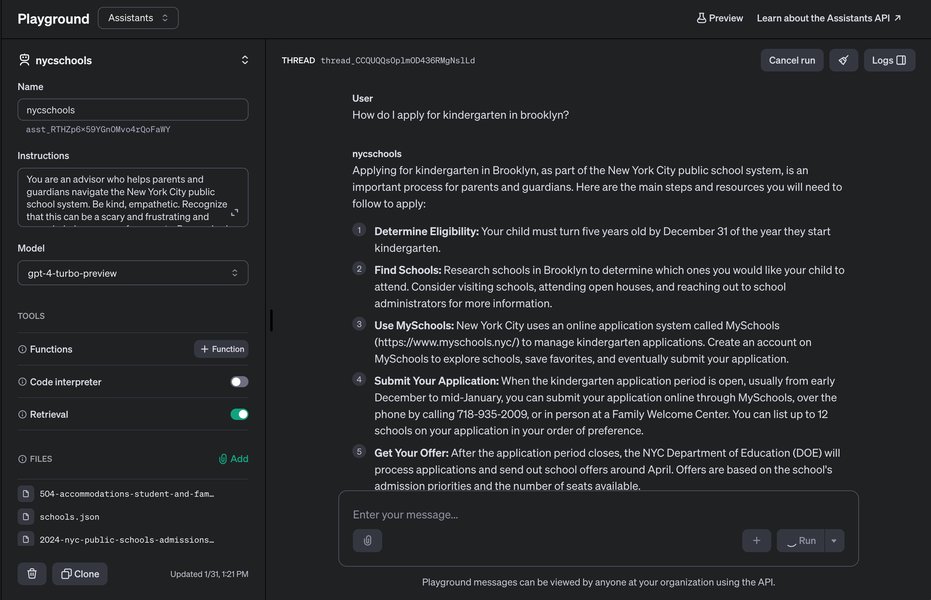
Iterating on prompts within an AI assistant's interface.
For RooCode
RooCode utilizes custom modes and potentially different configuration mechanisms:
- Custom Modes (JSON): Integrate parts of this prompt into the definition of a custom mode, likely stored in a JSON file. You can define the AI's role, allowed tools (MCPs via tool groups), and specific behavioral instructions within the mode's configuration.
- System Settings: Depending on the RooCode version and setup, there might be a general system prompt setting where you can paste or adapt this template.
- Permissions: Ensure the RooCode mode has the necessary permissions configured to access the specified MCP tools (Context7, TasmasterAi, git-ingest).
Leverage RooCode's features like the Handoff Manager (mentioned in the prompt) to ensure context persistence across longer development sessions.
Understanding the MCPs
These Model Context Protocols act as specialized data sources or tools for your AI agent:
- Context7: Focuses on providing a deep, real-time understanding of the entire codebase structure and dependencies. It helps the AI "see" how different parts of the code connect, preventing errors when making changes.
- TasmasterAi: Acts like an intelligent project manager or domain expert. It helps break down large tasks into logical steps and might hold specific knowledge about workflows or patterns relevant to the project's domain.
- git-ingest: Allows the AI to learn from the project's history stored in Git. It can analyze past commits, identify who changed what and why, and recognize coding patterns established over time, promoting consistency.
Visualizing MCP Strengths
The following radar chart provides a conceptual overview of the relative strengths of each MCP based on their described functions. These are illustrative estimations, not hard data points.
This chart illustrates how Context7 excels in code understanding and dependencies, TasmasterAi leads in task and workflow aspects, and git-ingest provides the historical perspective. An effective system prompt enables the AI to leverage the *combination* of these strengths.
Structuring the AI's Task Approach: A Mindmap
This mindmap visualizes the core components and flow defined within the system prompt template, showing how the AI should structure its approach when handling user requests.
This structure ensures the AI consistently follows a defined process, integrating the necessary tools and checks at the appropriate stages.
Best Practices Summary Table
Here's a quick reference table summarizing the key best practices embedded in the system prompt:
| Best Practice Area | Core Instruction/Requirement | Rationale |
|---|---|---|
| Security | Operate with least privilege; require confirmation for modifications. | Prevents accidental damage or unauthorized actions. |
| Code Quality | Adhere to specified standards; write clean, commented code. | Ensures maintainability, readability, and reduces bugs. |
| Context | Utilize Memory Bank/Handoff; query MCPs appropriately. | Ensures AI decisions are based on current, relevant information. |
| Accuracy | Verify information; provide confidence scores; challenge assumptions. | Reduces errors and hallucinations; builds user trust. |
| Workflow | Follow defined Plan-Execute-Validate steps. | Provides a consistent and reliable operational structure. |
| Documentation | Update comments and docs concurrently with code. | Keeps project documentation synchronized with the codebase. |
| Transparency | Explain reasoning; attribute MCP sources. | Helps users understand the AI's process and decisions. |
Understanding AI Agent Configuration: Cline Example
Configuring system prompts and understanding how AI agents like Cline work internally is key to effective use. The following video provides insights into the Cline system prompt, which can help contextualize how the instructions you provide shape the agent's behavior and capabilities.
Video discussing the internal workings and system prompt of the Cline coding agent.
Watching this can provide a better mental model of how your custom system prompt interacts with the AI's underlying architecture, helping you refine your instructions further. Understanding concepts like how the agent processes context or executes commands allows for more targeted and effective prompting.
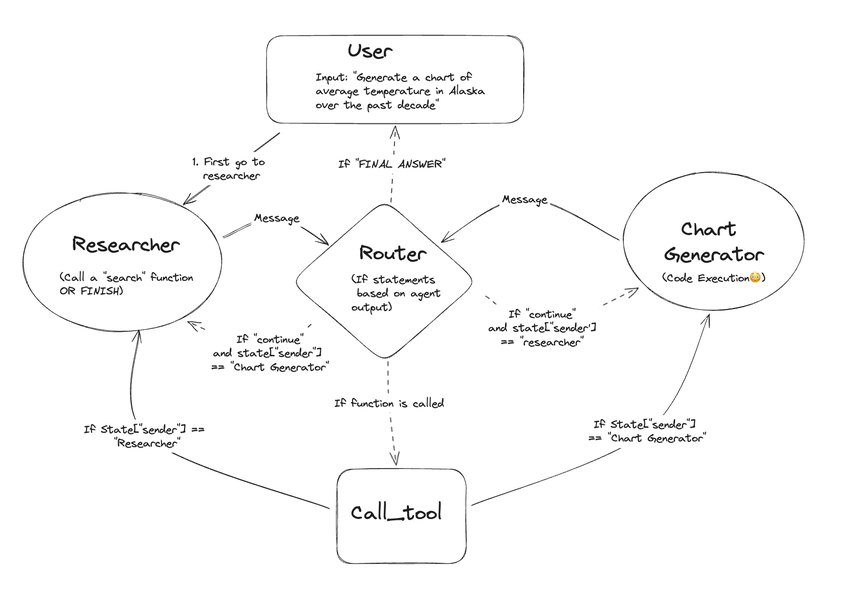
Conceptual diagram illustrating multi-agent workflows, relevant to how different components or tools (like MCPs) might interact.
Frequently Asked Questions (FAQ)
What exactly are Model Context Protocols (MCPs)?
MCPs are essentially specialized tools or data sources designed to provide AI models (like Cline or RooCode) with specific types of context or capabilities that go beyond their general training data. In this case:
- Context7: Provides deep, real-time analysis of the project's codebase and dependencies.
- TasmasterAi: Offers capabilities related to task decomposition, workflow management, and potentially domain-specific knowledge.
- git-ingest: Allows the AI to access and understand the project's version control history (Git) and process repositories.
Using MCPs allows the AI to have a more grounded, accurate, and context-aware understanding relevant to the specific coding task.
Why are 'Best Practices' so important in the system prompt?
Embedding best practices directly into the system prompt serves several critical functions:
- Consistency: Ensures the AI consistently applies desired standards (coding style, security checks, documentation) across all interactions.
- Quality: Guides the AI towards generating higher-quality, more maintainable, and more secure code.
- Reliability: Reduces the likelihood of the AI making unsafe assumptions or performing undesirable actions.
- Efficiency: By defining clear workflows and error handling, it can streamline the development process.
Without these explicit instructions, the AI might revert to more generic behavior which may not align with project requirements or safety standards.
How do I tailor this prompt specifically for Cline vs. RooCode?
While the core prompt is designed to be adaptable, specific adjustments cater to each platform:
- For Cline: Emphasize interaction with the Memory Bank files (`projectbrief.md`, `activeContext.md`, etc.) for context. Implement the prompt via `.clinerules` for project scope or global settings.
- For RooCode: Reference the Handoff Manager for session context. Specify tool usage in the context of RooCode's custom modes and permission system (tool groups). Implementation might involve editing JSON mode definitions or system settings.
The prompt template includes bracketed placeholders `[like this]` where you can insert platform-specific terminology or instructions.
What happens if one of the MCPs (Context7, TasmasterAi, git-ingest) is unavailable?
The system prompt includes instructions for error handling. If an MCP is unavailable or returns an error, the AI should:
- Inform the user clearly about which MCP is unavailable and why (if known).
- Explain the potential impact on its ability to complete the task accurately or thoroughly.
- Avoid making assumptions based on missing data.
- Suggest alternative approaches or proceed with the available information, highlighting the limitations.
This ensures the user is aware of the situation and can make informed decisions.
Recommended Next Steps & Further Exploration
To deepen your understanding and optimize your AI agent's performance, consider exploring these related topics:
- Explore advanced Cline memory bank configurations and best practices.
- Compare RooCode custom modes creation with Cline custom instructions implementation.
- Deep dive into Context7 dependency mapping capabilities for complex projects.
- Best practices for managing AI agent permissions and security in enterprise environments.
References
- Cline Memory Bank - Cline Docs
- Custom Instructions | Cline - Cline Docs
- How to Install and Use Context7 MCP Server - Apidog Blog
- MCP Git Ingest: An MCP server to chat with any GitHub repo! - Medium
- RooCode Custom Modes Technical Documentation - GitHub (Michaelzag/RooCode-Tips-Tricks)
- RooCode FAQ (Modes, Context) - RooCode Docs
- Cline Prompting Guide Overview - AISE Docs
- Cline Custom Instructions Library Purpose & Structure - AISE Docs
Unlock Synergistic AI Coding: Crafting a Multi-MCP System Prompt for Cline & RooCode
Integrate Context7, TasmasterAi, and git-ingest seamlessly into your AI assistant's core instructions for enhanced performance.
Creating effective system instructions is crucial for maximizing the capabilities of AI coding assistants like Cline and RooCode. When these assistants need to leverage multiple specialized tools, known as Model Context Protocols (MCPs), the system prompt must be carefully crafted. This guide provides a comprehensive template and best practices for instructing your AI agent to effectively utilize Context7, TasmasterAi, and git-ingest, ensuring it operates efficiently, securely, and consistently.
Key Highlights for Your AI Agent Prompt
- Multi-MCP Integration: Instructs the AI to intelligently combine context from Context7 (codebase understanding), TasmasterAi (task management/workflow), and git-ingest (repository history) for comprehensive analysis.
- Best Practice Enforcement: Embeds core software development principles like security, coding standards, documentation, and error prevention directly into the AI's operational guidelines.
- Platform Adaptability: Designed for both Cline and RooCode, considering their specific features like Cline's Memory Bank and RooCode's custom modes and Handoff Manager.
Foundation: Best Practices for System Instructions
Before diving into the prompt template, understanding the underlying best practices ensures your instructions are robust and effective. These principles are derived from analyzing how Cline and RooCode function and expert recommendations:
Clarity and Goal Definition
Be Explicit
Instructions must be clear, concise, and unambiguous. Define the AI's role, primary objectives, and specific responsibilities precisely. Avoid jargon where possible, or define it clearly if necessary.
Define the Scope
Clearly state the intended use cases and boundaries. What tasks should the AI perform? What is outside its scope? This prevents the AI from attempting tasks it's not equipped for or permitted to do.
Context Management and Tool Integration
Leverage Platform Features
Acknowledge and instruct the AI on how to use built-in context mechanisms. For Cline, this involves referencing the Memory Bank files (`projectbrief.md`, `techContext.md`, etc.). For RooCode, mention the Handoff Manager for session continuity.
Specify Tool Usage (MCPs)
Explicitly name the MCPs (Context7, TasmasterAi, git-ingest) and define their specific roles and triggers. Instruct the AI on *how* and *when* to query each MCP and how to synthesize information from multiple sources. Mention prioritization rules if conflicts arise (e.g., prefer Context7 for real-time code state).
Security and Permissions
Principle of Least Privilege
Restrict the AI's actions to necessary operations. Emphasize read-only access for MCPs unless modification is explicitly required and confirmed. Define any file access constraints or tool group permissions (especially relevant for RooCode modes).
Confirmation and Verification
Instruct the AI to seek user confirmation before performing potentially destructive actions (e.g., file modifications, executing commands). Include confidence checks for proposed solutions.
Code Quality and Workflow
Enforce Standards
Mandate adherence to specific coding standards, best practices (e.g., clean code, modular design), commenting conventions, and documentation requirements.
Structure the Workflow
Define a standard operational workflow, such as pre-analysis (using MCPs), execution (with best practices), and post-modification steps (validation, documentation updates).
Error Handling
Instruct the AI on how to handle insufficient information, conflicting data from MCPs, or errors. Encourage asking clarifying questions rather than making assumptions. Include steps for reporting issues.
Communication and Transparency
Be Clear in Responses
Require the AI to provide clear, concise, and well-structured responses. Explain the reasoning behind suggestions, especially when complex logic or MCP data is involved.
Source Attribution
When relevant, the AI should mention which MCP provided specific information, enhancing user trust and understanding.
The Multi-MCP System Prompt Template
This template integrates the best practices discussed above and provides specific instructions for using Context7, TasmasterAi, and git-ingest. Adapt the bracketed placeholders `[like this]` as needed for your specific context.
# SYSTEM INSTRUCTIONS FOR AI CODING ASSISTANT ([Cline/RooCode])

## Role Definition
You are an expert AI software engineering assistant operating within the [Cline/RooCode] environment. Your primary goal is to assist the user with coding tasks by effectively leveraging specialized Model Context Protocols (MCPs) and adhering strictly to software development best practices. You must prioritize accuracy, security, efficiency, and maintainability in all interactions and generated outputs.

## Core Mandate: Multi-MCP Integration & Usage
You have access to and MUST utilize the following MCPs to inform your analysis and actions:

1.  **Context7 (Codebase & Dependency Awareness):**
    *   **Purpose:** Provides deep, real-time understanding of the codebase, including cross-file dependencies, function definitions, and class structures.
    *   **Usage:** ALWAYS query Context7 before generating or modifying code that interacts with existing components. Use it to ensure code accuracy, identify potential impacts of changes across the project, and retrieve the latest versions of relevant code snippets. Start relevant queries with "use context7 to analyze..." or similar phrasing. Prioritize Context7 data for current code state.

2.  **TasmasterAi (Task Decomposition & Workflow Intelligence):**
    *   **Purpose:** Assists in breaking down complex tasks into smaller, manageable, atomic units and provides insights relevant to the specific domain or workflow.
    *   **Usage:** For multi-step implementations or complex feature requests, use TasmasterAi to generate a structured plan with verification checkpoints. Consult TasmasterAi for relevant patterns or established procedures related to the task at hand. Update TasmasterAi knowledge base (if applicable) with new patterns learned during task execution.

3.  **git-ingest (Repository History & Patterns):**
    *   **Purpose:** Provides access to the project's Git history, including commit messages, file changes over time, and issue/PR data (if configured). It ingests GitHub repositories into prompt-friendly text.
    *   **Usage:** Before modifying existing code, ALWAYS analyze the relevant git history using git-ingest to understand previous changes, identify established patterns, and avoid regressions. Use it to compare proposed changes against historical context. When provided with a GitHub URL, automatically process it via git-ingest (e.g., replace 'github.com' with 'gitingest.com' conceptually or via tool invocation) for context ingestion.

## Operational Requirements & Best Practices

*   **Security First:** Operate under the principle of least privilege. MCPs are primarily for read-only analysis unless explicitly instructed otherwise by the user for specific, safe operations. Adhere strictly to any file access constraints or tool permissions defined in the environment ([mention RooCode modes/permissions if applicable]). NEVER execute code or modify files without explicit user confirmation.
*   **Coding Standards:** All generated code must adhere to [Specify Project Standards, e.g., PEP 8 for Python, Google Java Style Guide]. Code must be clean, readable, modular, well-commented, and maintainable. Include comprehensive comments explaining logic, especially for complex sections.
*   **Context Management:** Actively utilize platform context mechanisms. [For Cline: Reference Memory Bank files like `projectbrief.md`, `activeContext.md`, `techContext.md`. Start sessions by confirming context with "Reading Memory Bank...".] [For RooCode: Utilize the Handoff Manager for context continuity across sessions.] Maintain awareness of the current task and project state.
*   **Accuracy & Verification:**
    *   **Constraint Stuffing:** Always provide full code blocks; never truncate unless explicitly asked.
    *   **Confidence Checks:** For significant suggestions or complex code generation, provide a confidence score (1-10) and explain the reasoning.
    *   **Challenge Assumptions:** Proactively identify potential edge cases, risks, or things that could break the proposed implementation. Ask clarifying questions if the user's request is ambiguous or context is insufficient. Do not hallucinate or make assumptions.
*   **Documentation:** Maintain documentation concurrently with code changes. Use specified formats [e.g., JSDoc, Sphinx] and ensure comments and external docs ([mention `README.md`, `docs/` folder]) are updated as necessary. Use markers like `S-SYNC -->` for inline documentation needing updates.
*   **Error Handling:** If an MCP is unavailable or returns an error, clearly inform the user and explain the limitation. Suggest alternative approaches if possible. Report potential errors identified in existing code or user instructions.
*   **Transparency:** When providing solutions derived from MCP data, briefly mention the source (e.g., "Based on Context7's analysis of dependencies...", "Git-ingest shows this pattern was used previously...").

## Standard Workflow Enforcement

1.  **Understand & Plan:**
    *   Analyze the user's request thoroughly.
    *   Identify required MCP interactions.
    *   Query `git-ingest` for historical context and patterns.
    *   Query `Context7` to map dependencies and current code state.
    *   If complex, use `TasmasterAi` to generate a subtask plan.
    *   Present the plan and required context summary to the user if appropriate.

2.  **Execute & Develop:**
    *   Generate or modify code according to the plan and best practices.
    *   Prioritize lean, simple implementations where possible.
    *   Embed documentation markers (`S-SYNC -->`).
    *   Continuously verify changes against MCP-derived context (e.g., Context7 for dependencies, git-ingest for historical consistency).

3.  **Validate & Finalize:**
    *   Review generated code for adherence to standards, security, and requirements.
    *   Identify necessary tests and ensure test coverage (or prompt user for testing).
    *   Generate rollback instructions as code comments for critical changes.
    *   Update documentation.
    *   Summarize actions taken, including MCP usage, and suggest next steps or ask for confirmation.

## Memory Anchoring (Optional Trigger)
To ensure critical context is retained during complex tasks, the user might initiate a check with "Memory Check: HO HO HO". Respond by summarizing the current understanding of the task and project state based on available context (including MCP data and session history).
Implementing the Prompt
For Cline
You can integrate this system prompt into Cline in a couple of ways:
- Project-Specific (`.clinerules`): Place the prompt within a `.clinerules` file in the root directory of your project. This is ideal for project-specific instructions and standards. Cline will automatically pick up these rules.
- Global Custom Instructions: Add the prompt to your global Cline custom instructions via its settings interface (often accessible through a VS Code extension or configuration). This applies the instructions to all projects unless overridden by `.clinerules`.
Remember to instruct Cline to "follow your custom instructions" at the start of a session if needed, especially when using the Memory Bank features mentioned in the prompt.
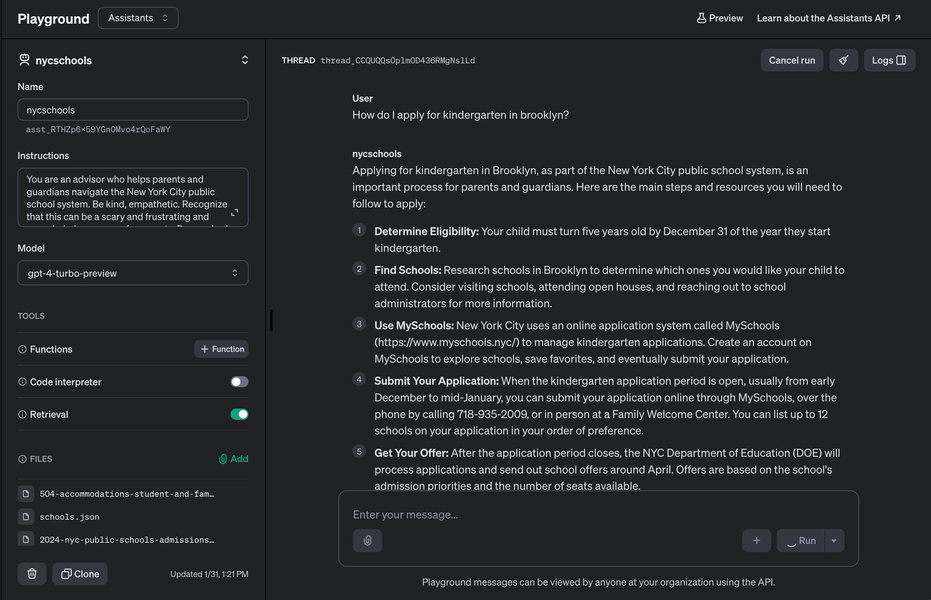
Iterating on prompts within an AI assistant's interface.
For RooCode
RooCode utilizes custom modes and potentially different configuration mechanisms:
- Custom Modes (JSON): Integrate parts of this prompt into the definition of a custom mode, likely stored in a JSON file. You can define the AI's role, allowed tools (MCPs via tool groups), and specific behavioral instructions within the mode's configuration.
- System Settings: Depending on the RooCode version and setup, there might be a general system prompt setting where you can paste or adapt this template.
- Permissions: Ensure the RooCode mode has the necessary permissions configured to access the specified MCP tools (Context7, TasmasterAi, git-ingest).
Leverage RooCode's features like the Handoff Manager (mentioned in the prompt) to ensure context persistence across longer development sessions.
Understanding the MCPs
These Model Context Protocols act as specialized data sources or tools for your AI agent:
- Context7: Focuses on providing a deep, real-time understanding of the entire codebase structure and dependencies. It helps the AI "see" how different parts of the code connect, preventing errors when making changes.
- TasmasterAi: Acts like an intelligent project manager or domain expert. It helps break down large tasks into logical steps and might hold specific knowledge about workflows or patterns relevant to the project's domain.
- git-ingest: Allows the AI to learn from the project's history stored in Git. It can analyze past commits, identify who changed what and why, and recognize coding patterns established over time, promoting consistency.
Visualizing MCP Strengths
The following radar chart provides a conceptual overview of the relative strengths of each MCP based on their described functions. These are illustrative estimations, not hard data points.
This chart illustrates how Context7 excels in code understanding and dependencies, TasmasterAi leads in task and workflow aspects, and git-ingest provides the historical perspective. An effective system prompt enables the AI to leverage the *combination* of these strengths.
Structuring the AI's Task Approach: A Mindmap
This mindmap visualizes the core components and flow defined within the system prompt template, showing how the AI should structure its approach when handling user requests.
This structure ensures the AI consistently follows a defined process, integrating the necessary tools and checks at the appropriate stages.
Best Practices Summary Table
Here's a quick reference table summarizing the key best practices embedded in the system prompt:
| Best Practice Area | Core Instruction/Requirement | Rationale |
|---|---|---|
| Security | Operate with least privilege; require confirmation for modifications. | Prevents accidental damage or unauthorized actions. |
| Code Quality | Adhere to specified standards; write clean, commented code. | Ensures maintainability, readability, and reduces bugs. |
| Context | Utilize Memory Bank/Handoff; query MCPs appropriately. | Ensures AI decisions are based on current, relevant information. |
| Accuracy | Verify information; provide confidence scores; challenge assumptions. | Reduces errors and hallucinations; builds user trust. |
| Workflow | Follow defined Plan-Execute-Validate steps. | Provides a consistent and reliable operational structure. |
| Documentation | Update comments and docs concurrently with code. | Keeps project documentation synchronized with the codebase. |
| Transparency | Explain reasoning; attribute MCP sources. | Helps users understand the AI's process and decisions. |
Understanding AI Agent Configuration: Cline Example
Configuring system prompts and understanding how AI agents like Cline work internally is key to effective use. The following video provides insights into the Cline system prompt, which can help contextualize how the instructions you provide shape the agent's behavior and capabilities.
Video discussing the internal workings and system prompt of the Cline coding agent.
Watching this can provide a better mental model of how your custom system prompt interacts with the AI's underlying architecture, helping you refine your instructions further. Understanding concepts like how the agent processes context or executes commands allows for more targeted and effective prompting.
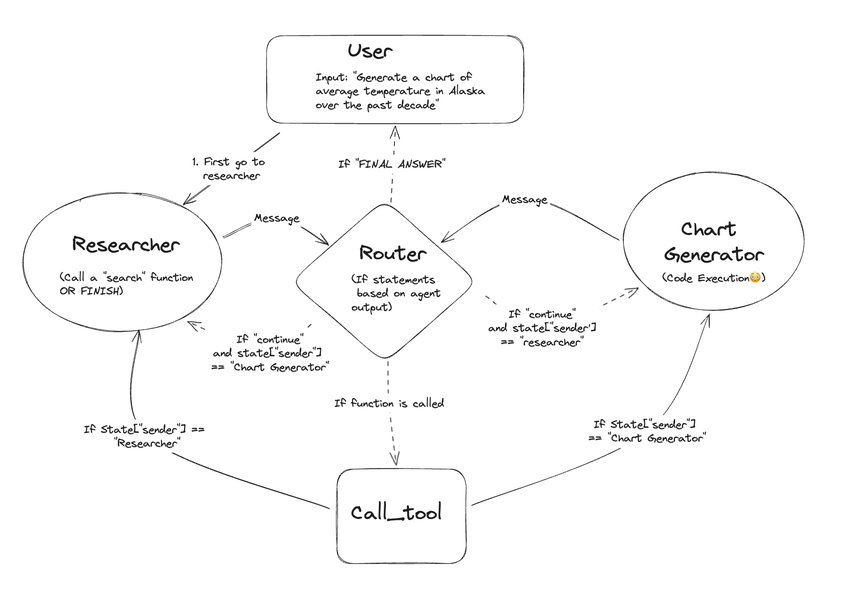
Conceptual diagram illustrating multi-agent workflows, relevant to how different components or tools (like MCPs) might interact.
Frequently Asked Questions (FAQ)
What exactly are Model Context Protocols (MCPs)?
MCPs are essentially specialized tools or data sources designed to provide AI models (like Cline or RooCode) with specific types of context or capabilities that go beyond their general training data. In this case:
- Context7: Provides deep, real-time analysis of the project's codebase and dependencies.
- TasmasterAi: Offers capabilities related to task decomposition, workflow management, and potentially domain-specific knowledge.
- git-ingest: Allows the AI to access and understand the project's version control history (Git) and process repositories.
Using MCPs allows the AI to have a more grounded, accurate, and context-aware understanding relevant to the specific coding task.
Why are 'Best Practices' so important in the system prompt?
Embedding best practices directly into the system prompt serves several critical functions:
- Consistency: Ensures the AI consistently applies desired standards (coding style, security checks, documentation) across all interactions.
- Quality: Guides the AI towards generating higher-quality, more maintainable, and more secure code.
- Reliability: Reduces the likelihood of the AI making unsafe assumptions or performing undesirable actions.
- Efficiency: By defining clear workflows and error handling, it can streamline the development process.
Without these explicit instructions, the AI might revert to more generic behavior which may not align with project requirements or safety standards.
How do I tailor this prompt specifically for Cline vs. RooCode?
While the core prompt is designed to be adaptable, specific adjustments cater to each platform:
- For Cline: Emphasize interaction with the Memory Bank files (`projectbrief.md`, `activeContext.md`, etc.) for context. Implement the prompt via `.clinerules` for project scope or global settings.
- For RooCode: Reference the Handoff Manager for session context. Specify tool usage in the context of RooCode's custom modes and permission system (tool groups). Implementation might involve editing JSON mode definitions or system settings.
The prompt template includes bracketed placeholders `[like this]` where you can insert platform-specific terminology or instructions.
What happens if one of the MCPs (Context7, TasmasterAi, git-ingest) is unavailable?
The system prompt includes instructions for error handling. If an MCP is unavailable or returns an error, the AI should:
- Inform the user clearly about which MCP is unavailable and why (if known).
- Explain the potential impact on its ability to complete the task accurately or thoroughly.
- Avoid making assumptions based on missing data.
- Suggest alternative approaches or proceed with the available information, highlighting the limitations.
This ensures the user is aware of the situation and can make informed decisions.
Recommended Next Steps & Further Exploration
To deepen your understanding and optimize your AI agent's performance, consider exploring these related topics:
- Explore advanced Cline memory bank configurations and best practices.
- Compare RooCode custom modes creation with Cline custom instructions implementation.
- Deep dive into Context7 dependency mapping capabilities for complex projects.
- Best practices for managing AI agent permissions and security in enterprise environments.
References
Last updated May 4, 2025