
Designing a Cloud-Based Data Mart Architecture
Visualize and Understand Departmental Data Solutions in the Cloud
Key Insights
- Data Marts are focused subsets of data: Unlike comprehensive data warehouses, data marts are designed to serve the specific analytical needs of a particular business unit or department, offering faster access to relevant data.
- Cloud architecture enhances data mart capabilities: Implementing data marts in the cloud provides significant advantages in scalability, flexibility, cost-effectiveness, and accessibility compared to traditional on-premises solutions.
- Diagramming tools are essential for visualization: Various tools, from general-purpose diagrammers like Draw.io and Lucidchart to cloud-specific ones like Cloudcraft and Holori, aid in creating clear and comprehensive cloud architecture diagrams for data marts.
Understanding Cloud-Based Data Marts
A data mart is a specialized data storage system tailored to the requirements of a specific business function or department within an organization. While a data warehouse consolidates data from across the entire enterprise, a data mart focuses on a subset of this data, making it easier and faster for specific teams to access and analyze information relevant to their needs. Cloud-based data marts leverage the scalability, flexibility, and cost advantages of cloud computing to provide more efficient and accessible data solutions for departments.
Cloud architecture offers several compelling reasons to host data marts in the cloud. Traditional on-premises data marts can be difficult to scale as data volumes grow and user demands increase. Cloud platforms provide elastic computational resources and scalable storage options, allowing data marts to handle increasing data loads cost-effectively. Furthermore, cloud-based data marts can integrate more seamlessly with other cloud services and tools, enhancing analytical capabilities and enabling real-time data access and analysis.
The architecture of a cloud-based data mart typically involves several key components, similar to a data warehouse but on a smaller, departmental scale. These include data sources, a mechanism for extracting, transforming, and loading (ETL) or extracting, loading, and transforming (ELT) data, a structured storage system optimized for analytical queries, and tools for reporting, analysis, and visualization. The specific architecture can vary based on the business requirements and the chosen cloud platform.
Architectural Components of a Cloud Data Mart
Designing a cloud-based data mart involves considering several layers and components that work together to deliver targeted data to end-users. These layers ensure data is ingested, stored, processed, and served efficiently for departmental analysis.
Data Ingestion Layer
This layer is responsible for collecting data from various sources relevant to the specific data mart's focus. These sources can be internal databases, external applications, APIs, or even flat files. The ingestion process often involves tools and services provided by the cloud platform for connecting to different data sources and initiating the data transfer.
Data Extraction
Extracting data involves pulling relevant information from the source systems. This can be done through various methods, including batch processing, streaming, or change data capture (CDC), depending on the data sources and the need for real-time or near-real-time data.
Data Loading
Once extracted, the data needs to be loaded into a staging area or directly into the data mart's storage. Cloud platforms offer scalable storage solutions like object storage or managed database services that can handle large volumes of raw or lightly processed data.
Data Storage Layer
The core of the data mart architecture is the storage system where the processed and organized data resides. This storage is optimized for analytical queries and can take various forms depending on the cloud platform and the specific needs of the data mart.
Database Technologies
Relational databases, columnar databases, or data warehousing services offered by cloud providers are common choices for data mart storage. Columnar databases, in particular, are well-suited for analytical workloads due to their ability to quickly scan and aggregate data across columns.
Schema Design
Within the storage layer, the data is typically organized using dimensional modeling techniques like star schema or snowflake schema. These schemas are designed to optimize query performance for analytical purposes. A star schema, for instance, centralizes data in a fact table surrounded by related dimension tables.
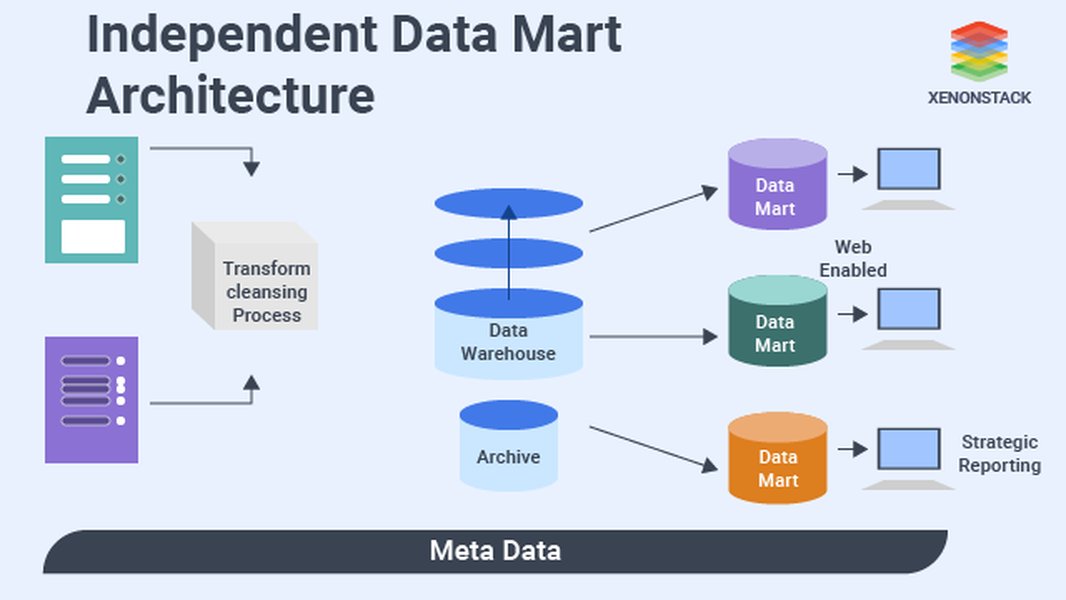
A conceptual diagram illustrating the architecture of a data mart.
Data Processing Layer
This layer involves transforming the ingested data into a format suitable for analysis within the data mart. This includes data cleaning, aggregation, joining data from different sources, and applying business rules.
ETL/ELT Pipelines
ETL (Extract, Transform, Load) or ELT (Extract, Load, Transform) processes are crucial for preparing data for the data mart. Cloud platforms provide managed services for building and orchestrating these data pipelines, making it easier to automate data transformations and ensure data quality.
Data Modeling
Applying the chosen schema design (star or snowflake) happens during the processing phase, where data is organized into fact and dimension tables for efficient querying and analysis.
Data Serving Layer
The final layer is responsible for providing access to the data mart for end-users and their analytical tools. This layer ensures that data is easily retrievable and can be used for reporting, dashboarding, and further analysis.
Analytical Tools and Services
Business intelligence (BI) tools, data visualization software, and analytical applications connect to the data mart through this layer. Cloud platforms often offer integrated BI services or provide easy connectivity for third-party tools.
Access Control and Security
Implementing robust access control mechanisms is vital to ensure that users only have access to the data relevant to their department and role. Cloud platforms provide comprehensive identity and access management (IAM) services for securing data access.
Cloud-Based Data Mart Architecture Patterns
There are several approaches to implementing data marts in the cloud, each with its own advantages and considerations. These patterns often relate to how the data mart interacts with a larger enterprise data warehouse, if one exists.
Dependent Data Mart
In this approach, the data mart is a subset of a larger, centralized enterprise data warehouse. Data is first loaded into the data warehouse and then extracted and transformed to populate the departmental data mart. This follows a top-down approach to data warehousing.
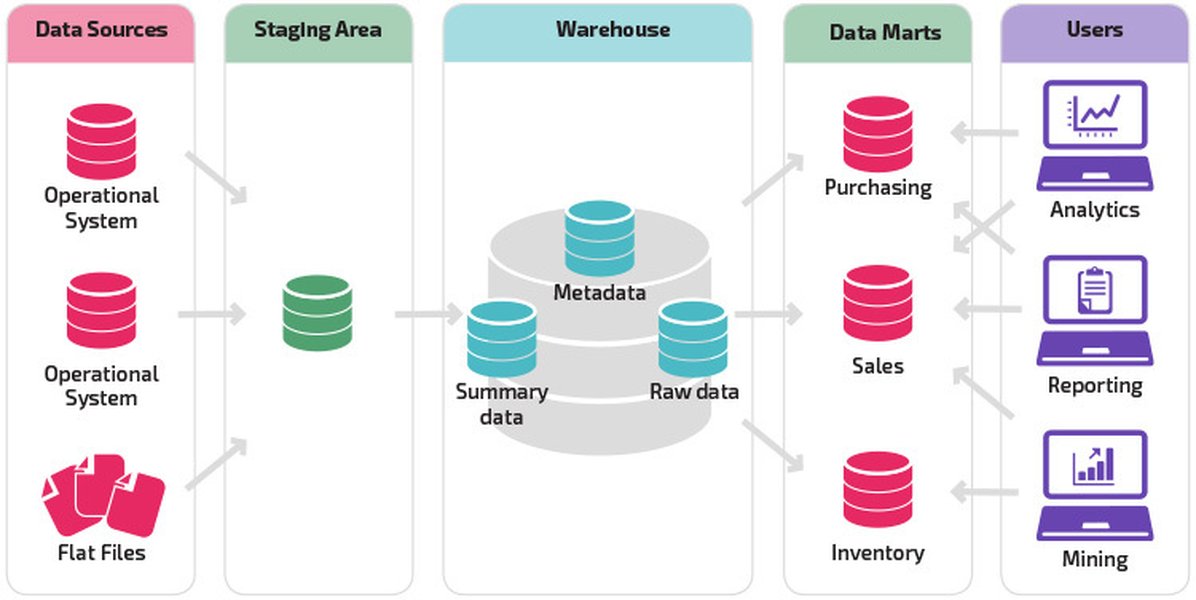
Illustrating a dependent data mart architecture where data flows from a data warehouse.
Independent Data Mart
An independent data mart is created without a central data warehouse. Data is extracted directly from operational systems and external sources, transformed, and loaded into the data mart. This approach is often quicker to implement but can lead to data silos and inconsistencies across departments if not managed carefully.
Virtualized Data Mart
Virtualized data marts do not involve physically moving data into a separate repository. Instead, they provide a virtual view or abstraction layer over the data in a data warehouse or other source systems. This approach reduces data redundancy and simplifies data management but relies on the performance of the underlying data sources.
Tools for Creating Cloud Architecture Diagrams
Visualizing your cloud-based data mart architecture is crucial for communication, documentation, and planning. Several tools are available to help you create clear and effective diagrams.
General Diagramming Tools
Tools like Draw.io (now Diagrams.net) and Lucidchart are popular general-purpose diagramming tools that offer a wide range of shapes and templates, including those for cloud providers. They are versatile and suitable for various diagramming needs.
Cloud-Specific Diagramming Tools
For more specialized cloud architecture diagramming, tools like Cloudcraft and Holori are designed specifically for visualizing cloud environments. Cloudcraft focuses on AWS and can generate diagrams directly from your live environment, even providing cost estimations. Holori supports multi-cloud environments and also helps with cost optimization.
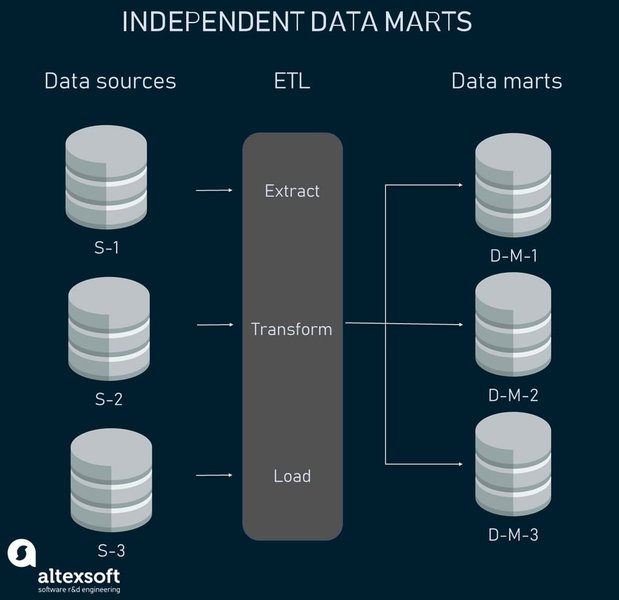
Comparing different data storage solutions, including data marts.
Other tools like Gliffy and Miro also offer features for creating cloud architecture diagrams, often with collaboration capabilities that are beneficial for teams.
AI-Powered Diagramming Tools
Emerging tools like Eraser IO leverage AI to generate architecture diagrams from natural language descriptions or code snippets, potentially speeding up the diagramming process.
Example Cloud Data Mart Architecture (Conceptual)
Below is a conceptual diagram illustrating a possible cloud-based data mart architecture. This diagram uses generic cloud service representations as specific service names vary between cloud providers (AWS, Azure, GCP, etc.).
| Component | Description | Potential Cloud Services (Examples) |
|---|---|---|
| Data Sources | Various sources of departmental data (databases, applications, files). | On-premises databases, SaaS applications, object storage buckets. |
| Data Ingestion | Process of collecting and moving data from sources to the cloud. | Managed ETL/ELT services, data streaming services, data transfer services. |
| Staging Area | Temporary storage for raw or semi-processed data before transformation. | Object storage (e.g., S3, Azure Blob Storage, Google Cloud Storage). |
| Data Processing/Transformation | Cleaning, transforming, and structuring data for analysis. | Managed processing services (e.g., Glue, Data Factory, Dataflow), serverless functions (e.g., Lambda, Azure Functions, Cloud Functions). |
| Data Mart Storage | Optimized database or data warehouse for analytical queries. | Managed database services (e.g., RDS, Azure SQL Database, Cloud SQL), data warehouse services (e.g., Redshift, Synapse Analytics, BigQuery). |
| Analytical Tools/Services | Tools for querying, reporting, and visualizing data. | Managed BI services (e.g., QuickSight, Power BI, Looker Studio), third-party BI tools. |
| Access Control | Managing user permissions and securing data access. | IAM services, network security groups, access policies. |
Benefits of Cloud-Based Data Marts
Migrating data marts to the cloud offers significant advantages for organizations and individual departments:
- Scalability: Easily scale storage and compute resources up or down based on demand, avoiding the limitations of on-premises hardware.
- Cost-Effectiveness: Pay-as-you-go pricing models can be more cost-efficient than managing dedicated on-premises infrastructure, especially for variable workloads.
- Accessibility: Cloud-based data marts can be accessed from anywhere with an internet connection, facilitating collaboration and remote work.
- Agility: Cloud platforms offer managed services that can accelerate the development and deployment of data marts, allowing departments to access insights faster.
- Integration: Seamless integration with a wide range of cloud services for enhanced analytics, machine learning, and data sharing.
- Disaster Recovery and High Availability: Cloud providers offer built-in features for data backup, disaster recovery, and high availability, ensuring data accessibility and resilience.
Challenges and Considerations
While cloud-based data marts offer numerous benefits, there are also challenges and considerations to keep in mind:
-
Data Security and Compliance: Ensuring data security and compliance with relevant regulations is paramount in the cloud. This requires careful configuration of security settings and access controls.
-
Data Governance: Maintaining data quality, consistency, and governance across potentially multiple departmental data marts, especially in independent data mart architectures, is crucial.
-
Cost Management: While potentially cost-effective, managing cloud costs requires careful monitoring and optimization to avoid unexpected expenses.
-
Vendor Lock-in: Relying heavily on specific cloud provider services can make it challenging to migrate to a different provider in the future.
-
Complexity: Designing and managing cloud-based data architectures can be complex, requiring specialized skills and expertise.
Frequently Asked Questions
What is the difference between a data mart and a data warehouse?
A data warehouse is a centralized repository of integrated data from across an entire organization, supporting enterprise-wide analysis and reporting. A data mart, on the other hand, is a smaller, focused subset of a data warehouse or a standalone repository designed to meet the specific analytical needs of a particular department or business unit.
Why should I consider a cloud-based data mart?
Cloud-based data marts offer enhanced scalability, cost-effectiveness, accessibility, and agility compared to traditional on-premises solutions. They can be deployed faster and integrate more easily with other cloud services, accelerating time to insight for departments.
What are the key components of a cloud data mart architecture?
Key components include data sources, data ingestion mechanisms (ETL/ELT), a data storage layer (database or data warehouse service), a data processing layer for transformations, and a data serving layer for connecting analytical tools. Access control and security are also critical aspects.
What tools can I use to create a cloud data mart diagram?
You can use general diagramming tools like Draw.io and Lucidchart, or cloud-specific tools such as Cloudcraft and Holori. AI-powered tools are also emerging for automated diagram generation.
What are the potential challenges of implementing a cloud data mart?
Challenges include ensuring data security and compliance, maintaining data governance and consistency, managing cloud costs effectively, potential vendor lock-in, and the complexity of designing and managing cloud architectures.
References
 aws.amazon.com
Last updated May 5, 2025