
Effortlessly Capture 7shifts Time Punch Data with a Concise Cloudflare Worker
Unlock real-time insights by building a lightweight, serverless webhook receiver for your 7shifts timekeeping events.
Integrating external services often involves webhooks, which are automated messages sent from apps when something happens. In the context of 7shifts, a popular employee scheduling and management software, webhooks can notify your systems about events like time punches. Cloudflare Workers provide an incredibly efficient and scalable serverless environment to receive and process these webhooks right at the edge, close to your users and data sources.
Key Insights at a Glance
- Serverless Efficiency: Cloudflare Workers enable you to run JavaScript code in response to HTTP requests without managing servers, making them perfect for lightweight tasks like webhook reception.
- Core Functionality: A webhook receiver for 7shifts time punches primarily needs to validate incoming POST requests, parse JSON payloads, and then act upon that data (e.g., log, store, or forward).
- Security and Reliability: Proper error handling, content type validation, and considerations for security (like API token management and potential signature verification) are crucial for a production-ready webhook.
This guide will walk you through creating a concise yet robust Cloudflare Worker to act as a webhook receiver for the 7shifts Time Punches API. We'll cover the code, its explanation, deployment considerations, and best practices.
The Cloudflare Worker Code: A Concise Receiver
JavaScript for Your Webhook Endpoint
Below is the JavaScript code for your Cloudflare Worker. This script is designed to be deployed directly and will listen for POST requests, expecting a JSON payload from 7shifts.
addEventListener('fetch', event => {
  event.respondWith(handleRequest(event.request, event.env));
});

async function handleRequest(request, env) {
  // 1. Ensure it's a POST request
  if (request.method !== 'POST') {
    return new Response(JSON.stringify({ status: 'error', message: 'Method Not Allowed. Please use POST.' }), {
      status: 405,
      headers: { 'Content-Type': 'application/json' },
    });
  }

  // 2. Ensure content type is application/json
  const contentType = request.headers.get('content-type') || '';
  if (!contentType.includes('application/json')) {
    return new Response(JSON.stringify({ status: 'error', message: 'Unsupported Media Type. Please send JSON.' }), {
      status: 415,
      headers: { 'Content-Type': 'application/json' },
    });
  }

  // 3. Optional: Define a specific path for your webhook if the Worker handles multiple routes.
  // For a dedicated worker, this might not be necessary.
  // const url = new URL(request.url);
  // if (url.pathname !== '/webhook/7shifts/timepunches') {
  //   return new Response(JSON.stringify({ status: 'error', message: 'Endpoint not found.' }), {
  //     status: 404,
  //     headers: { 'Content-Type': 'application/json' },
  //   });
  // }

  try {
    // 4. Parse the JSON payload from the request body
    const payload = await request.json();

    // 5. Process the payload: For this example, we'll log it.
    // In a real-world scenario, you might store it in Cloudflare KV,
    // a database, or forward it to another service.
    console.log('Received 7shifts Time Punches Webhook Payload:', JSON.stringify(payload, null, 2));

    // --- Placeholder for further processing logic ---
    // Example: Accessing a secret API key stored in Worker Secrets
    // const MY_API_KEY = env.MY_SECRET_API_KEY;
    // if (MY_API_KEY) {
    //   // Perform actions requiring the API key
    //   console.log('API Key found, proceeding with secured action.');
    // }
    //
    // Example: Forwarding payload to another service
    // const forwardResponse = await fetch('https://api.example.com/process-timepunch', {
    //   method: 'POST',
    //   headers: {
    //     'Content-Type': 'application/json',
    //     'Authorization': <code>Bearer ${env.FORWARDING_API_TOKEN} // Using a secret
    //   },
    //   body: JSON.stringify(payload)
    // });
    // if (!forwardResponse.ok) {
    //   console.error('Failed to forward payload:', await forwardResponse.text());
    // }
    // --- End of placeholder ---

    // 6. Acknowledge receipt with a 200 OK response
    // It's good practice to return a JSON response confirming receipt.
    return new Response(JSON.stringify({ status: 'success', message: 'Webhook received successfully.' }), {
      status: 200,
      headers: { 'Content-Type': 'application/json' },
    });

  } catch (error) {
    console.error('Error processing webhook:', error.message, error.stack);
    // Differentiate between bad JSON and other server errors
    if (error instanceof SyntaxError) { // Specifically for JSON.parse errors
      return new Response(JSON.stringify({ status: 'error', message: 'Invalid JSON payload.' }), {
        status: 400, // Bad Request
        headers: { 'Content-Type': 'application/json' },
      });
    }
    // For other errors
    return new Response(JSON.stringify({ status: 'error', message: 'Internal Server Error processing webhook.' }), {
      status: 500, // Internal Server Error
      headers: { 'Content-Type': 'application/json' },
    });
  }
}
Dissecting the Worker Script
Let's break down what each part of this Cloudflare Worker script does:
addEventListener('fetch', event => { ... }): This is the entry point for every Cloudflare Worker. It listens for incoming HTTP requests (fetchevents) and usesevent.respondWith()to send a response back to the client.async function handleRequest(request, env): This asynchronous function is where the main logic for handling the request resides. It takes therequestobject (containing details about the incoming HTTP request) andenv(an object containing environment variables and secrets bound to the Worker).- Method Check (
request.method !== 'POST'): Webhooks, especially those carrying data like 7shifts time punches, typically use the HTTP POST method. This check ensures that only POST requests are processed, returning a405 Method Not Allowedfor others. - Content-Type Check (
!contentType.includes('application/json')): 7shifts webhooks for time punches are expected to send data in JSON format. This check verifies theContent-Typeheader, returning a415 Unsupported Media Typeif it's not JSON. - Path Check (Optional): The commented-out section shows how you could restrict the Worker to respond only to a specific URL path (e.g.,
/webhook/7shifts/timepunches). This is useful if your Worker serves multiple purposes or endpoints. - Payload Parsing (
await request.json()): This line attempts to parse the request body as JSON. If the body is not valid JSON, it will throw aSyntaxError. - Processing Logic (
console.log(...)): In this concise example, we simply log the received payload to the Cloudflare Worker logs. This is a crucial step for debugging and verifying that you are receiving data correctly. The placeholder comments suggest where you'd add custom logic like:- Storing data in Cloudflare KV, D1, or R2.
- Forwarding the data to another API or internal system.
- Triggering notifications or other workflows.
- Accessing secrets (like API keys) from
envfor secure operations.
- Acknowledgment Response (
new Response(...)): It's vital to send a success response (HTTP 200-299 range) back to the webhook provider (7shifts) quickly to acknowledge receipt. This prevents 7shifts from assuming the webhook failed and retrying unnecessarily. Returning a JSON object is a common practice. - Error Handling (
try...catch): This block catches any errors that occur during processing.- If
request.json()fails due to malformed JSON, aSyntaxErroris caught, and a400 Bad Requestresponse is returned. - For any other unexpected errors, a generic
500 Internal Server Errorresponse is returned. Detailed error logging viaconsole.errorhelps in troubleshooting.
- If
Visualizing the Webhook Workflow
Understanding the Data Flow
The following mindmap illustrates the typical flow of information when 7shifts sends a time punch event to your Cloudflare Worker, and how the Worker processes it.
(e.g., clock-in, clock-out)"] id1.2["Sends HTTP POST Request"] id1.3["Payload Format: JSON"] id2["Cloudflare Worker: Edge Receiver"] id2.1["Listens for
fetch events"]
id2.2["Request Validation Stage"]
id2.2.1["Verify HTTP Method (Must be POST)"]
id2.2.2["Verify Content-Type (Must be application/json)"]
id2.2.3["Optional: Verify URL Path"]
id2.2.4["Advanced: Verify Webhook Signature (if provided by 7shifts)"]
id2.3["Payload Processing Stage"]
id2.3.1["Parse JSON data from request body"]
id2.3.2["Execute Business Logic"]
id2.3.2.1["Log received data (for debugging/auditing)"]
id2.3.2.2["Store data (e.g., Cloudflare KV, D1, external database)"]
id2.3.2.3["Forward data to other internal/external APIs"]
id2.3.2.4["Trigger notifications or other automated workflows"]
id2.4["Response Generation Stage"]
id2.4.1["Send Success Acknowledgment (HTTP 200 OK) to 7shifts"]
id2.4.2["Send Client Error Response (HTTP 4xx) for invalid requests"]
id2.4.3["Send Server Error Response (HTTP 5xx) for internal processing issues"]
id3["Key Operational Considerations"]
id3.1["Security Measures"]
id3.1.1["Use Worker Secrets for API keys/tokens"]
id3.1.2["Implement signature verification if available"]
id3.2["Robust Error Handling and Retries (on 7shifts side)"]
id3.3["Scalability (Handled inherently by Cloudflare Workers)"]
id3.4["Comprehensive Monitoring & Logging (Cloudflare Logs)"]
id4["Deployment & Management"]
id4.1["Using Wrangler CLI (for development and deployment)"]
id4.2["Configuration via Cloudflare Dashboard"]
This flow highlights the journey of a webhook event from its origin at 7shifts to its reception and initial processing by your Cloudflare Worker, emphasizing validation, data handling, and response mechanisms.
Essential Checks for a Robust Webhook Receiver
Building Reliability into Your Worker
While the provided code is concise, a production-grade webhook receiver often incorporates more checks and logic. The table below summarizes key aspects to consider for building a resilient and secure webhook endpoint.
| Check/Action | Description | Importance | Worker Implementation Point |
|---|---|---|---|
| HTTP Method Validation | Ensures the request uses the expected method (typically POST for webhooks that send data). | Critical | if (request.method !== 'POST') |
| Content-Type Validation | Verifies the payload is in the expected format (e.g., application/json for 7shifts). |
High | request.headers.get('content-type').includes('application/json') |
| Payload Parsing | Converts the raw request body into a usable data structure (e.g., a JavaScript object from JSON). | Critical | await request.json() within a try...catch block. |
| Data Schema Validation | Checks if the received data conforms to the expected structure, fields, and data types. This helps prevent errors downstream. | High | Custom logic or a schema validation library (e.g., Zod, Ajv) applied to the parsed payload. |
| Security Verification | Authenticates the webhook source. This can involve checking a shared secret in headers/payload or verifying a cryptographic signature (e.g., HMAC). | Critical | Compare a header value (e.g., X-7shifts-Signature if supported) against a calculated signature using a secret stored in env. |
| Idempotency Handling | Designs the system to safely process duplicate messages without unintended side effects, often using unique event IDs. | Medium to High | Check for an event ID in the payload; use Cloudflare KV or D1 to track processed event IDs. |
| Business Logic Execution | Performs the core task the webhook is intended for (e.g., updating a database, sending a notification, logging the time punch). | Critical | Your custom code operating on the validated and parsed payload. |
| Acknowledgment Response | Sends a timely success (e.g., HTTP 200 OK) or error response to the webhook sender. This is crucial for the sender's retry logic. | Critical | new Response('Success', { status: 200 }) or appropriate error responses. |
| Comprehensive Error Handling | Gracefully manages exceptions during any stage of processing and responds with informative error codes and messages. | Critical | try...catch blocks around parsing and business logic; specific error responses for different failure modes. |
| Logging and Monitoring | Records important events, received data (potentially sanitized), errors, and performance metrics for debugging, auditing, and operational insight. | High | console.log(), console.error() for Cloudflare Logs; integration with third-party logging/monitoring services. |
Understanding 7shifts Time Punches (7punches)
Context for Your Webhook Data
7shifts offers a time clocking feature, often referred to as 7punches, which allows employees to clock in and out for their shifts. The webhooks you're receiving would typically relate to these events, providing data such as employee ID, location ID, role ID, and the timestamps for clock-in or clock-out. Understanding this context helps in designing how your Worker will process and utilize the incoming time punch data.
The following video provides an overview of the 7punches system within 7shifts, which can give you a better understanding of the data your webhook receiver will handle:
7punches Overview by 7shifts
General Webhook Architecture
A Bird's-Eye View
Webhooks are a common pattern for enabling real-time communication between different web applications. The diagram below illustrates a general webhook architecture, where an event in a source application triggers an HTTP POST request to a predefined URL (your Cloudflare Worker endpoint).
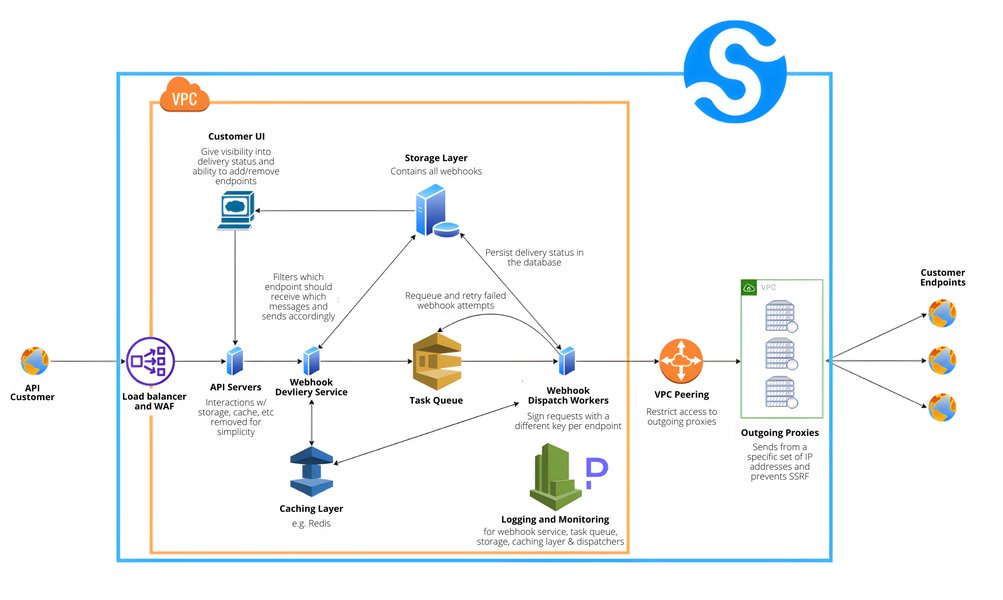
A typical webhook architecture involving a source application, a message queue (optional), and a webhook consumer. Source: Svix.com
In our case, 7shifts is the "Source Application," and your Cloudflare Worker is the "Webhook Consumer." Cloudflare's infrastructure inherently handles aspects that might otherwise require a message queue for simpler use cases, ensuring scalability and reliability for your webhook endpoint.
Evaluating Webhook Receiver Characteristics
From Basic to Production-Ready
When implementing a webhook receiver, various factors contribute to its robustness and suitability for production environments. The radar chart below compares a "Basic Implementation" (like a simple logger) against a more "Production-Ready Worker" across several key characteristics. A higher score (on a scale of 2 to 10) indicates better performance or more comprehensive handling of that characteristic.
This chart illustrates that while a basic implementation is quick to set up, a production-ready worker invests more in security, validation, comprehensive error handling, and monitoring to ensure reliability and maintainability.
Deployment and Further Steps
Bringing Your Worker Online
Deploying your Cloudflare Worker is straightforward using Wrangler, the command-line tool for managing Cloudflare Workers projects.
- Install Wrangler: If you haven't already, install Wrangler using npm:
npm install -g wrangler. - Login to Cloudflare: Authenticate Wrangler with your Cloudflare account:
wrangler login. - Initialize Project: Create a new Worker project:
wrangler init my-7shifts-webhook-receiver. Navigate into the directory:cd my-7shifts-webhook-receiver. - Replace Code: Open the generated
src/index.js(orindex.tsif using TypeScript) and replace its contents with the Worker code provided above. - Configure
wrangler.toml: Ensure yourwrangler.tomlfile is set up with your account ID and a name for your worker. You might add a route or use the defaultworkers.devsubdomain.# Example wrangler.toml name = "my-7shifts-webhook-receiver" main = "src/index.js" # or src/index.ts compatibility_date = "2023-10-30" # Use a recent date account_id = "YOUR_CLOUDFLARE_ACCOUNT_ID" # If you need to store secrets (e.g., API keys for forwarding data) # [vars] # MY_SECRET_API_KEY = "some_value_locally_for_dev_testing" # For actual secrets in production, use <code>wrangler secret put MY_SECRET_API_KEY - Add Secrets (if needed): If your Worker needs to access API keys or other sensitive information (e.g., for forwarding data as shown in the placeholder comments), store them as secrets:
wrangler secret put MY_SECRET_API_KEY. You'll be prompted to enter the secret value. - Deploy: Publish your Worker to the Cloudflare network:
wrangler deploy.
Once deployed, Wrangler will output the URL where your Worker is live. You will use this URL as the webhook endpoint in your 7shifts API configuration settings for time punches.
Frequently Asked Questions (FAQ)
What if 7shifts sends data that isn't JSON?
Content-Type header, specifically looking for application/json. If data is sent with a different content type, the Worker will respond with an HTTP 415 Unsupported Media Type error. If 7shifts were to send non-JSON data with an application/json header, the await request.json() line would fail, triggering a SyntaxError, and the Worker would respond with an HTTP 400 Bad Request.How can I secure my webhook receiver?
- Use HTTPS: Cloudflare Workers are served over HTTPS by default, encrypting data in transit.
- Secret Verification: If 7shifts supports sending a shared secret in a header or the payload, you can verify this secret in your Worker. Store your copy of the secret using Cloudflare Worker Secrets (
env.YOUR_SECRET). - Signature Verification: A more robust method is HMAC signature verification. If 7shifts signs its webhook payloads, you would use a shared secret to compute a signature on the received payload and compare it to the signature sent in a header (e.g.,
X-7shifts-Signature). - IP Whitelisting: If 7shifts provides a list of IP addresses from which webhooks originate, you could configure Cloudflare WAF (Web Application Firewall) rules to only allow requests from those IPs.
- Obscure URL: While not true security, using a long, unguessable path for your webhook endpoint can reduce unsolicited requests.
Where can I view the logs from my Cloudflare Worker?
console.log() and console.error() in your Worker can be viewed in the Cloudflare dashboard. Navigate to your account, select "Workers & Pages," then choose your Worker. You'll find a "Logs" tab where you can see real-time logs or query past logs. You can also use wrangler tail to stream logs live from your terminal.How does this Worker handle potential retries from 7shifts?
What if I need to process the time punch data further, like storing it in a database?
fetch requests from your Worker to an external database API or another microservice. Remember to store any API keys or database credentials securely as Worker Secrets.Conclusion
You've now seen how to create a concise and effective Cloudflare Worker to act as a webhook receiver for the 7shifts Time Punches API. This serverless approach offers scalability, low latency, and cost-efficiency. By validating requests, parsing JSON payloads, and implementing robust error handling, your Worker can reliably capture real-time data from 7shifts. Remember to tailor the processing logic and security measures to your specific application needs, leveraging Cloudflare's features like Worker Secrets for enhanced security.
Recommended Next Steps
To deepen your understanding and expand the capabilities of your webhook integration, consider exploring these related topics:
- How can I implement HMAC signature verification in a Cloudflare Worker for webhook security?
- What are the best practices for storing and managing API secrets when using Cloudflare Workers with third-party services?
- How can I use Cloudflare Workers KV to store and retrieve data received from webhook payloads for stateful processing?
- What strategies can I use for handling webhook retries and ensuring idempotent processing in a Cloudflare Worker?
References
Last updated May 21, 2025