
Mastering DataFrame Combinations in Pandas: Your Ultimate Guide
Unlock the power of pandas by learning how to efficiently merge, join, and concatenate DataFrames for seamless data analysis.
Combining datasets is a fundamental task in data analysis. Whether you're integrating information from different sources, enriching an existing dataset, or simply appending new records, the pandas library in Python provides a powerful and flexible toolkit. This guide will walk you through the primary methods for combining DataFrames: merge(), join(), and concat(), complete with code examples and explanations to help you choose the best approach for your specific needs.
Key Takeaways: Combining DataFrames
pd.merge(): Ideal for database-style joins on common columns or indices, offering fine-grained control over how DataFrames are combined (e.g., inner, left, right, outer joins).DataFrame.join(): Primarily used for combining DataFrames based on their indices, though it can also join on columns. It's a convenient shorthand for certain types of merges.pd.concat(): Best for stacking DataFrames vertically (appending rows) or horizontally (adding columns) without necessarily relying on common keys.
A Deep Dive into DataFrame Combination Methods
Understanding the nuances of each method will empower you to manipulate your data effectively. Let's explore them in detail.
pd.merge(): The Relational Powerhouse
Understanding merge()
The pd.merge() function is your go-to tool for performing SQL-like join operations. It combines rows from two DataFrames based on the values in one or more common columns (the "keys") or indices. This method is highly flexible and allows for various types of joins to control which rows are included in the resulting DataFrame.
Key Parameters for merge()
left,right: The two DataFrames to be merged.how: Specifies the type of merge to be performed. Options include:'inner': (Default) Returns only the rows with matching keys in both DataFrames.'left': Returns all rows from the left DataFrame and matched rows from the right DataFrame. Unmatched rows in the right DataFrame result inNaNvalues for its columns.'right': Returns all rows from the right DataFrame and matched rows from the left DataFrame. Unmatched rows in the left DataFrame result inNaNvalues for its columns.'outer': Returns all rows from both DataFrames. Unmatched keys result inNaNvalues where data is missing.'cross': Creates the Cartesian product of rows from both DataFrames. (Use with caution on large DataFrames).
on: Column or index level name(s) to join on. These must be present in both DataFrames. IfNoneand joining on columns, it infers common columns.left_on,right_on: Column or index level names to join on in the left and right DataFrames, respectively. Useful if key columns have different names.left_index,right_index: Boolean values (defaultFalse). IfTrue, uses the index from the left or right DataFrame as the join key(s).suffixes: A tuple of strings to append to overlapping column names (that are not join keys) in the left and right DataFrames, e.g.,('_left', '_right').
Code Examples: merge() in Action
import pandas as pd

# Sample DataFrames
df1 = pd.DataFrame({
    'EmployeeID': [101, 102, 103, 104],
    'Name': ['Alice', 'Bob', 'Charlie', 'David'],
    'DepartmentID': ['D1', 'D2', 'D1', 'D3']
})

df2 = pd.DataFrame({
    'EmpID': [101, 102, 105, 106],
    'Salary': [70000, 80000, 75000, 90000],
    'DeptID': ['D1', 'D2', 'D4', 'D2']
})

print("DataFrame 1 (Employees):")
print(df1)
print("\nDataFrame 2 (Salaries):")
print(df2)

# Inner Join: Merge on 'EmployeeID' (df1) and 'EmpID' (df2)
# Only employees present in both DataFrames
merged_inner = pd.merge(df1, df2, left_on='EmployeeID', right_on='EmpID', how='inner')
print("\nInner Join (on EmployeeID/EmpID):")
print(merged_inner)

# Left Join: All employees from df1, with salary info if available
merged_left = pd.merge(df1, df2, left_on='EmployeeID', right_on='EmpID', how='left', suffixes=('_emp', '_sal'))
print("\nLeft Join (on EmployeeID/EmpID):")
print(merged_left)

# Right Join: All salary entries from df2, with employee info if available
merged_right = pd.merge(df1, df2, left_on='EmployeeID', right_on='EmpID', how='right', suffixes=('_emp', '_sal'))
print("\nRight Join (on EmployeeID/EmpID):")
print(merged_right)

# Outer Join: All employees and all salary entries
merged_outer = pd.merge(df1, df2, left_on='EmployeeID', right_on='EmpID', how='outer', suffixes=('_emp', '_sal'))
print("\nOuter Join (on EmployeeID/EmpID):")
print(merged_outer)

# Merging on multiple columns (e.g., if DepartmentID also needs to match)
# For this example, let's assume df2's DeptID is the one to use
df1_renamed_dept = df1.rename(columns={'DepartmentID': 'DeptID_emp'})
merged_multi_key = pd.merge(df1_renamed_dept, df2, left_on=['EmployeeID', 'DeptID_emp'], right_on=['EmpID', 'DeptID'], how='inner')
# Note: This specific multi-key example might yield few results with the sample data if DeptID doesn't align well.
# The concept is to show merging on multiple corresponding keys.
DataFrame.join(): Index-Driven Combinations
Understanding join()
The DataFrame.join() method is a convenient way to combine columns of two potentially differently-indexed DataFrames into a single result DataFrame. It primarily joins based on the DataFrames' indices. While it can join on columns, merge() is often more explicit and flexible for column-based joins.
Key Parameters for join()
other: The DataFrame (or Series with a name, or list of DataFrames) to join with.on: Column or list of column names in the calling DataFrame to use as join keys. IfNone(default), joins on the index.how: Type of join to perform:'left'(default),'right','outer','inner'.lsuffix,rsuffix: Suffixes to apply to overlapping column names from the left and right DataFrames, respectively. Essential if both DataFrames have columns with the same name (not used as join key).
Code Examples: join() in Action
# Sample DataFrames (re-initialize for clarity, set index)
df_A = pd.DataFrame({
    'Name': ['Alice', 'Bob', 'Charlie'],
    'Age': [25, 30, 35]
}, index=['ID1', 'ID2', 'ID3'])

df_B = pd.DataFrame({
    'City': ['New York', 'London', 'Paris'],
    'Country': ['USA', 'UK', 'France']
}, index=['ID1', 'ID2', 'ID4']) # Note: ID3 missing, ID4 new

print("\nDataFrame A (Indexed):")
print(df_A)
print("\nDataFrame B (Indexed):")
print(df_B)

# Left Join on Index (default behavior)
joined_left_idx = df_A.join(df_B)
print("\nLeft Join on Index:")
print(joined_left_idx)

# Inner Join on Index
joined_inner_idx = df_A.join(df_B, how='inner')
print("\nInner Join on Index:")
print(joined_inner_idx)

# Outer Join on Index
joined_outer_idx = df_A.join(df_B, how='outer')
print("\nOuter Join on Index:")
print(joined_outer_idx)

# Joining on a column (less common for .join(), merge() is often preferred)
df_C = pd.DataFrame({
    'key_col': ['K1', 'K2', 'K3'],
    'Value_C': [100, 200, 300]
})
df_D = pd.DataFrame({
    'Value_D': [4.5, 5.5, 6.5]
}, index=['K1', 'K2', 'K4']) # Index matches key_col in df_C

# Set key_col as index for df_C to join with df_D's index
joined_on_col = df_C.set_index('key_col').join(df_D)
print("\nJoin df_C (on 'key_col' as index) with df_D (on index):")
print(joined_on_col)
pd.concat(): Stacking and Appending Data
Understanding concat()
The pd.concat() function is used for concatenating (or "stacking" or "chaining" together) pandas objects along a particular axis. It can append rows from one DataFrame to another (vertical concatenation) or add columns (horizontal concatenation). Unlike merge() or join(), concat() doesn't necessarily require common keys for combining, though it can align data based on index labels.
Key Parameters for concat()
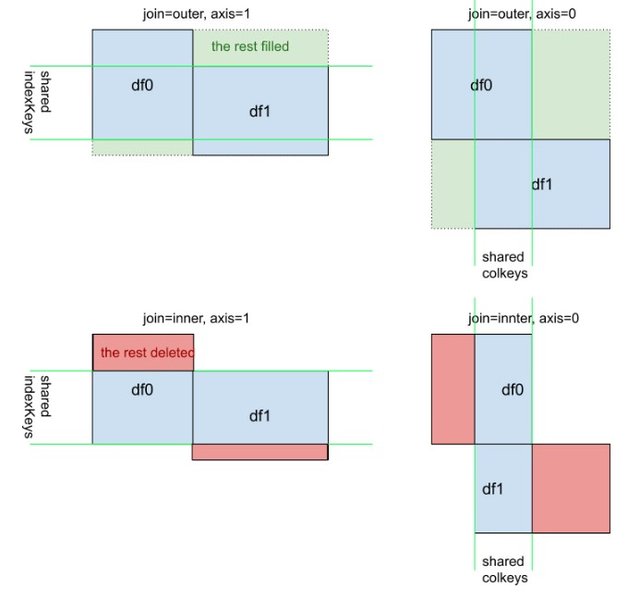
objs: A list or dictionary of pandas objects (Series, DataFrames) to be concatenated.axis: The axis to concatenate along.0or'index'for row-wise (stacking vertically, default),1or'columns'for column-wise (stacking horizontally).join: How to handle indexes on the other axis (the one not being concatenated).'outer'(default) for union,'inner'for intersection.ignore_index: Boolean, defaultFalse. IfTrue, the resulting axis will be labeled 0, ..., n-1, effectively resetting the index along the concatenation axis. Useful when concatenating DataFrames where the original index is not meaningful.keys: Sequence, defaultNone. Allows construction of a hierarchical index on the concatenation axis.
Code Examples: concat() in Action
# Sample DataFrames for concatenation
df_batch1 = pd.DataFrame({
    'ID': ['A01', 'A02'],
    'Measurement': [10.5, 12.1],
    'Type': ['X', 'Y']
})

df_batch2 = pd.DataFrame({
    'ID': ['A03', 'A04'],
    'Measurement': [9.8, 11.5],
    'Type': ['X', 'Z']
})

df_extra_info = pd.DataFrame({
    'Status': ['Active', 'Inactive'],
    'Priority': ['High', 'Low']
}, index=df_batch1.index) # Same index as df_batch1 for horizontal concat

print("\nDataFrame Batch 1:")
print(df_batch1)
print("\nDataFrame Batch 2:")
print(df_batch2)
print("\nDataFrame Extra Info:")
print(df_extra_info)

# Concatenate rows (axis=0, default)
concat_rows = pd.concat([df_batch1, df_batch2])
print("\nConcatenate Rows (default ignore_index=False):")
print(concat_rows)

# Concatenate rows, ignoring original index
concat_rows_ignore_idx = pd.concat([df_batch1, df_batch2], ignore_index=True)
print("\nConcatenate Rows (ignore_index=True):")
print(concat_rows_ignore_idx)

# Concatenate columns (axis=1)
# This works best if DataFrames have the same index or you want to align by index.
# Here, df_batch1 and df_extra_info share an index.
concat_cols = pd.concat([df_batch1, df_extra_info], axis=1)
print("\nConcatenate Columns (df_batch1 and df_extra_info):")
print(concat_cols)

# Concatenating columns with different indices will result in NaNs
df_batch2_reindexed = df_batch2.set_index(pd.Index(['idx_c', 'idx_d']))
concat_cols_diff_idx = pd.concat([df_batch1, df_batch2_reindexed], axis=1)
print("\nConcatenate Columns (df_batch1 and df_batch2_reindexed - different indices):")
print(concat_cols_diff_idx) # Illustrates NaNs due to misalignment

# Using 'join' parameter with concat (axis=1)
# Suppose df_batch1 had an extra column not in df_extra_info
df_batch1_mod = df_batch1.copy()
df_batch1_mod['Source'] = ['S1', 'S2']
concat_cols_inner_join = pd.concat([df_batch1_mod, df_extra_info], axis=1, join='inner')
print("\nConcatenate Columns with Inner Join (only common indices):")
print(concat_cols_inner_join)
# Note: 'join' for concat refers to how to align the *other* axis. For axis=1, it refers to index alignment.
Visualizing the Differences: merge vs. join vs. concat
To better understand the strengths of each method, consider this conceptual comparison across several dimensions. This radar chart provides an opinionated view of how these methods generally perform or apply in different scenarios. "Higher" values indicate greater suitability or capability for that dimension.
Chart Interpretation:
pd.merge() excels in flexibility for join keys and SQL-like behavior.
DataFrame.join() is strong for performance in index-based joins.
pd.concat() is the simplest for stacking data and easily handles multiple DataFrames at once.
Choosing the Right Tool for the Job
The best method for combining DataFrames depends on your specific data structure and the desired outcome. Here's a table summarizing their primary characteristics:
| Feature | pd.merge() |
DataFrame.join() |
pd.concat() |
|---|---|---|---|
| Primary Use Case | Database-style joining on common columns or indices. Highly flexible (SQL-like). | Primarily for joining DataFrames on their indices. Can also join on columns of the calling DataFrame. | Stacking/appending DataFrames vertically (rows) or horizontally (columns). |
| Join Keys | Columns or indices. Specified via on, left_on/right_on, left_index/right_index. |
Primarily indices. Can use on parameter for columns of the calling DataFrame. |
Not primarily key-based; aligns along the specified axis. Can use join parameter for alignment on the *other* axis. |
Join Types (how parameter) |
'inner', 'left', 'right', 'outer', 'cross' |
'left', 'right', 'outer', 'inner' |
For non-concatenation axis alignment via join parameter: 'inner', 'outer'. |
| Flexibility | Very high, many options for controlling join behavior. | Moderate, optimized for index-based joins; simpler syntax for this case. | Different type of operation; very flexible for appending/stacking. |
| Typical Syntax | pd.merge(df1, df2, ...) |
df1.join(other_df, ...) |
pd.concat([df1, df2, ...], ...) |
| Handling Overlapping Columns (non-keys) | suffixes parameter (e.g., ('_left', '_right')). |
lsuffix, rsuffix parameters. |
Columns are preserved. If axis=1 and indices align, duplicate column names will appear (unless handled beforehand). |
| Combining Multiple (>2) DataFrames | Typically done iteratively or with functools.reduce. |
Can take a list of DataFrames for the other argument. |
Naturally handles a list of DataFrames in objs. |
Conceptual Overview: DataFrame Combination Strategies
This mindmap visualizes the main strategies for combining DataFrames in pandas, highlighting the core purpose and key aspects of merge, join, and concat.
on, how, left_on, right_on, suffixes"] id1d["Join Types:
inner, left, right, outer, cross"] id2["DataFrame.join()"] id2a["Index-based Joins (Default)"] id2b["Can join on columns of calling DataFrame"] id2c["Key Parameters:
on, how, lsuffix, rsuffix"] id2d["Join Types:
left, right, outer, inner"] id3["pd.concat()"] id3a["Stacking/Appending DataFrames"] id3b["Along an Axis:
Vertical (axis=0, rows)
Horizontal (axis=1, columns)"] id3c["Key Parameters:
axis, join, ignore_index, keys"] id3d["Handles multiple DataFrames easily in a list"]
Illustrating Join Types
Visual aids can greatly help in understanding how different join types work. The image below, commonly used to explain SQL joins, is equally applicable to pandas merge operations.
Visual representation of Inner, Left, Right, and Full Outer joins. These concepts directly map to the how parameter in pd.merge().
Watch and Learn: Combining DataFrames in Action
For a visual walkthrough of these concepts, the following video provides excellent explanations and examples of using merge, join, and concat in pandas. It covers different join types and practical scenarios, which can complement the textual information and code examples provided here.
This video discusses how to combine DataFrames using all three primary methods, explains the differences between join types (like inner, left, outer), and demonstrates practical application scenarios, reinforcing the concepts covered in this guide.
Frequently Asked Questions (FAQ)
What's the main difference between merge and join in pandas?
The primary difference lies in what they join on by default and their flexibility.
pd.merge() is more versatile and is designed for database-style joins on specified columns or indices. You explicitly define the join keys using parameters like on, left_on, and right_on.
DataFrame.join() is a convenience method that primarily joins DataFrames on their indices by default. While it can join on columns of the calling DataFrame (using the on parameter), merge() offers more comprehensive options for column-based joins, especially when join keys have different names in the two DataFrames.
When should I use `concat` instead of `merge`?
Use pd.concat() when you want to stack DataFrames along an axis—either by appending rows (vertically, axis=0) or by adding columns (horizontally, axis=1). concat() is suitable when the DataFrames have similar structures or when you're simply adding more data without complex matching logic. For example, combining multiple data files that represent different time periods or different sets of observations.
Use pd.merge() when you need to combine DataFrames based on the values in common columns or indices, similar to a SQL join, where relationships between data are important.
How do I handle duplicate column names when combining DataFrames?
Different methods offer different solutions:
- For
pd.merge(): Use thesuffixesparameter (e.g.,suffixes=('_left', '_right')). This will append the specified suffixes to overlapping column names that are not part of the join key. - For
DataFrame.join(): Use thelsuffixandrsuffixparameters to add suffixes to overlapping column names from the left and right DataFrames, respectively. - For
pd.concat(): If concatenating alongaxis=1(horizontally) and there are duplicate column names, pandas will keep both columns with their original names. You might need to rename columns before or after concatenation if you need unique names. If concatenating alongaxis=0(vertically), column names must match for sensible results, or you can use thejoin='inner'orjoin='outer'parameter to decide how to handle non-matching columns.
Can I combine more than two DataFrames at once?
Yes, with some methods more directly than others:
pd.concat(): Is designed to take a list of DataFrames, so you can combine multiple DataFrames in a single call:pd.concat([df1, df2, df3, ...]).DataFrame.join(): Theotherparameter can accept a list of DataFrames to join against the calling DataFrame:df1.join([df2, df3]).pd.merge(): Directly accepts only two DataFrames (leftandright). To merge multiple DataFrames, you typically chain merge operations or usefunctools.reduce. For example:from functools import reduce data_frames = [df1, df2, df3] # Assuming these are defined merged_df = reduce(lambda left, right: pd.merge(left, right, on='common_key'), data_frames)
What is an 'inner' join versus an 'outer' join?
These terms define how rows are included based on matching keys:
- Inner Join (
how='inner'): The resulting DataFrame will only contain rows where the join key(s) exist in both the left and right DataFrames. It's like finding the intersection of the keys. - Outer Join (
how='outer'or Full Outer Join): The resulting DataFrame will contain all rows from both the left and right DataFrames. If a key from one DataFrame doesn't have a match in the other, the columns from the non-matching DataFrame will be filled withNaN(Not a Number) values for that row. It's like finding the union of the keys.
how='left') which includes all rows from the left DataFrame and matching rows from the right (or NaNs), and Right Outer Join (how='right') which includes all rows from the right DataFrame and matching rows from the left (or NaNs).
Recommended Further Exploration
- How to perform advanced multi-key merges in pandas?
- What are the performance considerations when merging large DataFrames in pandas?
- How to handle missing data (NaN) after merging pandas DataFrames?
- Can you explain the 'cross' join in pandas `merge` with an example?
References
Last updated May 7, 2025