
Exploring the Landscape of Web Authoring Software in 2025
A Comprehensive Guide to Tools for Building Your Online Presence
Key Insights into Web Authoring Software
- Diverse Tools for Varied Needs: The world of web authoring software encompasses a wide range of tools, from simple text editors to sophisticated drag-and-drop website builders and comprehensive content management systems, catering to different skill levels and project requirements.
- Popular Choices Abound: Several platforms and software stand out in the current landscape, including widely recognized names like WordPress, Wix, Squarespace, and Adobe Dreamweaver, each offering unique strengths and features.
- Beyond Basic Editing: Modern web authoring tools often integrate advanced functionalities such as visual design interfaces, collaboration features, e-commerce capabilities, and SEO tools, moving far beyond just writing code.
Creating a website today is more accessible than ever, thanks to a vast array of web authoring software. These tools empower individuals and businesses to build an online presence without necessarily requiring extensive coding knowledge. From simple blogs to complex e-commerce platforms, the right web authoring software can streamline the development process and help bring digital visions to life.
Understanding Web Authoring Software
What is Web Authoring Software?
Web authoring software refers to applications and platforms designed to assist in the creation, management, and publishing of web content. These tools abstract away some or all of the underlying code (like HTML, CSS, and JavaScript), providing a more user-friendly interface for designing and building websites.
Categories of Web Authoring Tools
Web authoring tools can generally be categorized based on their approach and complexity:
- Text Editors: These are basic programs for writing and editing code directly. Examples include Notepad++ and Sublime Text. They offer maximum flexibility but require a strong understanding of web languages.
- WYSIWYG Editors: What You See Is What You Get editors provide a visual interface where users can design a website much like using a word processor, and the software generates the corresponding code. Adobe Dreamweaver is a classic example.
- Website Builders: These platforms offer drag-and-drop interfaces, pre-designed templates, and hosting services, making it easy for beginners to create functional websites quickly. Wix, Squarespace, and GoDaddy Websites + Marketing fall into this category.
- Content Management Systems (CMS): CMS platforms like WordPress provide a framework for managing website content, user roles, and functionalities. They offer a balance of ease of use and flexibility, often extensible through themes and plugins.
- Design and Prototyping Tools: While not strictly authoring tools that produce final websites, software like Figma and Adobe XD are crucial for designing website layouts and user interfaces before development.
Popular Web Authoring Software in 2025
Leading Platforms and Their Strengths
Several web authoring tools have gained significant popularity due to their feature sets, ease of use, and versatility. Here are some of the most commonly used options:
WordPress
WordPress is a dominant force in the web authoring landscape, powering a large percentage of websites globally. It started as a blogging platform but has evolved into a full-featured CMS capable of handling various website types, from simple blogs to complex e-commerce sites and corporate websites. Its strength lies in its flexibility, extensive plugin and theme ecosystem, and a large community for support. Paired with page builders like Elementor, WordPress offers powerful drag-and-drop design capabilities.
WordPress is an excellent choice for those seeking scalability and control over their website. Its open-source nature allows for deep customization, but it can require more technical understanding for advanced configurations and maintenance compared to hosted website builders.
Wix
Wix is a user-friendly website builder known for its intuitive drag-and-drop interface and extensive collection of templates. It's a popular choice for individuals and small businesses who want to create a professional-looking website quickly without coding. Wix offers a wide range of built-in features and integrations, including e-commerce tools, booking systems, and marketing features.
While Wix is incredibly easy to use, its proprietary nature means less flexibility compared to open-source platforms like WordPress. Users are tied to the Wix platform, and migrating a Wix site to another host can be challenging.
Squarespace
Squarespace is another leading website builder celebrated for its aesthetically pleasing templates and user-friendly interface. It's particularly favored by creatives, designers, and businesses that prioritize visual presentation. Squarespace offers a streamlined experience with integrated tools for blogging, e-commerce, and portfolio creation.
Similar to Wix, Squarespace provides an all-in-one solution including hosting. While its design capabilities are strong, it may offer less customization depth compared to WordPress and its vast plugin ecosystem.
Adobe Dreamweaver
Adobe Dreamweaver is a powerful web development tool that offers both visual design capabilities and a robust code editor. It caters to users who want the flexibility of working with code while still benefiting from a visual interface. Dreamweaver supports various web technologies and provides features for site management and collaboration.
Dreamweaver is part of the Adobe Creative Cloud suite and is a more complex tool than website builders, requiring a greater understanding of web development principles. It's often preferred by web designers and developers who need fine-grained control over their code.
Figma
Figma is a collaborative interface design tool that has become a standard in the web design industry. While it doesn't directly publish websites, it's essential for the design and prototyping phase. Figma allows teams to collaborate in real-time on wireframes, mockups, and interactive prototypes. Its vector-based design tools and emphasis on collaboration make it a powerful asset for web projects.
Figma is primarily a design tool and requires handover to developers or integration with authoring tools to build the actual website. Its strength lies in its collaborative features and design system capabilities.
Visualizing Web Authoring Tools
To further illustrate the diverse nature of web authoring software, here is an image showcasing some popular tools and their interfaces:
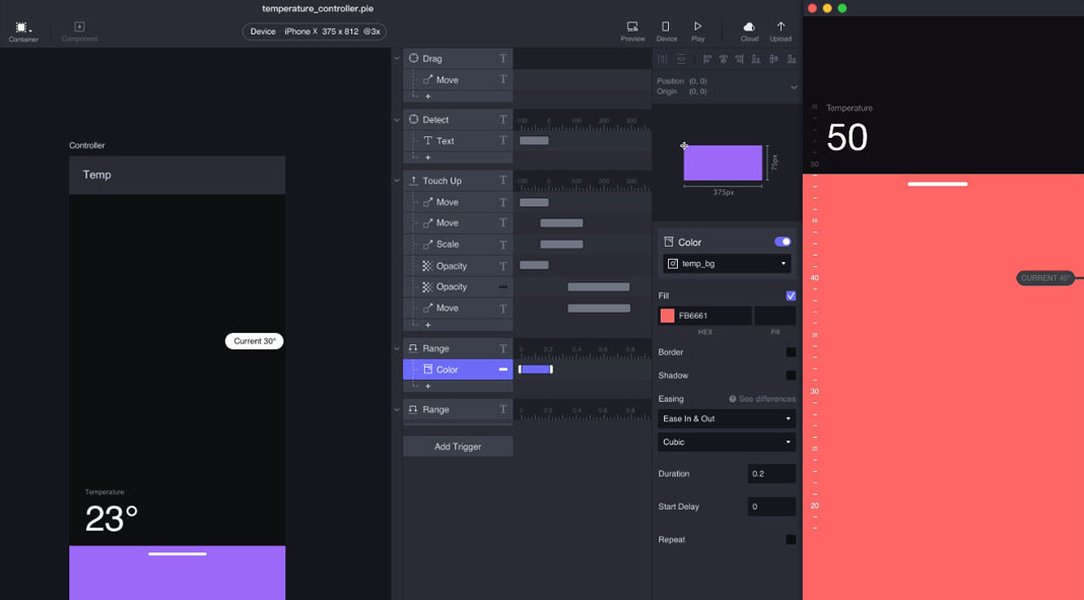
A visual representation of different web design and authoring tools.
This image highlights the varied approaches and interfaces available, from visual drag-and-drop editors to more code-focused environments.
Beyond Website Creation: eLearning Authoring Tools and Help Authoring Tools
Specialized Authoring Software
The term "authoring software" extends beyond general web design to include specialized tools for creating specific types of digital content. Two notable areas are eLearning authoring and help authoring.
eLearning Authoring Tools
eLearning authoring tools are designed to create interactive online courses and training materials. These tools often include features for creating quizzes, simulations, and multimedia-rich content. Examples include Adobe Captivate, Articulate Rise 360, and Easygenerator.
These tools are crucial for instructional designers and educators to develop engaging and effective online learning experiences. They often support standards like SCORM and xAPI for integration with Learning Management Systems (LMS).
An introductory video discussing HTML5 authoring tools for eLearning.
This video provides a deeper look into how HTML5 authoring tools are used specifically for creating engaging eLearning content, showcasing a different facet of authoring software.
Help Authoring Tools (HATs)
Help Authoring Tools (HATs) are specialized software used by technical writers to create and publish technical documentation, such as user guides, manuals, and online help systems. These tools facilitate the structured writing and management of technical content and often support multiple output formats (e.g., HTML Help, PDF, web-based help).
Examples of HATs include Adobe RoboHelp, HelpSmith, and HelpNDoc. They are essential for creating clear, concise, and easily navigable documentation for software, hardware, and services.
Choosing the Right Web Authoring Software
Factors to Consider
Selecting the most suitable web authoring software depends on various factors, including:
- Skill Level: Beginners may prefer user-friendly website builders, while experienced developers might opt for code editors or more advanced CMS platforms.
- Project Requirements: The type of website (blog, e-commerce, portfolio, etc.) will influence the features needed in the software.
- Budget: Options range from free open-source software to subscription-based platforms and one-time purchases.
- Scalability: Consider the potential for future growth and whether the software can accommodate increased traffic and complexity.
- Collaboration: If multiple team members will be working on the website, tools with strong collaboration features are essential.
Comparison of Popular Web Authoring Tools
Feature Overview
Here is a table summarizing some key features of popular web authoring tools:
| Tool | Category | Ease of Use | Flexibility | Primary Use Case | Pricing Model |
|---|---|---|---|---|---|
| WordPress | CMS | Moderate (with builders) | High | Blogs, Business Sites, E-commerce | Free (Open Source), Hosting Costs |
| Wix | Website Builder | High | Moderate | Small Business Websites, Portfolios | Subscription |
| Squarespace | Website Builder | High | Moderate | Creative Portfolios, Business Sites | Subscription |
| Adobe Dreamweaver | WYSIWYG/Code Editor | Moderate to High | High | Custom Web Development | Subscription (Adobe Creative Cloud) |
| Figma | Design/Prototyping | High | N/A (Design Only) | UI/UX Design, Prototyping | Free Plan, Subscription |
Looking Ahead: Trends in Web Authoring
The Future of Web Creation
The web authoring landscape continues to evolve with advancements in technology. Some notable trends include:
-
AI Integration: More tools are incorporating Artificial Intelligence to assist with design, content generation, and optimization.
-
Headless CMS: A growing trend where the content management system is separated from the presentation layer, offering greater flexibility for delivering content across various platforms.
-
No-Code and Low-Code Platforms: The rise of platforms that allow users to build complex applications and websites with minimal or no coding.
-
Increased Focus on Performance and SEO: Authoring tools are increasingly incorporating features to help users optimize their websites for speed and search engine visibility.
Frequently Asked Questions About Web Authoring Software
Do I need coding knowledge to use web authoring software?
It depends on the type of software. Website builders like Wix and Squarespace are designed for users with no coding experience. CMS platforms like WordPress can be used without extensive coding, especially with page builders, but some knowledge of HTML and CSS is helpful for advanced customization. Code editors like Sublime Text require a strong understanding of web languages.
What is the difference between a website builder and a CMS?
Website builders typically offer an all-in-one solution with hosting and a user-friendly drag-and-drop interface, making them ideal for quick and simple website creation. CMS platforms provide a more flexible framework for managing content and users, offering greater scalability and customization options, often requiring separate hosting.
Are free web authoring tools available?
Yes, there are free options available. Some website builders offer free plans with limitations (e.g., ads, limited features), and open-source CMS platforms like WordPress are free to use, though you'll need to pay for hosting.
Which web authoring software is best for e-commerce?
Platforms like Shopify and specialized e-commerce features within WordPress (with WooCommerce) and Wix are popular choices for building online stores, offering features for product management, payments, and shipping.
Can I collaborate with others using web authoring software?
Many modern web authoring tools, particularly website builders and design tools like Figma, offer collaboration features that allow multiple users to work on a project simultaneously.
References

 squarespace.com
Last updated April 25, 2025