
Transform Your Professional Story: The Ultimate CV Redesign Guide
Master the art of CV transformation with expert techniques, modern tools, and design principles that make recruiters take notice
Essential CV Transformation Highlights
- Strategic Content Organization: Structure your CV with a clear hierarchy, showcasing achievements rather than duties to instantly capture employer attention
- Modern Design Implementation: Utilize contemporary templates, appropriate fonts, and strategic white space to create visual appeal while maintaining professionalism
- Digital Enhancement Options: Leverage AI-powered tools, online builders, or professional services to elevate your CV in today's competitive job market
The Strategic CV Redesign Approach
While I can't directly rewrite your specific CV without seeing it, I can provide a comprehensive framework to guide your CV transformation. A well-crafted CV serves as your professional narrative, strategically presenting your qualifications to potential employers.
Your CV redesign should focus on two critical components: compelling content and professional presentation. The most effective CVs combine achievement-focused writing with clean, scannable design that guides recruiters through your professional journey.
Content Optimization Strategies
Before addressing design elements, ensure your content effectively communicates your value proposition:
Craft a Powerful Professional Summary
Begin with a concise 3-4 line summary that highlights your core expertise, unique value proposition, and career direction. This section functions as your professional elevator pitch, enticing recruiters to continue reading.
Restructure Your Experience Section
Present your work history in reverse chronological order, emphasizing achievements over responsibilities. Transform passive statements into active accomplishments using powerful action verbs and quantifiable results. For example, rather than "Responsible for team management," write "Led a 5-person team that increased departmental productivity by 28% through process optimization."
Tailor for Relevance
Customize your CV for each application by analyzing job descriptions and incorporating relevant keywords. Remove outdated or irrelevant positions that don't support your current career trajectory, focusing instead on experiences that demonstrate transferable skills.
Showcase Skills Strategically
Create a dedicated skills section that highlights both technical proficiencies and soft skills relevant to your target roles. Organize these skills by category and be honest about your proficiency levels.
Design Enhancement Principles
Once your content is optimized, focus on design elements that improve readability and visual appeal:
Select Appropriate Typography
Choose professional, easy-to-read fonts like Calibri, Arial, or Helvetica. Use consistent font sizing throughout, typically 10-12pt for body text and 14-16pt for headings. Limit yourself to one or two complementary fonts to maintain visual cohesion.
Utilize Strategic Formatting
Incorporate white space, bullets, and section dividers to create visual breathing room and improve scanability. Use bold, italics, and underlining sparingly to highlight key information. Maintain consistent alignment and spacing throughout.
Consider Color Thoughtfully
Introduce color strategically to create visual interest without overwhelming the document. Limit your palette to 1-2 professional colors (navy, dark green, burgundy) for section headings or subtle accents.
Ensure Accessibility
Save your final document as a PDF to preserve formatting across devices. Verify that your CV is ATS (Applicant Tracking System) compatible by avoiding complex design elements like tables, images, or text boxes that may not parse correctly.
CV Redesign Options: Tools and Services
Depending on your time, budget, and design skills, you have several options for implementing your CV redesign:
DIY Approach with Online Builders
For those comfortable with self-directed redesign, online CV builders offer templates and formatting guidance:
- Canva: Offers free and premium CV templates with an intuitive drag-and-drop interface
- ResumeBuilder.com: Provides guided creation with industry-specific templates
- Kickresume: Features professionally designed templates with customization options
These platforms provide structure while allowing you to maintain full control over your content and design choices.
AI-Powered Tools for Content Enhancement
AI-powered resume tools can help refine your existing content by suggesting improvements and tailoring your CV to specific job descriptions:
- NodeFlair's Resume Assistant: Analyses your CV against job descriptions to suggest targeted improvements
- Kickresume AI Rewriter: Enhances existing content to sound more professional and impactful
- ChatGPT-based tools: Can help transform bullet points into achievement-focused statements
These tools are particularly helpful for overcoming writer's block or enhancing sections that feel weak or generic.
Professional CV Writing Services
For those seeking expert assistance, professional CV writers bring industry knowledge and writing expertise:
- Specialized CV Services: Companies like Resume Professional Writers offer industry-specific expertise
- Freelance Professionals: Platforms like Fiverr and Upwork connect you with individual CV writers
- Career Coaching Services: Provide comprehensive career guidance including CV development
Professional services typically include consultation, content development, and design implementation, with prices ranging from $100-$500 depending on experience level and service depth.
This radar chart compares the three main CV redesign approaches across key factors, helping you determine which option best suits your specific needs, budget, and timeline.
CV Components and Their Impact
Understanding the relative importance of different CV sections can help you allocate your redesign efforts effectively:
| CV Section | Impact Level | Optimization Strategy | Common Mistakes |
|---|---|---|---|
| Professional Summary | Very High | Concise value proposition focused on relevant expertise | Generic statements, excessive length, objective statements |
| Work Experience | Critical | Achievement-focused bullets with quantifiable results | Listing duties, chronological gaps, irrelevant positions |
| Skills Section | High | Organized by category, aligned with job requirements | Generic skills, skill inflation, excessive listing |
| Education | Medium | Focused presentation of relevant credentials | Over-emphasis for experienced professionals, irrelevant courses |
| Additional Sections | Low to Medium | Strategic inclusion of relevant certifications, projects, etc. | Irrelevant hobbies, excessive personal information |
CV Redesign Process: A Roadmap
This comprehensive roadmap outlines the complete CV redesign process, from initial assessment to final review:
Following this structured approach ensures you address all critical aspects of your CV redesign systematically, resulting in a document that effectively showcases your professional value.
Expert Video Insights on Modern CV Design
This comprehensive tutorial from a Cambridge University career consultant offers invaluable guidance on creating a CV that stands out in 2025. The video covers modern design principles, font selection, and strategic formatting that will give your CV a competitive edge.
The presenter shares insights from years of experience reviewing thousands of CVs for competitive positions, highlighting what makes certain designs stand out to recruiters and hiring managers in the current job market.
Inspiring CV Design Examples
Visual inspiration can help you envision possibilities for your own CV redesign. These professional examples demonstrate effective design principles while maintaining readability and professionalism:
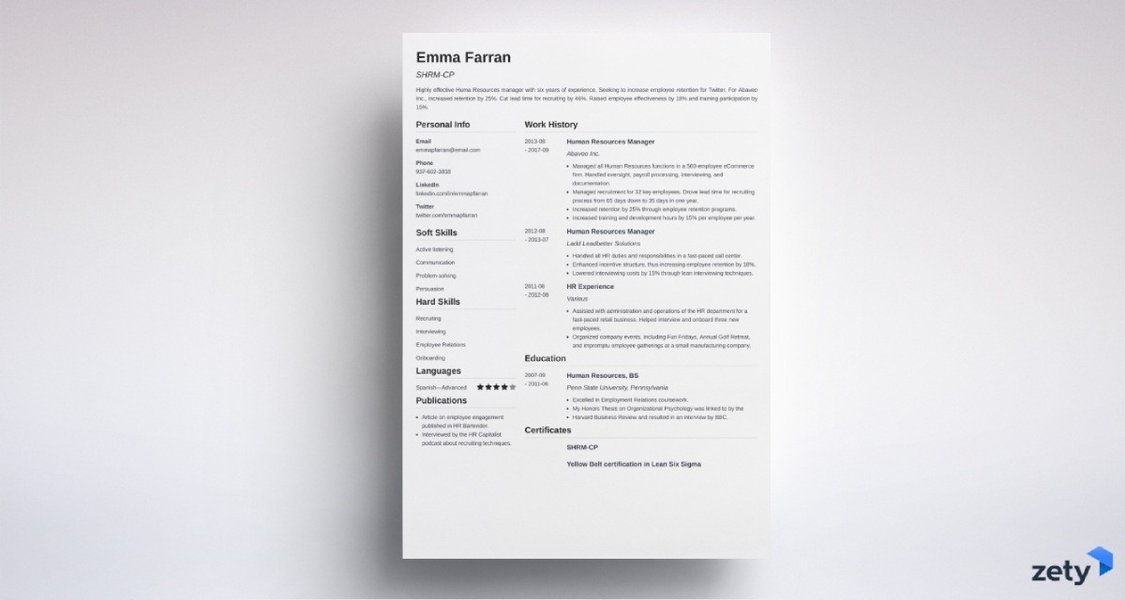
Clean Minimalist Design: This template demonstrates how strategic white space and typography can create a professional impression without excessive design elements, making it highly ATS-compatible while visually appealing.
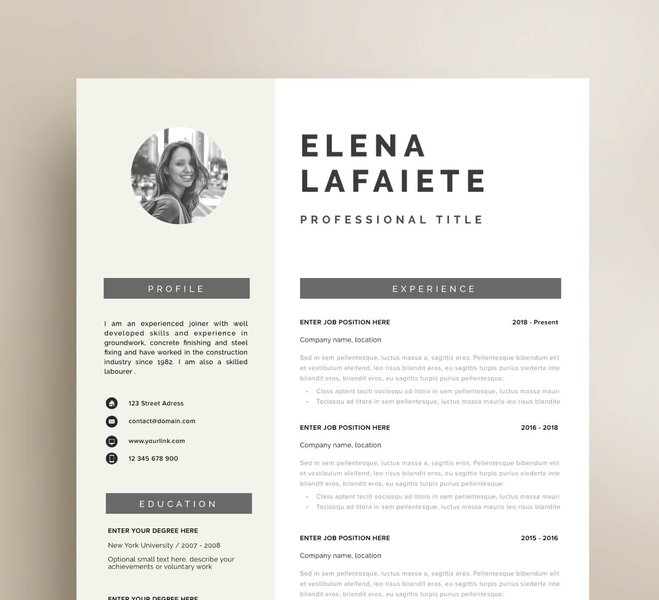
Creative Professional Layout: For creative industries, this template shows how to incorporate design elements while maintaining readability. Note the clear section delineation and strategic use of color to guide the reader's eye.
When drawing inspiration from these examples, focus on adapting the organizational principles rather than copying exact designs. Your CV should reflect your unique professional identity while maintaining industry-appropriate conventions.
Frequently Asked Questions
References
- How to Write a CV: Tips, Template and Example - Indeed
- Free CV Maker: Create professional CVs online - Canva
- How to Write a CV (With Examples) - Resume Genius
- AI Resume Rewrite - Kickresume
- Resume & CV Design Services - Fiverr
- Free AI Resume Writing Assistant - NodeFlair
Recommended Searches
Last updated April 4, 2025