
Unlocking Uninterrupted Connectivity: Your Definitive Guide to Network UPS Systems
Discover how Network Uninterruptible Power Supplies safeguard your digital world, ensuring seamless operation even when the power goes out.
A Network Uninterruptible Power Supply (UPS) is a critical hardware device designed to provide emergency backup power and protection to network equipment. This includes essential components like modems, routers, switches, servers, and Network Attached Storage (NAS) devices. In an increasingly connected world, maintaining network uptime is paramount for businesses and home users alike. A network UPS ensures that your digital infrastructure remains operational during power outages, sags, surges, brownouts, and other electrical disturbances, thereby preventing data loss, hardware damage, and costly downtime.
Key Insights into Network UPS
- Continuous Operation: Network UPS systems provide seamless battery backup, allowing network devices to continue functioning during power failures, ensuring uninterrupted internet access and local network services.
- Equipment Protection: Beyond backup power, these UPS units shield sensitive network hardware from damaging power surges, voltage spikes, and electrical noise, extending the lifespan of your equipment.
- Intelligent Management: Many modern network UPS systems offer sophisticated remote monitoring and management capabilities, enabling automated graceful shutdowns, status alerts, and proactive maintenance.
The Indispensable Role of UPS for Network Infrastructure
Investing in a UPS for your network equipment offers a multitude of benefits that go beyond simply keeping the lights on. In today's digitally reliant environment, the consequences of network downtime can range from minor inconvenience to significant financial loss and data corruption.
Ensuring Continuity of Service
The primary function of a network UPS is to maintain uninterrupted network connectivity. Whether it's a brief power flicker or a more extended outage, a UPS provides the necessary power to keep your modem, router, and switches operational. This is crucial for businesses that rely on constant internet access for operations, communication, and cloud services, as well as for home users who depend on their network for remote work, education, and entertainment.
Protecting Valuable Data and Hardware
Sudden power loss can lead to data corruption, especially for devices like servers and NAS systems that are actively reading or writing data. A UPS allows these devices to shut down gracefully, preserving data integrity. Furthermore, power surges, spikes, and brownouts can inflict severe damage on sensitive electronic components within network hardware. A UPS conditions the incoming power, filtering out these disturbances and protecting your investment.
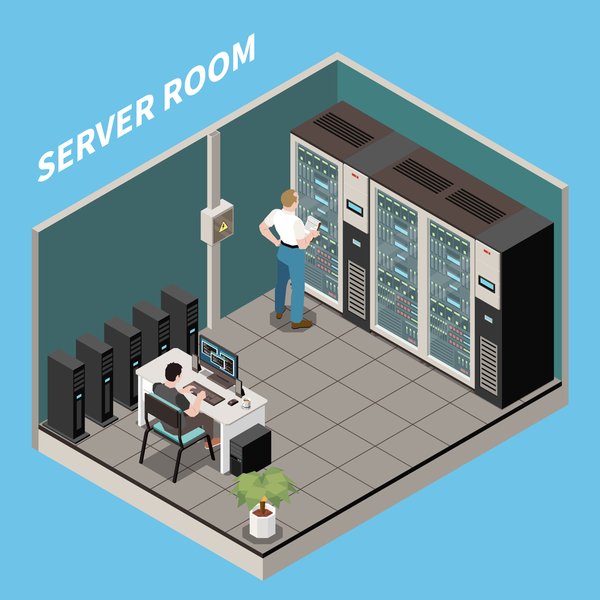
Rack-mounted UPS units are essential for protecting servers and network equipment in data centers and server rooms.
Enabling Remote Monitoring and Management
Advanced network UPS systems often come equipped with network management cards or support Simple Network Management Protocol (SNMP). These features enable IT administrators or tech-savvy users to:
- Monitor the UPS status remotely (battery level, load, input/output voltage).
- Receive alerts via email or SMS for power events or potential issues.
- Configure automated actions, such as a graceful shutdown of connected servers before the battery depletes.
- Perform remote diagnostics and firmware updates, enhancing security and system reliability.
Deciphering Network UPS Types
Understanding the different types of UPS systems is crucial for selecting the one that best fits your network's specific needs and budget. There are three primary topologies, each offering varying levels of protection and performance.
1. Offline/Standby UPS
Offline, or standby, UPS systems are the most basic and cost-effective option. Under normal conditions, they pass utility power directly to the connected devices, offering surge protection. When a power outage is detected, the UPS switches to battery power. There's a brief transfer time (typically a few milliseconds) during this switch, which is usually acceptable for less sensitive equipment like home routers and modems.
Best Suited For: Small home networks, individual workstations, and non-critical devices where minimal power conditioning is required.
2. Line-Interactive UPS
Line-interactive UPS systems are a popular choice for small businesses, network closets, and departmental servers. They incorporate an autotransformer that enables Automatic Voltage Regulation (AVR). AVR allows the UPS to correct minor power fluctuations (sags and swells) without switching to battery power, thus preserving battery life. They offer better protection and efficiency than standby UPS systems. The transfer time to battery is generally shorter than that of an offline UPS.
Best Suited For: Small to medium-sized business networks, servers, switches, and other sensitive IT equipment that require stable voltage and reliable backup.
3. Online Double-Conversion UPS
Online double-conversion UPS systems provide the highest level of power protection. They continuously convert incoming AC power to DC, and then back to AC. This double-conversion process isolates the connected equipment from all power problems, providing a pure, stable sine wave output with zero transfer time to battery. Because the inverter is always online, there is no interruption in power if the utility supply fails.
Best Suited For: Mission-critical applications, data centers, enterprise servers, sensitive medical equipment, and any environment where even a momentary power disruption is unacceptable.
Understanding UPS Waveform Output
The type of AC waveform a UPS produces when on battery power is also important:
- Pure Sine Wave: This is the ideal output, replicating the clean power supplied by utility companies. It is essential for sensitive electronics, servers with Active Power Factor Correction (APFC) power supplies, and some network hardware to prevent overheating, malfunctioning, or premature failure. Line-interactive and online UPS systems typically provide pure sine wave output.
- Simulated/Modified Sine Wave: A less expensive approximation of a sine wave, often a stepped square wave. While suitable for some electronics, it can cause issues with sensitive equipment or devices with APFC power supplies. Basic standby UPS units often produce this type of waveform.
Visualizing Your Network UPS Selection Strategy
Choosing the right Network UPS involves balancing various factors. The mindmap below outlines the key considerations to guide your decision-making process, ensuring you select a system that aligns with your specific power protection needs, budget, and network environment.
This mindmap helps you systematically consider all critical aspects, from calculating your power needs to evaluating management features and long-term costs.
Comparing UPS Topologies: A Feature Face-Off
The choice of UPS topology significantly impacts the level of protection and features available. The radar chart below provides a visual comparison of Offline/Standby, Line-Interactive, and Online Double-Conversion UPS systems across key performance characteristics. This can help you quickly identify which type aligns best with your priorities for network protection.
As illustrated, Online Double-Conversion UPS systems offer the highest protection and feature set but come at a higher cost, while Offline/Standby UPS units are more budget-friendly but provide basic protection. Line-Interactive systems strike a balance between the two.
Critical Features to Evaluate in a Network UPS
When selecting a UPS for your network equipment, several key features should be carefully considered to ensure it meets your requirements for power protection, management, and reliability.
Power Capacity (VA and Watts)
The power capacity of a UPS is rated in Volt-Amperes (VA) and Watts. It's crucial to calculate the total power consumption of all devices you intend to connect to the UPS (modem, router, switch, server, NAS, etc.). As a rule of thumb, choose a UPS with a wattage rating at least 20-30% higher than your total connected load to accommodate power spikes and allow for future expansion.
Runtime Duration
Runtime refers to how long the UPS can power your connected equipment during an outage. This depends on the UPS battery capacity and the load. Determine how much time you need: enough for a graceful shutdown of servers, or longer to maintain connectivity during extended outages. For low-power devices like modems and routers, even smaller UPS units can provide several hours of backup.
Form Factor
UPS systems come in various form factors:
- Tower/Desktop: Ideal for smaller network setups, home offices, or individual devices.
- Rackmount: Designed to fit into standard 19-inch server racks (e.g., 1U, 2U height). These are common in network closets, server rooms, and data centers, allowing for neat integration with other rack-mounted equipment.
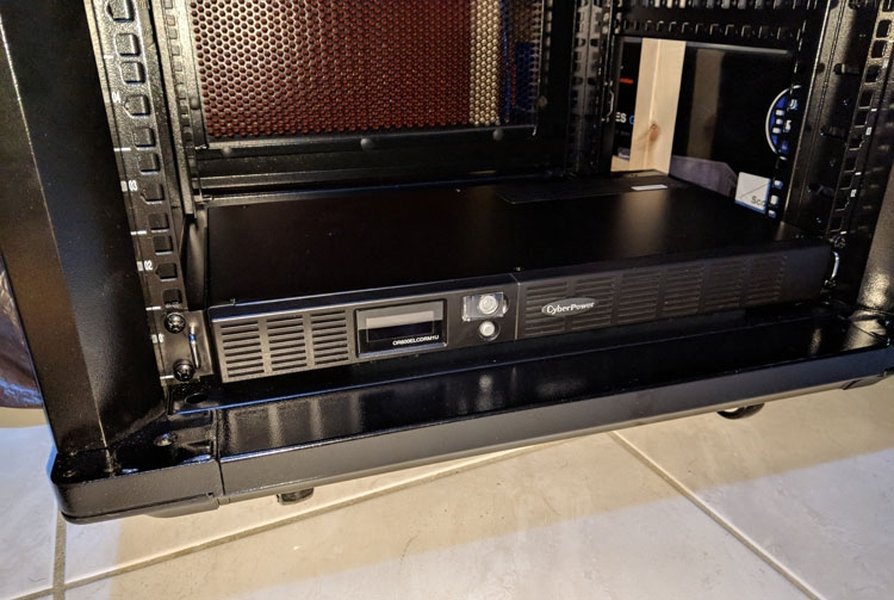
A rackmount UPS neatly integrates into a server rack, providing centralized power protection.
Network Management and Monitoring
For business-critical networks, remote management is essential. Look for:
- Network Management Card (NMC): An optional or built-in card that allows the UPS to connect directly to the network. This enables remote monitoring via a web browser or SNMP, configuration changes, event logging, and automated alerts (email, SMS).
- Software Integration: Compatibility with power management software that can initiate graceful shutdowns of connected servers and operating systems.
- USB/Serial Ports: For direct connection to a computer for local monitoring and management.
Automatic Voltage Regulation (AVR)
AVR, a feature typically found in line-interactive UPS systems, stabilizes inconsistent utility voltage by boosting low voltages and bucking high voltages without switching to battery power. This protects connected equipment from harmful fluctuations and extends battery life.
Surge and Data Line Protection
Beyond battery backup, a good UPS will offer robust surge protection for the AC power line. Some models also include surge protection for data lines (e.g., RJ45 Ethernet ports for network cables, RJ11 for phone lines, or coaxial connections for modems) to shield against surges that can travel through these connections.
Battery Technology and Maintenance
Most network UPS units use Valve-Regulated Lead-Acid (VRLA) batteries, which typically have a lifespan of 3-5 years. Some newer models utilize Lithium-ion batteries, offering longer life, lighter weight, and faster recharging, though usually at a higher initial cost. Features like hot-swappable batteries allow for replacement without powering down connected equipment.
Network UPS Type Comparison
The following table provides a concise comparison of the three main types of Network UPS systems, highlighting their key characteristics to aid in your selection process.
| Feature | Offline/Standby UPS | Line-Interactive UPS | Online Double-Conversion UPS |
|---|---|---|---|
| Primary Use Case | Home, SOHO, non-critical devices | Small/Medium Business, network closets, servers | Data centers, mission-critical systems, sensitive equipment |
| Cost | Low | Medium | High |
| Protection Level | Basic (surge, outage) | Good (surge, outage, voltage regulation via AVR) | Highest (complete isolation from power issues) |
| Transfer Time to Battery | Typically 2-10 ms | Typically 2-4 ms | Zero (none) |
| Voltage Regulation | None (or basic filtering) | Yes (AVR) | Yes (continuous power regeneration) |
| Waveform Output (on battery) | Often Simulated Sine Wave | Typically Pure Sine Wave (can be simulated in some models) | Always Pure Sine Wave |
| Efficiency | High (passes utility power directly) | Good (AVR may consume some power) | Moderate (double-conversion process consumes more power) |
This table helps to quickly differentiate the UPS types based on their core attributes and suitability for various network environments.
Exploring Network UPS Tools (NUT)
For users seeking advanced control and open-source flexibility, Network UPS Tools (NUT) is a significant project. NUT provides a common communication protocol and tools to monitor and manage a wide variety of UPS hardware from different manufacturers. It allows for graceful shutdown of connected systems during power failures and supports client-server architecture, enabling multiple computers to be managed by a single UPS. While setting up NUT can be more complex than proprietary software, it offers powerful customization and integration capabilities, particularly for Linux/Unix environments and technically adept users.
The video "Network UPS Tools (NUT Server) Ultimate Guide" provides an introduction to this open-source UPS monitoring solution, explaining its capabilities for managing various UPS devices across different operating systems.
Leading Network UPS Solutions
Several manufacturers are well-regarded for their network UPS offerings, providing a range of solutions for different needs:
- APC by Schneider Electric: Known for its Smart-UPS and Back-UPS Pro series, APC offers reliable solutions with good management features, widely used in both home and enterprise environments.
- CyberPower Systems: Offers a broad portfolio, including line-interactive and online UPS systems with pure sine wave output (e.g., CP1500PFCLCD series) and robust network management capabilities.
- Eaton: Provides high-quality UPS systems like the 5PX and 9PX series, often favored for enterprise and data center applications due to their advanced features, scalability, and network management cards.
- Vertiv (formerly Emerson Network Power): Offers the Liebert series, recognized for its reliability in critical IT infrastructure, including line-interactive and online double-conversion UPS systems.
- Tripp Lite (now part of Eaton): Offers a wide range of UPS systems, including models with AVR and sine wave output suitable for network applications.
When choosing a brand, consider factors like warranty, customer support, firmware update frequency (for security), and the availability of compatible management software and accessories.
Practical Tips for Selecting and Using Your Network UPS
Follow these tips to maximize the effectiveness and lifespan of your network UPS:
- Accurately Measure Power Draw: Use a wattmeter to determine the actual power consumption of your network devices. Don't rely solely on manufacturer specifications, which can sometimes be maximums.
- Don't Overload the UPS: Ensure the total load is well within the UPS's capacity (ideally not exceeding 80%). Overloading can reduce runtime and potentially damage the UPS.
- Plan for Future Growth: Select a UPS with some spare capacity if you anticipate adding more network devices in the future.
- Regularly Test Your UPS: Periodically simulate a power failure (by unplugging the UPS from the wall) to ensure it switches to battery and supports the connected load as expected. Test the shutdown software as well.
- Monitor Battery Health: Most UPS systems have self-test features and indicators for battery health. Replace batteries as recommended by the manufacturer (typically every 3-5 years) to maintain reliability.
- Ensure Proper Ventilation: UPS units generate heat. Place them in a location with adequate airflow to prevent overheating.
- Keep Firmware Updated: If your UPS has a network management card, regularly check for and apply firmware updates to patch security vulnerabilities and improve performance.
- Understand Warranty Terms: Be aware of the warranty period for both the UPS unit and its batteries.
Frequently Asked Questions (FAQ)
What is the difference between VA and Watts in a UPS rating?
VA (Volt-Amperes) is the "apparent power," while Watts (W) is the "real power" actually consumed by the equipment. Modern electronics often have a power factor (PF) that relates these two (Watts = VA x PF). It's important to ensure the UPS's Watt rating exceeds the total wattage of your connected devices. Most reputable UPS manufacturers list both VA and Watt ratings.
How long will a network UPS power my modem and router?
This depends on the UPS's battery capacity and the power consumption of your modem and router. A typical modem/router combo might consume 15-30 Watts. A small UPS (e.g., 400-600VA) could potentially power them for several hours. Larger UPS units will offer longer runtimes. Always check the manufacturer's runtime charts for estimates based on load.
Do I need a pure sine wave UPS for my network equipment?
For most basic home network devices like modems and routers, a simulated sine wave UPS might be sufficient. However, for servers, NAS devices, and other sensitive electronics, especially those with Active Power Factor Correction (APFC) power supplies, a pure sine wave UPS is highly recommended to ensure compatibility and prevent potential issues like overheating or unexpected shutdowns.
Can I plug a power strip or surge protector into a UPS?
It is generally not recommended to plug a surge protector or another power strip into the battery backup outlets of a UPS. Doing so can void the UPS warranty and may cause issues. If you need more outlets, choose a UPS with a sufficient number. Some UPS units have "surge-only" outlets where it might be acceptable, but always consult the UPS manual.
Recommended Next Steps
Explore these related queries for deeper insights into optimizing your network's power protection:
- How do I accurately calculate the required UPS capacity for my specific network setup?
- What are the detailed benefits of using a pure sine wave UPS compared to a simulated sine wave UPS for server equipment?
- How can I configure remote UPS management and automated shutdown procedures for my network devices?
- What are the best practices for maintaining and replacing UPS batteries to ensure optimal performance and longevity?
References
Last updated May 13, 2025