
Mastering the Art of Typing: A Comprehensive Guide
Unlock your potential with effective typing strategies and tools
Key Takeaways
- Consistent Practice: Regular, focused practice is essential for improving both speed and accuracy.
- Proper Technique: Mastering touch typing and maintaining correct posture significantly enhances typing efficiency.
- Utilize Resources: Leveraging online platforms and typing tools can provide structured learning and track progress effectively.
Understanding Proper Typing Technique
Foundation of Effective Typing
Learning to type efficiently begins with understanding and implementing proper typing techniques. This foundation not only boosts speed and accuracy but also minimizes the risk of repetitive strain injuries.
Mastering the Home Row
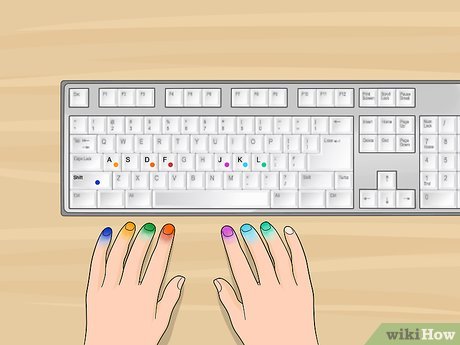
The home row is the central row of the keyboard and serves as the starting point for all fingers. Proper finger placement on the home row keys (ASDF for the left hand and JKL; for the right hand) ensures muscle memory development and facilitates touch typing.
Embracing Touch Typing
Touch typing involves typing without looking at the keyboard, allowing for faster and more accurate typing. This skill relies on the use of all ten fingers and the consistent practice of moving back to the home row after each keystroke.
Maintaining Proper Posture and Ergonomics
Proper posture is crucial in typing. Sit with your back straight, feet flat on the floor, and wrists slightly elevated over the keyboard. An ergonomic setup reduces fatigue and prevents long-term musculoskeletal issues.
Developing a Consistent Practice Routine
Strategies for Effective Practice
Consistency in practice accelerates the learning process. Establishing a regular typing schedule helps in reinforcing skills and improving performance over time.
Daily Practice Sessions
Aiming for short, daily practice sessions (15-30 minutes) is more effective than sporadic, lengthy sessions. Consistent practice aids in building muscle memory and maintaining steady progress.
Implementing Typing Drills and Exercises
Engaging in various typing drills and exercises targets different aspects of typing, such as speed, accuracy, and finger agility. Structured exercises help in addressing specific weaknesses and enhancing overall typing proficiency.
Incorporating Typing Games for Engagement
Typing games transform practice into an enjoyable activity. Games that require quick typing responses or involve competitive elements can keep learners motivated and make the learning process less monotonous.
Leveraging Online Typing Resources
Choosing the Right Tools for Success
Numerous online platforms offer structured typing lessons, interactive exercises, and progress tracking. Selecting the right resources tailored to individual learning styles can significantly enhance typing skills.
Recommended Typing Platforms
Several online platforms stand out for their comprehensive typing courses and user-friendly interfaces:
| Platform | Features | Benefits | Website |
|---|---|---|---|
| Typing.com | Comprehensive typing curriculum, games, and lessons | Engaging lessons, customizable content, free access | Visit Typing.com |
| TypingClub | Interactive lessons, badges, and progress tracking | Motivational rewards, multiple language support | Visit TypingClub |
| Keybr.com | Randomized typing exercises, multiplayer mode | Builds muscle memory, competitive elements | Visit Keybr.com |
| Ratatype | Typing tests, tutorials, multi-language support | Track progress, free certification | Visit Ratatype |
Features and Benefits of Each Platform
Each platform offers unique features tailored to different learning needs:
-
Typing.com: Ideal for structured learning with a comprehensive curriculum suitable for all age groups.
-
TypingClub: Engages learners through badges and levels, making it suitable for those who thrive on gamified learning.
-
Keybr.com: Focuses on building muscle memory with randomized exercises, perfect for advanced practice.
-
Ratatype: Provides detailed progress tracking and certifications, beneficial for those seeking formal acknowledgment of their skills.
Tracking Progress and Setting Goals
Monitoring typing speed (words per minute) and accuracy helps in setting realistic goals and measuring improvements. Most online platforms offer built-in analytics to visualize progress over time, aiding in maintaining motivation and adjusting practice routines as needed.
Enhancing Typing Efficiency and Speed
Optimizing Your Typing Performance
Improving typing efficiency involves focusing on accuracy, utilizing all fingers effectively, and minimizing errors. These elements collectively contribute to higher typing speeds and smoother workflow.
Prioritizing Accuracy Before Speed
Focusing on typing accurately lays a solid foundation for speed. As accuracy improves, speed naturally increases without the need for excessive corrections, leading to more efficient typing.
Utilizing All Ten Fingers
Engaging all ten fingers in the typing process distributes the workload evenly, enhancing speed and reducing strain on individual fingers. This technique promotes a balanced and efficient typing rhythm.
Avoiding Common Typing Mistakes
Being aware of and addressing common typing errors, such as improper finger placement or excessive hand movement, can significantly improve both speed and accuracy. Regular reviews of typing practice can help identify and correct these mistakes.
Advanced Typing Techniques and Tips
Taking Your Typing Skills to the Next Level
Once foundational skills are mastered, advanced techniques can further enhance typing proficiency. These include challenging oneself with complex exercises, engaging in transcription tasks, and utilizing advanced tracking tools.
Gradual Increase in Complexity
Progressively challenging typing exercises, such as typing longer paragraphs or incorporating varied vocabulary, helps in adapting to different typing scenarios and improves overall versatility.
Incorporating Transcription Exercises
Transcribing audio or video content into text sharpens typing speed and accuracy while enhancing listening and comprehension skills. This practice is particularly beneficial for those aiming to use typing in professional settings.
Utilizing Advanced Typing Tests
Engaging in timed typing tests that simulate real-world typing demands can provide a realistic assessment of typing capabilities and identify areas for further improvement.
Maintaining Typing Health and Well-being
Preventing Strain and Promoting Longevity
Long hours of typing can lead to physical strain and discomfort. Implementing health-conscious practices ensures sustained typing ability without compromising well-being.
Preventing Repetitive Strain Injuries
Maintaining proper posture and taking regular breaks can prevent common typing-related injuries such as carpal tunnel syndrome. Ergonomic keyboards and mouse devices can also alleviate physical stress.
Importance of Breaks and Hand Stretching
Incorporating short breaks and performing hand and wrist stretches during long typing sessions helps in reducing muscle fatigue and maintaining flexibility.
Conclusion
Mastering typing is a blend of understanding proper techniques, consistent practice, and utilizing the right resources. By focusing on accuracy, maintaining good posture, and leveraging online tools, individuals can significantly enhance their typing speed and efficiency. Incorporating advanced techniques and prioritizing typing health ensures long-term proficiency and well-being. Whether for professional purposes or personal development, improving typing skills is a valuable investment in today’s digital age.
References
Last updated February 16, 2025