
Navigating the World of User Manuals: Your Comprehensive Guide
Unlocking Product Potential and Fostering Workplace Clarity
Key Insights into User Manuals
- Accessibility is Key: Modern user manuals are increasingly available online, often in PDF format, making them easily searchable and downloadable from official brand websites and dedicated manual repositories.
- Diverse Applications: Beyond product instructions, the "user manual" concept extends to personal user manuals for work, which enhance team collaboration and communication by outlining individual work styles and preferences.
- Clarity and Visuals: Effective manuals, whether for products or personal work styles, prioritize clear, concise, step-by-step instructions, often augmented with images, diagrams, or 3D visuals to improve comprehension and reduce errors.
User manuals, also known as instruction manuals or user guides, are indispensable documents designed to help users understand, operate, and maintain a product or service effectively. They serve as a bridge between the product and its user, providing critical information that ensures safe, efficient, and optimal utilization. In today's complex technological landscape, the availability and quality of these manuals are more important than ever, empowering individuals to troubleshoot issues, maximize product features, and even extend product lifespans through proper care and repair.
The concept of a "manual" has also evolved to encompass guidelines for human interaction, notably in the workplace. "Personal user manuals" or "how to work with me" guides are emerging tools that foster better team dynamics by allowing individuals to articulate their working preferences, communication styles, and motivations. This innovative application of the manual concept promotes transparency, reduces miscommunication, and ultimately leads to more cohesive and productive teams.
Locating Product User Manuals Online
Where to Find Manuals for Your Devices
Gone are the days when a lost physical manual meant endless frustration. The digital age has revolutionized access to product documentation, making it possible to find nearly any user manual online. Several dedicated websites and official brand portals offer vast databases of free, downloadable PDF manuals, ensuring that you can always get the information you need.
Key Online Manual Repositories
- ManualsLib: This platform boasts a massive collection of PDF manuals, with millions of files covering a wide range of electronic appliances and other products. It allows users to search by product name, brand, or type, and offers the option to read manuals online or download them for offline access. The site emphasizes ease of use, with no sign-up required.
- Manuals.Plus: Committed to the "right to repair" movement, Manuals.Plus provides a vast library of free online manuals and user guides. Their interface is designed for user-friendliness, categorizing manuals by brand and product type to facilitate easy navigation. They continuously update their library to keep pace with technological advancements.
- ManualsOnline.com and ManyManuals.com: These sites also offer extensive online libraries of user manuals and owner guides. They provide a convenient way to access original user guides from manufacturers, allowing users to read them online or download PDF versions for free.
- ManualOwl.com: With hundreds of thousands of manuals, service guides, and product documents, ManualOwl.com is another valuable resource for finding free downloads, often including technical specifications.
Brand-Specific Support Pages
Many major manufacturers maintain dedicated support sections on their official websites where you can find user manuals, software guides, and drivers for their products. For example:
- Samsung: Provides a comprehensive support page where users can search for their product using a model code or category to find and download user manuals and software guides.
- HP: Offers a vast repository of PDF user manuals, service manuals, and operating guides for a wide range of HP products, including laptops and desktops.
- Mercedes-Benz and Honda: Automotive manufacturers like Mercedes-Benz and Honda also provide online access to owner's manuals for their vehicle models, often available as PDF downloads.
When searching for a manual, it's often best to start with the manufacturer's official website, as they typically provide the most up-to-date and accurate documentation. If that proves unsuccessful, the large third-party manual repositories are excellent alternatives.
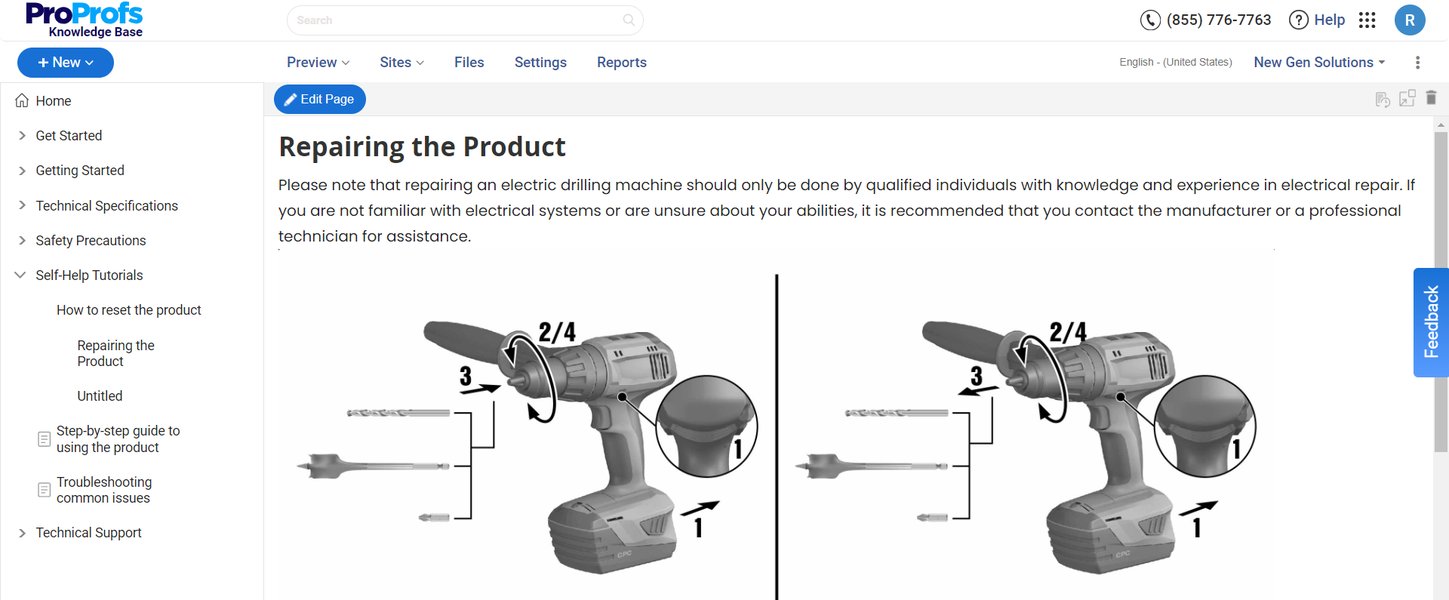
An example of a digital repair instruction manual.
The Essence of an Effective Instruction Manual
Crafting Clear and Comprehensive Guides
An effective instruction manual goes beyond just listing features; it empowers users to achieve their desired outcomes with a product. Whether it's a household appliance, a piece of software, or complex machinery, the quality of its manual significantly impacts user satisfaction and reduces the need for customer support.
Core Components of a Product Instruction Manual
A well-structured instruction manual typically includes:
- Product Overview and Table of Contents: An initial section that introduces the product and provides an easy-to-navigate table of contents, allowing users to quickly find relevant information.
- Safety Information: Critical warnings and precautions necessary for safe operation and to prevent injury or product damage. In many regions, this is a legal requirement.
- Assembly and Installation Instructions: Step-by-step guidance for setting up the product, including any necessary accessories.
- Operational Instructions: Clear, sequential steps on how to use the product's features and functions. This often benefits greatly from visual aids.
- Troubleshooting Solutions: Common problems and their corresponding solutions, enabling users to self-diagnose and fix minor issues.
- Maintenance and Care: Guidelines for proper cleaning, storage, and routine maintenance to extend the product's lifespan.
- Technical Specifications: Detailed information about the product's dimensions, power requirements, compatibility, and other technical data.
- Glossary of Terms: Explanation of any technical jargon, acronyms, or specific terminology used in the manual.
- Warranty Information and Contact Details: Details on product warranty and how to contact customer support.
Best Practices for Manual Creation
To create a truly compelling and useful manual, consider these best practices:
- User-Centric Approach: Identify your target users and their needs. Focus on solving potential problems they might encounter.
- Clarity and Conciseness: Use simple, unambiguous language. Avoid overly technical terms where possible, or explain them thoroughly if they are necessary.
- Sequential Steps: Present instructions in a logical, step-by-step format, often using numbered lists.
- Visual Elements: Integrate high-quality images, diagrams, annotated screenshots, and even 3D assembly instructions. Studies show that visuals significantly improve comprehension and task completion rates.
- Accessibility: Provide the manual in easily accessible formats like PDF or online documentation platforms. Consider multilingual options if your product has a global audience.
- Testing: Have new users test the manual to identify areas of confusion or difficulty before final publication.
- Regular Updates: Keep manuals current with product updates, new features, or identified issues.
Tools like Scribe can assist in creating visual, step-by-step guides with AI-powered documentation processes, streamlining the manual creation process.
This video demonstrates how to create compelling step-by-step guides, emphasizing the importance of visuals and efficiency in manual creation.
The "Personal User Manual" in the Workplace
Enhancing Team Collaboration and Understanding
Beyond traditional product instructions, the concept of a "user manual" has found a profound application in professional settings. A personal user manual, often called a "how to work with me" guide, is a document where an individual outlines their work style, preferences, strengths, and communication habits. These manuals are particularly valuable for remote or asynchronous teams, where opportunities for informal observation and interaction are limited.
Benefits of Personal User Manuals
- Improved Communication: Explicitly stating preferred communication channels, response times, and feedback styles can prevent misunderstandings and reduce anxiety.
- Conflict Prevention: By setting clear expectations about individual working preferences, these manuals can proactively prevent conflicts or frustrations that arise from differing work styles.
- Increased Productivity: When teammates understand how best to interact with and support each other, time spent on miscommunication is reduced, boosting overall team efficiency.
- Faster Onboarding: New team members can quickly understand their colleagues' working habits, accelerating the integration process.
- Fostering Empathy and Psychological Safety: These manuals encourage vulnerability and mutual understanding, reminding colleagues that everyone has unique preferences and needs. They celebrate diversity in working styles.
What to Include in Your Personal User Manual
A personal user manual can be tailored to individual needs but often covers aspects such as:
- Working Hours and Availability: When you are most productive and how you manage your time.
- Communication Preferences: Best ways to reach you (e.g., Slack, email, call), preferred response times, and how you prefer to receive feedback.
- Working Style: Do you prefer to work independently or collaboratively? How do you approach problem-solving?
- Strengths and Weaknesses: What you excel at and areas where you might need support or a different approach.
- Motivations and Frustrations: What energizes you and what might drain your energy.
- Feedback Preferences: How you prefer to give and receive constructive criticism.
Platforms like Manual of Me offer structured frameworks and workshops to help individuals and teams create and share their personal user manuals effectively. This practice encourages self-reflection and promotes a more supportive and understanding team environment.
Comparative Analysis of Manual Types
To further illustrate the diverse applications of manuals, here's a comparative overview:
| Feature | Product User Manual | Personal User Manual (Work) | Repair/Service Manual |
|---|---|---|---|
| Primary Purpose | Educate users on product operation, features, and safety. | Communicate individual work styles, preferences, and needs to colleagues. | Provide detailed instructions for product diagnosis, repair, and maintenance. |
| Target Audience | End-users, customers | Team members, colleagues, managers | Technicians, qualified service personnel, advanced DIY users |
| Content Focus | Step-by-step usage, troubleshooting, safety warnings, specifications. | Communication habits, work preferences, strengths, irritations, feedback styles. | Circuit diagrams, exploded views, repair procedures, component lists, diagnostics. |
| Typical Format | Printed booklet, PDF, online knowledge base. | Internal document (Google Doc, Notion, dedicated platform), sometimes shared digitally. | PDF, specialized software, sometimes printed large format. |
| Key Benefit | Enhanced user experience, reduced support queries, product longevity. | Improved team collaboration, reduced miscommunication, increased productivity. | Enables expert repair, extends product lifespan, ensures proper servicing. |
Assessing Personal Work Preferences: A Radar Chart View
Understanding Diverse Work Styles Through Self-Assessment
The creation of a personal user manual often involves reflecting on one's work preferences. This self-assessment can be visually represented to highlight individual characteristics and how they interact within a team. Below is a radar chart illustrating hypothetical preferences across several common work dimensions, demonstrating how different team members might prefer to operate.
This radar chart visually depicts how different hypothetical team members might score on various work preference dimensions. For example, "Team Member A" shows a strong preference for highly collaborative work and direct communication, while "Team Member B" prefers more autonomy in decision-making. "Team Member C" values structured meetings and a systematic approach to problem-solving. Such a visual tool within a personal user manual can quickly convey key insights about an individual's ideal working conditions, fostering better team dynamics and mutual understanding. The higher the value on an axis, the stronger the preference or characteristic in that area.
Future Trends in Manuals and Documentation
Evolving Formats and Technologies
The landscape of user manuals is continuously evolving, driven by technological advancements and changing user expectations. We are moving towards more dynamic, interactive, and intelligent documentation solutions.
- Interactive and 3D Instructions: Beyond static images, 3D assembly instructions and interactive guides are gaining traction. These allow users to manipulate models, zoom in, and get a more immersive understanding of complex processes, significantly reducing assembly errors and improving user satisfaction.
- AI-Powered Manual Creation and Support: Tools leveraging artificial intelligence are simplifying the creation of manuals by automating documentation processes, generating step-by-step guides, and even assisting with content organization. AI can also power chatbots and virtual assistants that provide instant, intelligent support based on manual content, reducing the need for users to sift through long documents.
- Digital Work Instructions (DWI): Platforms like Manual.to are offering digital work instruction software that helps organizations streamline operations and enhance efficiency by capturing crucial knowledge and sharing it through simple URLs or QR codes. This is particularly useful for training new employees and standardizing complex procedures.
- Personalized and Adaptive Manuals: Future manuals might adapt to individual user needs and learning styles, providing information in a format most suitable for them, whether it's through concise summaries, detailed explanations, or video tutorials.
- Emphasis on "Right to Repair": There's a growing movement advocating for easy access to repair information and manuals for devices. This trend promotes sustainable consumption by empowering users to repair their products, extending their lifespan and reducing waste. Many online manual repositories already align with this philosophy.
Frequently Asked Questions About Manuals
What is the primary purpose of a user manual?
Are product manuals legally required in the United States?
What is a "personal user manual" in a work context?
Can I find old or discontinued product manuals online?
What are the benefits of using visuals in an instruction manual?
Recommended Further Exploration
- How to write effective instruction manuals with visuals
- Benefits of personal user manuals for remote teams
- Best practices for digital work instructions and training
- Legal requirements for product user instructions
References
Last updated May 21, 2025