
Understanding Computers: An In-Depth Exploration
Unveiling the Complex Mechanisms Behind Modern Computing
Key Takeaways
- Comprehensive Hardware Integration: Understanding the critical roles of the CPU, memory, storage, and peripherals.
- Instruction Cycle and Data Processing: The foundational processes that enable computers to execute complex tasks.
- Advanced Computing Trends: Emerging technologies like AI, quantum computing, and their impact on future computing.
1. Introduction to Computers
What is a Computer?
A computer is an advanced electronic device designed to process, store, and retrieve data. It operates based on a set of instructions provided by software, enabling it to perform a wide array of tasks from simple calculations to complex simulations. The evolution of computers from mechanical calculators to today's sophisticated digital systems has revolutionized virtually every aspect of modern life.
Historical Evolution
The journey of computers began with early mechanical devices like the abacus and progressed through significant milestones such as the development of the first electronic computers during World War II. Innovations like the transistor, integrated circuits, and microprocessors have continuously enhanced computing power, efficiency, and accessibility, leading to the pervasive use of computers in personal, professional, and industrial environments.
2. Fundamental Components of a Computer
Central Processing Unit (CPU)
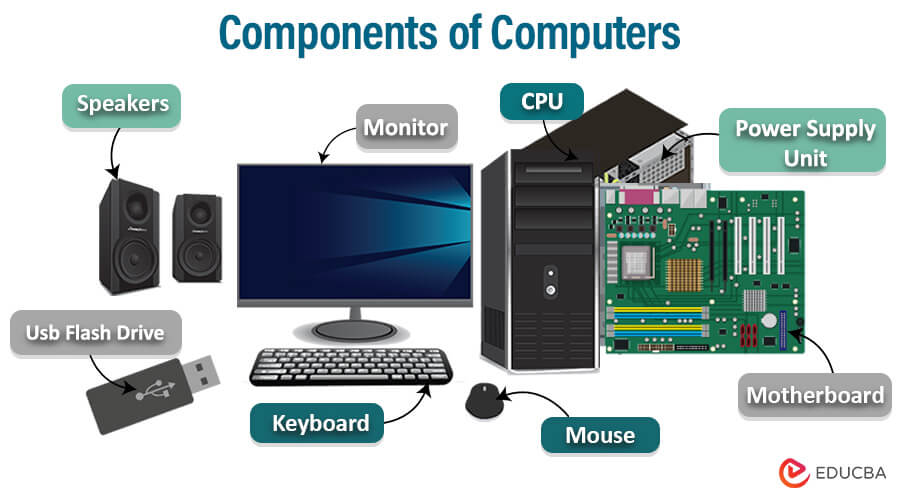
The CPU, often referred to as the "brain" of the computer, is responsible for executing instructions and performing calculations. It comprises several key elements:
Architecture
The CPU's architecture includes the Control Unit (CU), which directs operations, the Arithmetic Logic Unit (ALU), which performs mathematical and logical operations, and registers that hold data temporarily during processing.
Instruction Cycle
The CPU follows an instruction cycle consisting of fetching instructions from memory, decoding them to determine the required actions, executing the operations, and writing back the results. This cycle repeats billions of times per second, enabling rapid processing of complex tasks.
Memory Hierarchy
Memory within a computer is organized in a hierarchy based on speed and volatility:
- Registers: Extremely fast, small storage areas within the CPU for immediate data manipulation.
- Cache Memory: Slightly slower than registers, caches store frequently accessed data to speed up processing.
- Random Access Memory (RAM): Volatile memory used for temporary storage of data and instructions that are actively being used by the CPU.
- Secondary Storage: Non-volatile storage solutions like Hard Disk Drives (HDDs) and Solid-State Drives (SSDs) that retain data even when power is off.
Motherboard
The motherboard serves as the main circuit board connecting all hardware components. It provides pathways for data communication between the CPU, memory, storage devices, and peripheral components. Additionally, it houses various ports and slots for expanding the computer's capabilities through additional hardware.
Power Supply Unit (PSU)
The PSU converts alternating current (AC) from the wall outlet into direct current (DC) used by computer components. It ensures that each part receives the appropriate voltage and maintains system stability.
Input and Output Devices
Input devices like keyboards, mice, and touchscreens allow users to interact with the computer by providing data and commands. Output devices such as monitors, printers, and speakers display or present the processed information in a human-readable or audible form.
3. Input and Output Processes
Input Mechanisms
Input devices are essential for data entry and command execution. They convert user actions into digital signals that the computer can process:
- Keyboards: Used for typing text and issuing commands.
- Mice and Touchpads: Facilitate navigation and selection within graphical user interfaces.
- Touchscreens: Enable direct interaction with on-screen elements through touch gestures.
- Scanners and Cameras: Convert physical documents and images into digital formats.
- Microphones: Capture audio input for processing and recording.
Processing Data
Once input data is received, the CPU processes it according to the instructions provided by software applications. This involves performing calculations, executing logical operations, and manipulating data to achieve desired outcomes.
Output Mechanisms
Processed data is then delivered to output devices, transforming it into a format understandable by users:
- Monitors: Display visual information, including text, images, and videos.
- Printers: Produce physical copies of digital documents.
- Speakers: Output audio signals, enabling sound playback.
- External Storage Devices: Transfer processed data to other storage mediums or devices.
4. The Role of the CPU
Architecture and Components
The CPU's architecture is intricately designed to perform a multitude of tasks efficiently. Key components include:
- Control Unit (CU): Directs the operation of the processor by interpreting instructions and managing data flow.
- Arithmetic Logic Unit (ALU): Executes mathematical calculations and logical comparisons.
- Registers: Small, fast storage locations within the CPU that hold data and instructions temporarily during processing.
Instruction Cycle
The CPU operates through a continuous cycle of fetching, decoding, executing, and writing back instructions:
- Fetch: Retrieving an instruction from the memory.
- Decode: Interpreting the instruction to understand the required action.
- Execute: Performing the operation specified by the instruction.
- Write-back: Storing the result of the operation back into memory or registers.
Clock Speed and Performance
The clock speed of a CPU, measured in gigahertz (GHz), determines how many instruction cycles it can perform per second. Higher clock speeds generally translate to faster processing capabilities, enabling the CPU to handle more complex and numerous tasks efficiently.
5. Memory and Storage Systems
Random Access Memory (RAM)
RAM serves as the computer's short-term memory, providing fast access to data and instructions that the CPU actively uses. Unlike secondary storage, RAM is volatile, meaning it loses its contents when the computer is powered off. Adequate RAM is crucial for multitasking and running memory-intensive applications smoothly.
Secondary Storage Devices
Secondary storage offers long-term data retention and comes in various forms:
- Hard Disk Drives (HDDs): Utilize magnetic storage to hold large volumes of data cost-effectively.
- Solid-State Drives (SSDs): Provide faster data access speeds and increased durability by using flash memory.
- Optical Drives: Use laser technology to read and write data on CDs, DVDs, and Blu-ray discs.
Memory Hierarchy
The memory hierarchy balances speed, cost, and capacity to optimize system performance:
| Memory Type | Speed | Volatility | Capacity |
|---|---|---|---|
| Registers | Very High | Volatile | Small |
| Cache Memory | High | Volatile | Moderate |
| RAM | Moderate | Volatile | Large |
| Secondary Storage | Low | Non-volatile | Very Large |
Data Storage Principles
Data within a computer is represented using the binary system, where each bit is a 0 or 1. These bits are grouped into bytes (8 bits), forming the basic unit of data storage. This binary representation allows for the encoding of numbers, characters, and multimedia information, which the CPU can process efficiently using digital logic circuits.
6. The Boot Process
BIOS and UEFI
Upon powering on, the computer's firmware initiates the boot process. BIOS (Basic Input/Output System) or its modern counterpart UEFI (Unified Extensible Firmware Interface) performs essential functions:
- Power-On Self-Test (POST): Checks the functionality of hardware components like the CPU, memory, and storage devices.
- Hardware Initialization: Prepares hardware components for operation.
- Bootloader Execution: Locates and loads the operating system from storage into RAM.
Loading the Operating System
The bootloader transfers control to the operating system, which then initializes system services, drivers, and user interfaces. This process enables users to interact with the computer and run applications.
7. Software and Operating Systems
Role of Software
Software comprises programs and applications that provide instructions to the hardware, enabling it to perform specific tasks. Software can be categorized into:
- System Software: Includes the operating system and utility programs that manage hardware resources and provide a platform for applications.
- Application Software: Programs designed to perform user-oriented tasks such as word processing, web browsing, and graphic design.
Operating Systems (OS)
The OS is the backbone of the computer, managing hardware resources, coordinating tasks, and providing a user interface. Popular operating systems include Microsoft Windows, macOS, Linux distributions, and mobile OS platforms like Android and iOS.
Software Development and Execution
Software development involves writing code in high-level programming languages like C++, Java, or Python. This code is then compiled or interpreted into machine language, which the CPU can execute. The OS manages the execution of multiple applications, ensuring efficient resource allocation and multitasking.
8. Networking and Connectivity
Basics of Networking
Networking enables computers to communicate and share resources. Fundamental concepts include:
-
Local Area Network (LAN): Connects devices within a limited geographic area, such as a home or office.
-
Wide Area Network (WAN): Covers larger geographic areas, often connecting multiple LANs.
-
Internet: A global network of interconnected computers and servers facilitating data exchange worldwide.
Network Interface Cards (NICs)
NICs are hardware components that facilitate network connectivity, allowing computers to communicate over wired (Ethernet) or wireless (Wi-Fi) networks. They handle data transmission, reception, and protocol implementation to ensure reliable communication.
Cloud Computing
Cloud computing leverages remote servers hosted on the internet to store, manage, and process data. It offers scalability, flexibility, and cost-efficiency, enabling users to access resources and applications from anywhere with an internet connection.
9. Advanced Computing Concepts
Multitasking and Multiprocessing
Modern computers are designed to handle multiple tasks simultaneously. Multitasking allows the CPU to switch between different processes, while multiprocessing involves multiple CPU cores working in parallel to execute tasks more efficiently.
Virtualization
Virtualization technology enables the creation of virtual instances of hardware components or entire operating systems. This allows multiple virtual machines to run on a single physical machine, optimizing resource utilization and providing isolated environments for different applications.
Security and Encryption
As computers become more powerful and interconnected, securing data and ensuring privacy are paramount. Encryption techniques protect sensitive information by converting it into an unreadable format, while security protocols safeguard data transmission and system integrity against unauthorized access and cyber threats.
10. Future Trends in Computing
Artificial Intelligence and Machine Learning
AI and machine learning are transforming computing by enabling systems to learn from data, recognize patterns, and make informed decisions. These technologies are integral to advancements in automation, data analysis, natural language processing, and intelligent user interfaces.
Quantum Computing
Quantum computing leverages the principles of quantum mechanics to perform computations at unprecedented speeds. Quantum computers use qubits, which can represent multiple states simultaneously, allowing them to solve complex problems that are intractable for classical computers.
Internet of Things (IoT)
IoT refers to the network of interconnected devices embedded with sensors and software, enabling them to collect and exchange data. IoT applications span smart homes, healthcare, industrial automation, and environmental monitoring, enhancing efficiency and connectivity in everyday life.
Cloud and Edge Computing
While cloud computing centralizes data processing in remote servers, edge computing brings computation closer to data sources. This reduces latency, enhances real-time processing capabilities, and supports applications requiring immediate data analysis, such as autonomous vehicles and smart cities.
Cybersecurity Enhancements
As cyber threats become more sophisticated, advancements in cybersecurity are essential. Future developments focus on proactive threat detection, advanced encryption methods, and resilient system architectures to protect against increasingly complex attacks.
Conclusion
Understanding how computers work involves a comprehensive exploration of their hardware components, processing mechanisms, memory systems, and the intricate interplay between software and hardware. From the fundamental principles of binary computation to the advanced trends shaping the future of technology, computers remain at the forefront of innovation, driving progress across all sectors. As we continue to develop more powerful and intelligent systems, the role of computers in enhancing human capabilities and transforming industries will only grow, underscoring the importance of deepening our knowledge of their inner workings.
References
Last updated February 15, 2025