
Connecting Backend Support for a React-Based Note-Taking Website on AWS
A Comprehensive Guide to Hosting and Integrating Backend Services on AWS
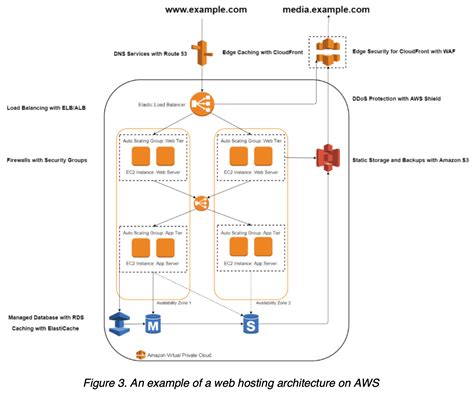
Key Takeaways
- Scalable Frontend Hosting: Utilize AWS Amplify or Amazon S3 with CloudFront to host your React application, ensuring scalability and low latency.
- Robust Serverless Backend: Implement AWS Lambda, API Gateway, and DynamoDB to create a scalable and cost-effective backend infrastructure.
- Secure and Seamless Integration: Leverage AWS Cognito for authentication and AWS Amplify for streamlined integration between frontend and backend services.
Introduction
Hosting a React-based note-taking application on AWS involves setting up a scalable frontend, establishing a robust backend, and ensuring seamless integration between the two. AWS offers a plethora of services that facilitate the deployment, management, and scaling of both frontend and backend components. This guide provides a step-by-step approach to connecting backend support for your React application, leveraging AWS's powerful ecosystem.
1. Frontend Hosting
1.1 AWS Amplify
AWS Amplify is a comprehensive suite of tools and services designed to simplify the hosting and deployment of modern web applications. It offers continuous deployment from your Git repository, automatic SSL provisioning, and integration with other AWS services.
- Setup and Deployment: Push your React application code to a GitHub, GitLab, or Bitbucket repository. Connect the repository to AWS Amplify, which will handle the build and deployment process automatically.
- Continuous Integration: Amplify monitors your repository for changes and automatically rebuilds and redeploys your application upon each commit.
- Custom Domains: Easily set up custom domain names and manage DNS configurations directly through Amplify.
1.2 Alternative: Amazon S3 with CloudFront
For those preferring a more hands-on approach, hosting the React frontend on Amazon S3 combined with CloudFront offers a scalable and performant solution.
- Build and Upload: Use
npm run buildto generate static files from your React application. Upload these files to an S3 bucket configured for static website hosting. - Content Delivery: Configure Amazon CloudFront as a Content Delivery Network (CDN) to distribute your application globally, reducing latency and improving load times.
- Security: Enable HTTPS by integrating with AWS Certificate Manager (ACM) to secure data transmission.
2. Backend Setup
2.1 Serverless Architecture with AWS Lambda
AWS Lambda enables you to run backend code without provisioning or managing servers. It automatically scales your application by running code in response to events.
- Create Lambda Functions: Develop functions in Node.js, Python, or other supported languages to handle CRUD operations for your notes.
- API Gateway Integration: Use Amazon API Gateway to expose your Lambda functions as RESTful APIs, serving as the interface between the frontend and backend.
- Scalability and Cost-Effectiveness: Pay only for the compute time you consume, ensuring cost-efficiency.
2.2 AWS AppSync for GraphQL APIs
If your application requires real-time data synchronization and complex querying capabilities, AWS AppSync offers a managed GraphQL service that seamlessly integrates with other AWS services.
- Real-Time Subscriptions: Enable real-time data updates to your frontend by utilizing AppSync's subscription features.
- Data Integration: Connect AppSync with DynamoDB for data storage and retrieval, simplifying backend operations.
- Security: Implement fine-grained access control using AWS Identity and Access Management (IAM) and AWS Cognito.
2.3 Database Configuration with DynamoDB
Amazon DynamoDB is a fully managed NoSQL database service that provides fast and predictable performance with seamless scalability.
- Create a DynamoDB Table: Define a table (e.g.,
NotesTable) with a primary key (e.g.,noteID) to store note data. - Integrate with Lambda: Use the AWS SDK within your Lambda functions to perform CRUD operations on the DynamoDB table.
- Performance Optimization: Utilize DynamoDB's indexing and query capabilities to optimize data retrieval.
2.4 Authentication with Amazon Cognito
Amazon Cognito provides user sign-up, sign-in, and access control, ensuring secure access to your application.
- Set Up a User Pool: Create a Cognito User Pool to manage user credentials and authentication flows.
- Integrate with Frontend: Use AWS Amplify or the Amazon Cognito SDK to handle user authentication within your React application.
- Secure API Access: Configure API Gateway to require valid Cognito tokens, ensuring that only authenticated users can access backend APIs.
2.5 Traditional Backend with EC2 (Optional)
For applications requiring more control over the server environment, deploying a traditional backend on Amazon EC2 is an alternative.
- Provision EC2 Instances: Launch EC2 instances with your preferred operating system and configure security groups for access control.
- Deploy Backend Frameworks: Use frameworks like Express.js (Node.js) or Django (Python) to build your backend APIs.
- Manage Scaling: Implement auto-scaling groups to handle varying traffic loads, ensuring reliability and performance.
3. Connecting Frontend to Backend
3.1 API Integration
Integrating your React frontend with the backend APIs is crucial for enabling data exchange and functionality.
- Define API Endpoints: Use API Gateway to create RESTful endpoints (e.g.,
/notes,/notes/{id}) that correspond to CRUD operations. - HTTP Requests: Utilize HTTP methods (GET, POST, PUT, DELETE) within your React application to interact with the backend APIs.
- Error Handling: Implement robust error handling mechanisms to manage API response errors and enhance user experience.
3.2 AWS Amplify Library
AWS Amplify simplifies the integration process between your React frontend and AWS backend services by providing pre-built UI components and streamlined API interactions.
-
Install Amplify:
npm install aws-amplify -
Configure Amplify:
import Amplify from 'aws-amplify'; import awsconfig from './aws-exports'; Amplify.configure(awsconfig); -
API Calls Integration:
import { API } from 'aws-amplify';

// Create a new note
async function createNote(note) {
    return await API.post('yourApiName', '/notes', {
        body: note
    });
}

// Fetch all notes
async function fetchNotes() {
    return await API.get('yourApiName', '/notes');
}
3.3 Authentication Integration
Ensuring secure access is paramount. Integrate Amazon Cognito with your React application to manage user authentication seamlessly.
- User Sign-Up and Sign-In: Utilize Cognito's authentication flows to handle user registration and login processes.
- Protected Routes: Implement route protection in your React application to ensure that only authenticated users can access certain pages.
- Token Management: Manage JWT tokens provided by Cognito to authenticate API requests securely.
3.4 Database Integration
Connecting your backend to a database like DynamoDB ensures that user data is stored and retrieved efficiently.
- Data Models: Define data models for your notes, including fields like title, content, and timestamps.
- Query Optimization: Use DynamoDB's indexing features to optimize data retrieval and enhance performance.
- Data Validation: Implement validation logic within your Lambda functions to ensure data integrity.
4. Deployment and Monitoring
4.1 Deployment Strategies
Efficient deployment ensures that your application is reliably available to users.
- CI/CD Pipelines: Set up Continuous Integration and Continuous Deployment pipelines using AWS CodePipeline or third-party tools like GitHub Actions to automate the deployment process.
- Automated Testing: Incorporate automated testing within your deployment pipeline to catch issues early and maintain code quality.
- Version Control: Utilize version control systems to manage code changes and maintain a history of deployments.
4.2 Monitoring with Amazon CloudWatch
Monitoring your application's performance and health is essential for maintaining reliability and addressing issues proactively.
- Set Up Metrics: Use CloudWatch to collect and track key performance metrics such as latency, error rates, and throughput.
- Log Management: Enable logging for your Lambda functions and API Gateway to troubleshoot and analyze application behavior.
- Alerts and Notifications: Configure CloudWatch Alarms to receive notifications for critical events or thresholds, ensuring timely responses to issues.
5. Security Considerations
5.1 IAM Roles and Permissions
Properly managing Identity and Access Management (IAM) roles and permissions is crucial for securing your AWS resources.
- Least Privilege Principle: Assign only the necessary permissions to each IAM role to minimize security risks.
- Role Separation: Create separate roles for different services (e.g., Lambda, EC2) to compartmentalize access and enhance security.
- Regular Audits: Periodically review and audit IAM roles and permissions to ensure compliance with security standards.
5.2 Enabling HTTPS
Securing data transmission between clients and your application is essential. Enable HTTPS to encrypt data in transit.
- SSL Certificates: Use AWS Certificate Manager (ACM) to provision and manage SSL/TLS certificates for your domain.
- CloudFront Configuration: Configure CloudFront distributions to use HTTPS by default, ensuring secure data delivery.
- API Gateway Security: Enforce HTTPS on API Gateway endpoints to secure API interactions.
5.3 Network Security
Implementing network security measures protects your application from unauthorized access and potential threats.
- Security Groups: Configure security groups for your AWS resources to control inbound and outbound traffic effectively.
- VPC Configuration: Use Virtual Private Clouds (VPCs) to isolate your backend services and manage network access.
- Firewall Rules: Implement firewall rules to restrict access to critical resources and minimize exposure to vulnerabilities.
6. Optional Enhancements
6.1 Infrastructure as Code (IaC)
Managing your infrastructure through code enhances reproducibility, scalability, and maintainability.
- Terraform: Use Terraform to define and provision AWS infrastructure using declarative configuration files.
- AWS Cloud Development Kit (CDK): Leverage AWS CDK to model and provision cloud application resources using familiar programming languages.
- Serverless Application Model (SAM): Utilize AWS SAM for building serverless applications, enabling easy deployment and management of Lambda functions and associated resources.
6.2 Enhanced Monitoring and Analytics
Advanced monitoring and analytics provide deeper insights into application performance and user behavior.
-
Amazon X-Ray: Implement AWS X-Ray to trace and analyze requests as they travel through your application, identifying bottlenecks and performance issues.
-
Custom Dashboards: Create custom CloudWatch dashboards to visualize key metrics and monitor application health in real-time.
-
User Analytics: Integrate analytics tools to track user interactions and gain insights into application usage patterns.
7. Code Examples
7.1 React Integration with AWS Amplify
import React, { useEffect, useState } from 'react';
import { API, Auth } from 'aws-amplify';
import awsconfig from './aws-exports';

Amplify.configure(awsconfig);

function App() {
    const [notes, setNotes] = useState([]);
    const [user, setUser] = useState(null);

    useEffect(() => {
        fetchNotes();
        Auth.currentAuthenticatedUser()
            .then(user => setUser(user))
            .catch(() => console.log("Not signed in"));
    }, []);

    const fetchNotes = async () => {
        try {
            const data = await API.get('notesApi', '/notes');
            setNotes(data);
        } catch (err) {
            console.error("Error fetching notes:", err);
        }
    };

    const createNote = async (note) => {
        try {
            const newNote = await API.post('notesApi', '/notes', { body: note });
            setNotes([...notes, newNote]);
        } catch (err) {
            console.error("Error creating note:", err);
        }
    };

    return (
        <div>
            <h1>My Notes</h1>
            {user ? <p>Welcome, {user.username}</p> : <p>Please sign in</p>}
            <button onClick={() => Auth.signOut()}>Sign Out</button>
            {/* Add components for displaying and creating notes */}
        </div>
    );
}

export default App;
7.2 AWS Lambda Function Example
// handler.js
const AWS = require('aws-sdk');
const dynamo = new AWS.DynamoDB.DocumentClient();
const uuid = require('uuid');

exports.handler = async (event) => {
    const { httpMethod, pathParameters, body } = event;
    let response;

    try {
        switch (httpMethod) {
            case 'GET':
                if (pathParameters && pathParameters.id) {
                    const params = {
                        TableName: 'NotesTable',
                        Key: { noteID: pathParameters.id },
                    };
                    const data = await dynamo.get(params).promise();
                    response = { statusCode: 200, body: JSON.stringify(data.Item) };
                } else {
                    const params = { TableName: 'NotesTable' };
                    const data = await dynamo.scan(params).promise();
                    response = { statusCode: 200, body: JSON.stringify(data.Items) };
                }
                break;
            case 'POST':
                const note = JSON.parse(body);
                note.noteID = uuid.v4();
                const putParams = {
                    TableName: 'NotesTable',
                    Item: note,
                };
                await dynamo.put(putParams).promise();
                response = { statusCode: 201, body: JSON.stringify(note) };
                break;
            // Implement PUT and DELETE similarly
            default:
                response = { statusCode: 405, body: 'Method Not Allowed' };
        }
    } catch (error) {
        response = { statusCode: 500, body: JSON.stringify({ error: error.message }) };
    }

    return response;
};
Conclusion
Connecting backend support for a React-based note-taking application on AWS involves a series of strategic decisions and integrations. By leveraging AWS Amplify or Amazon S3 with CloudFront for frontend hosting, coupled with AWS Lambda, API Gateway, and DynamoDB for backend services, you can create a scalable, secure, and efficient architecture. Incorporating AWS Cognito ensures robust authentication, while tools like AWS Amplify streamline the integration process. Implementing best practices in deployment, monitoring, and security further enhances the reliability and performance of your application. This comprehensive approach not only facilitates seamless functionality but also prepares your application for future growth and scalability.
References
 aws.amazon.com
 docs.aws.amazon.com
aws.amazon.com
docs.aws.amazon.com
aws.amazon.com
Last updated January 19, 2025