
Converting a PostgreSQL Query to a Function: A Comprehensive Guide
Learn how to encapsulate your complex queries for reusability and efficiency.
Turning a frequently used SQL query into a function in PostgreSQL can significantly enhance code reusability, improve performance in certain scenarios, and make your database schema more organized. Functions allow you to encapsulate a series of SQL statements, including complex joins, and execute them with a single call, potentially passing parameters to make them dynamic.
The provided query is a straightforward join between two tables, shop.goods and shop.stock, based on the matching id and good_id columns, respectively. This query retrieves information about products and their stock levels. Converting this into a function involves defining a function signature, specifying the return type, and embedding the query within the function body.
Key Highlights of Converting Queries to Functions
- Increased Reusability: Encapsulating logic in functions allows you to call the same query from different parts of your application or other database procedures without rewriting the code.
- Improved Readability and Maintainability: Functions abstract complex logic, making your SQL code cleaner and easier to understand and maintain.
- Potential Performance Benefits: In some cases, PostgreSQL can optimize function execution plans, leading to better performance compared to executing the raw query repeatedly.
Understanding PostgreSQL Functions
Defining and Utilizing User-Defined Functions
PostgreSQL supports various types of functions, including SQL functions and procedural language functions (like PL/pgSQL). For converting a simple query like the one provided, an SQL function is often the most straightforward approach. SQL functions execute a single SQL statement and return its result.
The basic syntax for creating a function in PostgreSQL is as follows:
CREATE [ OR REPLACE ] FUNCTION function_name ( [ parameter_list ] )
RETURNS return_type
LANGUAGE language_name
AS $$
-- Function body (SQL statement)
$$;
Let's break down the key components:
CREATE [ OR REPLACE ] FUNCTION function_name
This part initiates the function creation. CREATE FUNCTION creates a new function, while CREATE OR REPLACE FUNCTION will either create a new function or replace an existing one with the same name and parameter types.
( [ parameter_list ] )
Here you define the parameters the function will accept. Each parameter has a name and a data type. Our example query doesn't have parameters, but if it did (e.g., filtering by a specific good ID), they would be listed here.
RETURNS return_type
This specifies the data type of the value or set of values the function will return. For a query that returns multiple rows and columns, you can use RETURNS TABLE (...) or RETURNS SETOF record, defining the structure of the returned rows. Alternatively, you can return a specific data type if the function returns a single value.
LANGUAGE language_name
This indicates the language the function body is written in. For simple SQL queries, LANGUAGE SQL is used. PL/pgSQL is another common language for more complex procedural logic.
AS $$ ... $$
The function body is enclosed within these double dollar signs ($$). This is where you place the SQL query or procedural code.
Converting the Provided Query
Step-by-Step Conversion Process
Now, let's convert your specific query into a PostgreSQL function. Your query returns multiple rows, each containing columns from both the shop.goods and shop.stock tables. The columns are name, short_description, description, price, and stock.
To return this structure, we will use RETURNS TABLE (...) and define the columns and their data types. We need to infer the data types based on common database practices; you should replace these with the actual data types from your table definitions.
Here's the SQL code to create the function:
CREATE OR REPLACE FUNCTION get_goods_with_stock()
RETURNS TABLE (
    name VARCHAR,
    short_description VARCHAR,
    description TEXT,
    price NUMERIC,
    stock INTEGER
)
LANGUAGE SQL
AS $$
    SELECT
        t1.name,
        t1.short_description,
        t1.description,
        t1.price,
        t2.stock
    FROM
        shop.goods as t1
    JOIN
        shop.stock as t2 ON t1.id = t2.good_id;
$$;
In this function:
- We named the function
get_goods_with_stock. - It takes no parameters.
- It returns a table with the specified columns and their inferred data types.
- The language is set to
SQL. - The function body contains your original query.
Executing the Function
Once the function is created, you can execute it using a simple SELECT statement, just like you would query a table:
SELECT * FROM get_goods_with_stock();
This will return the result set of the query embedded within the function.
Understanding JOIN Clauses in PostgreSQL
Connecting Related Data Across Tables
The core of your query lies in the JOIN clause. Joins are fundamental in relational databases for combining rows from two or more tables based on a related column between them. Your query uses an INNER JOIN implicitly (as JOIN defaults to INNER JOIN).
INNER JOIN
An INNER JOIN returns only the rows where there is a match in both tables being joined. In your query, it will return only the goods that have a corresponding entry in the stock table.
The ON t1.id = t2.good_id part of the join specifies the condition for matching rows. It links rows in the shop.goods table (aliased as t1) to rows in the shop.stock table (aliased as t2) where the id in shop.goods matches the good_id in shop.stock.
Here's a visual representation of an INNER JOIN:
Visual representation of an INNER JOIN showing only matching rows.
Other Join Types
PostgreSQL supports several other types of joins, each with a different way of handling rows that don't have a match in the other table:
- LEFT JOIN (or LEFT OUTER JOIN): Returns all rows from the left table, and the matching rows from the right table. If there is no match in the right table,
NULLvalues are returned for the right side's columns. - RIGHT JOIN (or RIGHT OUTER JOIN): Returns all rows from the right table, and the matching rows from the left table. If there is no match in the left table,
NULLvalues are returned for the left side's columns. - FULL JOIN (or FULL OUTER JOIN): Returns all rows when there is a match in either the left or the right table. If there is no match,
NULLvalues are returned for the columns of the table without a match. - CROSS JOIN: Returns all possible combinations of rows from both tables, effectively creating a Cartesian product. This type of join does not require a join condition.
- NATURAL JOIN: Joins tables based on columns with the same name in both tables. This can be convenient but also risky if column names accidentally match.
- SELF JOIN: A join where a table is joined with itself. This is useful for comparing rows within the same table.
Understanding the different join types is crucial for effectively combining data from multiple tables to meet your specific querying needs.
When to Use Functions vs. Direct Queries
Choosing the Right Approach
While converting queries to functions offers benefits, it's not always the best approach. Consider the following:
Benefits of Using Functions:
- Abstraction of Complex Logic: Functions hide the underlying query complexity, providing a simpler interface for users or applications.
- Centralized Logic: Business logic can be stored in the database, ensuring consistency across different applications accessing the data.
- Security: You can grant execute privileges on a function without granting direct access to the underlying tables.
- Reduced Network Traffic: For complex operations, executing a function on the database server can reduce the amount of data transferred to the client.
When Direct Queries Might Be Preferable:
-
Simple, Ad-Hoc Queries: For one-off or simple queries, creating a function might be overkill.
-
Flexibility: Direct queries offer more flexibility for experimentation and quick analysis.
-
Performance Considerations: While functions can be optimized, sometimes the optimizer has more information about the query context when executed directly.
In the case of your provided query, converting it to a function is a good practice if you intend to use this specific combination of data frequently in your application or other database scripts.
Data Type Conversion in SQL
Using CAST and CONVERT
Although not directly required for your specific query conversion, understanding data type conversion functions like CAST and CONVERT is important for working with SQL functions and queries in general. These functions allow you to change a value from one data type to another.
CAST()
The CAST() function is part of the SQL standard and is widely supported across different database systems, including PostgreSQL. Its syntax is straightforward:
CAST(expression AS target_data_type)
For example, to cast a numerical value to text:
SELECT CAST(123 AS TEXT);
CONVERT()
The CONVERT() function is specific to some database systems, notably SQL Server. While PostgreSQL does not have a direct CONVERT() function with the same syntax as SQL Server, it uses CAST() for similar type conversion purposes. Some PostgreSQL functions, like TO_CHAR, serve conversion purposes, particularly for formatting dates and numbers as strings.
Here's an example using TO_CHAR in PostgreSQL:
SELECT TO_CHAR(NOW(), 'YYYY-MM-DD');
This converts the current timestamp to a string in 'YYYY-MM-DD' format.
Visualizing Database Structure
Entity-Relationship Diagrams (ERDs)
Understanding the relationships between your tables is crucial for writing correct join queries and designing effective functions. Entity-Relationship Diagrams (ERDs) are visual tools that illustrate the structure of a database, showing tables as entities and the relationships between them.
For your query joining shop.goods and shop.stock, an ERD would show these two tables connected, likely with a one-to-many relationship where one good can have many stock entries (though in this simple case, it might be a one-to-one if each good has only one stock record). The connecting line would indicate the relationship is based on the id in shop.goods and good_id in shop.stock.
Here's an example of a simple ER diagram:
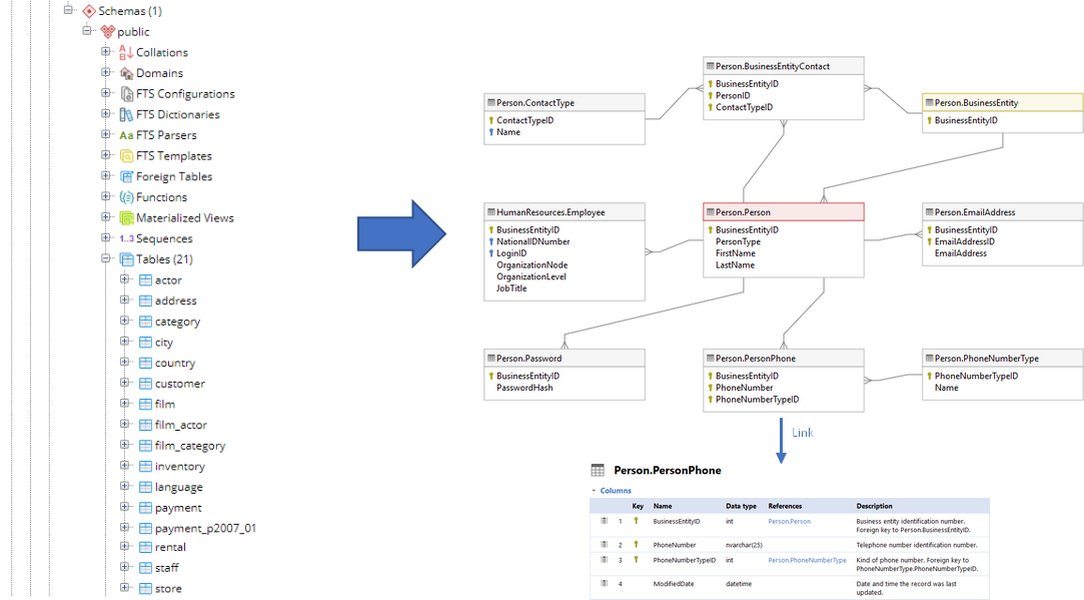
An example of an Entity-Relationship Diagram illustrating table relationships.
Tools are available to generate ERDs directly from your database schema, which can be invaluable for understanding and documenting your database structure.
Working with PostgreSQL Functions and Joins: A Summary Table
Key Concepts and Their Applications
This table summarizes the key concepts discussed regarding PostgreSQL functions and joins, providing a quick reference.
| Concept | Description | Relevance to Query Conversion | Example Usage |
|---|---|---|---|
| PostgreSQL Function | A stored set of SQL statements or procedural code that can be executed on demand. | Encapsulates the query for reusability and abstraction. | CREATE FUNCTION get_data() RETURNS TABLE (...) AS $$ SELECT ... $$ LANGUAGE SQL; |
| JOIN Clause | Combines rows from two or more tables based on a related column. | Forms the core of the provided query, linking shop.goods and shop.stock. |
FROM table1 JOIN table2 ON table1.col = table2.col |
| INNER JOIN | Returns rows with matching values in both tables. Default join type for JOIN. |
Used implicitly in the provided query to get goods that have stock information. | FROM table1 INNER JOIN table2 ON table1.col = table2.col |
| RETURNS TABLE | Specifies that a function returns a set of rows with a defined column structure. | Used in the function definition to match the output of the original query. | RETURNS TABLE (column1 datatype, column2 datatype) |
| LANGUAGE SQL | Specifies that the function body is a single SQL query. | Appropriate for converting simple SELECT statements into functions. |
LANGUAGE SQL |
| CAST() | Converts an expression from one data type to another (SQL standard). | Useful within function bodies or queries for type conversions. | CAST(column AS INTEGER) |
| TO_CHAR() | PostgreSQL function for converting values to formatted strings. | Alternative to CONVERT() for specific formatting needs. |
TO_CHAR(date_column, 'MM/DD/YYYY') |
Further Exploration
Adding Parameters and Error Handling
The function we created is a basic conversion. You could enhance it by adding parameters to make it more flexible. For example, you could add a parameter to filter goods by name or minimum stock level.
Here's an example of how you might modify the function to accept a minimum stock level parameter:
CREATE OR REPLACE FUNCTION get_goods_with_stock_filtered(min_stock INTEGER)
RETURNS TABLE (
    name VARCHAR,
    short_description VARCHAR,
    description TEXT,
    price NUMERIC,
    stock INTEGER
)
LANGUAGE SQL
AS $$
    SELECT
        t1.name,
        t1.short_description,
        t1.description,
        t1.price,
        t2.stock
    FROM
        shop.goods as t1
    JOIN
        shop.stock as t2 ON t1.id = t2.good_id
    WHERE
        t2.stock >= min_stock;
$$;
You would then call this function like this:
SELECT * FROM get_goods_with_stock_filtered(10);
For more complex logic or error handling, you would likely switch to a procedural language like PL/pgSQL. PL/pgSQL allows you to use control structures (like IF statements and loops) and handle exceptions.
FAQ
Can I perform joins within a PostgreSQL function?
Yes, you can definitely perform joins within a PostgreSQL function. The function body can contain any valid SQL query, including those with various types of joins (INNER JOIN, LEFT JOIN, etc.) to combine data from multiple tables.
What is the difference between CAST and CONVERT in SQL?
CAST() is a standard SQL function for data type conversion and is supported by PostgreSQL. CONVERT() is primarily used in SQL Server and has a different syntax and additional styling options for conversions. In PostgreSQL, you would typically use CAST() or specific conversion functions like TO_CHAR().
How do I return multiple rows and columns from a PostgreSQL function?
To return multiple rows and columns from a PostgreSQL function, you use the RETURNS TABLE (...) clause, where you define the names and data types of the columns in the result set. The function body should be a query that produces a result set matching this definition.
Can I pass parameters to a PostgreSQL function?
Yes, you can pass parameters to a PostgreSQL function. You define the parameters with their names and data types in the function signature within the parentheses after the function name. You can then use these parameters within the function body.
What is PL/pgSQL?
PL/pgSQL is a procedural language extension for PostgreSQL. It allows you to write functions and stored procedures with more complex logic, including control structures (IF, LOOP), variables, and exception handling, which are not available in simple SQL functions.
This video provides a guide on writing SQL Functions in PostgreSQL, including returning query results.
References
Last updated May 15, 2025