
Unlock the Secrets of Code: Your Guide to the Universal Language of Programming and AI
Master the fundamental building blocks of all software and automation, no prior experience needed!
Welcome to Chapter 3! If you've journeyed through Chapter 1, you've glimpsed the power of code and automation. In Chapter 2, you set up your digital workshop, preparing your tools for the exciting tasks ahead. Now, we're about to unlock the very essence of how computers "think" and how we can instruct them. This chapter, "Core Programming Concepts," is your key to understanding the universal language that underpins all software, from the simplest app to the most sophisticated Artificial Intelligence.
Think of this chapter as learning the fundamental notes and scales before you compose a symphony. These core concepts are the common threads woven through every programming language you'll ever encounter, including Python (Chapter 4) and JavaScript (Chapter 5). Mastering them here will not only make learning specific languages much easier but will also provide a solid foundation for understanding and building AI automation systems, which we'll explore in later chapters. We'll break down each concept in a beginner-friendly way, using simple analogies and showing how they relate to the exciting world of AI automation. Let's begin your journey to becoming a confident coder and an astute AI enthusiast!
Chapter Highlights: Your Key Takeaways
- Universal Building Blocks: You'll discover that concepts like variables, loops, and functions are fundamental to all programming languages, forming a "universal language" for instructing computers.
- Logic is King: Beyond just writing code (syntax), you'll learn that programming is fundamentally about logical thinking and problem-solving – skills crucial for designing effective AI automation.
- Foundation for AI: Each core concept explored here is a stepping stone towards understanding how AI systems process information, make decisions, and automate complex tasks.
Learning Goals
By the end of this chapter, you will be able to:
- Understand that programming involves creating structured instructions for computers, and differentiate between the rules of a language (syntax) and the problem-solving steps (logic).
- Explain the purpose of variables for storing information and distinguish between various data types (like numbers, text, and booleans).
- Identify and use common operators to perform calculations, comparisons, and logical operations.
- Describe how conditional statements (e.g., if-else) allow programs to make decisions and execute different paths based on specific conditions.
- Explain how loops (e.g., for, while) enable programs to repeat actions efficiently, a core aspect of automation.
- Understand the concept of functions as reusable blocks of code that perform specific tasks, promoting organization and efficiency.
- Recognize basic data structures like lists/arrays (for ordered collections) and dictionaries/objects (for key-value pairs) to manage data effectively.
- Develop foundational problem-solving skills by breaking down tasks into logical steps and planning solutions.
- Utilize pseudocode and flowcharts as tools for designing and visualizing program logic before writing actual code.
- Learn basic debugging techniques to identify and fix common errors in programs.
- Connect these core programming concepts to the foundational principles required for understanding and building AI automation solutions discussed in later chapters.
Curriculum: Exploring the Universal Language
Let's embark on a journey through the essential elements that make up the world of programming. Each section below unpacks a core concept, explained simply and connected to its role in both general coding and the exciting field of AI automation.
3.1 Code? Understanding Syntax and Logic
What is Code, Really?
At its heart, code is a set of precise instructions that tell a computer what to do, how to do it, and when to do it. Imagine you're writing a very detailed recipe for a robot chef. Every step must be crystal clear and in the correct order.
Syntax: The Grammar of Programming
Syntax refers to the specific rules and structure of a programming language – its grammar. Just like human languages have rules for sentence structure and punctuation, programming languages have rules for how commands are written. For example, missing a semicolon or a parenthesis can cause a program to not understand your instructions, leading to an error. Each programming language (like Python or JavaScript) has its own unique syntax, but the underlying principles of how to structure instructions are often similar.
Logic: The Brains of the Operation
Logic is the sequence of steps and decisions that a program follows to achieve a specific goal or solve a problem. It's the "thinking" part of the code. For instance, if you want a program to sort a list of numbers, the logic would involve comparing numbers and swapping them until they are in the correct order. Developing strong logical thinking is paramount for a programmer.
Connection to AI Automation: In AI automation, syntax ensures your instructions for an AI agent are correctly interpreted. The logic dictates how the AI agent makes decisions, processes data, or responds to different scenarios. For example, the logic in an automated email sorter AI would define how it categorizes emails based on keywords or sender information.

Understanding syntax and logic is the first step in mastering programming.
3.2 Variables & Data Types: Storing and Categorizing Information
Variables: Your Data's Labeled Boxes
Variables are fundamental to programming. Think of them as named containers or labeled boxes where you can store information that your program needs to use or manipulate. For example, you might create a variable called userName to store a user's name, or itemPrice to store the price of an item.
Example: userAge = 30 (Here, userAge is the variable, and it holds the value 30).
Data Types: What Kind of Information?
Data types define the nature of the data that a variable can hold and the kinds of operations that can be performed on that data. Common data types include:
- Integers: Whole numbers, like 10, -5, 0. (e.g.,
numberOfApples = 5) - Floats (Floating-Point Numbers): Numbers with decimal points, like 3.14, -0.5. (e.g.,
temperature = 23.5) - Strings: Sequences of characters, typically used for text. Strings are usually enclosed in quotes. (e.g.,
greeting = "Hello, World!") - Booleans: Represent truth values, either
trueorfalse. Essential for decision-making. (e.g.,isRaining = true) - Characters: Single letters or symbols. (e.g.,
initial = 'J')
Connection to AI Automation: AI systems heavily rely on variables and data types to handle vast amounts of information. An AI model analyzing customer feedback might store text comments as strings, satisfaction scores as integers or floats, and sentiment (positive/negative) as booleans. Correctly defining data types ensures the AI processes information accurately.
3.3 Operators: Performing Actions on Data
Operators are special symbols or keywords that perform operations on one or more values (called operands). They are the action words of programming, allowing you to manipulate variables and values.
Arithmetic Operators
These are used for mathematical calculations:
+(Addition)-(Subtraction)*(Multiplication)/(Division)%(Modulo - remainder of a division)
Example: totalCost = price * quantity
Comparison Operators
These are used to compare two values and result in a boolean (true or false):
==(Equal to)!=(Not equal to)>(Greater than)<(Less than)>=(Greater than or equal to)<=(Less than or equal to)
Example: isAdult = age >= 18
Logical Operators
These are used to combine or modify boolean expressions:
AND(Returnstrueif both operands are true)OR(Returnstrueif at least one operand is true)NOT(Reverses the boolean value of its operand)
Example: canEnter = isMember AND hasTicket
Connection to AI Automation: Operators are crucial for AI decision-making. An AI might use comparison operators to evaluate sensor data against thresholds (e.g., temperature > 30.0) and logical operators to combine multiple conditions before triggering an automated response (e.g., if temperature is high AND humidity is low, activate cooling system).
3.4 Control Flow: Conditionals - Making Decisions
Programs often need to make decisions and execute different sets of instructions based on certain conditions. This is where conditional statements (part of control flow) come in. The most common conditional statement is the if statement.
If Statements
An if statement executes a block of code only if a specified condition is true.
Analogy: "If it is raining (condition), then take an umbrella (action)."
If-Else Statements
An if-else statement allows you to execute one block of code if the condition is true, and another block if it's false.
Analogy: "If it is sunny (condition), go to the park (action). Else (otherwise), read a book indoors (alternative action)."
If-Else If-Else Statements
For multiple conditions, you can use else if (or similar constructs like elif in Python).
Connection to AI Automation: Conditionals are the backbone of decision-making in AI. An AI-powered chatbot uses conditionals to understand user intent and provide appropriate responses. For example: IF user asks for "weather", THEN fetch weather data. ELSE IF user asks for "news", THEN fetch headlines. Automated systems use conditionals to react dynamically to changing inputs.
3.5 Control Flow: Loops - Repeating Actions
Loops are used to execute a block of code repeatedly as long as a certain condition is met, or for a specific number of times. They are essential for automating repetitive tasks.
For Loops
A for loop is typically used when you know how many times you want to repeat an action. It iterates over a sequence (like a list of items or a range of numbers).
Analogy: "For each email in your inbox, check if it's spam."
While Loops
A while loop repeats a block of code as long as a specified condition remains true. The condition is checked before each iteration.
Analogy: "While the coffee machine has water, keep brewing coffee."
Connection to AI Automation: Loops are fundamental to AI and automation. AI models often train by iterating through large datasets multiple times (epochs) using loops. An automation script might use a loop to process all files in a folder, or an AI agent might loop through possible moves in a game to find the best one. Repetitive data entry, report generation, or system checks can all be automated using loops.
3.6 Functions: Reusable Code Blocks
A function is a named block of organized, reusable code that is designed to perform a single, specific task. Functions help break down large programs into smaller, manageable, and modular pieces.
Why Use Functions?
- Reusability: Write code once and use it multiple times by "calling" the function.
- Organization: Makes code cleaner, easier to understand, and maintain.
- Abstraction: Hides complex implementation details and exposes a simple interface.
Analogy: A function is like a recipe for a specific dish (e.g., "make_omelette"). You define the steps once. Whenever you want an omelette, you just follow (call) that recipe, perhaps with different ingredients (arguments/parameters).
Example: A function calculateArea(length, width) could take length and width as inputs and return the calculated area.
Connection to AI Automation: In AI systems, functions are used extensively. For example, you might have a function to preprocess text data, another to make a prediction using an AI model, and another to format the output. This modularity allows for easier development, testing, and scaling of AI automation workflows. LangChain (Chapter 11) and other AI orchestration tools rely heavily on the concept of chaining together distinct functional units.
3.7 Data Structures: Lists/Arrays - Organized Collections
Data structures are ways of organizing and storing data in a computer so that it can be accessed and modified efficiently. Lists (often called arrays in some languages) are one of the simplest and most common data structures.
A list is an ordered collection of items, which can be of mixed data types (though often they are of the same type). Items in a list are typically accessed by their position or index (starting from 0).
Analogy: A shopping list: ["milk", "eggs", "bread", "apples"]. You can add items, remove items, or check what's at a specific position.
Common List Operations:
- Accessing an item by its index (e.g.,
myList[0]gives the first item). - Adding an item to the end of the list.
- Removing an item from the list.
- Finding the length (number of items) of the list.
Connection to AI Automation: AI often deals with sequences of data, like a series of sensor readings, words in a sentence, or historical stock prices. Lists/arrays are perfect for storing and manipulating such sequential data. An AI might process a list of features for an input sample or generate a list of recommended products for a user.
3.8 Data Structures: Dictionaries/Objects - Key-Value Pairs
Dictionaries (often called objects in JavaScript or maps in other languages) are another fundamental data structure. They store data as collections of key-value pairs. Each key must be unique and is used to access its corresponding value.
Analogy: A real-world dictionary where each word (key) has a definition (value). Or a contact list: {"Name": "Alice Wonderland", "Phone": "555-1234", "Email": "alice@example.com"}. Here, "Name", "Phone", and "Email" are keys.
Why Use Dictionaries/Objects?
- Efficiently look up values when you know the key.
- Represent structured data where items have distinct properties.
Connection to AI Automation: Dictionaries are extremely useful for representing structured information that AI systems consume or produce. Configuration settings for an AI model, the properties of an entity recognized by Natural Language Processing (NLP), or JSON data from an API (Chapter 7) are often represented as dictionaries/objects. This makes data easily accessible and interpretable by different parts of an automation pipeline.

Data structures are essential for managing complex information in AI systems.
3.9 Problem Solving: The Programmer's Mindset
At its core, programming is about problem-solving. Before you write a single line of code, you need to understand the problem clearly and devise a logical plan to solve it. This involves:
- Understanding the Problem: What are the inputs? What is the desired output? What are the constraints?
- Breaking Down the Problem: Decompose large, complex problems into smaller, more manageable sub-problems.
- Developing an Algorithm: An algorithm is a step-by-step procedure or formula for solving a problem.
- Testing and Refining: Test your solution with various inputs and refine it until it works correctly and efficiently.
Connection to AI Automation: Designing AI automation solutions is a significant problem-solving endeavor. Whether it's creating a system to automate customer support, optimize logistics, or analyze medical images, you need to define the problem, gather data, choose appropriate AI models, and design the workflow—all requiring strong problem-solving skills.
3.10 Pseudocode & Flowcharts: Planning Your Solution
Before diving into writing code in a specific programming language, it's often helpful to plan your logic using tools like pseudocode and flowcharts.
Pseudocode
Pseudocode ("pseudo" means "false" or "imitation") is a way of describing the steps of an algorithm in a plain, human-readable language that mimics programming language structures but isn't bound by strict syntax rules. It helps you focus on the logic without worrying about the specifics of a particular language yet.
Example (Pseudocode for making tea):
START
  IF water_boiler_is_empty THEN
    FILL water_boiler
  ENDIF
  TURN_ON water_boiler
  WHILE water_is_not_boiling
    WAIT
  ENDWHILE
  ADD tea_bag TO cup
  POUR boiling_water INTO cup
  WAIT 3 minutes
  REMOVE tea_bag
  IF wants_milk THEN
    ADD milk
  ENDIF
  IF wants_sugar THEN
    ADD sugar
  ENDIF
  SERVE tea
END
Flowcharts
A flowchart is a visual representation of an algorithm or process. It uses standard symbols (like ovals for start/end, rectangles for processes, diamonds for decisions) connected by arrows to show the sequence of operations and the flow of control.
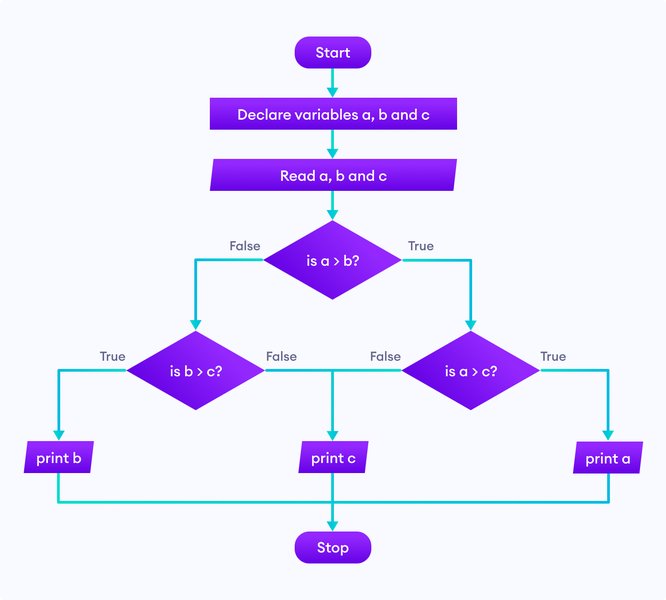
A flowchart visually maps out the logic of a program.
Connection to AI Automation: For complex AI automation workflows, pseudocode and flowcharts are invaluable for planning the sequence of operations, decision points, and interactions between different AI components or external systems. They help in visualizing the entire automated process before implementation.
3.11 Debugging 101: Finding and Fixing Errors
No matter how careful you are, errors (often called "bugs") are an inevitable part of programming. Debugging is the process of finding and fixing these errors in your code. It's a critical skill for any programmer.
Common Types of Errors:
- Syntax Errors: Mistakes in the grammar of the programming language (e.g., typos, missing punctuation). The code won't run.
- Runtime Errors: Errors that occur while the program is running (e.g., trying to divide by zero, accessing a non-existent file). The program crashes.
- Logic Errors: The code runs without crashing, but it doesn't produce the expected result because the underlying logic is flawed. These can be the trickiest to find.
Basic Debugging Techniques:
- Read Error Messages Carefully: They often point you to the location and type of error.
- Print Statements (or Logging): Insert statements in your code to print the values of variables at different stages to see what's happening.
- Use a Debugger Tool: Most programming environments (as discussed in Chapter 2) come with debuggers that let you step through your code line by line, inspect variables, and understand the flow of execution.
- Simplify and Isolate: If you have a complex piece of code that's not working, try to simplify it or test parts of it in isolation.
Connection to AI Automation: Debugging AI systems can be complex due to their "black box" nature sometimes (especially deep learning models). However, the principles are the same. You might debug the data preprocessing pipeline, the model training script, or the interaction logic in an automated agent. Effective logging and testing strategies are crucial for maintaining robust AI automation.
Transition to Part 2: Applying Core Concepts in Automation Languages
You've now been introduced to the foundational building blocks that are common across virtually all programming languages. These concepts—variables, data types, operators, control flow (conditionals and loops), functions, data structures, problem-solving approaches, and debugging—are the bedrock upon which all software, including sophisticated AI automation systems, is built.
As you move into Part 2 of this book, starting with Python in Chapter 4 and then JavaScript in Chapter 5, you'll see these "universal" concepts come to life in specific language syntaxes. The understanding you've gained here will accelerate your learning and empower you to write meaningful code. Remember, every complex AI system or automation script you'll encounter in later chapters (like AI Orchestration in Chapter 11 or Multi-Agent systems in Chapter 13) fundamentally relies on these core principles. You're well-equipped to take the next step!
Visualizing Core Programming Concepts
To better understand how these core programming concepts interrelate and their significance in your journey towards AI automation, let's explore them visually.
Interconnectedness of Programming Fundamentals
The following mindmap illustrates the relationships between the core programming concepts we've discussed. It shows how they form a cohesive set of tools for building software.
e.g., Integers, Strings, Booleans"] id3["Operations & Flow"] id3a["Operators
Arithmetic, Comparison, Logical"] id3b["Control Flow"] id3b1["Conditionals (If/Else)
Decision Making"] id3b2["Loops (For/While)
Repetition & Automation"] id4["Code Organization"] id4a["Functions (Reusable Blocks)"] id5["Data Organization"] id5a["Data Structures"] id5a1["Lists / Arrays
Ordered Collections"] id5a2["Dictionaries / Objects
Key-Value Pairs"] id6["Development Process"] id6a["Problem Solving Strategies"] id6b["Planning Tools"] id6b1["Pseudocode"] id6b2["Flowcharts"] id6c["Debugging (Error Fixing)"] id7["Relevance to AI Automation"] id7a["Building Intelligent Systems"] id7b["Automating Complex Tasks"]
This mindmap helps visualize how concepts like data management, control flow, and code organization are all interconnected and essential for building any program, including those used in AI automation.
Relative Importance of Core Concepts
The radar chart below provides a perspective on the importance of various core programming concepts across different dimensions like their foundational role in coding, applicability to AI automation, and general ease of understanding for beginners. These are subjective evaluations to guide your focus.
This chart highlights that while all concepts are important, some, like Problem Solving and Loops, have a particularly strong impact on AI automation. It also gives an idea of which topics beginners might grasp more quickly versus those that might require more practice.
Core Concepts at a Glance
The following table provides a quick summary of the core programming concepts, their purpose, a simple analogy to help remember them, and their specific relevance to AI automation. This can serve as a handy reference as you progress.
| Concept | Purpose | Simple Analogy | Relevance to AI Automation |
|---|---|---|---|
| Syntax & Logic | Rules for writing code & the problem-solving steps. | Grammar of a language & the plot of a story. | Ensures AI instructions are clear; defines AI's decision-making process. |
| Variables & Data Types | Storing and categorizing information. | Labeled boxes & types of items in boxes (e.g., numbers, text). | Manages data AI processes (e.g., user inputs, sensor readings, model parameters). |
| Operators | Performing actions on data (e.g., math, comparisons). | Kitchen tools for ingredients (e.g., knife for cutting, whisk for mixing). | Enables calculations, data transformations, and conditional checks in AI logic. |
| Conditionals (If-Else) | Making decisions in code. | Choosing an outfit based on weather (if rainy, take umbrella). | Core of AI decision-making; allows AI to respond differently to situations. |
| Loops (For, While) | Repeating actions efficiently. | A playlist repeating songs; washing multiple dishes one by one. | Automates repetitive tasks like data processing, model training iterations. |
| Functions | Creating reusable blocks of code for specific tasks. | A recipe for a specific dish; a button on a remote. | Organizes AI code into modular components (e.g., data preprocessing, prediction). |
| Lists/Arrays | Storing ordered collections of items. | A numbered to-do list or a grocery list. | Handles sequential data like time series, text sequences, image pixel arrays. |
| Dictionaries/Objects | Storing data as key-value pairs. | A phone book (name: number) or a personal profile (age: 30). | Represents structured data like configurations, API responses, feature sets for AI. |
| Problem Solving | Methodically breaking down and solving challenges. | Solving a jigsaw puzzle by finding edge pieces first. | Essential for designing, developing, and refining any AI automation solution. |
| Pseudocode & Flowcharts | Planning program logic before coding. | Writing an outline for an essay; drawing a map for a journey. | Helps design complex AI workflows and algorithms clearly. |
| Debugging | Finding and fixing errors in code. | Proofreading a document; finding a fault in a machine. | Ensures reliability and correctness of AI programs and automation scripts. |
Further Insights: Basic Programming Concepts Video
To reinforce your understanding of these foundational topics, the following video provides a clear explanation of several core programming concepts, including variables, loops, and functions. Watching how others explain these ideas can offer new perspectives and solidify your learning. This video covers many of the key elements discussed in this chapter and can be a great supplement to your reading.
This video, titled "Basic Programming Concepts: Variables, Loops, Functions...", directly addresses several of the sub-topics from our curriculum. It can help you see these concepts explained in a different format, which is often beneficial for learning. Pay attention to how the presenter uses examples to illustrate each point, much like we aim to do in this book.
Frequently Asked Questions (FAQ)
Recommended Next Steps
As you internalize these core programming concepts, you might be curious about how they translate into practice or what nuances lie ahead. Here are some related queries you might find helpful to explore next:
- How do these core programming concepts specifically apply in the Python language?
- What are some simple coding projects for beginners to practice variables, loops, and conditionals?
- Can you explain the difference between an array and a list in programming in more detail?
- What are common pitfalls for beginners when learning about functions and scope?
References
For further exploration of core programming concepts and their connection to AI and automation, these resources offer valuable insights:
Last updated May 16, 2025