
Educational Course Planning with Notion
Discover structured methodologies and creative strategies to streamline your online course development
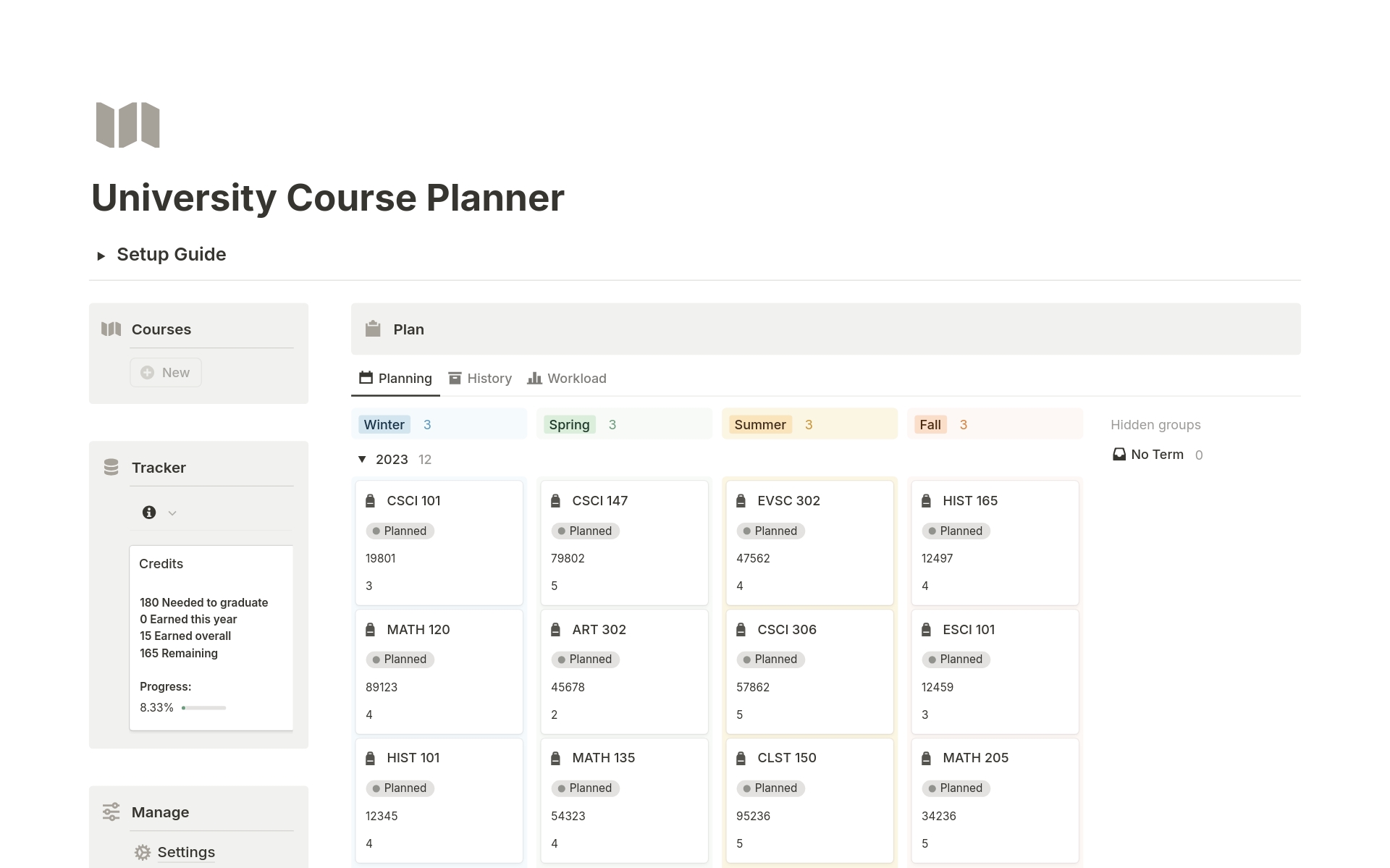
Highlights
- Create a Centralized Hub: Use Notion to house all course materials, ensuring efficient management and easy access.
- Structured Content Planning: Plan course modules, lessons, assignments, and feedback using tailored templates and databases.
- Collaborative Environment: Leverage Notion’s teamwork features to promote dynamic communication, real-time updates, and integrated resource tracking.
Introduction
Educational course planning is a multi-dimensional task. In today’s fast-paced digital landscape, Notion emerges as a highly versatile platform that supports educators and course creators in organizing, visualizing, and executing a well-structured curriculum. Beyond its simple note-taking features, Notion provides several powerful capabilities to centralize content, align teaching methodologies, and integrate resources effectively. This guide will walk you through best practices for utilizing Notion in planning and managing your educational courses, addressing content creation strategies, collaborative workflows, assessment integration, and more.
Setting Up Your Notion Workspace
Creating a Centralized Hub
One of the most effective strategies for educational planning is creating a dedicated workspace exclusive to your course. The idea is to centralize every piece of information—from course outlines to assignments—in one accessible location. This centralized hub allows you to maintain consistency, facilitate streamlined updates, and ensure that both educators and students have a single point of reference for all course materials.
Steps to Build Your Course Hub
Begin by setting up a new workspace in Notion dedicated solely to your course. Divide content into clearly defined sections such as Introduction, Modules, Assignments, and Additional Resources. Utilize Notion's hierarchical page structure to nest sub-pages for individual lessons or specific course topics. This approach enhances navigation and improves the overall organization of content.
Designing a Comprehensive Course Structure
Breaking Down the Curriculum
A robust course structure is essential when planning educational content. In Notion, you can partition your curriculum into modules and lessons, ensuring that each segment has a clear focus and defined learning outcomes.
Course Overview and Objectives
Start by drafting an overview page that communicates the course’s overall purpose and objectives. Outline the anticipated learning outcomes, prerequisites, and core themes. This page acts as the nucleus of your course planning, setting the stage for subsequent detailed breakdowns.
Modules and Lesson Organization
Divide your course into logical modules that reflect distinct units of knowledge. Each module should then be subdivided into individual lessons, allowing for granular focus on topics, readings, video sessions, or hands-on activities. Using databases within Notion, each lesson can be stored as a record with fields for lesson title, objectives, resources, assignments, and associated deadlines.
Syllabus and Weekly Plans
Incorporate a detailed syllabus that outlines the week-by-week progression of your course. This not only helps students visualize their learning journey but also aids educators in ensuring that the content is delivered sequentially and builds upon prior lessons. Visualize this timeline using Notion’s calendar or board views.
Utilizing Notion’s Template and Database Features
Streamlining Process with Templates
Notion provides a host of templates that streamline course planning by standardizing lesson plans, assignments, progress tracking, and feedback. Templates save time, reduce redundant work, and help maintain consistency throughout the course.
Customizable Lesson Templates
Leverage pre-made lesson templates to outline each session's structure. Include sections for key objectives, multimedia resources, quizzes, and assignments. Once your template is finalized, each lesson module can be quickly duplicated and adapted to fit the content needs.
Structuring Databases for Content Management
Databases in Notion can be configured into various views such as tables, calendars, or Kanban boards. These databases are invaluable for visually tracking the progression of lessons, managing deadlines, and assigning specific tasks. For example, a table format might include columns for Lesson Name, Objective, Resource Type, Due Date, and Status, thereby providing a quick snapshot of the course’s overall progress.
| Lesson Name | Objective | Resource Type | Due Date | Status |
|---|---|---|---|---|
| Introduction to Notion | Familiarize with basic features | Video/Tutorials | 2025-03-05 | Planned |
| Advanced Database Techniques | Master database views | Interactive Workshop | 2025-03-12 | In Progress |
| Template Customization | Create custom templates | Assignment/Project | 2025-03-19 | Upcoming |
| Collaboration and Integration | Use Notion with other tools | Live Session | 2025-03-26 | Upcoming |
Effective Content Management
Visualizing Your Curriculum
Organizing content in clear, logical views is imperative. Notion’s flexible database system allows educational content to be viewed through multiple perspectives. Whether you prefer table views that list content in a spreadsheet manner, calendar views that provide a timeline, or Kanban boards for a workflow overview, Notion accommodates your visual preferences.
Using Linked Databases
Linked databases enable you to cross-reference different elements within your course. You might have one database for modules and another for assignments or resources. Linking these databases creates a relational structure, ensuring that updates in one segment automatically reflect in associated sections. This relational approach minimizes redundancy and enhances accuracy in content tracking.
Tagging and Categorization
Notion allows for custom properties in databases, such as tagging topics or filtering based on content difficulty. By assigning tags to modules, lessons, or resources, you improve searchability and can easily filter out content based on your teaching plan or student requirements.
Enhancing Collaboration and Feedback Mechanisms
Collaborative Course Development
Modern educational planning thrives on collaboration, and Notion provides robust collaborative features that allow teams to work together seamlessly. Instructors, course designers, and even students can be invited to contribute, ensuring a richer feedback loop.
Shared Workspaces
By granting access to your course workspace, team members can add insights, suggest modifications, and help track progress in real time. This collaborative process not only increases the quality of course content but also ensures that diverse perspectives are considered during planning.
Feedback Integration
Use Notion’s commenting and in-line feedback features to gather input on course materials. Whether refining lesson plans or tweaking content delivery based on student feedback, these features make the iteration process dynamic and inclusive.
Integrating Assessments and Student Tracking
Assessment Management
A critical component of educational planning is designing and tracking assessments. Notion allows you to create detailed databases for assignments, tests, and quizzes, which serve as both learning tools and progress trackers.
Designing Assessments
Define assignments that align with your course objectives. Use pages to detail instructions, attach necessary resources, and set submission deadlines. Embedding multimedia content directly into the assessment pages can also enhance clarity and engagement.
Tracking Student Progress
Maintain a dedicated student progress database with custom properties like submission dates, grades, and feedback notes. Such structured tracking not only helps in identifying students’ strengths and areas that need improvement but also simplifies reporting and parent/institution communication.
Incorporating Multimedia and External Integrations
Enhancing the Learning Experience
Multimedia elements are essential in creating an interactive and engaging course. Notion supports embedding diverse content types, from images and videos to interactive simulations, which can significantly enhance the learning experience.
Embedding Multimedia Content
Incorporate videos, images, and audio recordings to provide additional explanations or serve as practical demonstrations of course concepts. Embed interactive elements using Notion’s embed block feature to ensure students have varied exposure to content delivery methods, meeting different learning style needs.
Integrations with Other Platforms
Notion’s ability to integrate with other productivity tools such as Google Drive, Slack, and various LMS (Learning Management Systems) is invaluable. These integrations simplify the process of resource sharing, enhancing the overall connectivity between your course content and external reference materials.
Marketing and Administration of Your Course
Promoting Your Course
Beyond instructional design, planning also involves the administrative and marketing side of course delivery. By utilizing Notion, educators can systematically develop marketing strategies, schedule promotional activities, and even manage enrollment tracking within the same workspace they use for content planning.
Planning Marketing Strategies
Use dedicated pages to map out marketing campaigns, listing key dates, target demographics, and communications channels. A cohesive plan ensures that your course reaches its intended audience and that the promotional efforts are timed to maximize enrollment.
Administrative Organization
Maintain sections within your workspace for administrative tasks such as tracking enrolment, managing financial records, and scheduling live sessions or webinars. An integrated administrative system minimizes the need for external tools, keeping everything within Notion.
Optimizing Workflows and Regular Updates
Workflow Automation and Version Control
An essential aspect of course planning is maintaining a dynamic workflow. Notion’s version history and revision controls allow you to track changes over time, ensuring that updates can be made without compromising the integrity of previous iterations.
Regular Content Updates
As course content and pedagogical techniques evolve, it’s important to update and refine course materials. Periodic reviews help incorporate feedback and new insights, ensuring that the course remains current and effective. Notion’s ability to roll back changes via version history is invaluable for this iterative process.
Task and Milestone Tracking
Utilize Notion’s to-do lists, kanban boards, and calendar views to track both short-term tasks and major milestones. Clearly defined checkpoints help maintain momentum and ensure a timely launch and completion of course modules.
Implementing Best Practices: Summary and Roadmap
A Consolidated Approach to Course Planning
Implementing the best practices discussed involves a blend of clear planning, effective use of Notion's features, and a collaborative mindset. Begin with a well-structured centralized hub, break down your curriculum into modules and lessons, utilize templates to streamline repetitive tasks, and harness the power of database-driven content management. Collaborate with your team, use multimedia to enhance learning, and integrate external tools to simplify administration and marketing.
In practice, this comprehensive strategy results in a balanced framework that facilitates efficient fluctuations between course development, resource organization, and student assessment. A well-planned educational course not only honors the structure but also welcomes the flexibility needed to adapt to real-time feedback and emerging educational trends.
Conclusion
Notion presents a revolutionary approach to educational course planning. By centralizing your workspace, breaking down your curriculum, and employing integrated databases and templates, you cultivate an environment where both educators and students thrive. This versatile tool simplifies administrative tasks, enhances collaborative workflows, and offers a dynamic way to manage content and assessments. In addition, Notion’s ability to sustain regular updates ensures that your course remains relevant and engaging. Embracing these best practices not only elevates the teaching and learning experience but also empowers educators to create innovative courses that resonate with today’s digital-savvy students.
In summary, leveraging Notion for course planning translates into a well-structured, flexible, and comprehensive environment. Whether planning a new curriculum, organizing existing content, or optimizing collaborative inputs, Notion stands out as an all-in-one solution that aligns with the evolving demands of digital education.
References
- Notion Course Template - Julia on Purpose
- 9 Best Tips to Manage Your Online Course Business with Notion - The Organized Notebook
- Top Tips to Create an Online Course in Notion - Owwlish
- How to Plan an Online Course on Notion - Made on Sundays
- Planning Your Online Course on Notion - Digital Made Simple
Recommended
Last updated February 27, 2025