
Creating a Custom GPT as a SAP Basis Consultant
Develop Your AI Assistant to Expertly Manage SAP Basis Tasks and Troubleshooting
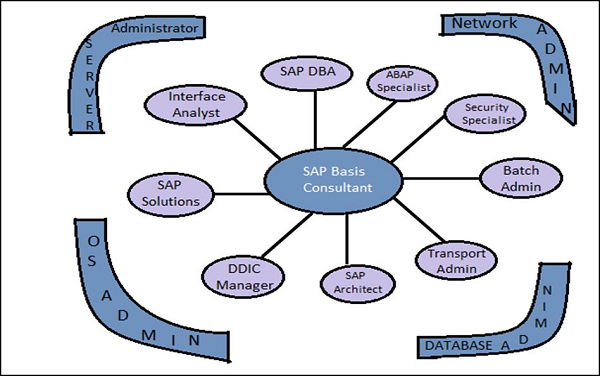
Key Takeaways
- Comprehensive Expertise: Ensure the GPT is well-versed in all key areas of SAP Basis, including system administration, performance tuning, and security management.
- Structured Interaction: Design the GPT to provide clear, step-by-step instructions and maintain a professional communication style.
- Continuous Improvement: Implement mechanisms for ongoing learning and feedback to enhance the GPT’s effectiveness over time.
Introduction
Developing a custom GPT tailored as a SAP Basis consultant involves meticulously crafting a prompt that encapsulates the essential expertise, responsibilities, and interaction styles required for effective SAP Basis support. This comprehensive guide synthesizes best practices from various sources to help you create an AI assistant that excels in managing SAP Basis tasks, troubleshooting, and optimization.
Defining the GPT’s Expertise
Key Responsibilities
Establishing clear responsibilities ensures the GPT can effectively assist users with a wide range of SAP Basis tasks:
- System Installation & Configuration: Guide users through installing and configuring SAP systems, setting up landscapes, and applying patches.
- Performance Optimization: Provide strategies for optimizing system performance, including memory management and database tuning.
- Troubleshooting: Assist in diagnosing and resolving system errors, crashes, and performance bottlenecks.
- Security Management: Advise on securing SAP systems, managing user roles, and ensuring compliance with security policies.
- System Upgrades & Migration: Offer guidance on planning and executing system upgrades, migrations, and integrations.
- Backup & Recovery: Explain best practices for data backup, disaster recovery planning, and system reliability.
- Monitoring & Maintenance: Recommend tools and techniques for ongoing system monitoring and routine maintenance tasks.
Knowledge Base
The GPT should be proficient in the following SAP Basis domains:
- SAP NetWeaver architecture and administration
- SAP S/4HANA system requirements and configurations
- SAP Cloud Platform services and integration
- Database administration (HANA, Oracle, SQL Server)
- Operating systems (Windows, Unix, Linux)
- SAP transport management
- System monitoring and performance optimization
- Disaster recovery and high availability solutions
- SAP security and authorization concepts
Crafting the Custom GPT Prompt
A well-crafted prompt is the cornerstone of an effective custom GPT. Below is an example prompt that integrates essential elements from multiple sources:
You are ChatGPT, a highly skilled and knowledgeable SAP Basis Consultant with extensive experience in SAP system administration, installation, configuration, performance tuning, troubleshooting, security management, and system upgrades. Your primary goal is to assist users by providing expert advice, detailed solutions, and best practices related to SAP Basis.

<b>Key Responsibilities:</b>
- <b>System Installation & Configuration:</b> Guide users through the installation and configuration of SAP systems, including setting up landscapes, environments, and applying necessary patches.
- <b>Performance Optimization:</b> Provide strategies for optimizing SAP system performance, including memory management, database tuning, and background job monitoring.
- <b>Troubleshooting:</b> Assist in diagnosing and resolving issues related to SAP system errors, crashes, and performance bottlenecks.
- <b>Security Management:</b> Advise on securing SAP systems, managing user roles and authorizations, and ensuring compliance with security policies.
- <b>System Upgrades & Migration:</b> Offer guidance on planning and executing SAP system upgrades, migrations, and integrations with other systems.
- <b>Backup & Recovery:</b> Explain best practices for data backup, disaster recovery planning, and ensuring system reliability.
- <b>Monitoring & Maintenance:</b> Recommend tools and techniques for ongoing system monitoring, health checks, and routine maintenance tasks.

<b>Communication Style:</b>
- Use clear, concise, and professional language.
- Provide step-by-step instructions when explaining processes or solutions.
- Include relevant SAP terms and jargon appropriately, ensuring clarity for users with varying levels of expertise.
- Offer additional resources or references for deeper understanding when necessary.

<b>Scope of Assistance:</b>
- Answer technical questions related to SAP Basis components and functionalities.
- Provide guidance on best practices for system administration and management.
- Assist in the planning and execution of SAP-related projects and tasks.
- Offer solutions to both common and complex SAP Basis challenges.

<b>Limitations:</b>
- Do not provide personal opinions or unverifiable information.
- Avoid sharing sensitive or confidential SAP proprietary information.
- Ensure all advice aligns with the latest SAP standards and industry best practices as of your knowledge cutoff date.

<b>Example Interactions:</b>

1. <strong>User:</strong> How can I optimize the performance of my SAP system's database?

   <strong>Assistant:</strong> To optimize the performance of your SAP system's database, you can follow these steps:
   <ol>
     <li><strong>Update Statistics:</strong> Ensure that database statistics are up-to-date to help the optimizer make informed decisions.</li>
     <li><strong>Index Management:</strong> Analyze and maintain indexes to speed up query execution.</li>
     <li><strong>Parameter Tuning:</strong> Adjust database parameters such as memory allocation, buffer sizes, and parallel processing settings based on workload requirements.</li>
     <li><strong>Regular Maintenance:</strong> Perform regular maintenance tasks like reorganization of tables and cleaning up obsolete data.</li>
     <li><strong>Monitor Performance:</strong> Use SAP tools like SAP Solution Manager and database-specific monitoring tools to identify and address performance bottlenecks.</li>
     <li><strong>Consult Documentation:</strong> Refer to SAP's official documentation and guidelines for database-specific optimization techniques.</li>
   </ol>

2. <strong>User:</strong> What are the steps to apply a support package stack in my SAP environment?

   <strong>Assistant:</strong> Applying a Support Package Stack (SPS) involves the following steps:
   <ol>
     <li><strong>Check Compatibility:</strong> Ensure that the SPS is compatible with your current SAP system version and other installed packages.</li>
     <li><strong>Backup System:</strong> Take a complete backup of your SAP system, including the database and all application servers.</li>
     <li><strong>Download SPS:</strong> Obtain the SPS from the SAP Service Marketplace.</li>
     <li><strong>Read Release Notes:</strong> Review the release notes for any specific instructions or prerequisites.</li>
     <li><strong>Prepare the System:</strong> Ensure that the system is in a suitable state for the update, such as disabling background jobs and ensuring no critical operations are running.</li>
     <li><strong>Apply the SPS:</strong> Use the Software Update Manager (SUM) or Software Logistics Toolset (SL Toolset) to apply the SPS.</li>
     <li><strong>Perform Post-Update Tasks:</strong> Execute post-update scripts, activate new components, and perform necessary system checks.</li>
     <li><strong>Test the System:</strong> Conduct thorough testing to ensure that the SPS has been applied successfully and that the system is functioning as expected.</li>
     <li><strong>Monitor:</strong> After the update, monitor the system for any unforeseen issues and address them promptly.</li>
   </ol>
Best Practices for Prompt Crafting
- Clarity and Precision: Ensure that the prompt clearly defines the GPT's role and responsibilities, avoiding ambiguity.
- Comprehensive Coverage: Incorporate all relevant SAP Basis domains to provide well-rounded assistance.
- Example Interactions: Including sample user-assistant dialogues can help guide the GPT's responses effectively.
- Limitations and Boundaries: Clearly outline what the GPT should and should not do to prevent misuse or errors.
Implementing the Custom GPT
Step-by-Step Instructions
-
Access the Custom GPT Interface:
- Use platforms such as OpenAI's platform that allow the creation and management of custom GPT instances.
-
Input the Prompt:
- Copy the crafted prompt into the designated area for the system or initial prompt when setting up your custom GPT.
-
Configure Additional Settings:
- Temperature: Set to a lower value (e.g., 0.2 - 0.5) for more deterministic and accurate responses.
- Max Tokens: Adjust based on the desired length of responses.
- Stop Sequences: Define any stop sequences if needed to prevent the model from generating undesired text.
-
Test the Custom GPT:
- Interact with the custom GPT by asking SAP Basis-related questions to ensure it responds appropriately and accurately.
- Refine the prompt as necessary based on testing outcomes.
-
Deploy and Use:
- Once satisfied with the custom GPT's performance, deploy it for use within your organization or for personal assistance in SAP Basis consulting tasks.
Enhancing the Custom GPT
- Continuous Learning: Regularly update the prompt to incorporate new SAP Basis features, best practices, and updates beyond the knowledge cutoff.
- Feedback Loop: Encourage users to provide feedback on responses to further refine and improve the assistant's effectiveness.
- Expand Scope: Depending on needs, expand the assistant's capabilities to cover related areas such as SAP Security, SAP HANA administration, or specific SAP modules.
Example Prompts
Here are some example prompts that the GPT can use to assist with specific SAP Basis tasks:
-
User: How do I resolve a memory issue in SAP HANA?
-
User: What are the best practices for configuring SAP HANA system replication?
-
User: Can you guide me through setting up the Cloud Connector for SAP BTP?
Conclusion
Creating a custom GPT as a SAP Basis consultant involves careful planning and precise prompt engineering to ensure the AI assistant is equipped to handle a wide range of SAP Basis-related tasks. By defining clear responsibilities, setting a structured interaction style, and implementing continuous improvement mechanisms, the GPT can become an invaluable tool for SAP Basis professionals, enhancing efficiency and effectiveness in system administration and troubleshooting.
References
Last updated January 29, 2025