
Building and Launching Your Website: A Comprehensive Guide
From Idea to Online Presence: Navigating the Path to Your Own Website
Creating a full website is an achievable goal, whether you're a complete beginner or have some technical background. The process involves several key stages, from initial planning and design to building, launching, and ongoing maintenance. Fortunately, a wide range of tools and resources are available today to simplify this journey, making it accessible to almost anyone.
Key Highlights for Creating Your Website
- Diverse Building Options: You have the choice between user-friendly website builders with drag-and-drop interfaces or learning foundational web development languages like HTML, CSS, and JavaScript for more control.
- Essential Pre-Launch Steps: Before your site goes live, crucial tasks include securing a domain name and hosting, optimizing for search engines (SEO), and thoroughly testing across different devices and browsers.
- Successful Launch and Beyond: A strategic launch involves promotion through various channels, followed by continuous monitoring, updates, and engagement with your audience.
Choosing Your Website Building Path
The first major decision in creating your website is determining the method you'll use for building it. Your choice will largely depend on your technical skills, budget, and the complexity of the website you envision.
Utilizing Website Builders
For individuals and small businesses without extensive coding knowledge, website builders offer a streamlined and often intuitive approach. These platforms typically provide drag-and-drop interfaces, pre-designed templates, and integrated hosting, making it possible to create a professional-looking website relatively quickly.
Popular website builders include:
- Wix: Known for its user-friendly drag-and-drop editor and a vast library of templates suitable for various purposes, including business sites and online stores. They also offer AI-powered website creation tools.
- Squarespace: Favored by creatives for its aesthetically pleasing templates and strong design focus. It provides customizable templates and AI tools to assist with the building process.
- Canva: Primarily a graphic design tool, Canva also offers a free website builder with customizable templates and easy-to-use drag-and-drop tools.
- GoDaddy Website Builder: Offers AI assistance to help create a website quickly by answering a few questions. Their plans are often geared towards service providers.
- Weebly: Provides a free website builder with customizable templates, suitable for creating websites, blogs, or online stores. They are noted for their e-commerce features on the free plan.
- Duda: A professional website builder designed for building high-converting websites at scale.
- Showit: A drag-and-drop builder specifically tailored for photographers and creative businesses.
- Yola: Offers a simple and straightforward platform for building no-fuss websites.
Website builders often provide integrated solutions for various business needs, such as e-commerce, scheduling, and marketing tools. While many offer free plans, upgrading to a premium plan is usually necessary to connect a custom domain and access more advanced features.
Building with Code (HTML, CSS, JavaScript)
For those who desire more control, flexibility, and a deeper understanding of how websites function, learning foundational web development languages is a rewarding path. HTML (HyperText Markup Language) provides the structure of a webpage, CSS (Cascading Style Sheets) controls its presentation and layout, and JavaScript adds interactivity and dynamic elements.
Learning to code allows you to build a website entirely from scratch or customize existing templates to a greater extent. There are numerous free online tutorials and resources available to learn these languages, such as W3Schools and tutorials on platforms like DigitalOcean and Reddit.
Frameworks and content management systems (CMS) like WordPress (which powers over 42% of websites globally) can be used in conjunction with coding to build more complex and dynamic websites. Webflow is another platform that bridges the gap between visual building and code, allowing users to create custom, responsive websites visually while having the power of code.
The Website Development Process
Regardless of whether you use a website builder or code, the process of creating a website generally follows a structured approach:
1. Planning and Strategy
Before you start building, it's crucial to define the purpose and goals of your website. Consider your target audience and the content you want to present. This stage involves:
- Defining the website's objective (e.g., blog, portfolio, business site, online store, tutorial site).
- Identifying your target audience and their needs.
- Planning the content strategy.
- Creating a sitemap to outline the website's structure and navigation.
- Developing wireframes to visualize the layout of different page types.
For a tutorial website, for example, defining your purpose might involve deciding if you're teaching fellow teachers or creating content for students. Your target audience will influence the design and content emphasis.
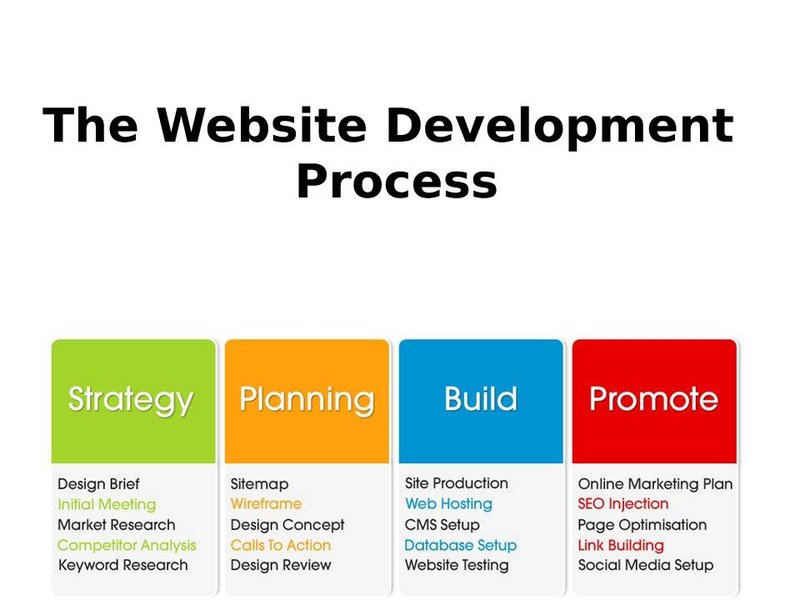
Visualizing the key stages of website development.
2. Design and Content Creation
This phase focuses on the visual appearance and the actual content of your website. If you're using a website builder, you'll select and customize a template. If you're coding, you'll apply CSS to style your HTML structure.
- Choosing a design that aligns with your brand or personal style.
- Selecting color schemes and typography.
- Creating and gathering text content, images, graphics, and videos.
- Ensuring content is well-organized and engaging.
Consider the impact of color on your site design and use images effectively. For business websites, ensure your content clearly communicates your offerings and value proposition.
3. Development and Building
This is where your website takes shape. Using your chosen method (website builder or code), you will build the individual pages and integrate the content.
- Implementing the sitemap and creating the planned pages.
- Adding text, images, videos, and other media.
- Setting up navigation menus.
- Implementing any necessary functionalities (e.g., contact forms, e-commerce features).
- Ensuring the website is responsive and displays correctly on different devices.
If you're coding, this involves writing HTML for structure, CSS for styling, and potentially JavaScript for interactive elements. Website builders simplify this by providing pre-built components and drag-and-drop functionality.
4. Testing and Optimization
Before launching, thorough testing is essential to ensure your website functions correctly and provides a good user experience.
- Testing all links to ensure they work.
- Checking forms and other interactive elements.
- Testing the website on different browsers (Chrome, Firefox, Safari, etc.).
- Testing responsiveness on various devices (desktops, tablets, smartphones).
- Checking for any broken images or missing content.
- Optimizing images for faster loading times.
This stage also includes implementing Search Engine Optimization (SEO) strategies to improve your website's visibility in search results. Basic SEO tactics include using relevant keywords strategically in your content, optimizing meta titles and descriptions, and creating a sitemap to help search engines index your site.
Key considerations during the website setup phase.
5. Launching Your Website
Launching your website involves making it accessible to the public. This requires securing a domain name and web hosting.
- Domain Name: This is your website's address on the internet (e.g., www.yourwebsite.com). Choose a name that is relevant, memorable, and easy to spell. You can purchase domain names from registrars like Namecheap or Bluehost.
- Web Hosting: This is where your website's files are stored, making them accessible to users online. Hosting providers offer various plans depending on your needs and expected traffic. Many website builders include hosting as part of their service.
Once you have a domain and hosting, you'll upload your website files to the server and configure the domain to point to your hosting account. Many hosting providers offer one-click installation for platforms like WordPress, simplifying the process for beginners.
6. Post-Launch Activities
Launching your website is not the end of the process; it's just the beginning. Ongoing activities are crucial for its success.
- Promotion: Announce your website launch through social media, email marketing, and other relevant channels. Consider contests, giveaways, or interactive content to drive traffic.
- Monitoring and Analytics: Use tools like Google Analytics to track visitor behavior, understand how users interact with your site, and identify areas for improvement.
- Maintenance and Updates: Regularly update your website's content, software (if using a CMS), and security measures.
- Engagement: Interact with your audience through comments, social media, or a blog section.
- SEO Monitoring: Continuously monitor your website's search engine performance and adjust your SEO strategy as needed.
Here is a video that provides tips for maximizing your website launch:
Tips to consider for a successful website launch.
Choosing the Right Tools and Platforms
The vast array of options available can be overwhelming. Here's a table summarizing some popular choices and their key features:
| Platform/Method | Description | Best For | Skill Level Required | Cost Considerations |
|---|---|---|---|---|
| Website Builders (Wix, Squarespace, Canva, etc.) | Drag-and-drop interfaces, templates, integrated hosting. | Beginners, small businesses, portfolios, simple online stores. | Beginner to Intermediate | Free plans available, paid plans for custom domains and advanced features. |
| Coding (HTML, CSS, JavaScript) | Building from scratch with code, maximum control and customization. | Those who want full control, unique designs, or plan to become web developers. | Intermediate to Advanced | Requires time investment to learn, hosting costs. |
| WordPress (Self-hosted) | Popular CMS with vast customization options through themes and plugins. | Blogs, business websites, e-commerce sites, complex sites. | Intermediate | Requires separate hosting and domain, themes and plugins may have costs. |
| Webflow | Visual builder with the power of code, flexible CMS. | Designers, marketers, developers who want a visual workflow with coding capabilities. | Intermediate to Advanced | Paid plans. |
| Google Sites | Simple, free website builder integrated with Google Workspace. | Basic websites, internal communication sites. | Beginner | Free. |
Frequently Asked Questions
Can I create a website for free?
Yes, many website builders like Wix, Canva, and Weebly offer free plans. However, these often come with limitations such as subdomain branding (e.g., yourwebsite.wix.com) and limited features. To use a custom domain and access more professional features, a paid plan is usually required.
Do I need to know how to code to build a website?
No, you do not necessarily need to know how to code. Website builders provide user-friendly interfaces that allow you to create a website without writing any code. However, learning HTML, CSS, and JavaScript will give you more control and flexibility.
What is the difference between a domain name and web hosting?
A domain name is your website's unique address on the internet (like a street address), while web hosting is the space on a server where your website's files are stored (like the physical building at that address).
How long does it take to create a website?
The time it takes to create a website varies greatly depending on its complexity, your chosen method, and your experience level. A simple website using a website builder might take a few hours or days, while a complex, custom-coded website could take weeks or months.
Recommended Further Exploration
- What are the best website builders for a small business?
- Guide to selecting the right domain name and web hosting.
- Where can I find beginner tutorials for HTML and CSS?
- What are the essential steps in a website launch checklist?
References

 support.squarespace.com
Last updated May 18, 2025