
Creating a Strong Password: Comprehensive Guide
Ensure Your Online Security with These Proven Strategies
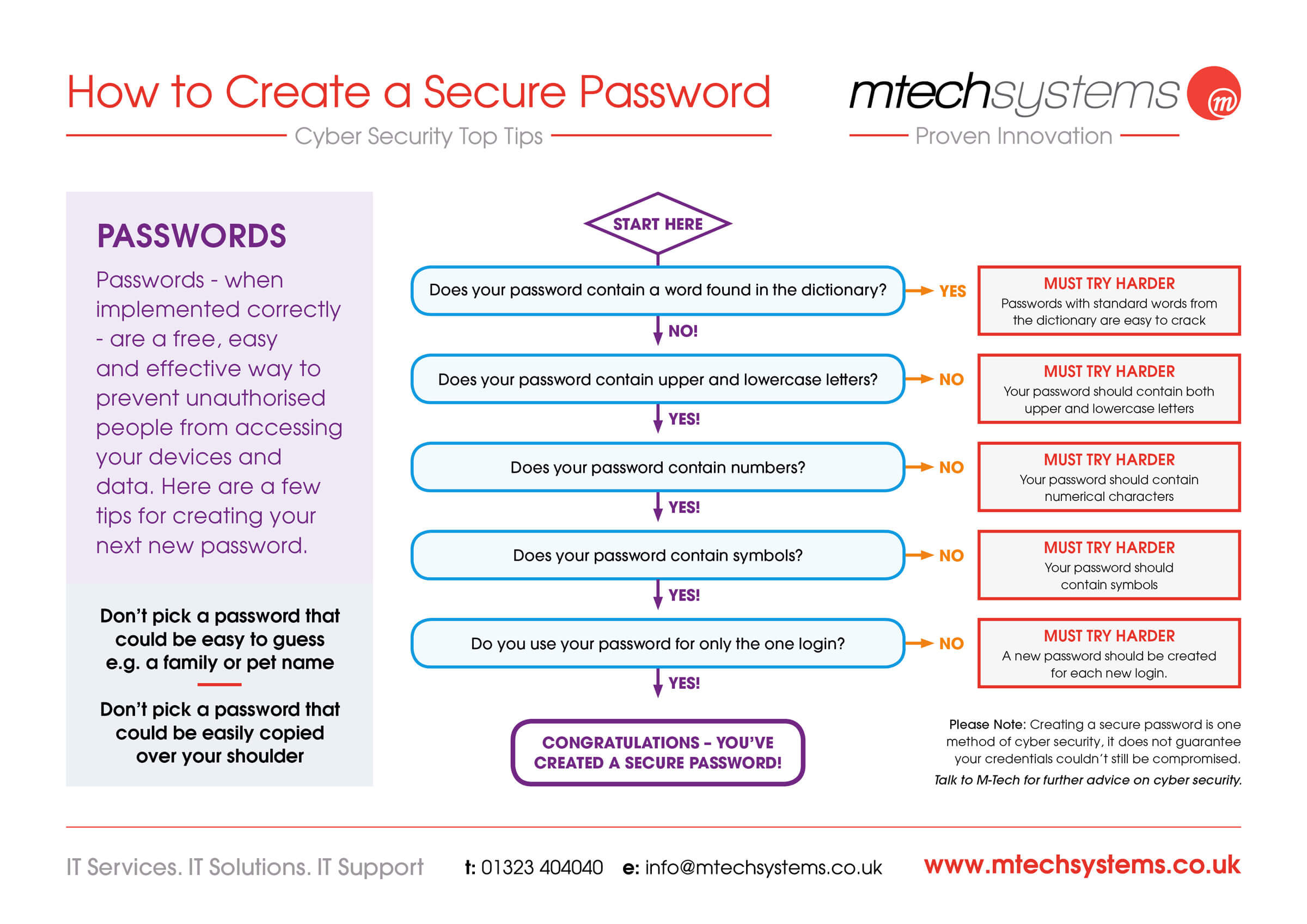
Key Takeaways
- Length and Complexity: Use passwords that are at least 12 characters long, incorporating a mix of uppercase and lowercase letters, numbers, and special symbols.
- Uniqueness: Ensure each of your passwords is unique to prevent a breach in one account from compromising others.
- Utilize Tools: Employ password managers and enable two-factor authentication to enhance security and manage multiple strong passwords efficiently.
Understanding the Importance of a Strong Password
In the digital age, safeguarding your online accounts is paramount. A strong password serves as the first line of defense against unauthorized access, protecting your personal information, financial data, and digital identity. Weak passwords can be easily compromised through various attack methods such as brute force attacks, phishing, and social engineering.
Implementing robust password practices not only enhances your security but also instills confidence in managing your digital presence. As cyber threats evolve, staying informed and proactive about password security is essential.
Key Characteristics of a Strong Password
1. Length
A long password is inherently more secure as it exponentially increases the number of possible combinations, making it harder for attackers to crack. It is recommended to use passwords that are at least 12 characters long. For enhanced security, especially for sensitive accounts, consider using passwords that exceed this length.
2. Complexity
Complexity in passwords means using a diverse combination of characters. Incorporate uppercase and lowercase letters, numbers, and special symbols (e.g., !, @, #, $, etc.). This variety reduces the likelihood of the password being guessed or cracked using automated tools.
3. Uniqueness
Each online account should have a unique password. Reusing passwords across multiple platforms increases the risk of a domino effect; if one account is breached, others can be easily compromised. To manage multiple unique passwords effectively, consider using a password manager.
4. Avoiding Personal Information
Passwords should not contain easily guessable personal information such as your name, birthday, address, or common words and phrases. Personal information can often be found on social media or through simple research, making your password more vulnerable to targeted attacks.
Effective Methods for Creating Strong Passwords
1. Passphrases
Passphrases are a combination of unrelated words or a sentence that is easy for you to remember but difficult for others to guess. They are typically longer than traditional passwords and can be enhanced with substitutions and symbols. For example, "Sunset-Garden$River4!" is a strong passphrase.
Strategies for Creating Passphrases
- Combine 4-7 unrelated words.
- Incorporate numbers and special characters.
- Use substitutions, such as replacing letters with numbers or symbols (e.g., "@" for "a", "3" for "e").
2. Random Strings
Randomly generated strings are highly secure as they lack any discernible patterns or meanings. These passwords are usually created using password managers or dedicated password generation tools, ensuring true randomness and complexity. An example of a random string password is "X5j13$#eCM1cG@Kdc".
Generating Random Passwords
# Example Python code to generate a random password
import random
import string

def generate_password(length=16):
    characters = string.ascii_letters + string.digits + string.punctuation
    password = ''.join(random.choice(characters) for _ in range(length))
    return password

print(generate_password())
3. Keyboard Patterns
Using keyboard patterns involves creating a password based on a specific pattern on your keyboard. While these can be easier to remember, they should be used cautiously as predictable patterns can be susceptible to certain types of attacks. Enhancing these patterns with additional characters can improve their security.
Tools and Best Practices
1. Password Managers
Password managers are essential tools for generating, storing, and managing your passwords securely. They eliminate the need to remember multiple complex passwords by storing them in an encrypted vault, accessible through a single master password. Popular password managers include Bitwarden, LastPass, and 1Password.
Benefits of Using a Password Manager
- Generates strong, unique passwords for each account.
- Saves and autofills passwords across devices.
- Stores sensitive information securely.
- Alerts you to weak or compromised passwords.
2. Two-Factor Authentication (2FA)
Two-Factor Authentication adds an extra layer of security by requiring a second form of verification in addition to your password. This could be a code sent to your mobile device, a biometric verification, or a hardware token. Enabling 2FA significantly reduces the risk of unauthorized access, even if your password is compromised.
Implementing 2FA
- Use authenticator apps like Google Authenticator or Authy.
- Enable SMS-based verification where available.
- Consider hardware tokens for enhanced security.
3. Regular Password Updates
Regularly updating your passwords, especially for sensitive accounts, helps mitigate the risk of long-term breaches. Although not always necessary, it is a good practice to change your passwords periodically and immediately update them following any suspected security incidents.
Best Practices for Updating Passwords
- Set a schedule for periodic password changes.
- Immediately update passwords if a service you use has been breached.
- Avoid using previous passwords when creating new ones.
Password Management Strategies
Effective password management is crucial for maintaining the security of your online accounts. Here are some strategies to manage your passwords efficiently:
1. Create a Master Password
Your master password is the key to your password manager. It should be exceptionally strong and memorable, as it provides access to all your other passwords.
Characteristics of a Strong Master Password
- At least 16 characters long.
- Includes a mix of letters, numbers, and symbols.
- Uses a passphrase or a series of unrelated words.
2. Categorize and Organize Your Passwords
Organizing your passwords by category (e.g., financial, social media, work) helps in managing them more effectively. Most password managers allow you to categorize and tag your passwords, making them easier to locate and manage.
Organizational Tips
- Create folders or categories for different types of accounts.
- Use tags or labels to identify important or sensitive accounts.
- Regularly review and update your organization system as needed.
3. Monitor for Breaches
Stay informed about potential breaches that may affect your accounts. Many password managers offer breach monitoring services that alert you if your stored passwords are found in compromised databases.
Actions to Take When a Breach is Detected
- Change the affected password immediately.
- Enable two-factor authentication if not already in place.
- Review your account settings for any suspicious activity.
Common Mistakes to Avoid
Avoiding common pitfalls can significantly enhance the strength and security of your passwords. Here are some mistakes to be wary of:
1. Using Predictable Patterns
Patterns such as "12345678" or "password" are highly insecure and easily guessable. Avoid using sequential numbers, repeated characters, or simple keyboard patterns.
2. Reusing Passwords Across Multiple Accounts
Reusing passwords increases the risk of multiple accounts being compromised if one password is breached. Each account should have a unique password.
3. Ignoring Password Updates
Failing to update passwords regularly or after a suspected breach can leave your accounts vulnerable. Regular updates are a key component of maintaining security.
Examples of Strong Passwords
To illustrate what constitutes a strong password, here are some examples:
| Type | Example | Strength |
|---|---|---|
| Passphrase | Sunset-Garden$River4! | High |
| Random String | X5j13$#eCM1cG@Kdc | Very High |
| Keyboard Pattern | 1qazdrfvgy7 | Moderate |
Creating Memorable Yet Strong Passwords
While random strings offer high security, they can be challenging to remember. Passphrases strike a balance between security and memorability. For example, "Tr0mb0ne&Fish?Qu1ck^side" combines memorable words with substitutions and symbols, making it both strong and easier to recall.
Enhancing Security with Additional Measures
Passwords are a critical component of online security, but additional measures can further protect your accounts:
1. Biometric Authentication
Biometric methods like fingerprint scanning or facial recognition add an extra layer of security by ensuring that only authorized users can access accounts.
Benefits of Biometric Authentication
- Provides a unique identifier linked to the user.
- Eliminates the need to remember complex passwords.
- Reduces the risk of unauthorized access.
2. Security Questions
Security questions can provide an additional verification step. However, it's important to choose questions and answers that are not easily guessable or publicly available.
Choosing Secure Security Questions
- Select questions with answers that are difficult to guess or find online.
- Avoid using questions where the answers can be easily researched.
- Consider using fictitious answers to enhance security.
Maintaining Password Security Over Time
Password security is not a one-time effort but requires ongoing maintenance to adapt to evolving threats. Here are strategies to maintain your password security:
1. Regular Audits
Periodically review your passwords to ensure they remain strong and unique. Remove or update passwords for accounts that are no longer in use.
Conducting Password Audits
- Use your password manager's auditing tools to identify weak or reused passwords.
- Update passwords that show vulnerabilities.
- Ensure all active accounts have strong, unique passwords.
2. Staying Informed About Security Best Practices
Cybersecurity is an ever-evolving field. Staying informed about the latest best practices and emerging threats ensures that your password strategies remain effective.
Staying Updated
- Subscribe to cybersecurity newsletters and updates.
- Participate in security training and awareness programs.
- Adopt new security technologies and methodologies as they become available.
3. Responding to Security Breaches
In the event of a security breach, act swiftly to minimize damage. Change passwords immediately, especially for any accounts that may have been compromised.
Steps to Take After a Breach
-
Identify which accounts were affected.
-
Change passwords for compromised accounts and any other accounts using the same password.
-
Monitor accounts for any unusual activity.
Conclusion
Creating and maintaining strong passwords is a fundamental aspect of online security. By adhering to best practices such as ensuring length and complexity, maintaining uniqueness across all accounts, and utilizing tools like password managers and two-factor authentication, you can significantly bolster your defenses against cyber threats. Regularly reviewing and updating your password strategies ensures that your digital presence remains secure in the face of evolving challenges. Empower yourself with these strategies to protect your personal and professional information effectively.
References
Last updated February 7, 2025