
Unlock Digital Fortresses: Your Ultimate Guide to Crafting Unbreakable Passwords
Discover the secrets to creating passwords that stand strong against modern threats, ensuring your online safety.
Quick Wins: Core Tenets of Password Security
- Prioritize Length: Aim for passwords with a minimum of 14-16 characters; the longer, the more formidable it is against brute-force attacks.
- Embrace Complexity & Uniqueness: Combine uppercase letters, lowercase letters, numbers, and symbols. Crucially, every account deserves its own unique password.
- Leverage Password Managers: These tools can generate, store, and manage highly complex and unique passwords for all your accounts, requiring you to remember only one master password.
The Pillars of a Strong Password: Understanding the Essentials
Creating a strong password isn't just about random characters; it's about understanding the principles that make a password resilient against attempts to compromise it. As of May 2025, these foundational elements are more critical than ever.
Length Matters Most
The single most effective factor in password strength is its length. Each additional character exponentially increases the number of possible combinations, making it significantly harder for attackers to guess or use brute-force methods. While a minimum of 12 characters is often cited, security experts now strongly recommend at least 14 to 16 characters, with longer passwords being even better. For critical accounts, consider passwords exceeding 20 characters.
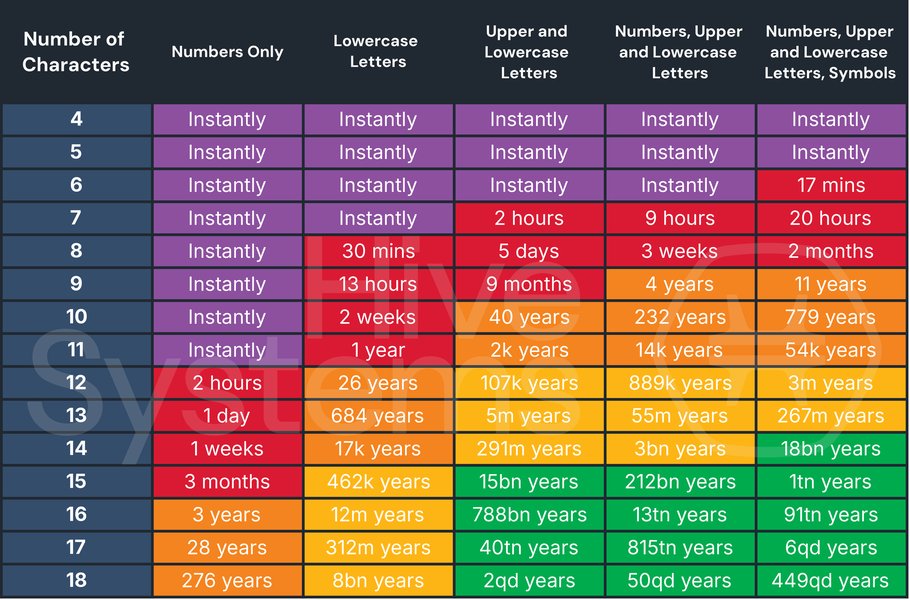
This table illustrates how password length and complexity dramatically increase the time required for attackers to crack a password. (Source: Hive Systems)
Complexity is Key: The Character Mix
A strong password incorporates a variety of character types. This diversity thwarts dictionary attacks and common guessing patterns. Aim to include:
- Uppercase letters (A-Z)
- Lowercase letters (a-z)
- Numbers (0-9)
- Special characters (e.g., !, @, #, $, %, ^, &, *, (, ), _, +, =, -, [, ], {, }, |, ;, :, ,, ., <, >, /, ?)
Avoid common substitutions like replacing 'a' with '@' or 's' with '$' if the base word is too simple (e.g., "P@sswOrd123" is still weak if "password" is the base). The goal is true randomness within the complexity.
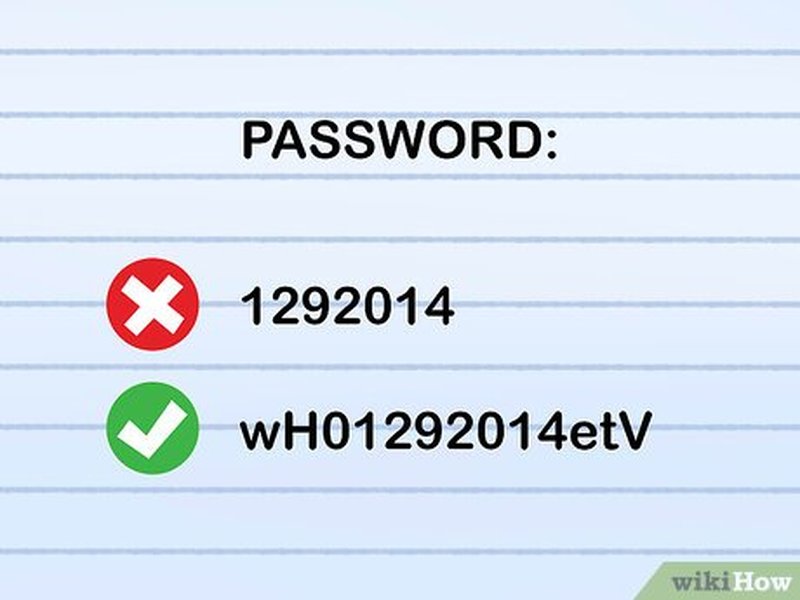
An illustration of using a mix of uppercase, lowercase, numbers, and symbols to enhance password complexity.
Uniqueness Prevents Chain Reactions
Never reuse passwords across multiple accounts. If one account is compromised and you've used the same password elsewhere, all those accounts become vulnerable. Each online service or application should have its own distinct, strong password. This principle is paramount in containing the damage from data breaches.
Randomness Thwarts Guesswork
Strong passwords should appear random and avoid any predictable patterns or personal information. Steer clear of:
- Names of family members, pets, or friends.
- Birthdays, anniversaries, or other significant dates.
- Addresses or phone numbers.
- Common dictionary words or phrases (e.g., "password", "123456", "qwerty").
- Sequential characters (e.g., "abcdefg", "12345678").
- Keyboard patterns (e.g., "asdfghjkl").
The more random your password appears, the harder it is for both humans and automated tools to guess.
Crafting Your Fortress: Effective Password Creation Strategies
Knowing the principles is one thing; applying them is another. Here are practical strategies to create passwords that are both strong and, with practice, manageable.
The Passphrase Method: Memorable and Mighty
One of the most recommended methods is creating a passphrase. This involves stringing together three to five (or more) unrelated words. For example: "BlueGiraffeSingsQuietly@Ocean7".
Key advantages of passphrases:
- Length: They are inherently long.
- Memorability: Easier to remember than a random string of characters, especially if the words create a vivid or unusual mental image.
- Strength: When combined with mixed case, numbers, and symbols, they become very robust. For instance, you can capitalize each word, add a number and a symbol at the end or in between words.
Example transformation: A sentence like "I enjoy walking my energetic dog in the park every morning!" could become "IewMed!tp#Em9". This involves taking the first letter of each word (or a selection) and adding complexity.
The Random String Method: For Ultimate Randomness
For maximum security, especially when using a password manager, a truly random string of characters is ideal. This means a jumble of uppercase letters, lowercase letters, numbers, and symbols with no discernible pattern. Example: kJ7$pL!mZ@tV9#sXw2. While extremely difficult to memorize, these are best generated and stored by password managers.
Character Replacement and Modification
This technique can enhance a base phrase or word, but use it cautiously. Simply substituting 'o' with '0' or 'i' with '1' in common words is no longer sufficient, as attackers' tools account for these. Instead, apply more complex or less obvious substitutions, and always start with a strong, uncommon base phrase. For example, taking a line from a song or book and strategically altering it with numbers and symbols in unexpected places.
Leveraging Technology: The Power of Password Managers
Remembering dozens of unique, long, and complex passwords is a Herculean task for any human. This is where password managers come into play as an indispensable tool for modern digital security.
Why Entrust Your Passwords to a Manager?
- Strong Password Generation: They can create truly random, long, and complex passwords that you wouldn't be able to devise or remember on your own.
- Secure Storage: Passwords are stored in an encrypted vault, protected by a single, strong master password (which you must create and protect diligently).
- Uniqueness Ensured: They make it easy to use a different, strong password for every online account.
- Convenience: Many password managers can auto-fill login credentials on websites and apps, saving time and hassle.
- Security Audits: Some offer features to check for weak, reused, or compromised passwords in your vault.
Choosing a Reputable Password Manager
Several well-regarded password managers are available, each with various features and pricing models. Some popular options include:
- LastPass
- Bitwarden (often praised for its open-source nature)
- 1Password
- NordPass
- Dashlane
- Keeper
When choosing, consider factors like security features, ease of use, cross-platform compatibility, and user reviews.
Common Pitfalls: What to Avoid When Creating Passwords
Even with good intentions, it's easy to fall into common traps that weaken your password security. Be mindful to avoid these:
- Reusing Passwords: The cardinal sin of password security. One breach can compromise multiple accounts.
- Using Personal Information: Names, birthdays, addresses, pet names – anything easily found online or guessed by someone who knows you.
- Dictionary Words and Common Phrases: Attackers use "dictionary attacks" that rapidly try common words and phrases.
- Sequential or Repetitive Characters: "12345678", "abcdefg", "111111", "password123".
- Obvious Substitutions: Replacing 'o' with '0' in "password" (P@ssw0rd) is a trick well-known to hackers.
- Writing Passwords Down Insecurely: Avoid sticky notes on your monitor or plain text files on your computer. If you must write one down (e.g., master password), store it in a physically secure location like a safe, and never label it obviously.
- Incrementing Passwords: Changing "PasswordSummer23!" to "PasswordWinter23!" is not a significant improvement.
A helpful visual summary of best practices and common mistakes in password creation. (Source: SoSafe)
Visualizing Password Strength Factors
The effectiveness of a password strategy can be evaluated across several dimensions. This radar chart provides a conceptual comparison of different password approaches based on key factors. "Uniqueness Potential" refers to how likely the method is to produce a password unique to one account. "Memorability" here refers to the inherent memorability of the string itself, without considering a password manager.
As the chart suggests, passwords generated by managers excel in strength, uniqueness, complexity, and length, though their inherent memorability is low (which is why the manager stores them). Long unique passphrases offer a good balance, especially for master passwords or accounts not managed by a password tool.
Connecting the Dots: A Mindmap of Password Security
This mindmap provides a visual overview of the interconnected concepts involved in creating and maintaining strong passwords, helping to solidify your understanding of a comprehensive security strategy.
Lowercase
Numbers
Symbols)"] id1c["Uniqueness (One password per account)"] id1d["Randomness (Avoid personal data
common words, patterns)"] id2["Effective Creation Strategies"] id2a["Passphrases
(Multiple unrelated words + modifications)"] id2b["Random Character Strings
(Often via generators)"] id2c["Strategic Character Substitution
(Beyond simple replacements)"] id3["Essential Tools & Aids"] id3a["Password Managers"] id3aa["Generate Strong Passwords"] id3ab["Securely Store Credentials (Encrypted Vault)"] id3ac["Automate Login/Auto-fill"] id3ad["Audit Password Strength"] id3b["Standalone Password Generators"] id4["Common Pitfalls to Avoid"] id4a["Reusing Passwords Across Sites"] id4b["Using Easily Guessable Personal Information"] id4c["Choosing Short or Simple Passwords"] id4d["Employing Dictionary Words or Predictable Patterns"] id4e["Storing Passwords Insecurely"] id5["Broader Security Measures"] id5a["Two-Factor Authentication (2FA/MFA)"] id5b["Regular Password Audits & Updates"] id5c["Phishing Awareness & Vigilance"] id5d["Secure Password Recovery Methods"]
This mindmap illustrates how core principles, creation methods, essential tools like password managers, and awareness of pitfalls all contribute to a robust password security posture, further enhanced by additional security layers.
Your Strong Password Checklist
Use this table as a quick reference to ensure your passwords meet the criteria for being strong and effective.
| Feature / Practice | Recommendation | Why it's Important |
|---|---|---|
| Minimum Length | 14-16+ characters | Exponentially harder to brute-force or guess. |
| Uppercase Letters (A-Z) | Include | Increases the pool of possible characters, enhancing complexity. |
| Lowercase Letters (a-z) | Include | Essential for character variety and complexity. |
| Numbers (0-9) | Include | Adds another layer of complexity. |
| Symbols (!, @, #, $, etc.) | Include | Significantly boosts complexity and resistance to attacks. |
| Unique Per Account | Absolutely Critical | Prevents a single breach from compromising multiple accounts. |
| Avoids Personal Information | Essential | Reduces guessability by those who know you or can find info online. |
| Avoids Dictionary Words/Common Phrases | Essential | Resists automated dictionary and common password attacks. |
| Avoids Sequences/Patterns | Essential | Prevents easy guessing of predictable elements. |
| Generated by Password Manager (for most accounts) | Highly Recommended | Ensures randomness, complexity, and uniqueness with secure storage. |
Beyond the Password: Layering Your Defenses
While a strong password is your first line of defense, it shouldn't be your only one. Enhance your online security with these additional measures:
Enable Two-Factor or Multi-Factor Authentication (2FA/MFA)
Whenever available, enable 2FA or MFA. This requires a second form of verification in addition to your password, such as a code sent to your phone, a biometric scan (fingerprint/face ID), or a physical security key. Even if an attacker obtains your password, they likely won't have access to your second factor.
Conduct Regular Password Audits and Updates
Periodically review your passwords, especially for critical accounts. Change them regularly (e.g., every 3-6 months for high-value accounts, or immediately if you suspect a breach or are notified of one by a service provider). Password managers can often help identify weak or reused passwords.
Stay Vigilant Against Phishing Attacks
Be cautious of emails, messages, or websites asking for your login credentials. Cybercriminals use deceptive tactics (phishing) to trick you into revealing your passwords. Always verify the source and avoid clicking suspicious links or downloading unexpected attachments.
Implement Account Lockout Policies (if applicable)
For system administrators or those managing accounts for others, setting policies that lock an account after a certain number of failed login attempts can help thwart brute-force attacks.
Plan Secure Password Recovery Protocols
Ensure you have secure and reliable methods for recovering access to your accounts if you forget a password. This often involves setting up recovery email addresses or phone numbers, which themselves should be well-protected.
Expert Insights: A Video Guide to Strong & Memorable Passwords
For a dynamic explanation of these concepts, the following video provides valuable tips on creating passwords that are both secure and manageable. It delves into techniques that balance the need for robust security with the human challenge of remembering complex credentials, reinforcing many of the strategies discussed here.
This video emphasizes the importance of password length and complexity, introduces methods for making strong passwords easier to recall, and touches upon the role of tools like password managers in maintaining good digital hygiene. It serves as an excellent supplement to the written guidelines, offering visual and auditory learning cues.
Frequently Asked Questions (FAQ)
How long should my password ideally be?
For strong security, aim for a minimum of 14-16 characters. Longer is generally better, especially for critical accounts like your email or password manager master password. Some experts even recommend 20+ characters for maximum protection against brute-force attacks.
Is it ever okay to write down my passwords?
Generally, it's advised against writing passwords down, especially in easily accessible or obvious places (like a sticky note on your monitor). However, if you must write down a very complex master password for a password manager, store it in an extremely secure physical location (e.g., a locked safe, a bank security deposit box) separate from your computer. For all other passwords, a reputable password manager is a much safer storage solution.
How often should I change my passwords?
The advice on this varies. A common recommendation is to change passwords for important accounts every 3 to 6 months. More critically, you should change a password immediately if you suspect the account has been compromised, or if the service provider announces a data breach that might have exposed user credentials. Using unique passwords for each account minimizes the impact of such breaches.
What if I find it impossible to remember so many complex passwords?
This is precisely why password managers are highly recommended. You only need to create and remember one very strong master password for the manager. The manager then generates, stores, and auto-fills unique, complex passwords for all your other accounts. Alternatively, for passwords you must memorize (like your master password), the passphrase method (combining several unrelated words with modifications) can be effective.
Are password generator tools safe to use?
Yes, password generators from reputable sources, especially those built into trusted password managers or offered by well-known cybersecurity companies, are generally very safe and highly effective. They are designed to create truly random passwords with a good mix of character types, which are far stronger than most passwords humans would create on their own. Avoid obscure or untrusted online generators.
Recommended Further Exploration
- What are the best practices for choosing and securing a password manager?
- How does two-factor authentication enhance account security beyond strong passwords?
- What are the most common ways hackers try to crack passwords and how can I defend against them?
- How can I create memorable passphrases that are also highly secure?
References
Last updated May 8, 2025