
Unlocking CRM Potential: Building the Ultimate Workflow Automation Feature
A Product Manager's guide to the essential functional requirements for automating customer interactions and boosting efficiency.
Feature Highlights
- Comprehensive Automation: Define workflows triggered by record changes, specific dates/times, or user events to automate tasks like sending emails, WhatsApp messages, updating records, and creating tasks.
- Intelligent Logic: Implement conditional branching (if/then/else), time delays, and complex condition evaluation using logical operators (AND/OR) based on CRM data across related records.
- Seamless Integration & Monitoring: Connect with external systems via webhooks/APIs, utilize pre-approved WhatsApp templates, and monitor workflow performance through detailed logs, dashboards, and error handling mechanisms.
Objective of the Feature
As the Product Manager for this initiative, the primary objective of the CRM Workflow feature is to design and implement a flexible, robust, and customizable automation system. This system will empower businesses to streamline, automate, and standardize repetitive customer relationship management processes by defining rule-based triggers and sequences of actions. Key goals include improving operational efficiency, reducing manual errors, accelerating response times, ensuring consistent communication (including via Email and WhatsApp templates), managing delays intelligently, and ultimately enhancing customer engagement and supporting the achievement of strategic business objectives.
Functional Requirements Deep Dive
To achieve the objective, the CRM Workflow feature must encompass a wide range of capabilities. The following functional requirements outline the necessary components, detailing the triggers, conditions, actions, management aspects, and user interface needed for a successful implementation.
Workflow Creation and Management
FR-3.1.1: Workflow Definition
The system must allow users with appropriate administrative permissions to define new workflows. This includes providing a unique name, a clear description outlining the workflow's purpose, and specifying the primary CRM module or object the workflow applies to (e.g., Leads, Contacts, Deals, Cases, Custom Objects).
FR-3.1.2: Trigger Configuration
Users must be able to configure specific triggers that initiate a workflow automatically. Supported trigger types include:
- Record-Based Triggers:
- On Record Creation: When a new record is created in the designated module.
- On Record Update: When an existing record is modified. This must allow specifying particular fields and the nature of the change (e.g., any change, change to a specific value like "Lead Status" becoming "Qualified", value increasing/decreasing).
- On Record Deletion: (Optional, based on system design) When a record is deleted.
- Date/Time Triggers:
- Specific Date Field: Based on a date or date/time field within the record (e.g., 3 days before
Contract Renewal Date, onBirthday). - Recurring Schedule: Based on a fixed schedule (e.g., every Monday at 9:00 AM, the 1st of every month). Timezone awareness is crucial for global operations.
- Specific Date Field: Based on a date or date/time field within the record (e.g., 3 days before
- Event-Based Triggers:
- User Activity: Based on specific user interactions tracked by the CRM (e.g., form submission, email link clicked, email opened).
- System Events: Based on predefined system occurrences (e.g., customer support ticket submitted, deal stage changed).
- External Events: Via integrations like webhooks received from third-party applications.
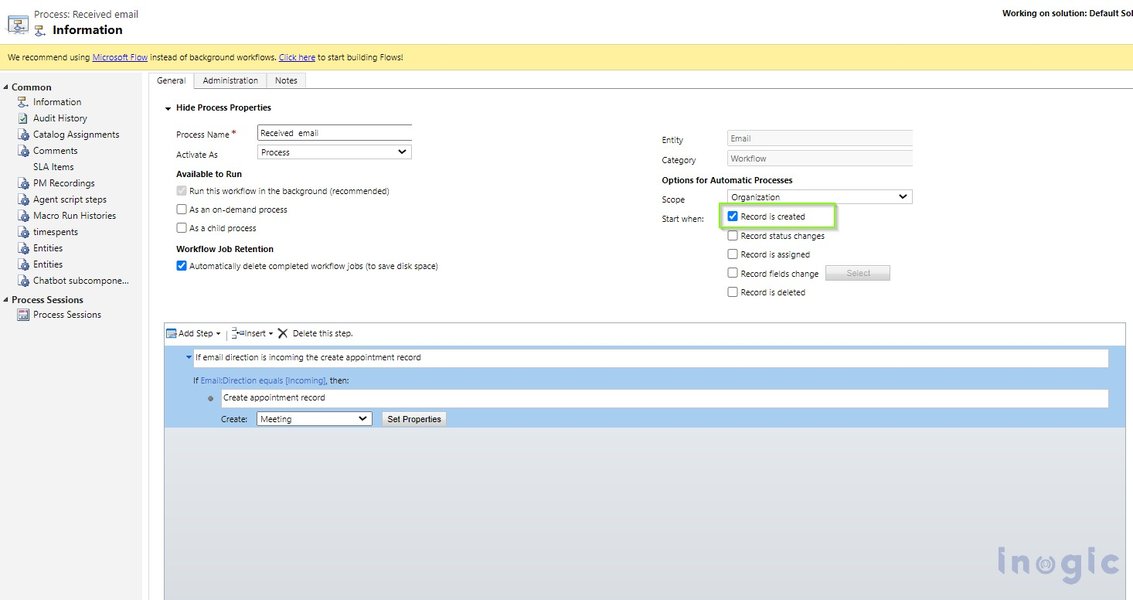
Conceptual overview of CRM workflow triggers leading to automated actions.
FR-3.1.3: Condition Configuration
The system must allow the definition of specific conditions that need to be met for the entire workflow or individual actions within it to execute. This adds a layer of precision beyond the initial trigger.
- Field Value Criteria: Based on the values of one or more fields on the triggering record (e.g.,
Deal Amount > $5000,Lead Source is "Webinar",Account Tier equals "Premium"). - Related Record Criteria: Based on field values from associated records (e.g., the primary Contact's
Account Industry is "Technology", the associatedCase Priority is "High"). - Logical Operators: Support for combining multiple conditions using AND, OR, and NOT operators to build complex evaluation logic (e.g.,
(Status = "Open" AND Priority = "High") OR (CreatedDate < 7 days ago)). Nesting of conditions (e.g., up to 3 levels) should be supported. - Comparison Operators: A comprehensive set of operators is required, including: equal to, not equal to, greater than, less than, greater than or equal to, less than or equal to, contains, does not contain, starts with, ends with, is empty, is not empty. These must function correctly across different data types (text, number, date, boolean, picklist).
FR-3.1.4: Action Configuration
Users must be able to define a sequence of automated actions to be performed when the trigger event occurs and all specified conditions are met. The system needs to support a variety of action types, detailed further below.
Detailed Workflow Actions
The core of the workflow feature lies in its ability to perform automated actions. The following table summarizes key actions, their purpose, essential parameters, and typical use cases:
| Action Type | Purpose | Key Parameters & Details | Common Use Case |
|---|---|---|---|
| Send Email | Automate email communication to contacts or internal users. | Recipient(s) (static, dynamic from fields), Sender, Subject, Body (HTML/Plain Text, Templates, Merge Fields {FirstName}), Attachments (limits apply), Scheduling (immediate, delayed), Tracking (opens, clicks), A/B Testing support. | Welcome emails, follow-up sequences, internal alerts, meeting confirmations. |
| Send WhatsApp Template | Send pre-approved WhatsApp messages via Business API. | Recipient Phone (from CRM), Approved Template ID, Template Variables (Merge Fields {OrderID}), Media Attachments (if template allows), Compliance Checks (Opt-in), Error Handling (retry, fallback). Requires WhatsApp Business API integration. | Order confirmations, appointment reminders, shipping notifications, support updates. |
| Send SMS | Send text messages to contacts or users. | Recipient Phone (from CRM), Message Content (Merge Fields), Sender ID (requires integration), Delivery Status Tracking. Requires SMS Gateway integration. | Quick alerts, time-sensitive reminders, two-factor authentication codes (if applicable). |
| Delay / Wait | Pause the workflow execution. | Fixed Duration (minutes, hours, days, weeks), Until Specific Date/Time, Until Condition Met (e.g., field update), Asynchronous processing. | Spacing out communication in a sequence, waiting for lead nurturing period, delaying action until business hours. |
| Create Task | Generate a task record and assign it. | Subject, Assigned User/Team (dynamic/static), Due Date (relative/absolute), Priority, Status, Description, Reminders. | Assign sales follow-up calls, schedule support check-ins, create onboarding tasks. |
| Create Event | Schedule a calendar event. | Subject, Start/End Time, Location, Description, Attendees (invite users/contacts). | Automatically schedule demo meetings, internal review sessions. |
| Update Record | Modify fields on the triggering record or related records. | Select Record (triggering/related), Field(s) to Update, New Value (static, from another field, calculated formula), Data Validation. | Update lead status after email engagement, set 'Last Contacted Date', change deal stage based on activity. |
| Create Record | Generate a new record in the same or another module. | Module for New Record, Field Mapping (from triggering record), Default Values. | Create an Opportunity when a Lead is qualified, generate a Case from an inquiry email. |
| Assign Record | Change the owner of the triggering record. | Assignee (specific user, team, assignment rule like round-robin). | Route leads based on territory or workload, reassign cases upon escalation. |
| Send Internal Notification | Alert CRM users via in-app messages. | Recipient(s) (user, team, role), Message Content (Merge Fields), Urgency/Priority Level. | Notify sales manager of a large deal, alert support lead about an escalated ticket. |
| Webhook (Call External API) | Send data to or trigger an external system. | Target URL, HTTP Method (GET, POST, PUT, DELETE), Request Body/Payload (JSON/XML, include record data), Headers (Authentication tokens), Error Handling. | Sync data with ERP, update marketing automation platform, trigger external processes. |
| Conditional Branching (If/Then/Else) | Execute different action paths based on conditions. | Branch Condition(s), Action Sequence for 'If' path, Action Sequence for 'Else' path, Nesting support (limited). | Send different emails based on customer segment, assign tasks differently based on deal size. |
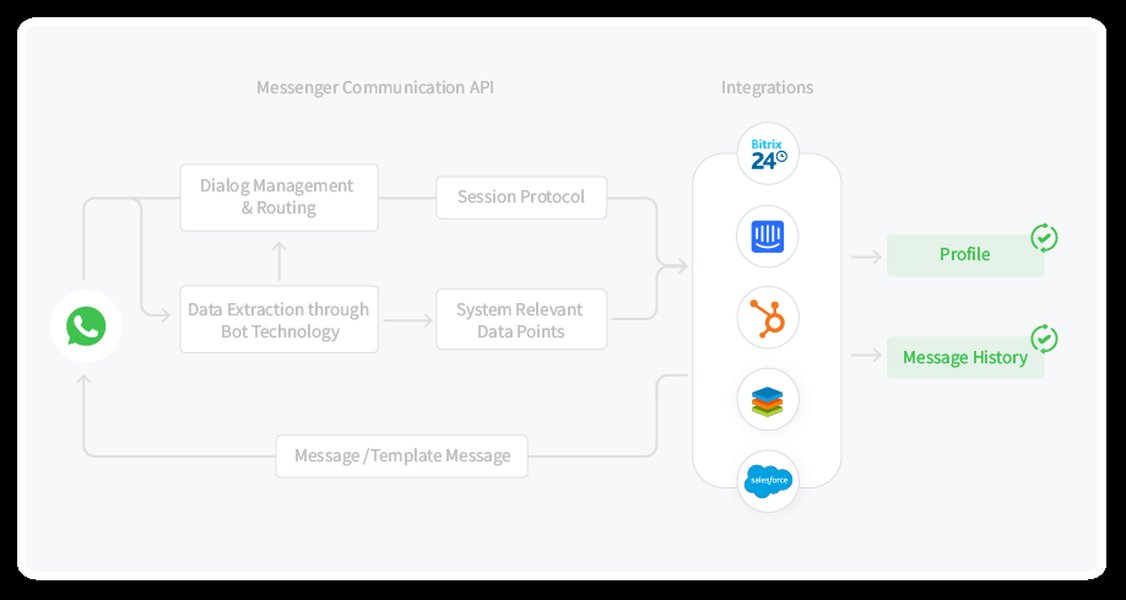
Example flow illustrating how WhatsApp messages can be integrated into CRM workflows.
Visualizing Workflow Components
Understanding the relative importance and complexity of different workflow components is key for prioritization during development and for users configuring workflows. The radar chart below provides a conceptual visualization based on typical user value and implementation effort.
This chart suggests that core functionalities like triggers, email actions, record updates, and the visual builder offer high user value, while integrations like WhatsApp and Webhooks, along with the builder itself, tend to represent higher implementation complexity.
Understanding Workflow Structure
A typical CRM workflow follows a logical structure starting with a trigger, evaluating conditions, and executing a series of actions, potentially including branches and delays. The mindmap below illustrates this fundamental structure:
(e.g., Lead Created, Deal Updated)"] id1a["Condition Check
(e.g., Lead Score > 50 AND Status = 'New')"] id1a1["Path A (Condition Met)"] id1a1a["Action 1: Send Welcome Email"] id1a1b["Action 2: Create Follow-up Task"] id1a1c["Action 3: Delay (2 days)"] id1a1d["Action 4: Update Lead Status ('Contacted')"] id1a1e["Conditional Branch
(e.g., If Industry = 'Tech')"] id1a1e1["Sub-Action: Send Tech Case Study"] id1a1e2["Sub-Action: Notify Tech Sales Rep"] id1a1f["End Workflow"] id1a2["Path B (Condition Not Met)"] id1a2a["Action: Assign to Nurturing List"] id1a2b["Action: Log Event"] id1a2c["End Workflow"] id2["Workflow Monitoring"] id2a["Execution Logs"] id2b["Error Handling"] id2c["Performance Reports"] id3["Workflow Management"] id3a["Visual Builder"] id3b["Activation/Deactivation"] id3c["Versioning/Cloning"]
This mindmap visually breaks down the components of a workflow, from the initial trigger and condition evaluation through various possible actions, branching logic, and essential management/monitoring aspects.
Workflow Activation, Management & Control
FR-3.1.5: Activation & Deactivation
Users must have the ability to easily activate (turn on) or deactivate (turn off) workflows. Deactivated workflows should not process any triggers.
FR-3.1.6 + B/D: Duplication & Versioning
The system should allow users to duplicate or clone existing workflows to quickly create variations. Additionally, implementing version control for workflows is recommended, allowing users to track changes and potentially revert to previous versions.
FR-3.1.7: History, Logs & Auditing
Comprehensive logging is essential. The system must maintain a detailed history of all workflow executions. Logs should include: the triggering record ID, timestamp of execution, specific actions performed, success/failure status of each action, any error messages encountered, and the user context if applicable. These logs must be easily accessible for troubleshooting, auditing, and reporting, and should be retained for a configurable period (e.g., 90 days).
Monitoring and Reporting (FR-3.2)
FR-3.2.1 & FR-3.2.2: Status & Execution Logs
A dedicated interface should provide a clear overview of all configured workflows, displaying their current status (Active/Inactive). Users must be able to easily drill down into detailed execution logs for individual workflow runs to diagnose issues or verify actions.
FR-3.2.3: Performance Metrics & Analytics
The system should track and report on key workflow performance indicators. This includes metrics like: total number of times triggered, success/failure rates, average execution time per workflow, counts of specific actions performed (e.g., emails sent, tasks created), and potentially conversion metrics if linked to sales goals. Customizable dashboards for visualizing these metrics are highly desirable.
User Interface and Experience (FR-3.3)
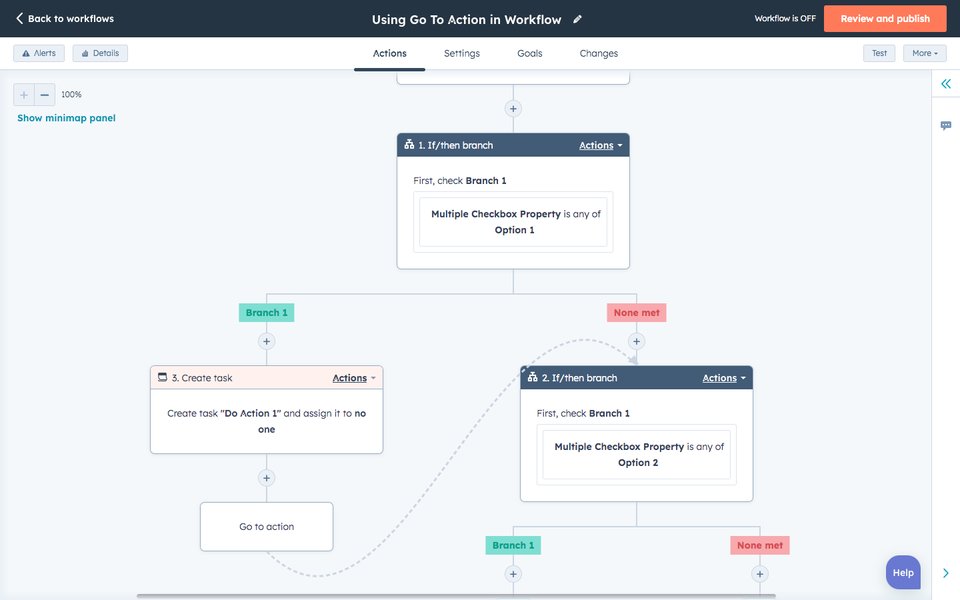
Example of an intuitive visual workflow builder, enhancing user experience.
FR-3.3.1 & FR-3.3.2: Visual Builder & Navigation
A user-friendly, visual interface is paramount for workflow creation and management. A drag-and-drop builder or a clear flowchart/list view representation is strongly recommended. Navigation within the workflow configuration area should be intuitive, allowing users to easily add, edit, rearrange, and delete triggers, conditions, and actions.
Testing & Simulation
The system should include a testing or simulation mode. This allows users to validate their workflow logic using sample data without affecting live CRM records or executing real external actions (like sending emails or API calls). This is crucial for preventing errors in production.
Permissions and Security (FR-3.4)
FR-3.4.1: Access Control
Robust role-based access control (RBAC) must be implemented. Permissions should govern who can create, edit, delete, activate, deactivate, and view workflows and their execution logs. This ensures that only authorized personnel can modify automation processes.
Data Security & Compliance
All data handled by workflows, especially sensitive customer information used in communications or API calls, must be secured using standard encryption practices (both in transit and at rest). Workflows involving external communication (Email, WhatsApp, SMS) must facilitate compliance with regulations like GDPR and CCPA, particularly regarding consent and opt-out mechanisms.
Integration and Extensibility
The workflow feature must be designed for integration.
- Native Integrations: Seamless operation with other parts of the CRM is fundamental.
- Third-Party Integrations: Support for connecting with external systems via Webhooks/APIs (as an action type) is crucial. Pre-built connectors for common platforms (e.g., email marketing services, other business tools) would add significant value. Secure authentication methods (e.g., OAuth) must be supported for integrations.
- Data Mapping: Users should be able to easily map CRM fields to parameters required by actions (e.g., mapping CRM email field to the 'To' address in an email action).
- Extensibility: Consider providing hooks or an SDK to allow developers to create custom action types or triggers in the future.
Error Handling and Reliability
Workflows must be reliable and handle errors gracefully.
- Retry Logic: For transient failures (e.g., temporary API unavailability), implement automatic retry mechanisms (e.g., 3 attempts with increasing delay/exponential backoff).
- Failure Notification: Alert designated administrators or workflow owners when a workflow execution fails permanently after retries.
- Fallback Options: Allow configuration of fallback actions or paths if a critical step fails (e.g., if WhatsApp send fails, attempt to send an SMS or create a manual task).
- Clear Error Logging: Failed executions must be logged with specific error codes and messages to facilitate troubleshooting.
CRM Workflow Automation in Action
To better understand the practical application and setup of CRM workflows, the following video provides an introduction and guide to setting up automations, covering concepts similar to those outlined in these requirements:
This video offers a general overview of setting up CRM automations and workflows, highlighting benefits like automating outreach and activities.
The video demonstrates how businesses can leverage workflow automation to automate email sequences, manage activities, and streamline outreach based on CRM data and triggers, aligning directly with the capabilities defined in this requirements document.
Frequently Asked Questions (FAQ)
▶ What exactly is a 'trigger' in a CRM workflow?
A trigger is the specific event or condition that starts a workflow. It's the "when" part of the automation. Examples include: when a new lead record is created, when a deal's status is updated to 'Won', when a specific date field (like a contract renewal date) is reached, or when a customer clicks a link in an email.
▶ Can workflows include delays, like waiting a few days before sending a follow-up?
Yes, absolutely. The 'Delay' or 'Wait' action is a standard and essential part of workflow automation. You can configure workflows to pause for a specific duration (e.g., wait 3 days), until a certain date/time, or even until another condition is met within the CRM (like a task being completed).
▶ How does the 'Send WhatsApp Template' action work? Are there limitations?
This action typically requires integration with the WhatsApp Business API. Due to WhatsApp's policies, you usually can't send free-form marketing messages initially. Instead, you must use pre-approved 'Message Templates' for business-initiated conversations (like appointment reminders or shipping updates). These templates can include placeholders (variables) that the CRM workflow populates with specific data (e.g., customer name, order number) before sending. Compliance with opt-in rules is also crucial.
▶ What happens if an action in a workflow fails (e.g., an email bounces)?
Good workflow systems include error handling. This typically involves logging the failure with details about the error. Many systems also offer configurable retry logic (attempting the action again after a short delay). You might also be able to define fallback actions (e.g., if email fails, create a task for manual follow-up) or configure notifications to alert an administrator about the failure.
Recommended
- What are the best practices for designing effective CRM workflow logic to avoid complexity?
- How can businesses effectively measure the return on investment (ROI) from implementing CRM workflow automation?
- Can you provide examples of advanced CRM workflow use cases specifically tailored for sales team productivity?
- What are the key considerations when integrating CRM workflows with external marketing automation platforms?
References
Last updated May 5, 2025