
Unlocking CSA Insights: Tailored Dashboards for Strategic Oversight and Operational Excellence
Discover the key data points each stakeholder group needs from your Control Self-Assessment program for maximum impact.
As an expert in managing Control Self-Assessment (CSA) programs, I understand the critical role that well-designed dashboards play in communicating risks, controls, and program effectiveness. To provide you with the most tailored and impactful dashboard information, it's helpful to understand a bit more about your specific CSA program and organizational context. Please consider these questions:
Clarifying Questions for Tailored CSA Dashboard Design
- Program Scope and Focus: What are the primary objectives of your CSA program (e.g., financial controls, IT governance, operational efficiency, specific regulatory compliance like ISO 27001, COSO, COBIT)? Which business units, processes, or systems are in scope?
- Maturity and Methodology: What is the current maturity level of your CSA program (newly implemented, established, optimizing)? What methodologies are employed for assessments (e.g., questionnaires, workshops, interviews, facilitated sessions)?
- Assessment Frequency and Reporting Cadence: How often are CSA assessments conducted (e.g., annually, quarterly, continuously)? How frequently will dashboards be updated and reviewed by each stakeholder group?
- Risk and Control Framework: How are risks and controls typically rated or scored (e.g., high/medium/low, numerical scales, qualitative descriptors)? Is there a standard risk taxonomy or control library in use?
- Technology and Tools: What tools or platforms (e.g., GRC software, BI tools like Power BI or Tableau, spreadsheets) are currently used for managing the CSA process and data? Are there plans for integration with other systems (e.g., audit management, incident management)?
- Stakeholder Objectives and Desired Actions: What are the primary decisions or actions each stakeholder group (Audit Committee, Business Units, CSA COE) is expected to take based on the dashboard information? What are their key concerns and priorities?
- Expected Level of Detail and Data Granularity: What level of detail is typically expected by each audience (e.g., high-level summaries, drill-down capabilities to specific findings)?
- Remediation Tracking: How are remediation plans for identified control weaknesses or issues currently tracked, managed, and reported?
- Existing Reporting and KPIs: Are there any existing reporting formats, templates, or key performance indicators (KPIs) that are currently used and well-received, or that need to be incorporated?
Your responses to these questions will enable a more precise and effective dashboard design. However, based on common best practices, here’s a comprehensive breakdown of the data and information typically shared with each audience.
Key Highlights: CSA Dashboard Content by Audience
Essential insights at a glance for effective CSA program communication.
- Audit Committee: Requires a high-level, strategic view focusing on overall risk posture, material control weaknesses, and alignment with organizational objectives. Emphasis is on assurance and governance oversight.
- Business Units: Need actionable, unit-specific data to manage their risks and controls effectively, track remediation efforts, and understand their performance relative to targets or peers.
- CSA Center of Excellence (COE): Demands a comprehensive, holistic view of the entire CSA program to monitor effectiveness, identify enterprise-wide trends, manage resources, and drive continuous improvement.
a. CSA Dashboard for the Audit Committee
Strategic Oversight and Assurance
The Audit Committee needs a concise, high-level dashboard that provides assurance on the effectiveness of the control environment and highlights significant risk exposures. The information should enable them to fulfill their governance responsibilities.
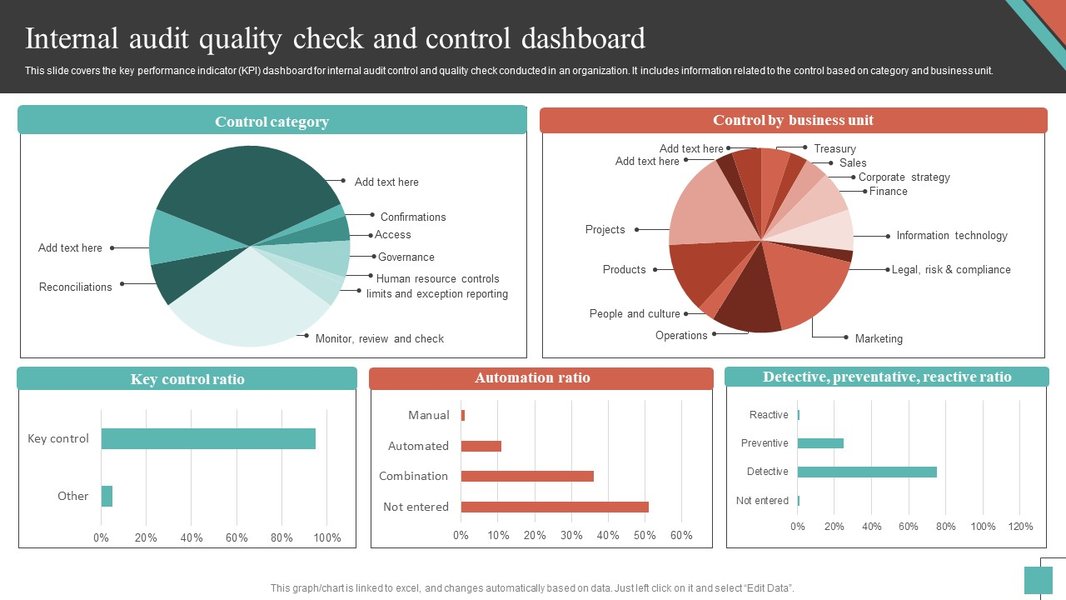
Illustrative example of a dashboard providing quality and control insights.
Key Data and Information:
- Overall CSA Program Health:
- Summary of program status, including completion rates of planned assessments against targets.
- Coverage of high-risk areas, processes, and business units.
- Changes from previous reporting periods clearly highlighted.
- Key Risk Exposures:
- High-level overview of the most significant risks identified across the organization through CSAs (e.g., top 5-10 risks).
- Risk heatmaps or matrices visualizing inherent and residual risk levels.
- Emerging risk themes and their potential impact.
- Control Effectiveness Summary:
- Aggregated summary of control effectiveness (e.g., percentage of controls assessed as effective, partially effective, ineffective).
- Trends in control effectiveness over time (e.g., quarter-over-quarter, year-over-year).
- Breakdown of control effectiveness by key risk areas or critical processes.
- Material Control Weaknesses and Deficiencies:
- Summary of critical control weaknesses or deficiencies identified.
- Potential impact (financial, operational, reputational, compliance) of these weaknesses.
- Status of remediation efforts for material weaknesses, focusing on overdue or high-priority items.
- Significant Action Plans and Remediation Status:
- Overview of the most significant action plans resulting from CSA findings.
- Progress towards completion, including aging of open high-risk findings.
- Escalations or roadblocks impacting remediation.
- Alignment with Internal and External Audit:
- Correlation of CSA findings with internal audit observations and external audit management letter points.
- Confirmation that CSA program scope aligns with key areas identified by other assurance functions.
- Regulatory Compliance Posture:
- Status of controls related to key regulatory requirements, where applicable.
- Significant compliance gaps identified through CSAs.
b. CSA Dashboard for Business Units
Actionable Insights for Operational Management
Business Units require detailed, actionable information pertinent to their specific operations. The dashboard should empower them to understand their risk profile, manage their controls, and take timely corrective actions.
Key Data and Information:
- Business Unit-Specific Risk Profile:
- Detailed view of risks identified within their specific unit, broken down by process, sub-process, or critical system.
- Risk ratings and contributing factors specific to their operations.
- Trend analysis of risks within the unit over time.
- Control Assessment Results (Detailed):
- Status of control assessments completed versus planned for their unit.
- Specific controls tested, assessment ratings (e.g., Effective, Needs Improvement, Ineffective), and the rationale/evidence for ratings.
- Drill-down capability to individual assessment responses and supporting documentation.
- Identified Control Weaknesses/Deficiencies (Detailed):
- Specific details of all control weaknesses and gaps identified within the unit.
- Root cause analysis (if available) and potential impact on unit objectives.
- Comparison of current findings with historical issues to identify recurring problems.
- Action Plans and Ownership:
- Clear listing of all action plans assigned to the business unit to address identified weaknesses.
- Assigned owners, due dates, and current status for each action plan.
- Tools or links to manage and update their action plans.
- Progress on Action Plan Completion:
- Real-time status updates on the implementation of remediation actions.
- Alerts for upcoming or overdue action items.
- Percentage of action plans completed, pending, or overdue.
- Trends in Unit's Risk and Control Environment:
- Visualizations (e.g., line charts, bar graphs) showing trends in risk levels, control effectiveness, and issue resolution specific to the business unit.
- Benchmarking (if applicable and appropriate):
- Comparison of the business unit's CSA results (e.g., control effectiveness, number of issues) against other similar units or organizational averages, for awareness and motivation.
- Participation and Engagement Metrics:
- CSA participation rates and timeliness of submissions within the unit.
- Status of control owners’ attestations or certifications.
c. CSA Dashboard for the CSA Center of Excellence (COE)
Holistic Program Management and Continuous Improvement
The CSA COE requires a comprehensive, enterprise-wide view of the CSA program. This dashboard should enable them to manage program effectiveness, identify systemic issues, allocate resources efficiently, and drive continuous improvement initiatives.
Key Data and Information:
- Overall Program Performance Metrics:
- Aggregated assessment completion rates across all participating units/functions.
- Timeliness of assessments and quality of submissions (e.g., completeness, evidence provided).
- Total number of controls assessed across the organization.
- Program coverage against the planned scope and risk-based priorities.
- Aggregated Risk and Control Landscape:
- Enterprise-wide risk heatmaps and control effectiveness summaries.
- Identification of systemic control weaknesses, common themes, or recurring issues across multiple units.
- Emerging risk trends based on aggregated CSA data.
- Drill-down capabilities from aggregated views to unit-level or specific control details.
- Effectiveness of Action Plans (Enterprise-wide):
- Overall status of remediation actions across the organization.
- Aging analysis of open action plans, highlighting overdue items by severity or business unit.
- Analysis of root causes for common or high-impact control failures.
- Effectiveness of implemented remediation (e.g., reduction in repeat findings).
- Program Methodology and Quality Assurance:
- Metrics on the consistency of CSA methodology application across units.
- Results from quality assurance reviews of CSA assessments.
- Feedback from participants on the CSA process and tools.
- Analysis of the effectiveness of the CSA methodology and identification of areas for refinement.
- Resource Allocation and Utilization:
- Information on resource deployment for CSA activities (e.g., time spent by business units, COE support).
- Identification of areas requiring more support or training.
- Training and Awareness Metrics:
- Completion rates and effectiveness of CSA-related training programs.
- Metrics indicating the level of risk and control awareness across the organization.
- Alignment with Other Assurance Activities:
- Analysis of how CSA results align with or supplement findings from internal audit, external audit, regulatory inspections, and other compliance functions.
- Identification of overlaps or gaps in assurance coverage.
- Technology and Tooling Performance:
- User adoption and performance metrics for any GRC/CSA software or tools.
- Effectiveness of the tools in supporting the CSA process.
- Benchmarking (Internal and External):
- Comparison of program metrics and results against internal historical data and, where available, external industry benchmarks.
Visualizing Audience Focus: A Comparative Overview
Understanding the distinct informational needs of each stakeholder group.
Different stakeholders require varying levels of detail and focus from the CSA dashboard. The Audit Committee needs high-level strategic insights, Business Units need granular operational data, and the CSA COE requires a comprehensive overview for program management. The radar chart below illustrates these distinct focuses across key informational dimensions. A higher score indicates a greater emphasis or need for detail in that specific area for the respective audience.
This visualization helps in prioritizing the data elements and visual designs for each specific dashboard, ensuring that the information presented is relevant, actionable, and meets the primary needs of its audience.
Mapping the CSA Ecosystem for Dashboarding
Understanding the interconnected components of a Control Self-Assessment program.
A Control Self-Assessment (CSA) program involves multiple interconnected components, from initial planning and risk identification to control testing, issue remediation, and ongoing monitoring. Dashboards serve as a critical communication tool within this ecosystem, translating complex data into actionable insights for various stakeholders. The mindmap below illustrates the key elements that feed into and are informed by CSA dashboards.
(Strategic Oversight, Governance)"] id1b["Business Units
(Operational Management, Actionable Insights)"] id1c["CSA Center of Excellence
(Holistic Program View, Continuous Improvement)"] id2["Key Information Areas"] id2a["Risk Management
(Identification, Assessment, Aggregation)"] id2b["Control Environment
(Design, Effectiveness, Testing)"] id2c["Issue & Remediation Management
(Tracking, Status, Effectiveness)"] id2d["Program Health & Performance
(Completion, Quality, Trends)"] id3["Data Sources & Inputs"] id3a["CSA Questionnaires & Workshops"] id3b["Control Test Results & Evidence"] id3c["Risk Registers"] id3d["Action Plan Tracking Systems"] id3e["GRC Platforms / Tools"] id3f["Internal & External Audit Findings"] id4["Dashboard Outputs & Visualizations"] id4a["Key Performance Indicators (KPIs)"] id4b["Risk Heatmaps & Matrices"] id4c["Trend Analysis Charts"] id4d["Control Effectiveness Summaries"] id4e["Action Plan Status Reports"] id4f["Drill-Down Capabilities"] id5["Program Objectives"] id5a["Enhance Risk Awareness"] id5b["Improve Control Effectiveness"] id5c["Strengthen Governance"] id5d["Drive Accountability"] id5e["Ensure Compliance"] id5f["Foster Continuous Improvement"]
This mindmap highlights how various elements of the CSA program, such as data sources, key information areas (like risk management and control environment), and program objectives, all contribute to and are reflected in the dashboards designed for different audiences. Effective CSA dashboards integrate these components to provide a clear, comprehensive, and actionable view of the organization's control landscape.
Summary of Key Dashboard Content by Audience
A comparative table of essential data points.
To further clarify the distinct yet overlapping information needs, the following table summarizes the key data elements for each audience. While some metrics are relevant to all, the level of detail, focus, and presentation will vary significantly.
| Data / Information Element | Audit Committee | Business Units | CSA Center of Excellence (COE) |
|---|---|---|---|
| CSA Program Completion Rates | Summary (Overall) | Detailed (Unit-Specific) | Comprehensive (Program-Wide, by Unit) |
| Overall Control Effectiveness | High-Level Summary (Trends, Key Areas) | Detailed (Per Process/Control in Unit) | Aggregated (Enterprise, Trends, Drill-Down) |
| Key Risks & Control Failures | Top Risks, Material Weaknesses | Unit-Specific Risks, All Deficiencies | Systemic Risks, Common Failures (Program-Wide) |
| Remediation Progress & Aging | High-Risk/Material Items | All Unit-Specific Action Plans | Enterprise-Wide, Overdue Analysis, Effectiveness |
| Participation & Engagement Metrics | High-Level (Overall Program Health) | Detailed (Unit Performance) | Comprehensive (By Unit, Process, Trends) |
| Trend Analysis (Effectiveness, Risks) | Strategic Trends (Long-Term) | Operational Trends (Short/Mid-Term) | Enterprise-Wide & Unit-Specific Trends |
| Benchmarking & Comparisons | Optional (High-Level Industry if relevant) | Internal (vs. Other Units/Targets) | Internal & External (Program Performance) |
| Program Quality & Compliance Metrics | Assurance on Program Rigor | Awareness of Local Compliance | Detailed (Methodology Adherence, Data Quality) |
| Resource & Coverage Insights | Assurance on Adequate Coverage | N/A (Focus on Own Operations) | Detailed (Allocation, Efficiency, Gaps) |
| Drill-down & Custom Views | Limited (Summary Views) | Moderate (To Own Data) | Extensive (Across Program Data) |
This table provides a quick reference for tailoring dashboard content. The goal is to deliver relevant, actionable information that empowers each stakeholder group to fulfill its responsibilities effectively within the Control Self-Assessment framework.
Best Practices in Dashboard Design
Crafting effective and engaging dashboards.
Creating dashboards that are both informative and easy to understand is crucial for the success of your CSA program. Adhering to design best practices ensures that stakeholders can quickly grasp key insights and make informed decisions. The video below offers valuable tips on dashboard design, covering aspects like clarity, visual appeal, and user experience, which are applicable when constructing your CSA dashboards.
This video discusses fundamental knowledge about dashboard design, including "Dos and Don'ts" to create effective visualizations.
Key considerations from dashboard design best practices include:
- Know Your Audience: Tailor the information, complexity, and visuals to the specific needs and technical understanding of each stakeholder group (Audit Committee, Business Units, COE).
- Focus on Key Metrics: Avoid clutter by highlighting the most important KPIs and insights that drive action or inform decisions.
- Use Appropriate Visualizations: Select chart types (e.g., bar charts for comparison, line charts for trends, heatmaps for risk) that best represent the data and make it easy to understand.
- Maintain Simplicity and Clarity: Ensure dashboards are intuitive, with clear labels, logical layouts, and consistent design elements.
- Provide Context: Include comparisons to targets, benchmarks, or previous periods to help users interpret the data meaningfully.
- Enable Interactivity (where appropriate): Features like filters and drill-downs can allow users (especially COE and Business Units) to explore data further without overwhelming them initially.
- Ensure Data Accuracy and Timeliness: Dashboards are only as good as the data they present. Establish processes for regular data updates and validation.
By applying these principles, your CSA dashboards will become powerful tools for communication, oversight, and continuous improvement within your organization.
Frequently Asked Questions (FAQ)
What is the primary purpose of a CSA dashboard? +
A Control Self-Assessment (CSA) dashboard is a visual tool that provides a consolidated view of key metrics, risks, control effectiveness, and action plan statuses related to an organization's CSA program. Its primary purpose is to communicate complex information in an accessible and actionable format to various stakeholders, enabling them to monitor performance, make informed decisions, and drive improvements in the control environment.
Why is it important to tailor CSA dashboards for different audiences? +
Different audiences (e.g., Audit Committee, Business Units, CSA COE) have distinct responsibilities, decision-making needs, and levels of interest in the details of the CSA program. Tailoring dashboards ensures that each group receives the most relevant information in the appropriate format and level of granularity. For example, the Audit Committee needs high-level strategic overviews, while Business Units require detailed, actionable data for their specific areas. This targeted approach increases engagement, understanding, and the overall effectiveness of the CSA program.
What are some common challenges in developing effective CSA dashboards? +
Common challenges include:
- Data Quality and Availability: Ensuring accurate, complete, and timely data from various sources.
- Defining Meaningful Metrics: Selecting KPIs that truly reflect program effectiveness and resonate with stakeholders.
- Information Overload: Presenting too much data, making it difficult for users to identify key insights.
- Lack of User Adoption: If dashboards are not user-friendly, relevant, or integrated into decision-making processes.
- Technical Limitations: Constraints of the chosen dashboarding tools or difficulties in integrating data.
- Maintaining Relevance: Dashboards can become outdated if not regularly reviewed and updated to reflect changing business needs or risk landscapes.
How often should CSA dashboards be updated and reviewed? +
The frequency of updates and reviews depends on several factors, including the nature of the risks being monitored, the assessment cycle of the CSA program, and the needs of the stakeholders.
- For Business Units and the CSA COE: More frequent updates (e.g., monthly or even real-time for critical operational data) are often beneficial for ongoing monitoring and management.
- For the Audit Committee: Updates typically align with their meeting schedules (e.g., quarterly), focusing on significant changes, trends, and high-level performance.
Regular reviews of the dashboard content itself (e.g., annually or biannually) are also important to ensure it remains relevant and effective.
Recommended Further Insights
Explore related topics for a deeper understanding.
- How can we measure the effectiveness of a Control Self-Assessment program beyond dashboard metrics?
- What are the best practices for integrating CSA results with overall enterprise risk management (ERM) reporting?
- Explore advanced visualization techniques for presenting complex CSA data to senior executives.
- How can automation and AI enhance the data collection and analysis for CSA dashboards?
References
Sources and further reading.
 aws.amazon.com
Last updated May 8, 2025