
Data Preparation for Length Frequency Analysis in R
A detailed guide to structuring and analyzing fish length data effectively
Highlights
- Data structuring and integrity checks: Learn optimal data formats and ensure correctness for robust analysis.
- Utilizing specialized R packages: Explore full use of TropFishR and aLBI packages to streamline length-frequency computations.
- Practical examples and visualization: Benefit from code examples, plotting functions, and tools to convert raw measurements into actionable insights.
Introduction
Length Frequency (LF) analysis is a fundamental technique in fisheries science used to analyze the size distribution of fish populations. This method is particularly useful in data-limited scenarios where detailed age data might not be available. By examining the frequency distribution of different length classes, researchers and fisheries managers can estimate growth rates, mortality, recruitment patterns, and stock assessments.
Preparing data for LF analysis in R involves several crucial steps that encompass data collection, structuring, cleaning, visualization, and conversion into formats compatible with specific R packages, such as TropFishR and aLBI. The process not only ensures that the analysis is statistically robust and accurate but also makes it easier to interpret the biological significance of the data. In this guide, we will explore all these steps in detail and provide insightful commentary along with sample code and practical tips for best practices.
Data Collection and Basic Formatting
Step 1: Data Collection
The foundation of any length frequency analysis is reliable and consistent data collection. Ideally, you will need a dataset with measurements of fish lengths. This typically involves collecting data from field surveys, commercial catches, or scientific sampling. Common data points include:
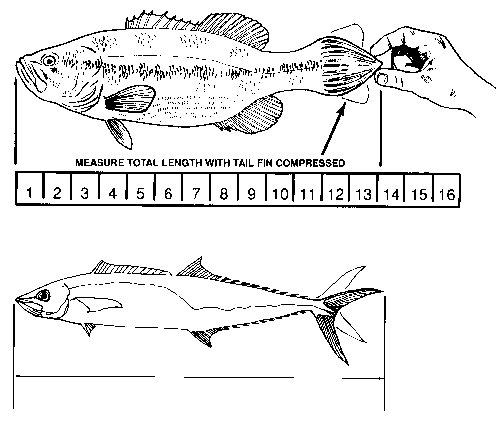
- Length Measurement: Measurements can be standard length (SL), fork length (FL), or total length (TL). The choice of measurement depends on the species and scientific goals.
- Date of Sampling: Record the date to enable temporal analysis and to identify seasonal patterns in fish growth or recruitment.
- Frequency: Sometimes, rather than individual records, the data is pre-aggregated into the number of fish observed within specific length classes.
Step 2: Setting Up Data in an R-Friendly Format
Once you have collected the data, it should be organized into a data frame in R. Data can be read from various sources such as CSV files, Excel spreadsheets, or directly inputted. The most common structure involves at least two columns:
- Length: A numeric column with measured lengths.
- Frequency: A numeric column providing the count of fish at each measured length.
Here is a simple example to create a data frame in R:
# Creating sample length and frequency data
lengths <- c(10, 12, 14, 15, 16, 18)
frequencies <- c(5, 10, 7, 3, 6, 8)
length_data <- data.frame(Length = lengths, Frequency = frequencies)
This data frame is now ready for further manipulation and analysis.
Data Structuring and Integrity Checks
Step 3: Data Structure and Integrity
When working with data intended for LF analysis, ensuring the integrity of the dataset is paramount. This includes checking that:
- Numeric columns are indeed numeric and free from non-numeric characters.
- Dates and other metadata are formatted consistently.
- Missing or erroneous entries are handled appropriately (e.g., through imputation, exclusion, or correction).
In R, the str() function is excellent for quickly inspecting the variable types and getting an overall glimpse of the data structure:
# Check the structure of the data frame
str(length_data)
This simple command ensures that all length values and frequencies are in the correct numeric format. Additionally, if your data includes date fields, consider converting them using R's date functions (e.g., as.Date()) to standardize the format.
Step 4: Validating Data Ranges and Outliers
A further important step is to visualize the raw data to identify potential anomalies or outliers. This preliminary step can be undertaken using histograms or scatter plots to ensure that length classes are distributed as expected:
# A simple histogram to look at the length distribution
hist(length_data$Length, main = "Histogram of Fish Lengths", xlab = "Length (cm)", col = "lightblue")
Close inspection of these plots can reveal issues like unlikely length measurements or frequency distributions that suggest data entry errors. Once identified, such issues can be addressed either by removing or correcting these entries.
Data Conversion for Advanced LF Analysis
Step 5: Transforming Raw Data into LFQ Format
Many analysis packages, such as TropFishR, require the data to be in a particular format known as an LFQ (Length Frequency Quantity) list. This conversion involves reformatting your data so that the measurements, dates, and frequencies are arranged in a standardized list. This can be achieved using specific functions available in these packages.
For instance, TropFishR includes a function lfqCreate() that takes your raw data and transforms it into the necessary LFQ object. Here's an exemplary workflow:
# Load the TropFishR package
library(TropFishR)

# Assume length_data has columns: Date, Length, Frequency (if available)
# Convert the date column into Date type if not already
length_data$Date <- as.Date(length_data$Date, format = "%Y-%m-%d")

# Create an LFQ list using TropFishR
lfq_data <- lfqCreate(dates = length_data$Date, lengths = length_data$Length, Fname = "Frequency")
The lfqCreate() function streamlines data processing by ensuring that all necessary fields are adequately formatted.
Step 6: Adjusting Bin Sizes for Frequency Distribution
A critical step in preparing LF analysis data is deciding on appropriate bin sizes, which determine how the continuous length data is grouped into categories. An incorrect bin size can either obscure subtle differences between groups or produce excessively granular data that is difficult to interpret.
Visual exploration helps in adjusting the bin size. Often, plotting the initial distribution using default bins is a good starting point. You can refine these intervals based on biological and statistical criteria, ensuring a balance between precision and interpretability.
Example of Bin Adjustment
Consider a dataset where the fish lengths vary considerably. Visualize the distribution using different bin widths until the plot reflects meaningful biological groupings:
# Create a histogram with specified bin widths
hist(length_data$Length, breaks = seq(min(length_data$Length), max(length_data$Length), by = 2),
     main = "Length Frequency with Custom Bin Width", xlab = "Length (cm)",
     col = "lightgreen")
Adjusting the by parameter changes the bin width as required, making it easier to capture population dynamics.
Utilizing R Packages for LF Analysis
TropFishR Package
TropFishR is a specialized package created for fisheries stock assessment using length frequency data. It offers a suite of functions such as plot.lfq() for visualization, lfqCreate() for data preparation, and additional statistical models for growth and mortality estimation.
Once your data is converted into an LFQ object, you can employ TropFishR to perform advanced analyses and generate plots that assist in identifying growth curves and other key biological parameters.
Other Relevant Packages
In addition to TropFishR, the aLBI package is also beneficial. The aLBI package is aimed at length-based indicator calculations, which complement LF analysis by offering more detailed growth insights and mortality estimates. Many practitioners use these tools in tandem to validate their findings.
The typical workflow in R might involve the following steps:
- Load the necessary packages (
TropFishR,aLBI, and others as needed). - Import and clean your dataset.
- Transform the dataset into an LFQ list for TropFishR.
- Visualize the LFQ data and adjust parameters like bin size.
- Execute growth and mortality models using the built-in functions.
Example Workflow Code
Below is a practical example that integrates these steps:
| Step | R Code | Description |
|---|---|---|
| 1. Load Packages | |
Loads required packages for data handling and analysis. |
| 2. Import Data | |
Reads fish length data from an Excel file. |
| 3. Data Preparation | |
Formats the data into an LF-ready object. |
| 4. Visualization | |
Visualizes the formatted LF data, aiding in selecting the best bin size and parameters. |
| 5. Model Application | |
Applies length-based indicators for deeper stock assessment insights. |
This table summarizes the logical workflow, making it easier to adapt to various datasets and research objectives.
Considerations for Robust Analysis
Ensuring Data Consistency
When undertaking LF analysis, consistency is key. Always verify that measurement units are uniform (e.g., centimeters) and that sampling methods remain consistent across collections. Inconsistencies can lead to misleading estimates of growth and mortality, impacting subsequent fisheries management decisions.
Parameter Selection and Sensitivity Analysis
Selecting the right parameters, such as bin width, is essential to accurately reflect the biological characteristics of the population. Sensitivity analysis, which involves testing various parameter values, can help determine the robustness of the model results. Always compare multiple scenarios and validate against known biological parameters when possible.
Documentation and Reproducibility
Finally, thorough documentation of all analytical steps—from data cleaning to model outputs—is critical for reproducibility. Clear documentation aids in peer review and enables future researchers to build on your work effectively.
References
- LFQ Data with TropFishR - CRAN
- Using TropFishR ELEFAN Functions - CRAN
- Length-frequency Analysis Research - Wiley
- Fish Stock Assessment using LF Data - OUP
- plot.lfq Documentation - RDrr
Recommended Related Queries
 s3-us-west-2.amazonaws.com
Last updated March 6, 2025