
Unlocking Your Data: A Deep Dive into DAVx⁵ Login Options
Explore the various authentication methods in DAVx⁵ for seamless synchronization of your contacts, calendars, and tasks.
Key Highlights of DAVx⁵ Login
- Versatile Authentication: DAVx⁵ offers flexible login methods including URL and username, email address, and advanced options, catering to diverse server configurations and user needs.
- Enhanced Security with 2FA: For services employing two-factor authentication (2FA), DAVx⁵ seamlessly integrates through app-specific passwords, bolstering your data security.
- Seamless Integration for Major Services: DAVx⁵ provides specialized login flows for popular platforms like Google and Nextcloud, simplifying the setup process for these widely used services.
DAVx⁵ is a comprehensive and robust CalDAV/CardDAV client and synchronization application designed for Android devices. It serves as a vital tool for managing and synchronizing your contacts (CardDAV), calendars (CalDAV), and even WebDAV cloud files, ensuring your personal and professional data remains consistent across multiple devices. The app's flexibility in connecting to various services is largely attributed to its diverse login options, each tailored to different server setups and security requirements.
Understanding DAVx⁵'s Core Functionality
Before delving into the specific login methods, it's crucial to grasp DAVx⁵'s fundamental role. It acts as an intermediary, facilitating communication between your Android device and CalDAV/CardDAV servers. This allows for real-time synchronization of critical information such as contact details (names, phone numbers, email addresses, organizations, photos, notes), calendar events, and tasks. DAVx⁵ achieves this by mapping Android contacts and contact groups to vCard resources and vice versa, ensuring data integrity and consistency.
The synchronization process involves several technical steps, including preparing the local collection, querying server capabilities, and exchanging data via HTTP traffic. For enhanced security, DAVx⁵ relies on Android's account manager for storing usernames and passwords, and Android's secure keystore for client certificates, without directly reading them. This architecture underscores DAVx⁵'s commitment to user privacy and data protection.
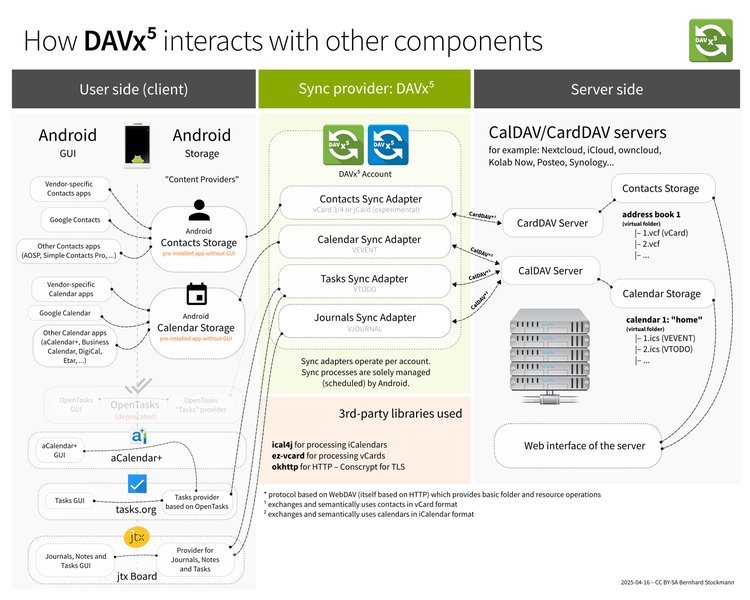
How DAVx⁵ interacts with other system components, facilitating data flow.
The Three Pillars of DAVx⁵ Login
DAVx⁵ offers three primary methods for adding an account, each suited for different server configurations and user expertise levels. These options ensure broad compatibility with various CalDAV and CardDAV service providers.
1. Login with URL and User Name
This method is a highly versatile and commonly used option for connecting to a wide array of CalDAV and CardDAV servers. It requires the user to explicitly provide the server's base URL and their login credentials (username and password).
When to Use This Option
- Self-hosted Servers: Ideal for users with their own Nextcloud, Synology, or other private CalDAV/CardDAV servers where the base URL is known.
- Providers Requiring Explicit URLs: Some service providers, especially those not utilizing SRV records for automatic discovery, may necessitate direct URL input. Examples include Fastmail with custom domains or iCloud accounts not ending with @icloud.com, where a base URL like
https://icloud.comand the iCloud account username are required. - Manual Configuration: When automatic discovery fails or is not supported by the service, this method provides the necessary manual control.
Key Details for Setup
Users will typically be prompted to enter the "Base URL" (the root address of the CalDAV/CardDAV service) and their "User name" and "Password." For services employing two-factor authentication (2FA), an app-specific password generated on the service provider's website is often required instead of the main account password. For instance, with services like Above Privacy Suite, users enter cal.above.im as the server URL and their Above email credentials.
// Example of an Intent for DAVx⁵ login with URL and username
val intent = Intent().apply {
    setClassName("at.bitfire.davdroid", "at.bitfire.davdroid.ui.setup.LoginActivity")
    putExtra("url", "https://example.com/path/")
    putExtra("username", user.name)
    putExtra("password", user.app_password)
}
// This intent can be used programmatically or via QR codes for deployment.
This method can also be used in more advanced scenarios, such as integrating with services that publish read-only ICS calendars without requiring a username or password, by leaving those fields empty.
2. Login with Email Address
This is often the most straightforward and user-friendly login option, particularly for well-known email and cloud service providers. DAVx⁵ attempts to automatically discover the necessary server URLs and configurations based solely on the provided email address.
When to Use This Option
- Major Service Providers: Frequently recommended for services like mail.com, mailbox.org, and AOL Mail, where DAVx⁵ can leverage service discovery to locate the correct CalDAV/CardDAV endpoints.
- Simplified Setup: Ideal for users who prefer a quicker setup process without needing to manually input server URLs.
Key Details for Setup
The user simply enters their email address and password. DAVx⁵ then performs a service discovery process to find the relevant CalDAV and CardDAV URLs. As with the URL and username option, if the service employs 2FA, an app-specific password is required. For example, Fastmail users are advised to generate an app password and use it with their email address for login.
It's important to note that the account name used in DAVx⁵, particularly for CalDAV, should ideally be the user's email address, especially when events involve attendees, to ensure proper scheduling functionality.
3. Advanced Login Options
The "Advanced login" option in DAVx⁵ provides a more granular control over the connection parameters, catering to complex server configurations, specific security requirements, or troubleshooting scenarios. While not explicitly listed as a standalone option in all interfaces, its functionalities are often integrated within the "Login with URL and username" or through specific service-provider flows.
Features and Use Cases
- Client Certificates: For environments requiring heightened security, DAVx⁵ supports authentication via SSL client certificates. This is particularly relevant for enterprise or private Nextcloud instances where a client certificate is mandated in addition to username and password.
- Proxy Settings: Users can override system proxy settings and specify a custom HTTP(S) proxy, useful in controlled network environments or for debugging connection issues.
- Custom Trust Stores: The ability to disable automatic trust of system-wide CA certificates allows users to implement their own trust stores for enhanced security.
- Managed DAVx⁵ Deployments: In organizational settings, "Managed DAVx⁵" leverages advanced configuration options, often through QR codes, MDM/EMM solutions, or network discovery, to pre-configure base URLs, login credentials (including client certificates), and other settings for mass deployment.
The advanced login options provide flexibility for specific integration needs. For instance, QR codes can be generated to simplify the setup of complex URLs or credentials for users within an organization.
Service-Specific Login Workflows
Beyond the general login methods, DAVx⁵ also offers specialized workflows for popular services, streamlining the setup process and addressing unique authentication requirements.
Google Integration: OAuth 2.0
For Google accounts, DAVx⁵ utilizes OAuth 2.0, the recommended authentication method due to Google disabling their CardDAV API for other authentication types since June 6th, 2023. This involves a secure web-based login flow where DAVx⁵ requests access to your Google Contacts and Calendars without directly handling your Google password. Users select "Google Contacts / Calendar" in the login dialog, then complete the authentication in their browser.
A helpful guide demonstrating how to synchronize your Google Contacts and Calendars with DAVx⁵ using OAuth.
This video provides a visual walkthrough of the OAuth-based login process for Google, which simplifies the setup by leveraging Google's secure authentication framework, eliminating the need to manually input server URLs or app passwords directly into DAVx⁵. This method enhances security by allowing users to grant granular permissions to DAVx⁵ via Google's own interface.
Nextcloud Integration: Simplified Flow
DAVx⁵ offers a specific service login method for Nextcloud, allowing authentication directly through the web without manual credential entry into DAVx⁵. Users can choose "Nextcloud" from the "Add account" screen, enter their Nextcloud's root URL, and then authenticate via a browser. Alternatively, the Nextcloud Android app can facilitate the setup by opening DAVx⁵ directly with the correct login flow via the "Sync calendar & contacts" option in its settings.
Comparative Analysis of Login Methods
Each login method has its strengths and is best suited for particular scenarios. The choice of method depends on the service provider, the user's technical comfort, and the security requirements.
| Login Method | Primary Use Case(s) | Complexity | Security Considerations |
|---|---|---|---|
| Login with URL and User Name | Self-hosted servers (Nextcloud, Synology), specific providers (iCloud without @icloud.com, Fastmail custom domain), manual configuration, read-only ICS. | Moderate (requires knowing base URL). | Requires app-specific passwords for 2FA-enabled services; direct credential input. |
| Login with Email Address | Common email/cloud providers (mail.com, mailbox.org, AOL Mail), simplified setup. | Low (relies on auto-discovery). | Requires app-specific passwords for 2FA-enabled services; direct credential input. |
| Advanced Login (Client Certificate/Proxy) | Enterprise environments, highly secure Nextcloud instances, custom network setups, managed deployments. | High (requires specific server/network knowledge). | Supports client certificates for enhanced security; granular control over network settings. |
This table summarizes the main aspects of each DAVx⁵ login method, helping users choose the most appropriate option based on their specific needs and server configurations.
Assessing DAVx⁵'s Login Robustness
To further illustrate the strengths and specific characteristics of each login method, let's visualize their capabilities using a radar chart. This chart will evaluate each method across several dimensions:
- Ease of Use: How simple is the setup process for an average user?
- Compatibility: How widely compatible is the method with various CalDAV/CardDAV servers?
- Security Features: Does it support advanced security measures like 2FA via app passwords or client certificates?
- Configuration Flexibility: How much control does it offer over connection parameters?
- Troubleshooting Ease: How easy is it to diagnose and resolve issues with this method?
This radar chart visually represents the trade-offs and strengths of each DAVx⁵ login method. "Login with Email Address" scores highest on ease of use due to its automated discovery. "Login with URL and User Name" offers a strong balance across all parameters, especially compatibility. "Advanced Login" excels in security features and configuration flexibility, albeit at a lower ease of use, reflecting its specialized nature.
Common Challenges and Troubleshooting
While DAVx⁵ is designed for robust synchronization, users may occasionally encounter issues during the login or sync process. Common challenges often revolve around two-factor authentication, incorrect URLs, or device-specific power-saving settings.
Two-Factor Authentication (2FA)
Many modern services employ 2FA for enhanced security. When setting up DAVx⁵ with such services (e.g., Google, Fastmail, mail.com), it's crucial to generate an app-specific password through the service provider's website. This app password should be used in DAVx⁵ instead of your main account password, as direct password entry might be blocked by the 2FA system.
Incorrect Base URL or Credentials
A common cause of login failures is an incorrect base URL or incorrect username/password. DAVx⁵ needs an accessible CalDAV/CardDAV URL to detect the service. Users should consult their service provider's documentation or DAVx⁵'s list of tested services for the correct base URL. Verify that the credentials entered are accurate and, if 2FA is active, that an app-specific password is used.
Device-Specific Optimizations
On some Android devices, particularly those from manufacturers like Huawei and Xiaomi, aggressive battery optimization settings can interfere with DAVx⁵'s background synchronization. It may be necessary to adjust device settings to allow DAVx⁵ to run automatically and prevent it from being "killed" by the system, ensuring continuous and reliable syncing.
Client Certificates
If a server requires a client certificate for authentication, ensure that the certificate is correctly installed in Android's secure keystore. DAVx⁵ will then use this certificate for authentication. Issues can arise if the certificate is missing, expired, or not properly selected during the advanced login process.
Maintaining Data Privacy and Security
DAVx⁵ prioritizes user privacy and security. The app does not store your username and password directly but utilizes Android's account manager for secure storage. Client certificates are taken from Android's secure keystore and are not readable by DAVx⁵ itself. To further protect login data, device encryption is highly recommended.
DAVx⁵ also allows for verbose logging, which can be useful for troubleshooting by generating a log file containing status messages and HTTP traffic. This log can be shared for support, but users should be mindful of the information it contains.
Frequently Asked Questions (FAQ)
What is DAVx⁵ used for?
How does DAVx⁵ handle two-factor authentication (2FA)?
Can I use DAVx⁵ with my self-hosted Nextcloud server?
What is the "Base URL" in DAVx⁵?
Does DAVx⁵ store my login credentials?
Why might my DAVx⁵ synchronization stop working on certain devices?
Can I use DAVx⁵ to sync Google contacts and calendars?
Conclusion
DAVx⁵ offers a robust and flexible solution for synchronizing contacts, calendars, and tasks across various platforms. Its three distinct login methods—Login with URL and User Name, Login with Email Address, and Advanced Login—each cater to different user needs and server configurations. Whether you're connecting to a popular cloud service, a self-hosted server, or require advanced security features like client certificates, DAVx⁵ provides the necessary tools for seamless and secure data management. Understanding these options is key to effectively leveraging DAVx⁵'s powerful synchronization capabilities and maintaining control over your personal data.
Recommended Further Exploration
- How to configure DAVx⁵ for Nextcloud with two-factor authentication?
- Troubleshooting common DAVx⁵ synchronization issues.
- Setting up DAVx⁵ with client certificates for enhanced security.
- Integrating DAVx⁵ with Google services using OAuth 2.0.
References
Last updated May 21, 2025