
Unlocking Voice Intelligence: Building a Real-Time Deepgram Transcription Flask App
Create a powerful speech-to-text application that transcribes audio in real-time using Deepgram's AI capabilities and Flask's web framework
Key Implementation Highlights
- Real-time transcription: Implement Deepgram's powerful speech recognition API to convert spoken language to text instantly
- WebSocket integration: Use Flask-SocketIO to establish persistent connections for streaming audio from browser to server
- User-friendly interface: Create an intuitive frontend that captures microphone input and displays transcription results seamlessly
Prerequisites and Project Setup
Before diving into the implementation, ensure you have the proper environment and resources ready:
System Requirements
- Python 3.7 or higher (required for async operations)
- Flask 2.0+ (for WebSocket support)
- Deepgram API key (sign up at Deepgram Console)
Creating Your Project Environment
Begin by setting up a virtual environment to manage dependencies:
# Create a new project directory
mkdir deepgram-flask-transcription
cd deepgram-flask-transcription

# Create a virtual environment
python -m venv venv

# Activate the virtual environment
# On Windows:
venv\Scripts\activate
# On macOS/Linux:
source venv/bin/activate

# Install required packages
pip install Flask flask-socketio deepgram-sdk python-dotenv
Create a .env file to securely store your Deepgram API key:
# .env file
DEEPGRAM_API_KEY=your_api_key_here
Project Structure
Your project should have the following structure:
deepgram-flask-transcription/
├── .env                  # Environment variables
├── app.py                # Main Flask application
├── static/               # Static files
│   ├── css/              # CSS files
│   │   └── style.css     # Custom styles
│   └── js/               # JavaScript files
│       └── main.js       # Frontend functionality
└── templates/            # HTML templates
    └── index.html        # Main interface
Building the Flask Backend
Let's create the core of our application - the Flask backend that interfaces with Deepgram:
Main Application File
Create app.py with the following code:
from flask import Flask, render_template
from flask_socketio import SocketIO, emit
from deepgram import Deepgram
import os
import asyncio
import json
from dotenv import load_dotenv

# Load environment variables
load_dotenv()

# Initialize Flask app
app = Flask(__name__)
app.config['SECRET_KEY'] = 'your-secret-key'
socketio = SocketIO(app, cors_allowed_origins="*")

# Initialize Deepgram client
deepgram_api_key = os.getenv('DEEPGRAM_API_KEY')
deepgram = Deepgram(deepgram_api_key)

# Dictionary to store active transcription connections
transcription_connections = {}

@app.route('/')
def index():
    """Render the main page"""
    return render_template('index.html')

@socketio.on('connect')
def handle_connect():
    """Handle client connection"""
    print(f'Client connected: {request.sid}')

@socketio.on('disconnect')
def handle_disconnect():
    """Handle client disconnection"""
    print(f'Client disconnected: {request.sid}')
    # Close any active transcription connection
    if request.sid in transcription_connections:
        asyncio.create_task(transcription_connections[request.sid].finish())
        del transcription_connections[request.sid]

@socketio.on('start_transcription')
def handle_start_transcription():
    """Start a new transcription session"""
    print("Starting transcription")

    async def start_deepgram():
        try:
            # Create a websocket connection to Deepgram
            options = {
                "punctuate": True,
                "interim_results": True,
                "language": "en-US",
                "model": "nova",
            }

            # Create a websocket connection to Deepgram
            socket = await deepgram.transcription.live(options)
            transcription_connections[request.sid] = socket

            # Handle messages received from Deepgram
            socket.registerHandler(socket.event.CLOSE, lambda c: print(f'Connection closed with code {c}.'))
            socket.registerHandler(socket.event.TRANSCRIPT_RECEIVED, handle_transcript)

            emit('ready_for_audio')
        except Exception as e:
            print(f"Could not open socket: {e}")
            emit('error', {'message': str(e)})

    socketio.start_background_task(start_deepgram)

def handle_transcript(transcript):
    """Process transcript data from Deepgram"""
    # Extract transcript text
    transcript_data = json.loads(transcript)

    if transcript_data.get('is_final'):
        # Send final transcription to client
        transcript_text = transcript_data['channel']['alternatives'][0]['transcript']
        if transcript_text:
            print(f"Final transcript: {transcript_text}")
            emit('final_transcript', {'text': transcript_text}, broadcast=True)
    else:
        # Send interim results
        transcript_text = transcript_data['channel']['alternatives'][0]['transcript']
        if transcript_text:
            print(f"Interim transcript: {transcript_text}")
            emit('interim_transcript', {'text': transcript_text}, broadcast=True)

@socketio.on('audio_data')
def handle_audio_data(data):
    """Handle audio data sent from the client"""
    # Get the client's active transcription connection
    socket = transcription_connections.get(request.sid)
    if socket:
        asyncio.create_task(socket.send(data))

if __name__ == '__main__':
    socketio.run(app, debug=True, port=5000)
Understanding the Backend Components
This Flask application:
- Initializes Flask and Flask-SocketIO for real-time communication
- Sets up a connection to the Deepgram API using your API key
- Creates routes to serve the web interface and handle WebSocket events
- Manages audio streaming from client to Deepgram and transcription results back to client
Creating the Frontend Interface
The frontend needs to capture audio from the user's microphone and communicate with the backend via WebSockets:
HTML Template
Create templates/index.html:
<!DOCTYPE html>
<html lang="en">
<head>
    <meta charset="UTF-8">
    <meta name="viewport" content="width=device-width, initial-scale=1.0">
    <title>Deepgram Live Transcription</title>
    <link rel="stylesheet" href="{{ url_for('static', filename='css/style.css') }}">
    <script src="https://cdnjs.cloudflare.com/ajax/libs/socket.io/4.0.1/socket.io.js"></script>
</head>
<body>
    <div class="container">
        <h1>Deepgram Live Transcription</h1>

        <div class="controls">
            <button id="startButton" class="btn">Start Listening</button>
            <button id="stopButton" class="btn" disabled>Stop Listening</button>
        </div>

        <div class="status-indicator">
            <div id="statusLight" class="status-light"></div>
            <p id="statusText">Ready</p>
        </div>

        <div class="transcription-container">
            <div class="interim-container">
                <h3>Interim Results:</h3>
                <div id="interimTranscript" class="transcript interim"></div>
            </div>

            <div class="final-container">
                <h3>Final Transcript:</h3>
                <div id="finalTranscript" class="transcript final"></div>
            </div>
        </div>
    </div>

    <script src="{{ url_for('static', filename='js/main.js') }}"></script>
</body>
</html>
CSS Styling
Create static/css/style.css:
* {
    box-sizing: border-box;
    margin: 0;
    padding: 0;
}

body {
    font-family: 'Segoe UI', Tahoma, Geneva, Verdana, sans-serif;
    line-height: 1.6;
    color: #333;
    background-color: #f8f9fa;
}

.container {
    max-width: 800px;
    margin: 2rem auto;
    padding: 2rem;
    background-color: #fff;
    border-radius: 8px;
    box-shadow: 0 4px 6px rgba(0, 0, 0, 0.1);
}

h1 {
    color: #388278;
    text-align: center;
    margin-bottom: 2rem;
}

h3 {
    color: #388278;
    margin-bottom: 0.5rem;
}

.controls {
    display: flex;
    justify-content: center;
    gap: 1rem;
    margin-bottom: 2rem;
}

.btn {
    padding: 0.75rem 1.5rem;
    background-color: #388278;
    color: white;
    border: none;
    border-radius: 4px;
    cursor: pointer;
    font-size: 1rem;
    transition: background-color 0.3s;
}

.btn:hover {
    background-color: #2c6b62;
}

.btn:disabled {
    background-color: #ccc;
    cursor: not-allowed;
}

.status-indicator {
    display: flex;
    align-items: center;
    justify-content: center;
    margin-bottom: 2rem;
}

.status-light {
    width: 20px;
    height: 20px;
    border-radius: 50%;
    background-color: #ccc;
    margin-right: 0.5rem;
}

.status-light.inactive {
    background-color: #ccc;
}

.status-light.listening {
    background-color: #28a745;
    animation: pulse 1.5s infinite;
}

@keyframes pulse {
    0% {
        opacity: 1;
    }
    50% {
        opacity: 0.5;
    }
    100% {
        opacity: 1;
    }
}

.transcription-container {
    display: grid;
    grid-template-columns: 1fr;
    gap: 2rem;
}

.transcript {
    padding: 1.5rem;
    border-radius: 4px;
    min-height: 100px;
    max-height: 300px;
    overflow-y: auto;
}

.interim {
    background-color: rgba(56, 130, 120, 0.1);
    font-style: italic;
}

.final {
    background-color: rgba(56, 130, 120, 0.2);
    font-weight: 500;
}
JavaScript Functionality
Create static/js/main.js:
document.addEventListener('DOMContentLoaded', () => {
    // DOM Elements
    const startButton = document.getElementById('startButton');
    const stopButton = document.getElementById('stopButton');
    const statusLight = document.getElementById('statusLight');
    const statusText = document.getElementById('statusText');
    const interimTranscript = document.getElementById('interimTranscript');
    const finalTranscript = document.getElementById('finalTranscript');

    // Variables
    let socket;
    let audioContext;
    let mediaStream;
    let processor;
    let input;

    // Initialize Socket.IO connection
    function initSocket() {
        socket = io.connect(location.origin);

        socket.on('connect', () => {
            console.log('Connected to server');
        });

        socket.on('disconnect', () => {
            console.log('Disconnected from server');
            stopTranscription();
        });

        socket.on('ready_for_audio', () => {
            startAudioCapture();
        });

        socket.on('interim_transcript', (data) => {
            interimTranscript.textContent = data.text;
        });

        socket.on('final_transcript', (data) => {
            // Add the final transcript to the display
            const p = document.createElement('p');
            p.textContent = data.text;
            finalTranscript.appendChild(p);
            finalTranscript.scrollTop = finalTranscript.scrollHeight;

            // Clear interim transcript
            interimTranscript.textContent = '';
        });

        socket.on('error', (data) => {
            alert(`Error: ${data.message}`);
            stopTranscription();
        });
    }

    // Start the transcription process
    function startTranscription() {
        // Initialize socket if it doesn't exist
        if (!socket) {
            initSocket();
        }

        // Update UI
        startButton.disabled = true;
        stopButton.disabled = false;
        statusLight.classList.add('listening');
        statusLight.classList.remove('inactive');
        statusText.textContent = 'Listening...';

        // Start Deepgram transcription
        socket.emit('start_transcription');
    }

    // Start capturing audio from the user's microphone
    async function startAudioCapture() {
        try {
            // Get access to the microphone
            mediaStream = await navigator.mediaDevices.getUserMedia({ audio: true });

            // Create audio context and processor
            audioContext = new (window.AudioContext || window.webkitAudioContext)();
            input = audioContext.createMediaStreamSource(mediaStream);
            processor = audioContext.createScriptProcessor(4096, 1, 1);

            // Connect the nodes
            input.connect(processor);
            processor.connect(audioContext.destination);

            // Process audio data
            processor.onaudioprocess = (e) => {
                // Convert audio data to format expected by Deepgram
                const inputData = e.inputBuffer.getChannelData(0);
                const audio16 = convertFloat32ToInt16(inputData);
                socket.emit('audio_data', audio16.buffer);
            };

            console.log('Audio capture started');
        } catch (err) {
            console.error('Error starting audio capture:', err);
            alert(`Error accessing microphone: ${err.message}`);
            stopTranscription();
        }
    }

    // Convert audio data from Float32 to Int16
    function convertFloat32ToInt16(buffer) {
        const l = buffer.length;
        const buf = new Int16Array(l);

        for (let i = 0; i < l; i++) {
            buf[i] = Math.min(1, Math.max(-1, buffer[i])) * 0x7FFF;
        }

        return buf;
    }

    // Stop the transcription process
    function stopTranscription() {
        // Clean up audio resources
        if (processor && input) {
            input.disconnect(processor);
            processor.disconnect(audioContext.destination);
            processor = null;
            input = null;
        }

        // Stop microphone access
        if (mediaStream) {
            mediaStream.getTracks().forEach(track => track.stop());
            mediaStream = null;
        }

        // Close audio context
        if (audioContext) {
            audioContext.close();
            audioContext = null;
        }

        // Update UI
        startButton.disabled = false;
        stopButton.disabled = true;
        statusLight.classList.remove('listening');
        statusLight.classList.add('inactive');
        statusText.textContent = 'Ready';

        // Close socket connection
        if (socket) {
            socket.disconnect();
            socket = null;
        }
    }

    // Event listeners
    startButton.addEventListener('click', startTranscription);
    stopButton.addEventListener('click', stopTranscription);
});
System Architecture and Data Flow
Understanding how data flows through your application is crucial for proper implementation and troubleshooting:
Architecture Overview
Data Flow Visualization
This radar chart illustrates the relative importance and complexity of different system components:
Component Analysis
The radar chart shows that WebSocket communication and real-time audio processing are the most complex components of this system. The Deepgram API integration is relatively straightforward due to the well-documented SDK, while the frontend user experience requires careful attention to ensure smooth operation.
Key Feature Comparison
When building a Deepgram transcription application, it's important to understand how different implementation approaches compare:
| Feature | Flask + Deepgram | Flask + SpeechRecognition | Flask + Whisper API | Node.js + Deepgram |
|---|---|---|---|---|
| Real-time Transcription | Excellent | Limited | Good | Excellent |
| Language Support | 150+ languages | Varies by engine | 100+ languages | 150+ languages |
| Accuracy | Very High | Moderate | High | Very High |
| Integration Complexity | Moderate | Low | Moderate | Moderate |
| WebSocket Support | Native | Requires extra code | Requires extra code | Native |
| Processing Location | Cloud | Local or Cloud | Cloud | Cloud |
| Latency | Low (~300ms) | Varies | Medium (~500ms) | Low (~300ms) |
| Cost | Usage-based | Varies | Usage-based | Usage-based |
Video Demonstration
This video provides an excellent walkthrough of implementing live transcription with Deepgram, which follows similar principles to our Flask implementation:
The video demonstrates how to use Deepgram's API to get live speech transcriptions directly in your browser, similar to what we're implementing with our Flask application. It covers key concepts including WebSocket connections, handling audio streams, and processing real-time transcription results.
Implementation Images
Here are some visual references to help you understand the components of a speech-to-text transcription system:

Example of a speech transcription app interface
Flask-based speech processing application screenshot
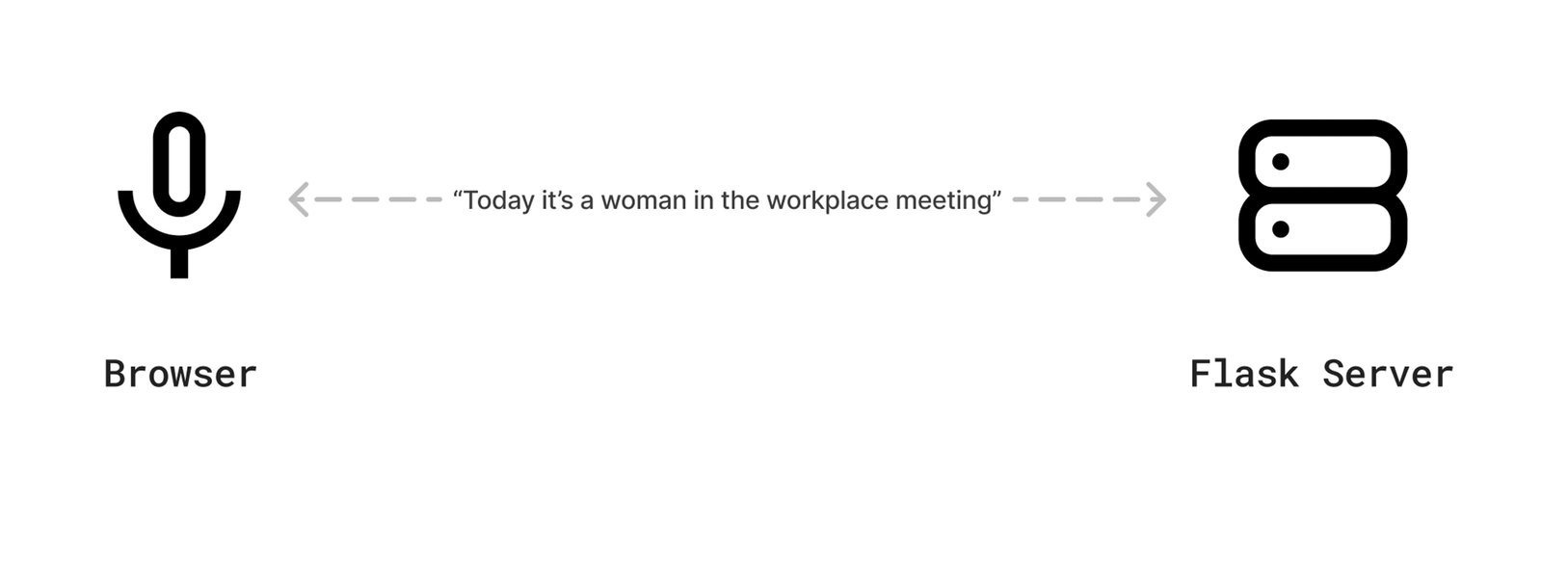
Visualization of real-time AI speech processing
Troubleshooting Common Issues
When implementing Deepgram with Flask, you may encounter several common issues. Here's how to address them:
Why am I getting a "No module named 'deepgram'" error?
pip install deepgram-sdk in your virtual environment. Also verify that you're activating the correct virtual environment before running your Flask app.
How do I fix "Error: Access is denied" when trying to access the microphone?
Why isn't my WebSocket connection working?
- Check if your Flask-SocketIO version is compatible with your client-side Socket.IO library
- Ensure CORS settings are properly configured
- Verify network settings aren't blocking WebSocket connections
- Check console logs for specific error messages
socketio = SocketIO(app, cors_allowed_origins="*") during development to rule out CORS issues.
Why does transcription stop after a few seconds?
- Inactivity timeouts in Deepgram (ensure continuous audio is being sent)
- Rate limiting on your Deepgram API key
- Network instability
- Browser throttling background tabs (keep the tab active)
How can I improve transcription accuracy?
- Use a higher-quality microphone
- Reduce background noise
- Specify the correct language model in your Deepgram options
- Use Deepgram's specialized models (e.g., "nova" for general purpose or "meeting" for multi-speaker content)
- Implement keyword boosting for domain-specific terminology
- Use a higher sample rate for audio (16kHz or 48kHz)
References
- Live Transcription With Python and Flask - Deepgram Blog
- GitHub - Vatsalparsaniya/Flask-speech-to-text: Speech to text using Flask
- Create your own speech to text application with Whisper from OpenAI
- Deepgram Python SDK Documentation
- Deepgram Live Streaming Audio Transcription Documentation
- How to Turn Transcripts into Data Visualizations with Python - DEV Community
- Speech Recognition with Python and Flask - The Codex
Recommended Searches
Last updated April 7, 2025