
Running DeepSeek 70B Q4 Locally: VRAM Requirements and Considerations
An In-Depth Analysis of VRAM Needs for DeepSeek 70B Q4 Model Deployment
Key Highlights
- VRAM Requirements Vary: Depending on the specific quantization method, requirements range from approximately 40 GB to 48 GB VRAM.
- Quantization Techniques: Using GGUF quantization methods such as Q4_K_M often demands around 42.52 GB VRAM, while alternatives like Q4_0 and IQ4_XS may reduce the amount marginally.
- System Considerations: VRAM is the primary factor, yet overall system RAM and multi-GPU setups can influence performance, especially in setups with heavy computational loads.
Understanding DeepSeek 70B Q4 and Its Operational Demands
The DeepSeek 70B Q4 model is one of the larger, highly capable language models designed for complex tasks that require in-depth computational processing. Running such a high-parameter model locally involves intricate considerations, of which memory requirements, particularly VRAM (Video RAM), are of paramount importance. The purpose behind quantizing the model – reducing its precision, such as using 4-bit quantization – is to strike a balance between model performance and the hardware constraints typically found in consumer-grade or even specialized AI hardware setups.
Quantization and Its Impact on VRAM
Quantization refers to the process of reducing the number of bits that represent a number in neural network weights. In the context of DeepSeek 70B, the Q4 (4-bit) quantization significantly decreases the precision usually required for floating point calculations without a drastic trade-off on performance, thus making it feasible to run on hardware that might otherwise be insufficient. The many formats available within the GGUF (General GPU Utility Format) quantization framework, including variants such as Q4_K_M, Q4_0, and IQ4_XS, specify different trade-offs in terms of memory consumption and accuracy.
Detailed VRAM Specifics by Quantization Method
The most cited VRAM requirement for the Q4_K_M quantization method is approximately 42.52 GB. This requirement is widely noted as an optimal balance for maintaining high quality of inference output while still leveraging lower bit representation. Other quantization variants show slight variations in their VRAM needs:
| Quantization Variant | Approximate VRAM Requirement | Notes |
|---|---|---|
| Q4_K_M | ~42.52 GB | Preferred for general use cases due to quality. |
| Q4_0 | ~40.12 GB | Legacy format with similar utility. |
| IQ4_XS | ~37.90 GB | Offers a slightly reduced VRAM footprint with comparable performance. |
These figures demonstrate that while the computed VRAM requirements can vary slightly, the overall spectrum tends to center around 40+ GB for most variants. For instance, with the Q4_K_M, which is often considered a default or standard variant for many users, you need slightly over 42 GB of VRAM. This figure provides a good balance between model performance and resource utilization.
Beyond VRAM: The Role of System RAM and Multi-GPU Setups
While VRAM is critical for running models like DeepSeek 70B Q4, it is important to note that overall system RAM can play a supportive role. In scenarios where VRAM might fall short, heavy reliance on system RAM can help alleviate some constraints, although this comes with the risk of slower performance as data is shuttled back and forth between the CPU and GPU. Users who intend to achieve absolute maximum quality often consider the sum total of both system RAM and VRAM.
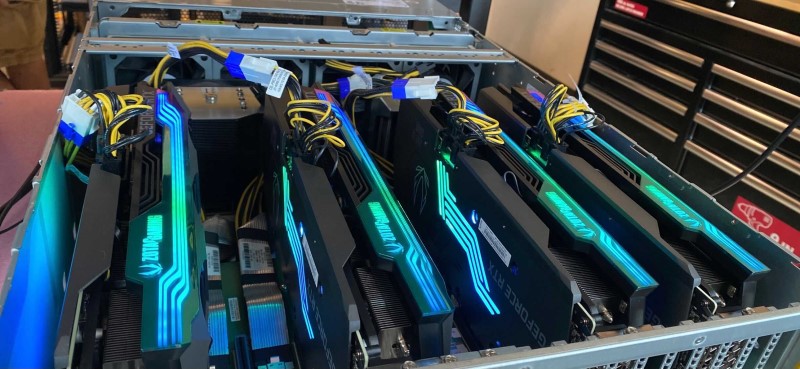
Moreover, if a single GPU does not meet the required VRAM threshold, multi-GPU configurations become a viable alternative. For example, using a setup where each GPU is equipped with at least 32 GB of VRAM can collectively satisfy the necessary workload distribution. Some advanced users deploy multiple high-end GPUs, such as dual RTX 4090 cards or even configurations involving RTX 3090 cards, in multi-GPU setups. These methods help distribute the model workload effectively, ensuring that the VRAM constraints imposed by a single GPU are overcome.
Practical Recommendations for Hardware Configurations
For most practitioners who need to run DeepSeek 70B Q4 locally, there is a general consensus on aiming for GPUs with at least 42 to 48 GB of VRAM. This range is based on avoiding performance bottlenecks and ensuring a smoother operational flow during inference stages. The slightly higher end of this recommendation, around 48 GB VRAM, is suggested by users who have encountered performance degradation when operating on systems with less VRAM. The following considerations can be helpful:
- High-end Single GPU: Investing in a top-tier GPU that offers near 48 GB of VRAM can provide better performance, especially if the system is dedicated solely to running heavy models.
- Multi-GPU Configurations: For users with hardware limitations, operating a multi-GPU setup, where the VRAM contributions are aggregated, can allow the model to run seamlessly. For instance, using two GPUs with 32 GB VRAM each can effectively substitute for a single high-capacity module.
- Memory Offloading Techniques: If acquiring hardware with the necessary VRAM is challenging, exploring offloading techniques that allow computations to spill over to system RAM can be a temporary workaround. However, this approach typically results in slower computation speeds due to higher data transfer latencies.
It is important to understand that hardware recommendations are highly dynamic and influenced by ongoing developments in both software optimizations and GPU architectures. As such, users should closely monitor updates from the model maintainers and community feedback to calibrate their hardware settings based on the latest performance metrics.
DeepDive: Implications and Considerations for Running DeepSeek 70B Q4
Operational Performance and Scalability
When contemplating the deployment of the DeepSeek 70B Q4 model, it is crucial to analyze operational performance. As machine learning applications scale, ensuring that the hardware can adeptly accommodate demanding tasks is key. Users planning to run inference locally should not only consider the memory limits but also factor in processing speeds, thermal management, and power consumption. Superior performance in high-stakes environments such as research labs or production environments often warrants optimizations at both hardware and software levels.
The influence of other system components on performance becomes increasingly pronounced when you push hardware to its limits. In particular, adequate cooling systems, fast interconnects, and robust power supplies help prevent throttling and other performance issues during sustained high-load operations. Thus, while the quantified VRAM requirements offer a starting parameter, the entire system's harmony determines real-world performance.
Balancing Model Fidelity with Resource Availability
Achieving optimal balance between model fidelity and resource management is a central challenge when deploying large language models. With DeepSeek 70B Q4, the transition to a lower-precision format like 4-bit quantization ensures that even users with relatively lower VRAM can operate the model at an acceptable performance level. However, the trade-off occasionally entails a slight dip in precision or output quality compared to utilizing full 16-bit or 32-bit formats, which are generally considered more accurate. The choice of quantization technique thus becomes important—not only to make the model operational on existing hardware, but also to maintain a high standard of post-quantization performance.
Users who operate at the edge of their hardware’s capabilities may experience performance compromises, necessitating a careful calibration between VRAM and model performance. In many instances, experienced users recommend opting for the higher VRAM variants or investing in hardware upgrades, particularly if the computational workflow involves frequent high-load scenarios.
Software Ecosystem and Community Best Practices
A significant factor that has influenced the hardware recommendations for DeepSeek 70B Q4 is the evolving software ecosystem around the model. Insightful contributions from the community have led to innovative approaches aimed at reducing VRAM footprint without excessively compromising performance. Practical guidelines and empirical testing have resulted in well-documented best practices, which include choosing the proper model variant based on user scenarios and integrating quantization methods that optimize the balance between workload and available hardware.
In addition, developers and researchers actively exchange information on forums, model repository pages, and specialized hardware resource websites. These discussions routinely indicate that while a baseline of approximately 42 GB VRAM (as seen in the Q4_K_M variant) may suffice under ideal conditions, actual deployments often benefit from hardware slightly above this threshold—around 48 GB VRAM—to account for overheads encountered during real-world usage.
Recommendations for Running DeepSeek 70B Q4 Locally
Given the evaluation of VRAM requirements and operational insights, the following recommendations are designed for users intending to deploy DeepSeek 70B Q4 locally:
Hardware Recommendations
1. High VRAM GPU: Acquiring a GPU with at least 42-48 GB of VRAM is ideal. For users prioritizing high fidelity and minimal performance slowdowns, aiming for the higher range (close to 48 GB) is advisable. This is because, in practical scenarios, the additional VRAM helps manage overheads and ensures resource availability during peak computations.
2. Multi-GPU Scenarios: In cases where a single GPU does not meet the necessary memory requirements, using a multi-GPU setup can be a viable alternative. Configurations where each GPU offers 32 GB or more are known to effectively distribute the computational load, thereby ensuring the overall system is not overwhelmed.
3. System RAM Supplementation: Although VRAM is the bottleneck for such models, having ample system RAM (e.g., 64 GB or more) is recommended to support data handling, offloading procedures, and ensuring that secondary processes do not adversely affect performance.
Software and Optimization Strategies
1. Quantization Method Selection: When deploying, choose the quantization method that best suits your hardware configuration. The Q4_K_M variant, demanding around 42.52 GB, is widely recognized for being a strong default option, owing to its balance between performance and resource requirement. Alternative quantization configurations, like Q4_0 or IQ4_XS, might be considered if you are attempting to squeeze performance on slightly constrained systems.
2. Memory Footprint Adjustments: Where necessary, explore advanced techniques such as offloading parts of the computation to the CPU or system RAM. While this may introduce latency, it provides a safety net for systems working below optimal VRAM thresholds.
3. Regular Performance Benchmarking: Continuously benchmark the performance after deploying the model to dynamically adjust and optimize system settings. The insights you gain from these benchmarks can guide future hardware or software adjustments, ensuring that long-term performance remains acceptable.
Practical Deployment Considerations
When planning to run a model of this magnitude locally, one must not overlook the significance of balanced system architecture. The deep learning workload involved is distributed across GPU cores, memory channels, and thermal management systems among others. Typically, users find that thermal throttling or power supply limitations can become significant constraints if the system is not adequately supported.
Furthermore, users are encouraged to consider the total cost of ownership when upgrading hardware for AI workloads. This not only includes the cost of high VRAM GPUs or multi-GPU solutions but also supplementary investments in high-quality cooling systems, power supplies, and in certain situations, higher bandwidth interconnects such as NVLink, which can greatly enhance multi-GPU communication.
The choice of deployment also hinges on the intended usage frequency—whether for occasional research tasks or for continuous, production-level deployments where consistent model inference is required. For production environments, the extra expense in hardware—and adopting robust redundancy through multi-GPU setups—are investments that lead to reduced latency and improved throughput.
Final Analysis and Decision Making
Synthesizing the insights and the latest benchmarks from technical evaluations, it is evident that running DeepSeek 70B Q4 locally is feasible, but does necessitate a considered approach towards hardware capacity. In an environment where the VRAM can range from about 40 GB (with lesser variants) to essentially 48 GB for smoother operation, users must be prepared to invest in GPUs that comfortably exceed the lower threshold. The Q4_K_M quantization variant generally sets the baseline at approximately 42.52 GB, though for robust performance, particularly in production or heavy usage scenarios, a VRAM capacity near 48 GB tends to be recommended.
The decision to utilize a particular quantization technique, or to opt for a multi-GPU setup, should rest on both immediate resource availability and long-term scalability considerations. It is advisable for users to assess their performance needs, existing hardware configurations, and willingness to upgrade. In many cases, targeting the higher VRAM capacity not only simplifies optimization but also ensures a more reliable and efficient running environment for advanced language models like DeepSeek 70B.
Conclusion
In conclusion, the DeepSeek 70B Q4 model, when quantized for 4-bit precision, typically requires VRAM in the vicinity of 42.52 GB as a baseline—most notably for the Q4_K_M variant. However, practical recommendations suggest that users aiming for optimal performance should consider systems with up to 48 GB of VRAM. Additionally, various quantization methods and multi-GPU configurations offer flexibility, allowing users to tailor deployments according to their hardware constraints while maintaining acceptable model fidelity and performance. Balancing VRAM, system RAM, and proper system architecture is essential not just to run the model, but to do so in a way that maximizes throughput and minimizes computational bottlenecks.
When deciding how to set up your environment, consider both the specific VRAM requirements indicated by your chosen quantization method as well as the broader hardware ecosystem. The insights detailed here should serve as a guide to help in planning an effective and scalable deployment of DeepSeek 70B Q4 for your local machine, ensuring you achieve a robust balance between cost-efficiency and performance.
References
- DeepSeek-R1-Distill-Llama-70B-GGUF - Hugging Face
- Deepseek on Hardware Corner - Hardware Corner
- Hardware Requirements for DeepSeek R1 AI Models - Geeky Gadgets
- GPU Requirements for DeepSeek R1 - Apxml
Recommended Further Reading
Last updated February 23, 2025