
Digibyte Mining Process Image Guide
A detailed guide to designing an infographic for Digibyte mining
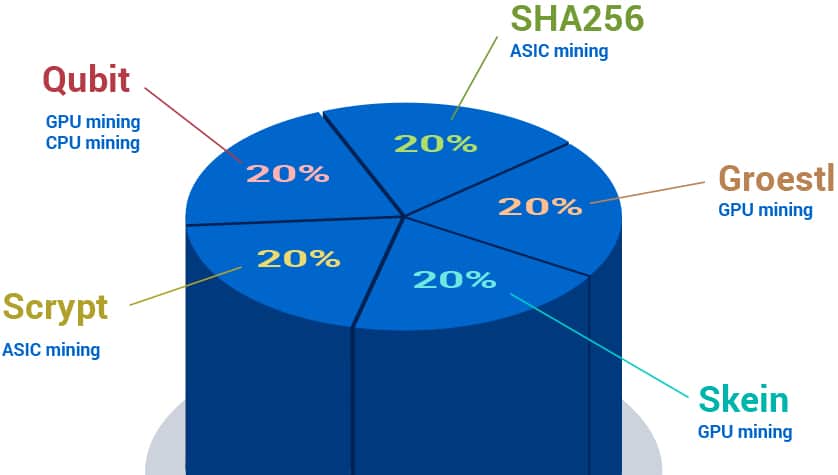
Key Highlights
- Multi-Algorithm Approach: Demonstrates the use of five distinct mining algorithms to secure the network.
- Step-by-Step Process: Illustrates transaction verification, block creation, proof-of-work, and reward distribution.
- Mining Hardware & Options: Highlights the roles of ASICs, GPUs, solo versus pooled mining, and network security measures.
Introduction and Overview
The Digibyte mining process is unique due to its use of a multi-algorithm system that involves five distinct mining algorithms working simultaneously. To help visualize this process, you can design an image or infographic that walks viewers through each major step of the mining process. This guide outlines the key components, which include the transaction collection, block formation, multi-algorithm hashing, proof-of-work verification, block broadcasting, and reward distribution. Additionally, the image should also explain the different hardware used by miners and the benefits of using multiple mining algorithms, such as increased decentralization and security.
Designing the Infographic
Conceptual Layout
When designing the image, consider dividing the infographic into several clearly demarcated sections. Each section should cover distinct aspects of the mining process. The following is a recommended layout:
Section 1: Title and Introduction
Begin with a prominent title such as “Digibyte Mining Process” along with a brief subtitle like “Securing the Network and Minting New Coins.” Include a small logo or a simplified icon that represents Digibyte. The design should have a clean background—perhaps a gradient or a subtle digital pattern—to set the stage for the technical content to follow.
Section 2: The Mining Algorithms
This section is dedicated to the five different mining algorithms used by Digibyte:
- SHA-256: Traditionally mined using ASIC devices. Emphasize its role similar to Bitcoin mining.
- Scrypt: Also associated with ASICs, predominantly recognized for its efficiency in alternative digital currencies.
- Skein: Generally mined using GPU hardware for increased flexibility and is visually distinguished with unique symbols.
- Qubit: Represents innovative approaches for specialized hardware, offering balanced mining participation.
- Odocrypt: Designed to optimize for the latest available CPU computations, ensuring a fair disadvantage for centralized mining.
Illustrate each algorithm with a corresponding icon or symbol that can be housed in its own box. Use arrows to denote that miners can choose an algorithm that corresponds with their mining rig’s architecture.
Section 3: Mining Hardware Options
The hardware used in mining plays an important role. Consider adding icons or stylized drawings of:
- ASIC Miners: Depict these as specialized, rectangular boxes with cooling fans or heat sinks. They are most suited to the SHA-256 and Scrypt algorithms.
- GPUs: Represent GPUs using graphics cards, often with distinct branding showing Nvidia or AMD logos. These are best for Skein and similar algorithms.
- CPUs: Although less common for Digibyte mining, include a subtle reference to CPUs to underscore the evolution of mining hardware.
An effective method is using a table to compare the hardware options visually.
| Hardware Type | Suitable Algorithms | Typical Use |
|---|---|---|
| ASIC Miners | SHA-256 & Scrypt | High efficiency, specialized mining devices |
| GPUs | Skein & others | Flexible mining with broad application |
| CPUs | Experimental mining | Limited usage, more research than industrial mining |
This table helps viewers quickly compare the different hardware types used by miners and understand which hardware is applied to each algorithm.
Section 4: The Mining Process Flow
The mining process involves multiple steps. To communicate these steps, design a flowchart that visually captures the sequential progression:
- Step 1 - Transaction Collection: Represent a cluster of digital transactions flowing into a “mempool,” illustrated as a cloud-like shape. Label it clearly to denote that new transactions are gathered and verified.
- Step 2 - Block Formation: Draw a stage where verified transactions are assembled into a candidate block. Use boxes or kinematic shapes to illustrate the aggregation of data points.
- Step 3 - Multi-Algorithm Hashing: This is the core of the DigiByte mining process. Depict five parallel paths labeled with the names of the five distinct algorithms. Use arrows directing from the block formation stage to these paths. Each path should be illustrated with a unique color or design to reflect its individual identity.
- Step 4 - Proof-of-Work (PoW): Show a block attempting to solve a cryptographic puzzle. This could involve a visual representation of a lock or a puzzle piece. Emphasize that the miner iterates through numerous attempts (nonce values) until they achieve a hash that meets the targeted difficulty.
- Step 5 - Block Verification & Broadcasting: Once a valid hash is found, illustrate the block being broadcast to a network of nodes. Icons representing different computers or nodes can surround the block, showing a peer-to-peer network verifying its validity.
- Step 6 - Reward Distribution: Conclude with an image of a miner or a central reward symbol receiving Digibyte coins. This part of the infographic should highlight that miners are rewarded with new coins plus any transaction fees from the processed block.
Consider a text-based flowchart representation similar to this:
  // The following is a pseudo-diagram description:

       [Transactions]
             │
             ▼
      {Mempool/Verification}
             │
             ▼
      {Block Formation}
             │
             ▼
  ┌─────────────────────────────┐
  │ Multi-Algorithm Hashing:    │
  │ [SHA-256] [Scrypt] [Skein]    │
  │ [Qubit]   [Odocrypt]          │
  └─────────────────────────────┘
             │
             ▼
     {Proof-of-Work Puzzle}
             │
             ▼
       [Valid Block Found?]
             │
         (Yes/No Branch)
             │
             ▼
     {Broadcast to Network}
             │
             ▼
     {Block Verification}
             │
             ▼
     {Reward: DGB + Fees}
This pseudo-diagram helps designers visualize the sequential stages in the mining process and decide on how to best represent each step graphically.
Section 5: Mining Options – Solo vs. Pools
The infographic should also cover the two primary mining methods:
- Solo Mining: Illustrate a single miner working independently. This can be depicted with a lone figure or icon with a direct connection to the mining process.
- Pooled Mining: Represent multiple miners collaboratively contributing their hashing power. Use interconnected nodes or a network diagram to illustrate how various machines join forces to mine blocks, collectively increasing their chance of solving the cryptographic puzzle.
Visual cues such as labels (“Solo Mining” and “Pooled Mining”) and different colored arrows can help distinguish between these two methods.
Section 6: Emphasizing Network Security
One of the major advantages of the Digibyte mining process is its robust security, achieved through diversity in mining algorithms and hardware. In your visual representation, you can:
- Highlight how using multiple algorithms prevents any single type of hardware from monopolizing mining power, thereby reducing risks associated with centralization.
- Include a section that explains the “MultiShield Mechanism,” which involves automatic difficulty adjustments and consensus verification by multiple network nodes.
- Demonstrate, perhaps via a diagram or icons, the decentralized nature of the network. This might include a representation of several interconnected nodes or a distributed ledger symbol that points to the security benefits.
By emphasizing these security measures, the infographic can effectively communicate why Digibyte’s approach offers enhanced protection against 51% attacks or other vulnerabilities.
Section 7: Using Color and Icons Effectively
The overall design should be visually appealing and informative. Consider the following guidelines:
- Color Palette: Use a limited but impactful color palette. For example, you can use gold (#cc9900) for headings, teal (#388278) for secondary headings, and green (#7FA86E) for subheadings. The use of these colors will not only align with your headers but also create a visually harmonious design.
- Icons and Symbols: Use icons to represent complex concepts such as mining hardware, blockchain nodes, and cryptographic puzzles. Icons should be simple, flat design images that are easy to identify at a glance. For instance, a mini lock or key could represent the cryptographic aspect, while gears might symbolize mechanical or algorithmic processes.
- Flow Arrows: Use arrows to connect different sections and processes. This visual cue ensures that the reader can clearly follow the sequential nature of the mining process.
Step-by-Step Detailed Process for the Infographic
To compile the above segments into one comprehensive image, follow these detailed steps:
-
Header Block:
At the very top, include the image title “Digibyte Mining Process” along with an illustrative subtitle like “Securing the Network and Minting New Coins.” This section should be eye-catching and include an emblem or icon representative of Digibyte.
-
Algorithm Overview:
Directly below the header, use horizontally aligned boxes to display each of the five algorithms. Each box should contain the algorithm name and a brief icon signifying what type of hardware is typically involved (for example, a microchip for ASICs or a GPU icon for graphics processing units). If desired, include small, concise bullet points underneath each algorithm highlighting its distinct features.
-
Process Flow Diagram:
In the center of the infographic, create a flowchart that starts with the collection of new transactions. From there, lead into the block formation stage. This flowchart should then split into five parallel paths (one for each algorithm) demonstrating multi-hashing. Connect these paths back to a central “Proof-of-Work” step where a valid block is produced, followed by arrows pointing to “Block Verification” and finally to “Reward Distribution.”
-
Mining Hardware Comparison:
To one side or as a bottom section, integrate the hardware table previously mentioned. This table should outline the advantages of various mining hardware options, illustrating the roles played by ASIC, GPU, and (to a lesser extent) CPU mining within the Digibyte ecosystem.
-
Network Security Segment:
Incorporate a dedicated section that visually explains the advantages of a multi-algorithm approach. Graphical elements or icons can depict nodes interconnecting, reducing the risk of a central point of failure. Annotations in this section can explain how diverse mining methods protect against malicious attacks.
-
Solo vs. Pooled Mining Comparison:
Distinguish between solo mining and pooled mining by using contrasting visual representations—perhaps a standalone miner icon versus a network of interconnected mining rigs. This helps viewers understand the benefits and limitations of each approach.
The comprehensive image should thus present an intuitive and easy-to-understand visual narrative of the Digibyte mining process, from transaction collection to final reward dispensation, all the while highlighting the unique benefits provided by its multi-algorithm system.
Supplementary Content and Detailed Explanations
Understanding Each Process Step
Below, you will find an extended explanation, which can also be integrated into the infographic as brief callouts or tooltips:
1. Transaction Collection and Verification
At the start of the mining process, new transactions are broadcast across the Digibyte network. These transactions accumulate in what is called the mempool. Miners pick transactions from this pool, checking for validity and proper digital signatures before including them in a new block. Visually, this step can be represented by icons of digital documents or data packets converging into a single repository.
2. Block Formation
Verified transactions are then organized into candidate blocks by the miners. This stage emphasizes the aggregation of raw data into a structured block that will undergo further scrutiny through the hashing process. Designers might portray this step as data blocks or a stack of files being arranged in sequence.
3. Multi-Algorithm Hashing
Once the block is formed, the mining process splits into multiple paths aligned with each of Digibyte’s five algorithms. Miners choose an algorithm that best suits their hardware capabilities. They then iterate through a process called finding a nonce—a number that, when combined with the block’s data, produces a hash lower than a target value. This proof-of-work mechanism is critical for maintaining the security and integrity of the blockchain.
4. Proof-of-Work Computation
Miners repeatedly compute the hash using the selected algorithm, adjusting the nonce in each attempt. When a valid hash is found that meets the network’s difficulty threshold, the mining process reaches a milestone, allowing that block to be added to the blockchain. A succinct visual representation is to display a series of iterative attempts (using arrows or looping icons) leading to a “Success” node.
5. Block Verification and Broadcasting
Following successful proof-of-work, the miner broadcasts the newly mined block to all network nodes. Each node then independently verifies the solution’s legitimacy and the correctness of the included transaction data. Graphically, this can be depicted as a central block icon being sent out to various node icons, connected via arrows.
6. Reward Distribution
After the block is verified by the network, the miner receives a block reward, which includes newly minted Digibyte coins and any associated transaction fees. This final step can be illustrated by an icon of currency or coins being transferred to a miner’s wallet. A visual depiction of reward dispensation reaffirms the economic incentive that drives the mining process.
Design Recommendations
As you refine the layout and visual style for your infographic, consider the following best practices:
- Consistency in Icons and Color Codes: Use a consistent style for the icons and color codes so that the viewer can easily correlate the text to the graphic elements. For instance, if gold represents major headings, ensure that related blocks also use similar hues where relevant.
- Legibility and Clarity: Maintain clear labels and concise descriptions adjacent to each section. With technical topics such as mining algorithms, brevity combined with clarity is essential for viewer understanding.
- Interactive Elements: If the infographic is digital, consider interactive elements such as hover-over tooltips that provide further detail. This could allow viewers unfamiliar with technical jargon to receive additional context without overwhelming the main visual.
- Scalability: Design the image so that it remains legible whether viewed on a large computer screen or a smaller mobile device. Use vector graphics where possible to maintain quality across resolutions.
Implementation Tools and Final Steps
Tool Suggestions
To create this infographic, you can utilize various graphic design tools that offer both precision and ease of use:
- Microsoft Visio or Lucidchart: Ideal for creating flowcharts and detailed diagrams.
- Adobe Illustrator or Affinity Designer: Perfect for crafting vector-based artwork that can be scaled without loss in clarity.
- Online Flowchart Makers: Tools such as Draw.io or Canva can provide pre-made elements and shapes that help you build the diagram quickly.
Final Composition Steps
- Sketch the Layout: Begin by sketching a rough layout either on paper or using a digital drawing tablet. This helps in visualizing the spatial distribution of elements.
- Create or Source Icons: Use free icon libraries or design original icons matching your color theme and style.
- Assemble the Flowchart: Place the five algorithms in visible parallel paths while ensuring the flow of steps remains coherent.
- Integrate Textual Explanations: Either embed concise text explanations within the diagram or accompany the infographic with a comprehensive legend that details each section.
- Refine and Test: Finally, test your infographic by seeking feedback from peers. Make adjustments for legibility, clarity, and technical accuracy.
Conclusion and Final Thoughts
Although I cannot generate an image directly, this comprehensive guide provides all the necessary details to create an illustrative infographic of the Digibyte mining process. From understanding the flow of transactions and multi-algorithm hashing to differentiating between solo and pooled mining, the guide covers every component needed for a well-rounded visual explanation. By following the layout, design recommendations, and implementation steps provided, you can produce an image that not only educates but also engages viewers with the intricate details of how Digibyte secures its network through decentralized mining. This tailored visual tool will help both newcomers and experienced individuals appreciate the nuance and sophistication behind Digibyte mining.
References
-
Understanding DigiByte Mining Explained: A Comprehensive Guide - Bytebrain
- How To Mine DigiByte (DGB): A Comprehensive Guide - Bitcomedy
- How to Start Digibyte Coin Mining: A Beginner's Guide - Mining Provider
- How to mine DigiByte (DGB) - Godex Crypto Blog
- How to Mine Digibyte: Complete Guide for Profitable DGB Mining - HowToMine
- Digibyte (DGB): What It Is and How It Works - Investopedia
Recommended Exploration
Last updated February 19, 2025